


 محول الفيديو النهائي
 مسجل الشاشة
 إصلاح الفيديو
 تنزيل آمن
أفضل محولات MP4 لتعزيز المحتوى - أدوات لتحويلات سلسة
أصبح تحويل ملفات الفيديو إلى تنسيق MP4 ضروريًا لأي شخص يريد الاستمتاع بالتشغيل السلس عبر الأجهزة. بينما يتوفر عدد لا يحصى من الأدوات لتحويل مقاطع الفيديو إلى MP4 ، لا تقدم جميعها نفس الجودة والأداء.
That is the reason why we have taken the time to review and compare the best MP4 converters on the market, so you can make an informed decision and streamline your video workflow. Whether you're a professional videographer, a content creator, or just looking to convert some videos for personal use, our comprehensive review of the top-rated MP4 converters will help you find the perfect tool for your needs.

الجزء 1. مقارنة البرامج
إذا كنت ترغب في معرفة أفضل برنامج يلبي احتياجاتك في لمحة ، يمكنك إلقاء نظرة على الجدول الذي يقارن بين البرامج المذكورة في هذا المنشور. كل هذه البرامج تضمن مساعدتك في التحويل إلى MP4.
| البرامج | تحويل دفعة | تسريع GPU | ميزات إضافية |
| محول فيديو مجاني على الإنترنت | نعم | لا | تخصيص تنسيق الإخراج ، تحويل دفعة |
| Online-Convert.com | نعم | لا | تحويل أنواع الملفات المختلفة |
| CloudConvert | نعم | لا | التكامل مع خدمات التخزين السحابية |
| تحويل | نعم | لا | التكامل مع خدمات التخزين السحابية ، وتحويل أنواع الملفات المختلفة |
| FVC Video Converter Ultimate | نعم | نعم | تحرير الفيديو ، صانع GIF ، صانع ثلاثي الأبعاد |
| مشغل الميديا VLC | لا | لا | مشغل الوسائط وتدفق الفيديو وتحويل الصوت |
| فرملة اليد | نعم | لا | تحرير الفيديو ، مسح دفعة |
الجزء 2. أفضل 4 محولات MP4 على الإنترنت
باستخدام محولات الملفات عبر الإنترنت ، يمكنك بسهولة تحويل ملفاتك من أي جهاز دون الحاجة إلى تنزيل أي برامج إضافية. عادةً ما تكون محولات الملفات عبر الإنترنت سريعة جدًا ومجانية الاستخدام وآمنة ، مما يضمن حماية بياناتك من الوصول غير المصرح به. لذلك ، إذا كنت ترغب في التحويل إلى MP4 أو التحويل من MP4 ، يمكنك التحقق من هذه البرامج عبر الإنترنت.
1. MP4 محول مجاني على الإنترنت
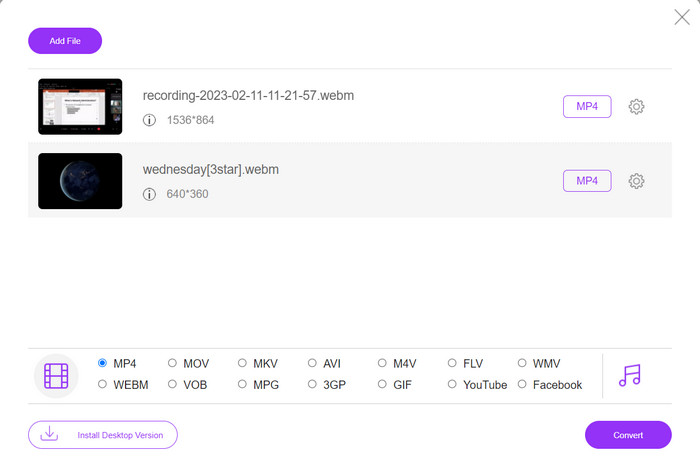
Converting files online is very convenient as you can do it from any device with an internet connection without needing to download any additional software. That is what Free MP4 Converter Online is made for. That means you do not have to install anything on your device to convert files to MP4. One of its outstanding features is its customization option. Users are able to edit the video resolution, bit rate, frame rate, etc. Besides, the process is simple and straightforward.
الميزات الرئيسية:
◆ تحويل مقاطع الفيديو إلى العديد من تنسيقات الإخراج بسرعة.
◆ لا يحد من حجم الملف الذي يمكن للمستخدمين تنزيله.
◆ يمكن الوصول إليه من أي متصفح وجهاز متصل بالإنترنت.
Step 1. You can use this MP4 video converter by visiting its official website. Simply open any browser on your computer and instantly visit its website.
Step 2. Immediately install the bit-sized launcher and upload the video(s) you wish to convert to MP4. From the format selection below, choose MP4 by ticking on its radio button.
Step 3. Finally, hit the Convert button to initialize the process of converting files.
2. Online-Convert.com
Online-Convert هو محول MP4 سهل الاستخدام ومتعدد الاستخدامات عبر الإنترنت يدعم مجموعة واسعة من تنسيقات الإدخال والإخراج ، بما في ذلك تخصيص إعدادات الإخراج مثل الدقة ومعدل البت ومعدل الإطارات. الأداة سريعة وموثوقة ، مع تكامل التخزين السحابي وميزات الأمان مثل تشفير SSL لحماية ملفاتك أثناء عملية التحميل والتحويل. بالإضافة إلى ذلك ، فهو مجاني تمامًا للاستخدام بدون تكاليف مخفية ، مما يجعله خيارًا يمكن الوصول إليه لأي شخص يطلب تحويل ملفات الفيديو بميزانية محدودة.
الميزات الرئيسية:
◆ يأتي مع مجموعة واسعة من تنسيقات الفيديو.
◆ واجهة سهلة الاستخدام.
◆ تحويل سريع وموثوق.
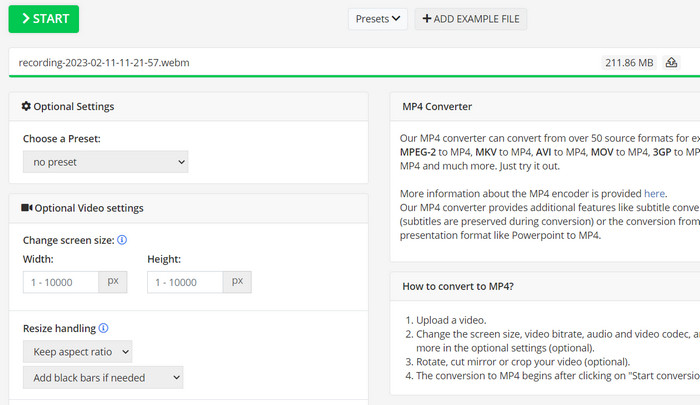
Step 1. Go to Online-Convert.com and choose Video Converter from the list of tools.
Step 2. Click Choose Files to add the video file you want to convert. You may also drag the file and drop it into the box.
Step 3. You can also change the resolution, bitrate, and frame rate of the result if you want to. The settings will be available underneath the conversion area.
Step 4. To start the conversion process, click the Start button. A progress bar will show how far along the conversion is on the page.
3. CloudConvert
CloudConvert هو محول MP4 عبر الإنترنت يقدم مجموعة شاملة من الميزات لمستخدميه ، بما في ذلك دعم التنسيق الشامل ، وإعدادات الإخراج القابلة للتخصيص ، والواجهة سهلة الاستخدام ، وتكامل التخزين السحابي ، والأمن والخصوصية ، وتكامل واجهة برمجة التطبيقات ، والخيارات المجانية والمدفوعة. أيضًا ، يعد محول الفيديو إلى MP4 أداة موثوقة ومتعددة الاستخدامات لتحويل ملفات الفيديو إلى تنسيق MP4. تجعل إعدادات الإخراج القابلة للتخصيص منه خيارًا رائعًا للمستخدمين الذين يحتاجون إلى ضبط جودة وحجم مقاطع الفيديو الخاصة بهم لتناسب احتياجاتهم الخاصة.
الميزات الرئيسية:
◆ تقدم CloudConvert تكامل API لتكامل مهام سير العمل.
◆ يستخدم تشفير SSL لحماية ملفات المستخدم.
◆ يدعم تكامل التخزين السحابي.
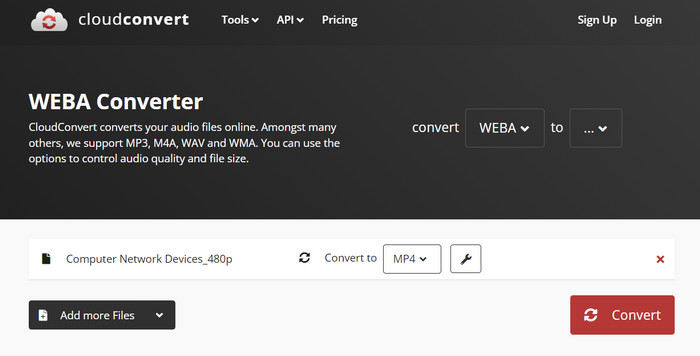
Step 1. Go to the CloudConvert website and make a free account if you haven't already.
Step 2. Click on Select Files to add the video file you want to convert. You can also just drag and drop the file into the upload box. Choose MP4 from the drop-down menu for the output file.
Step 3. Change the output choices, such as resolution, bitrate, and frame rate, if you want.
Step 4. Click the Convert button to begin the conversion process.
4. تحويل
يعد برنامج Convertio خيارًا رائعًا إذا كنت تريد طريقة سريعة لتحويل ملفات الفيديو إلى تنسيق MP4. بفضل واجهته سهلة الاستخدام وأوقات التحويل السريعة ، من السهل تغيير أفلامك بحيث يمكن عرضها على مجموعة واسعة من الأجهزة والأنظمة الأساسية. Convertio هي أداة متعددة الاستخدامات يمكنها التعامل مع جميع احتياجات تحويل الفيديو الخاصة بك. إنه يعمل مع التخزين السحابي ويتيح لك استخدام مجموعة واسعة من ملفات الإدخال والإخراج. اكتشف كيف يعمل محول MP4 المجاني.
الميزات الرئيسية:
◆ تحويل دفعة لملفات متعددة.
◆ التكامل مع خدمات مثل Google Drive و Dropbox وما إلى ذلك.
◆ ميزات متقدمة مثل OCR لتحويل المستندات الممسوحة ضوئيًا.
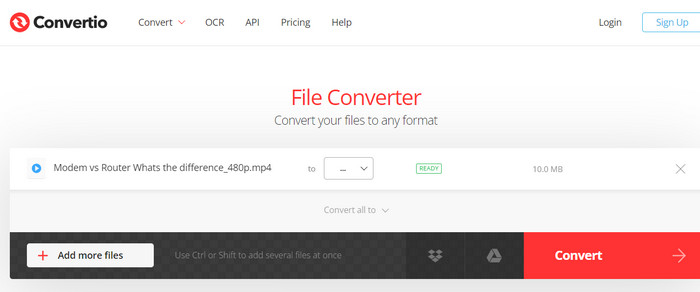
Step 1. Click Choose Files on the Convertio website (https://convertio.co/) to add the video file you want to convert. You may choose to drag the file and drop it into the upload area.
Step 2. From the drop-down box, choose MP4 as the format to use. You can also change the resolution, bitrate, and frame rate of the result if you want to.
Step 3. To start the conversion process, click the Convert button. A progress bar will show how far along the conversion is on the page.
Step 4. Once the process is done, you can click Download to save the MP4 file to your computer.
الجزء 3. أفضل 3 محولات MP4 غير متصل
الآن ، إذا وجدت ، في بعض الحالات ، أنك لا تستطيع الوصول إلى الإنترنت ، يمكنك اختيار البرامج غير المتصلة بالإنترنت في هذه الحالات. إذن ، إليك الأدوات التي قد تعتمد عليها.
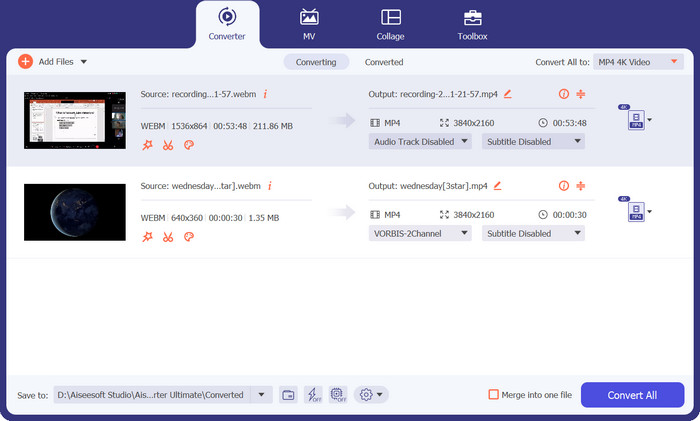
1. FVC Video Converter Ultimate
FVC Video Converter Ultimate is a powerful software that provides a comprehensive solution for converting video files to MP4 format. It supports a wide range of input and output formats, including support for HD and 4K video, and offers customizable output settings to ensure high-quality output. Additionally, this MP4 converter offers batch conversion for multiple files at once and includes editing tools for trimming, cropping, adding watermarks, and more. With its fast conversion times and high-quality output, FVC Video Converter Ultimate is a reliable and versatile tool for all your MP4 conversion needs.
الميزات الرئيسية:
◆ يتضمن دعمًا لمقاطع الفيديو عالية الدقة و 4 K للاحتفاظ بمقاطع الفيديو عالية الجودة.
◆ دعم تسريع الأجهزة لوحدات معالجة الرسومات NVIDIA و AMD.
◆ يدعم أجهزة الإخراج المختلفة.
Step 1. The first thing you need to do to use this converter is to get its installer. Then, install it on your device. You may get the app using the Free Download buttons below.
تنزيل مجانيلنظام Windows 7 أو أحدثتنزيل آمن
تنزيل مجانيلنظام MacOS 10.7 أو أحدثتنزيل آمن
Step 2. Then, launch the tool and load any video by ticking the Plus sign button from the main interface of the program.
Step 3. Next, go to the Profile menu and select MP4 from the Video tab. Finally, hit the Convert All button and get all your videos transformed to MP4 files.
2. مشغل الميديا VLC
VLC Media Player هو مشغل وسائط متعددة مجاني معترف به على نطاق واسع لقدرته على تشغيل أي تنسيق ملف صوتي أو فيديو تقريبًا. ما قد لا يعرفه الكثير من الناس هو أن VLC Media Player هو أيضًا محول فيديو قوي يمكنه تحويل مقاطع الفيديو الخاصة بك إلى تنسيق MP4 بسهولة. فيما يلي بعض ميزاته الرئيسية لمعرفة المزيد عن هذا البرنامج.
الميزات الرئيسية:
◆ يمكنه تحرير ترميز الفيديو والصوت والدقة ومعدل البت.
◆ It has the ability to add subtitles to videos.
◆ إنه قادر على معاينة مقاطع الفيديو قبل التحويل.
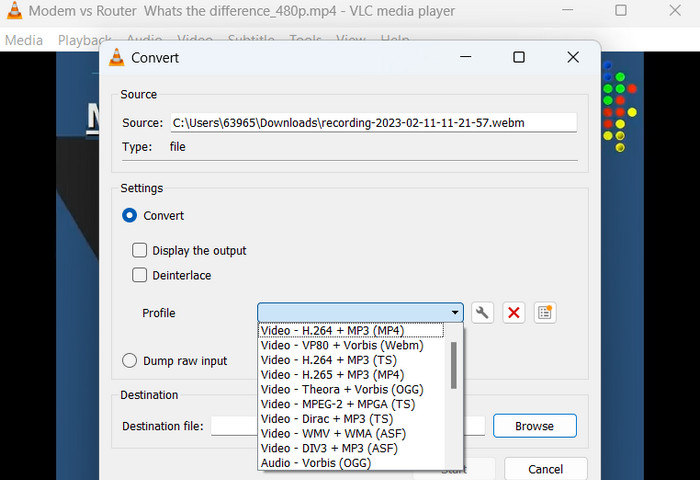
Step 1. Open VLC Media Player on your computer. Click on Media in the top menu bar and select Convert/Save from the drop-down menu.
Step 2. Click on the Add button to select the video file you want to convert. Once you have added the file, click on the Convert/Save button.
Step 3. In the Profile section, select Video - H.264 + MP3 (MP4) as the output format. Click on the Start button to begin the conversion process and wait for the conversion to complete.
3. فرملة اليد
HandBrake هو محول فيديو مفتوح المصدر يسمح لك بتحويل ملفات الفيديو الخاصة بك إلى مجموعة متنوعة من التنسيقات ، بما في ذلك MP4. إنها أداة شائعة بين عشاق الفيديو لسهولة استخدامها وميزاتها القوية. وبالمثل ، يوفر محول الفيديو MP4 هذا أيضًا معالجة مجمعة ، بحيث يمكنك تحويل ملفات متعددة في وقت واحد ، ولديه مجموعة من الإعدادات المسبقة التي تجعل من السهل تحسين مقاطع الفيديو الخاصة بك للأجهزة والأنظمة الأساسية المختلفة.
الميزات الرئيسية:
◆ برنامج مجاني ومفتوح المصدر.
◆ يدعم الترجمة وصناع الفصول.
إعدادات مسبقة لتحسين إخراج الفيديو.
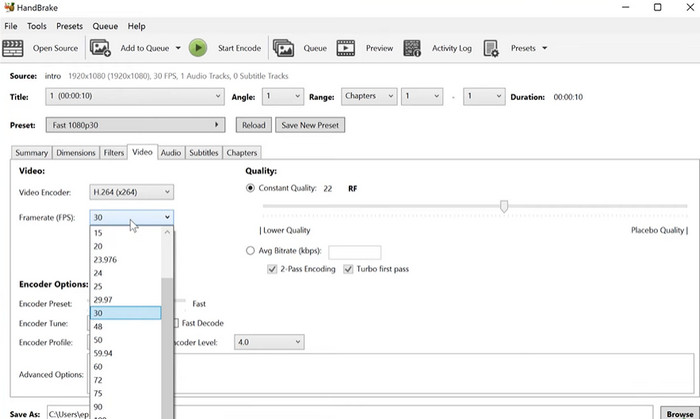
Step 1. Download and install HandBrake from the official website. Open HandBrake and select the video file you want to convert by clicking the Open Source button in the top left corner of the window.
Step 2. Choose a preset for your output file by selecting one of the options from the Presets menu in the top row of the window. If you're unsure which preset to use, you can choose Fast 1080p30 for a good balance between speed and quality.
Step 3. Click the Start Encode button in the top menu to begin the conversion process.
الجزء 4. أسئلة وأجوبة حول محولات MP4
هل يمكنني تشغيل ملفات MP4 على جهاز iPhone الخاص بي؟
Yes. MP4 is already a supported format on iPhone devices. MP4 is a universal video format that is compatible with most devices, including iPhones. Therefore, you will not have to use an MP4-to-iPhone converter. You can simply use the pre-installed player of iPhone or find a 3rd-party video player for iPhone.
هل يمكنني تحميل ملفات MP4 إلى TikTok؟
نعم. لا يتعين عليك العثور على محول MP4 إلى TikTok للتحميل لأن TikTok يقبل ملفات فيديو MP4 كأحد التنسيقات المدعومة لتحميل مقاطع الفيديو على النظام الأساسي.
هل يمكنني تحويل ملفات MP4 إلى تنسيقات متوافقة مع iTunes؟
نعم. ليست هناك حاجة للعثور على محول MP4 إلى iTunes. يمكنك استخدام المحولات ، مثل HandBrake ، لمساعدتك في ذلك.
خاتمة
MP4 converters are essential tools for anyone looking to watch or share their videos across different devices or platforms, and they provide a convenient and reliable way to ensure compatibility and high-quality video playback. Therefore, we have compiled and compared the best programs available to help you choose the right-fit app.
-
 أفضل محرر MP4 لنظامي التشغيل Windows و Mac في عام 2023
 سواء كنت تستخدم جهاز الكمبيوتر الخاص بك لتحرير فيديو MP4 أو تعمل فقط على هاتفك ، فستتمكن من العثور على بعض الخيارات الرائعة هنا ، بما في ذلك أفضل محرر MP4 لنظامي التشغيل Windows و Mac.
-
 كيفية ضغط فيديو MP4 إلى حجم أصغر
 هل فيديو MP4 كبير جدًا بحيث لا يمكن تحميله؟ تريد تصغير حجم الفيديو؟ فيما يلي 3 طرق فعالة لضغط ملف MP4 إلى حجم أصغر بلا حدود.
-
 5 من أفضل برامج تحرير البيانات الوصفية MP4 [مُحدَّثة في 2023]
 كيف يمكنني تغيير بيانات MP4 الوصفية؟ أفضل طريقة لتغيير البيانات الوصفية الخاصة بـ MP4 هي استخدام محرر العلامات الذي يدعم تنسيق MP4 مثل النموذج الذي ندرجه أدناه.
