


 محول الفيديو النهائي
 مسجل الشاشة
 إصلاح الفيديو
 تنزيل آمن
كيفية تحويل أي فيديو إلى MP4 مجانًا
عندما يتعلق الأمر بتنسيق الفيديو، فإن MP4 بلا شك واحد من أكثر التنسيقات شيوعًا التي نستخدمها اليوم. يمكنه أن يحتوي ليس فقط على الفيديو، بل أيضًا على الصوت والترجمات. في الوقت الحاضر، يستخدم الكثير من الأشخاص تنسيق MP4 لإنشاء نُسخ احتياطية من مقاطع الفيديو والأفلام الخاصة بهم. لذلك، من الشائع جدًا تحويل الفيديو وحفظه كملف MP4. بالإضافة إلى ذلك، يكاد يكون كل مشغّل وجهاز قادرًا على تشغيل مقاطع فيديو MP4، وهو ما يمنحنا سببًا إضافيًا لـتحويل الفيديو إلى MP4.
لذا، في هذا المقال سنتعرّف على كيفية تغيير صيغ الفيديو الأخرى إلى MP4. كذلك سنتعلّم كيف نحمّل مقاطع الفيديو عبر الإنترنت إلى جهاز الكمبيوتر الخاص بك.

الجزء 1. كيفية تحويل ملفات الفيديو المحلية إلى MP4
قد يقوم شخص ما بقطع الزوايا عن طريق تغيير امتداد الملف إلى MP4 لتغيير نوع الملف. ومع ذلك ، قد يسبب هذا مشكلة - لا يمكن لجهازك التعرف على الملف الذي تم تغييره. لذلك ، من الأفضل استخدام محول فيديو احترافي لتغيير نوع الملف.
1. محول الفيديو MP4 على الإنترنت
إذا كنت بحاجة إلى تحويل مقاطع الفيديو المحفوظة على جهاز الكمبيوتر إلى MP4 عبر الإنترنت، يمكنك ببساطة استخدام أداة تحويل مفيدة تُسمّى FVC Free Online Video Converter.
يمكن لمحوّل الفيديو هذا تنفيذ عملية تحويل الفيديو بسهولة. يمكنك بكل بساطة تحويل أي مقاطع فيديو وأفلام إلى MP4 مع الحفاظ على الجودة الأصلية. يمكنك حتى تعديل دقّة العرض، ومعدّل الإطارات، ومعدّل البت للفيديو الخاص بك، أو تحويل مقاطع الفيديو مثل WMV إلى MP3 وفقًا لاحتياجاتك.
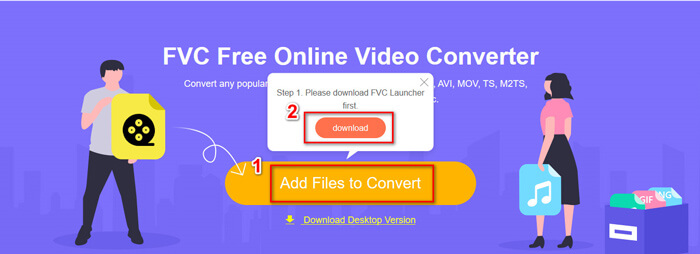
الخطوة 1. انتقل إلى موقعه الرسمي. انقر على Add Files to Convert ثم Download. سيتم تنزيل أداة التشغيل على جهازك. يُرجى تثبيتها.
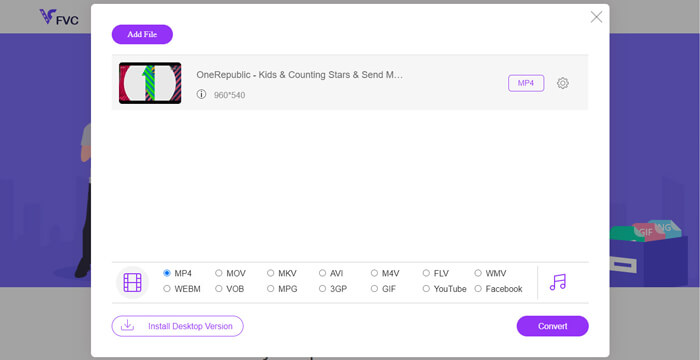
الخطوة 2. بعد التثبيت، سترى نافذة الفتح (Open Window) حيث يمكنك اختيار مقاطع الفيديو التي تريد تحويلها.
الخطوة 3. بعد ذلك يمكنك اختيار الصيغة MP4 قبل بدء التحويل. انقر على Convert واختر مسار الحفظ. بعد ذلك ستحصل سريعًا على فيديو MP4 الخاص بك.
2. مشغل الميديا VLC
قد تتفاجأ من أن VLC Media Player يمكنه تحويل مقاطع الفيديو أيضًا. لكن هذا صحيح أنه يمكن استخدامه كمحول فيديو MP4. إذا كان لديك بالفعل برنامج VLC على جهاز الكمبيوتر الخاص بك ، فيمكنك تجربته.
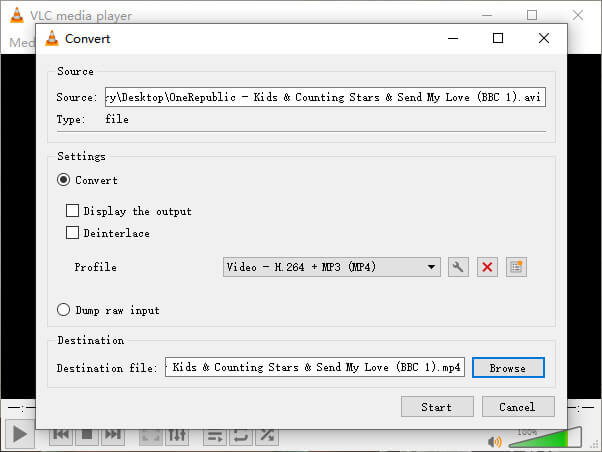
الخطوة 1. افتح مشغّل الوسائط VLC Media Player. انتقل إلى قائمة Media ثم اختر Convert/Save…
الخطوة 2. أضِف الفيديو إلى VLC ثم انقر على زر Convert / Save في الأسفل.
الخطوة 3. بعد ذلك تأكّد من أن صيغة الإخراج هي MP4. اختر مسار الحفظ ثم Start لبدء عملية التحويل.
الجزء 2. كيفية تنزيل دفق الفيديو على MP4
في الوقت الحاضر ، يستمتع الناس في جميع أنحاء العالم بمشاهدة مقاطع الفيديو عبر الإنترنت. أثناء مشاهدة مقاطع الفيديو هذه ، قد تجدها ممتعة وتريد حفظها على جهاز الكمبيوتر الخاص بك لمشاهدتها لاحقًا. ومع ذلك ، لا يمكن تنزيل معظم مقاطع الفيديو المتدفقة عبر الإنترنت مباشرة ، وقد يكون لبعضها تنسيقات خاصة بها يصعب التعرف عليها من قبل اللاعبين العاديين.
إذن ، كيف تقوم بتنزيل وتحويل الفيديو عبر الإنترنت إلى تنسيق أكثر شيوعًا ، مثل MP4 ، على جهاز الكمبيوتر الخاص بك؟
يمكن لميزة التسجيل في FVC Free Screen Recorder أن تساعدك في ذلك. يمكنك تسجيل أي فيديوهات أونلاين على يوتيوب أو فيميو وغيرها بجودة عالية كما تشاء. والأداة مجانية 100٪ للاستخدام. يُرجى اتباع الخطوات أدناه لتسجيل مقاطع الفيديو المتدفقة.
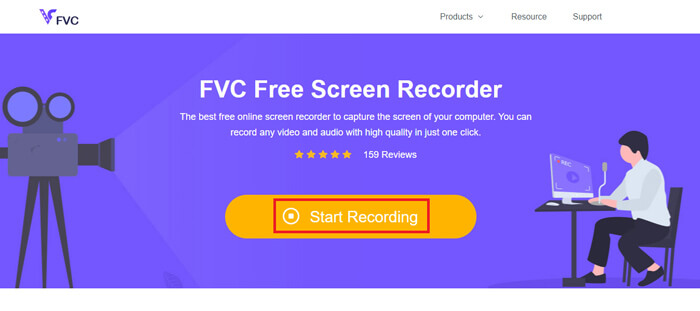
الخطوة 1. انقر على الرابط أعلاه واختر Start Recording. ثم تحتاج إلى تنزيل أداة التشغيل وتثبيتها على جهازك إذا لم تكن قد فعلت ذلك من قبل.
تنزيل مجانيلـ Windows 7 أو أحدثتنزيل آمن
تنزيل مجانيلـ MacOS 10.7 أو أحدثتنزيل آمن
الخطوة 2. اضبط منطقة التسجيل على حجم مناسب. ثم فعّل Speaker. يمكنك أيضًا تفعيل Microphone إذا أردت إضافة تعليق صوتي. انقر على REC لبدء التسجيل.
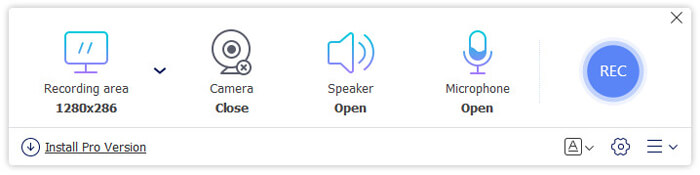
الخطوة 3. عندما تنتهي من التسجيل، انقر على أيقونة Stop لإنهائه. سيتم حفظ الفيديو على جهاز الكمبيوتر تلقائيًا.
الجزء 3. أسئلة وأجوبة حول تحويل الفيديو إلى MP4
1. كم يستغرق تحويل الفيديو إلى MP4؟
عادة ، يستغرق الأمر بضع دقائق فقط لتحويل مقاطع الفيديو إلى MP4. ولكن إذا كان حجم الفيديو كبيرًا جدًا أو كانت سرعة الشبكة بطيئة ، فقد تحتاج إلى مزيد من الوقت لإكمال التحويل.
2. ماذا لو كان ملف MP4 المحول كبيرًا جدًا بحيث لا يمكن مشاركته؟
بعد ذلك تحتاج إلى ضغط ملف فيديو MP4 هذا إلى حجم أصغر. في الواقع، مع أداة FVC Free Online Video Converter يمكنك تقليل حجم الملف بسهولة. فقط انقر على أيقونة الإعدادات بجانب ملفك بعد تشغيل المسجّل، ثم خفّض دقّة الفيديو إلى مستوى أقل. بعد التحويل ستلاحظ أن حجم الفيديو أصبح أصغر بكثير من الملف الأصلي.
حل آخر هو استخدام أداة ضغط فيديو قوية مثل FVC Free Video Compressor التي يمكنها تقليل حجم الفيديو في وقت قصير مع الحفاظ على جودة عالية.
3. هل هناك طريقة لتحويل فيديوهات YouTube أو Facebook إلى MP4؟
إذا كنت من مستخدمي YouTube Premium ، فيمكنك تنزيل مقطع فيديو YouTube واستخدام محول الفيديو لتحويله إلى MP4.
خاتمة
تفضّل استخدام الأدوات أونلاين؟ يمكنك الاعتماد على FVC Free Online Video Converter. هل ثبّت برنامج VLC على جهازك بالفعل؟ يمكنك تجربة ميزة التحويل المدمجة فيه.
الآن أصبحتَ على دراية بكل ما يتعلّق بتحويل الفيديو إلى صيغة MP4. نرجو أن تكون قد وجدت أفضل محوّل يناسب احتياجاتك. لا تتردد في ترك تعليقك لنا؛ فملاحظاتك القيّمة ستساعدنا على التحسين.
-
 3 طرق مجانية لتغيير AVI إلى MP4 على نظامي التشغيل Windows / Mac
 في بعض الأحيان ، عندما نشاهد فيلمًا على الهاتف ، يطالب المشغل الذي نستخدمه بعدم إمكانية تشغيل الفيديو لأنه لا يدعم تنسيق AVI. إذن كيف يمكننا تغيير AVI إلى MP4 بسرعة دون فقدان الجودة؟ إليك عدة طرق مجانية يمكنك تجربتها.
-
 كيفية تحويل MKV إلى MP4 على نظامي التشغيل Windows / Mac
 لا يمكن تشغيل مقاطع فيديو MKV؟ هل تريد مشاهدة مقاطع فيديو MKV على الأجهزة التي لا تدعم MKV؟ فيما يلي طريقتان مجانيتان لتحويل MKV إلى MP4 دون فقدان الجودة.
-
 أفضل 4 طرق لتحرير تحويل MP4 إلى MOV
 كيفية تحويل MP4 إلى MOV على نظام Mac؟ هل هناك أي طريقة مجانية لتحويل MP4 إلى MOV دون فقدان الجودة؟ يشارك هذا المنشور 4 طرق بسيطة لمساعدتك في تحويل الفيديو من MP4 إلى MOV على أجهزة Mac و Windows PC وعلى الإنترنت.
