


 محول الفيديو النهائي
 مسجل الشاشة
 إصلاح الفيديو
 تنزيل آمن
WTV to MP4 Converter: كيفية تحويل WTV إلى MP4
تم تطوير WTV ، باعتباره خليفة تنسيق DVR-MS ، بواسطة Microsoft لتخزين محتوى التلفزيون المسجل بواسطة Windows Media Center. تم ترميز WTV بمعيار MPEG-2 و MPEG-4 و MPEG-1 Layer II أو Dolby Digital AC-3 ، ويتم دعم WTV بواسطة عدد قليل من البرامج مثل FFMPEG و Windows Media Center و CyberLink PowerDVD 12 و Nero 12 و HandBrake و CCextractor ، إلخ.

If you want to watch or share WTV files conveniently, you had better convert WTV to MP4, the most popular format for almost any device.
We’ve searched the Internet in a quest for WTV to MP4 converter and found the top 2 free WTV to MP4 converters to turn WTV to MP4.
الجزء 1. Free Video Converter - تحويل WTV إلى MP4 عبر الإنترنت
Well, it is very easy to convert WTV to MP4. The easiest way to change WTV to MP4 is to finish it online. Free Online Video Converter is the freeware to convert WTV to MP4 and other mainstream video and audio formats. This free online tool is compatible with Windows 10/8/7 and Mac OS X 10.7 or above, and you can easily transcode WTV to MP4 within steps.
لتبسيط العملية ، يمكنك اتباع الدليل:
1. Click Add Files to Convert button to upload WTV files from PC.
2. Select MP4 from the checkbox.
3. Click Convert to convert and download WTV files automatically.
الآن ، نحن هنا لإرشادك إلى كيفية تحويل WTV إلى MP4 بالتفصيل.
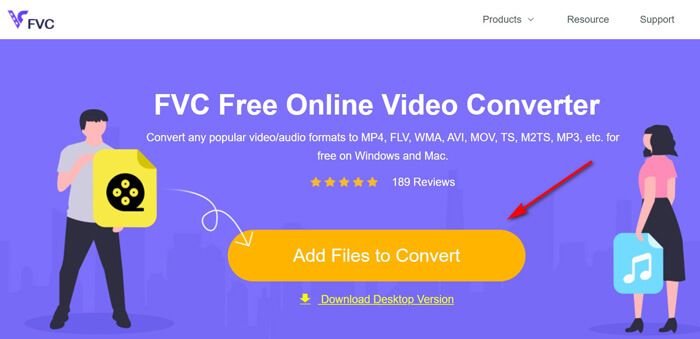
Step 1. Add WTV files
Open this free online WTV to MP4 converter via your browser. Click Add Files to Convert button, and a pop-up window prompts to tell you to download and install the launcher. Just download it and the open-source window will appear after the successful installation. Then you can select the WTV recordings on your computer for uploading. This freeware supports batch conversion and you can add more than one WTV files online.
Step 2. Select MP4
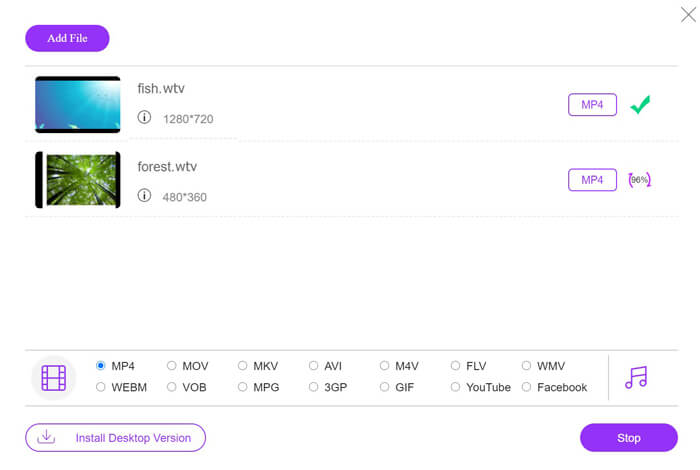
Tick the checkbox of MP4 on the bottom, where you can find various output options like MKV, AVI, M4V, FLV, VOB, GIF, YouTube, Facebook, MP3, AAC, WMA, WAV, FLAC, etc.
In addition, you can click the Settings icon next to the output MP4 pane to adjust the encoder, frame rate, resolution, bitrates, and other parameters.

Step 3. Convert WTV to MP4
After everything is done, click the Convert button and a window appears that requires you to select the destination to store the converted MP4 files. Choose the destination and return to this free online converter, click Convert again to start converting and downloading the MP4 files automatically. You can see the conversion progress percentage directly.
الجزء 2. HandBrake - تحويل WTV إلى MP4 على جهاز الكمبيوتر / ماك
هناك طريقة مجانية أخرى لتحويل WTV إلى MP4 وهي استخدام HandBrake. HandBrake هي البرامج القليلة التي يمكنها قراءة ملفات WTV. إلى جانب ذلك ، يمكنه أيضًا تحويل ترميز WTV إلى MP4 / MKV على جهاز كمبيوتر يعمل بنظام Windows و Mac.
HandBrake هو برنامج سطح المكتب مفتوح المصدر ، لذا يجب عليك تنزيل هذا المحول المجاني أولاً على جهاز الكمبيوتر الخاص بك.
مرة أخرى ، الخطوات البسيطة لتحويل WTV إلى MP4 في HandBrake هي كما يلي:
1. أضف ملفات WTF أو المجلد بأكمله إلى HandBrake.
2. ملف تعريف MP4 مخصص في HandBrake.
2. معاينة وتحويل WTV إلى MP4.
فيما يلي دليل شامل لتغيير WTV إلى MP4 في HandBrake.
Step 1. Add WTV files into HandBrake
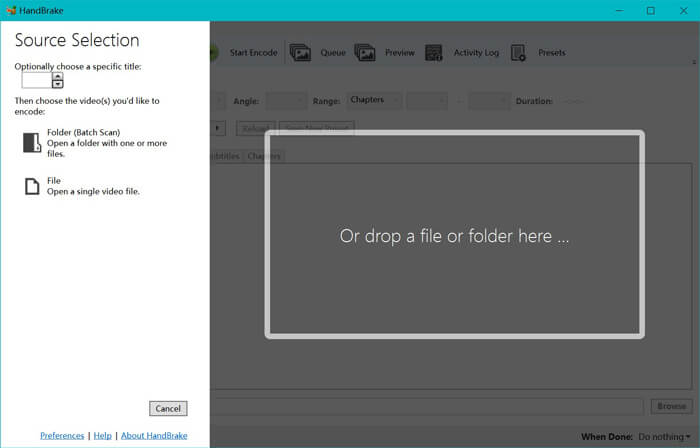
Once you have installed HandBrake on your computer, HandBrake will present the open-source dialog by default. Here you can click Folder or File to select the WTV files or folder into main window. Alternatively, you can also drag and drop the WTV files into this software.
Step 2. Select MP4 format
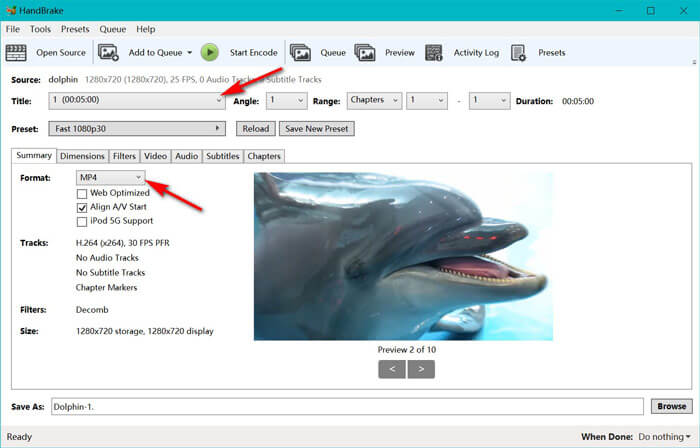
Once you have loaded the WTV files, you can select the exact WTF file from the Title drop-down option. Then select MP4 in the tab of Summary as the output for the selected WTV file. Besides, HandBrake allows you to adjust the dimensions, filters, video codec/quality, audio track, etc. Not only MP4, it can also convert other formats like AVI, MOV, M2TS, etc., to MKV.
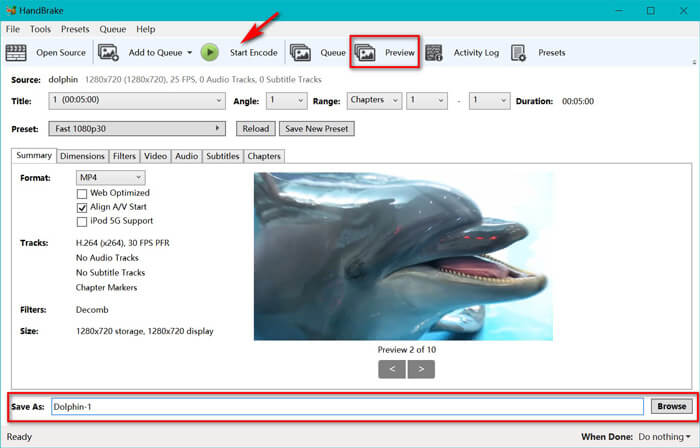
Step 3. Preview and convert WTV to MP4
HandBrake’s Preview on the toolbar feature allows you to see what your new MP4 video will look before encoding it. After all your settings are just right, give the name of the converted MP4 files and select the location of your new videos by clicking the Browse button at the bottom. Finally, just click Start Encode button on the toolbar to convert WTV to MP4.
الجزء 3. أسئلة وأجوبة من WTV إلى MP4
لماذا تقوم HandBrake بحفظ MP4 كـ M4V؟
بالنسبة لملفات MP4 ، فإن HandBrake ستعمل على ملفات MP4 تلقائيًا باستخدام الامتداد M4V ، عندما تختار صوت AC3 وترجمات SRT أو لديك علامات فصل لتخصيص ملف MP4. ولكن يمكنك تغيير الامتداد .m4v إلى .mp4 مباشرة.
هل يمكن لمشغل VLC تشغيل ملفات WTV؟
لا يمكن لـ VLC تشغيل ملفات WTV مباشرة. يجب عليك تثبيت K-Lite Code Pack لتثبيت حزمة رمز WTV ثم تشغيل ملفات WTV على VLC.
هل يمكنني تحويل ملفات WTV المحمية؟
نعم تستطيع. ومع ذلك ، يدعم MCEBuddy فقط تحرير وتحويل ملفات WTF التجارية المحمية. يجب عليك استخدام هذا البرنامج لنسخ وتحويل ملفات WTV المحمية.
خاتمة
لاستخدام ملفات WTV المسجلة في Window Media Center بشكل ملائم ، يجب عليك تحويل WTV إلى MP4 أولاً. يشارك هذا المنشور طريقتين مجانيتين لتحويل WTV إلى MP4 عبر الإنترنت عبر Free Online Video Converter و HandBrake. يتيح لك Free Online Video Converter تحويل WTV إلى MP4 والتنسيقات الشائعة الأخرى ، بينما يمنحك HandBrake المزيد من عناصر التحكم في التحرير بخيارات محدودة لتنسيق الإخراج.
ما هي الطريقة التي تفضلها؟
أو ربما لديك محول WTV إلى MP4 أفضل؟
في كلتا الحالتين ، أود أن أسمع منك. لذا ، تفضل واترك تعليقًا أدناه.
-
 كيفية تحويل MXF إلى MP4 عبر محول مجاني
 هذا المنشور هو الدليل التفصيلي لتحويل MXF إلى MP4 على الكمبيوتر. يمكنك الحصول على 4 محولات مجانية من MXF إلى MP4 لتحويل كاميرا الفيديو MXF إلى MP4 بخطوات بسيطة.
-
 أفضل 3 طرق لتحرير تحويل MP4 إلى MOV
 كيفية تحويل MP4 إلى MOV على نظام Mac؟ هل هناك أي طريقة مجانية لتحويل MP4 إلى MOV دون فقدان الجودة؟ يشارك هذا المنشور 3 طرق بسيطة لمساعدتك في تحويل الفيديو من MP4 إلى MOV على أجهزة Mac و Windows PC وعلى الإنترنت.
-
 كيفية تحويل M2TS إلى WMV على Windows / Mac / عبر الإنترنت (مجاني تمامًا للاستخدام)
 فيما يلي 3 طرق سهلة لتحويل مقاطع فيديو M2TS إلى WMV. يمكنك تغيير تنسيق الفيديو من M2TS إلى WMV مجانًا على أنظمة التشغيل Windows و Mac وعلى الإنترنت بسرعة. يتم دعم تحويل الدُفعة.
