


 محول الفيديو النهائي
 مسجل الشاشة
 إصلاح الفيديو
 تنزيل آمن
الطرق الشائعة الاستخدام لتحويل Xvid إلى MP4 عبر الإنترنت وغير متصل
هل تواجه بعض المشكلات عند تشغيل مقاطع فيديو Xvid الخاصة بك؟ إذن نقدم لك أفضل الحلول. أفضل ما يمكنك فعله هو تحويل ملفات Xvid إلى صيغ رائعة أخرى، مثل MP4. وبهذه الطريقة لن تواجه أي متاعب عند بث مقاطع الفيديو. سيقدّم لك هذا المقال محوّلًا مجانيًا من Xvid إلى MP4 يمكنك استخدامه. سيساعدك هذا البرنامج في تحويل ملفات الفيديو بسهولة وفورًا. إذا أثار هذا النوع من المواضيع اهتمامك، فتابع قراءة الأجزاء التالية واستمتع بوقتك في تعلّم أشياء جديدة!

الجزء 1: أسهل طريقة لتحويل Xvid إلى MP4 على نظامي التشغيل Mac و Windows
استخدم Video Converter Ultimate لتحويل Xvid إلى MP4. يمكنك استخدام هذا المحوّل على كلٍّ من أجهزة Mac وWindows. فهو يحوّل البيانات بسرعة تزيد 30 مرة عن غيره من المحوّلات. بالإضافة إلى ذلك، وبفضل دعمه للتحويل الدفعي، يمكنك تحويل عدد كبير من ملفات Xvid إلى ملف MP4 واحد. يمكنك بسهولة وسرعة تحويل الملفات بهذه الميزة. كما يدعم هذا البرنامج أنواعًا إضافية من ملفات الفيديو، مثل AVI وFLV وMKV وMOV وVOB وWMV وM4V وأكثر من 100 صيغة أخرى. وهو متاح لمستخدمي Xvid وMP4. علاوة على ذلك، وبفضل واجهته سهلة الاستخدام وطرق التحويل البسيطة، يمكن للمبتدئين والمحترفين على حد سواء استخدام هذا المحوّل. لمعرفة المزيد عمّا يمكن توقّعه عند استخدام Video Converter Ultimate، اطّلع على المزايا الإضافية أدناه.
الميزات
◆ قم بتحويل تنسيقات ملفات الفيديو المختلفة ، مثل Xvid و MP4 و DIVX و M4V و FLV و AVI و MKV و WMV و SWF والمزيد.
◆ تحويل ملفات فيديو متعددة في وقت واحد.
◆ يوفر عملية تحويل فائقة السرعة ، أسرع 30 مرة من المحولات الأخرى.
◆ يقدم أدوات تحرير الفيديو ، بما في ذلك مُحسِّن الفيديو ، والضاغط ، والقصاص ، والعاكس ، وما إلى ذلك.
اتبع الخطوات التفصيلية أدناه لتحويل Xvid إلى MP4 على جهاز Mac أو Windows باستخدام FVC Video Converter Ultimate.
الخطوة 1: نزّل برنامج Video Converter Ultimate على جهاز Mac أو Windows بالنقر على زر Download أدناه. بعد ذلك، عند الانتهاء من تثبيته، شغّل البرنامج.
تحميل مجانيلنظام Windows 7 أو أحدثتنزيل آمن
تحميل مجانيلنظام MacOS 10.7 أو أحدثتنزيل آمن
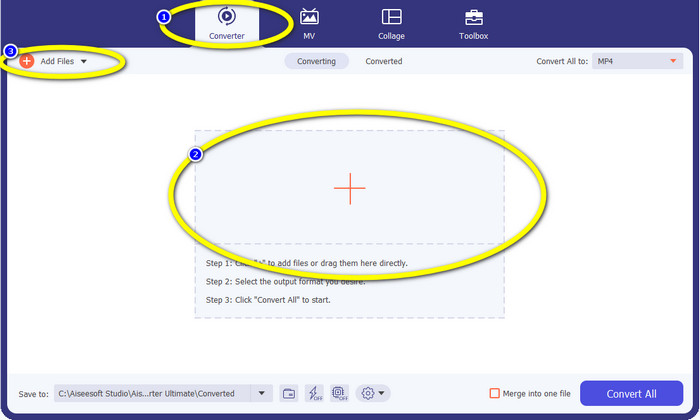
الخطوة 2: عندما تظهر الواجهة على الشاشة، اختر خيار Converter ثم انقر على أيقونة + لإضافة ملف Xvid. هناك طريقة أخرى لإضافة ملف فيديو وهي النقر على زر Add Files.
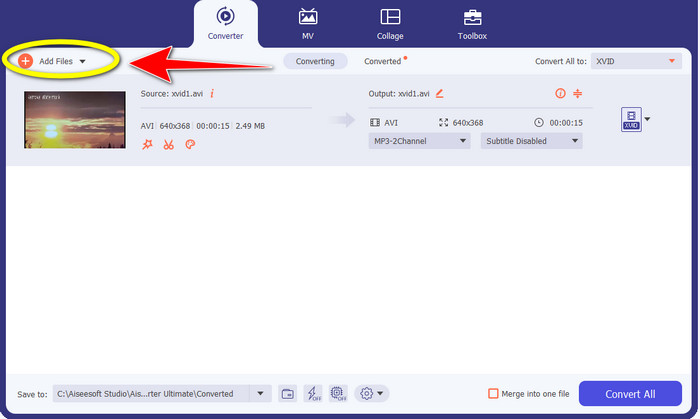
الخطوة 3: يتيح لك هذا البرنامج تحويل ملفات متعددة. لذا، لإضافة مقطع فيديو Xvid آخر تريد تحويله، انقر على زر Add Files في الجزء العلوي الأيسر من الواجهة.
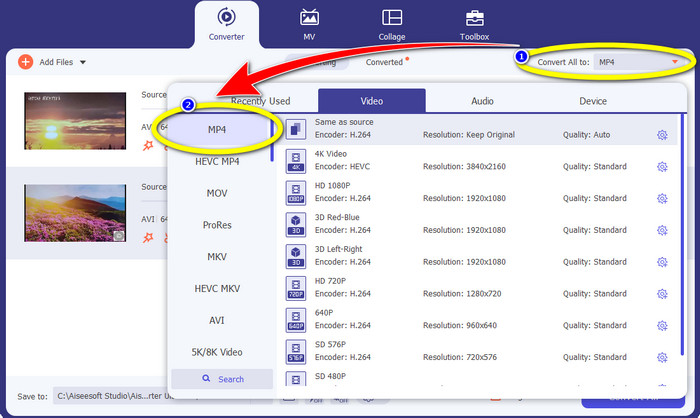
الخطوة 4: بعد ذلك، لتحويلها إلى ملف MP4 واحد، انقر على زر Convert All to. اختر ملف MP4 من خيارات الصيغ وحدّد جودة الفيديو المطلوبة.
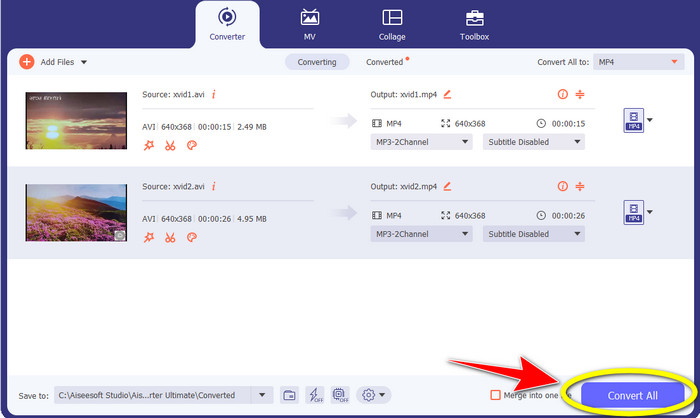
الخطوة 5: بعد اختيار صيغة الإخراج المطلوبة، يمكنك المتابعة إلى عملية التحويل بالنقر على زر Convert All. ثم احفظ ملف MP4 على جهازك.
الجزء 2: كيفية تحويل Xvid إلى MP4 على VLC
في هذا الجزء، ستتعلّم كيفية تحويل Xvid إلى MP4 باستخدام VLC. وللعلم، يمكن لـمشغّل الوسائط VLC تحويل ملفات فيديو متعددة بالإضافة إلى تشغيلها. فهو يدعم صيغ فيديو مثل MP4 وTS وWEM وOGG وغيرها. كما يمكنه تحويل ملفات الصوت مثل MP3 وFLAC وغيرها. لذلك يُعد VLC أيضًا برنامجًا موثوقًا لتحويل أنواع مختلفة من الملفات. ولكن هذا البرنامج ليس مناسبًا للمبتدئين، إذ إن واجهته صعبة الفهم، مما يجعل استخدامه أكثر تعقيدًا. كما يستغرق وقتًا طويلًا في التنزيل والتثبيت على أجهزة الكمبيوتر.
الخطوة 1: نزّل وثبّت مشغّل الوسائط VLC على جهاز الكمبيوتر. ثم شغّل البرنامج.
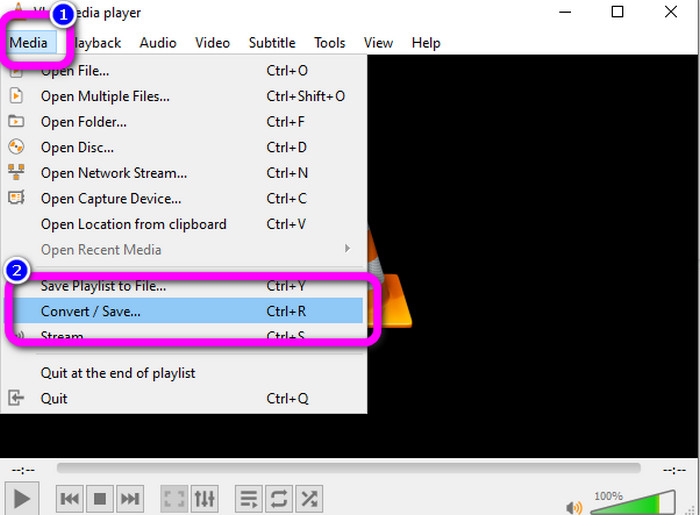
الخطوة 2: انتقل إلى الجزء العلوي من الواجهة واختر خيار Media. ثم انقر على زر Convert/Save.
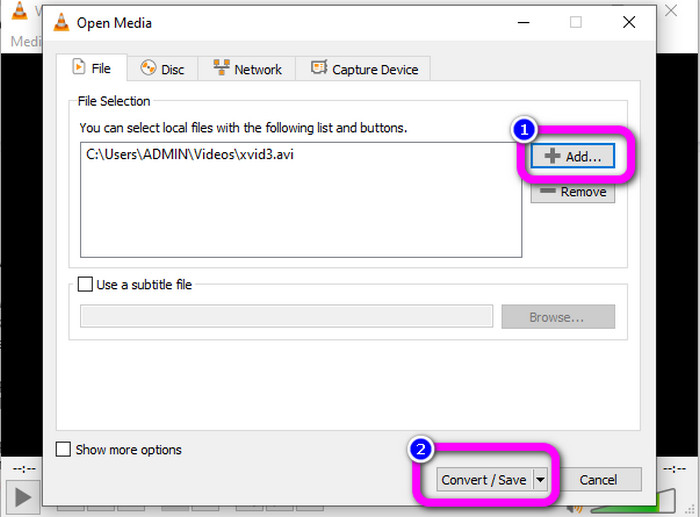
الخطوة 3: اضغط على زر Add لإدراج ملف فيديو Xvid. بعد إضافة الملف، انقر على زر Convert / Save.
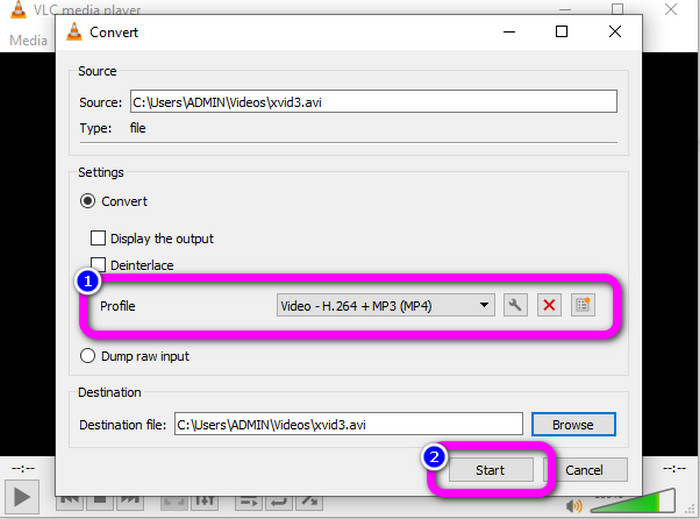
الخطوة 4: في الخطوة الأخيرة، انقر على Profile لعرض خيارات الصيغ، ثم اختر صيغة ملف MP4. عيّن ملف الوجهة، ثم تابع عملية التحويل بالنقر على زر Start.
الجزء 3: خطوات سهلة لتحويل Xvid إلى MP4 على فرملة اليد
Handbrake هي أداة أخرى غير متصلة بالإنترنت يمكنك الوثوق بها في تحويل ملف Xvid إلى تنسيق MP4. تقدم هذه الأداة أيضًا عملية تحويل مجمعة ، حيث يتعين عليك فقط إدخال مجلد يتكون من عدة مقاطع فيديو وتحويلها مرة واحدة. ومع ذلك ، فهو ليس سهل الاستخدام. العديد من الخيارات محيرة للمبتدئين. اتبع الدليل البسيط أدناه لتحويل Xvid إلى MP4 باستخدام Handbrake.
الخطوة 1: نزّل برنامج Handbrake على جهاز الكمبيوتر. شغّله بعد انتهاء عملية التثبيت.
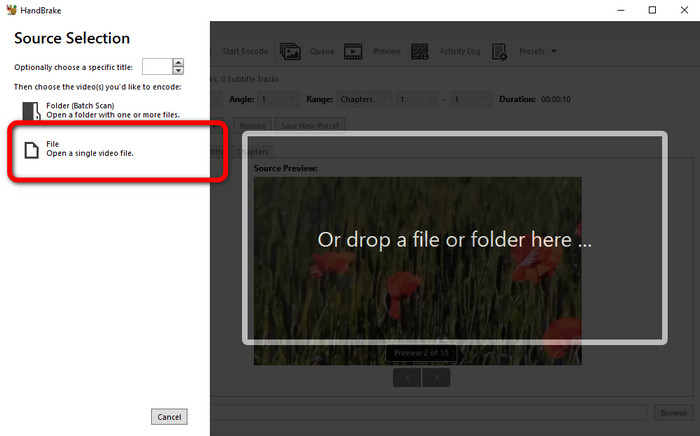
الخطوة 2: افتح زر File لإضافة ملف فيديو Xvid.
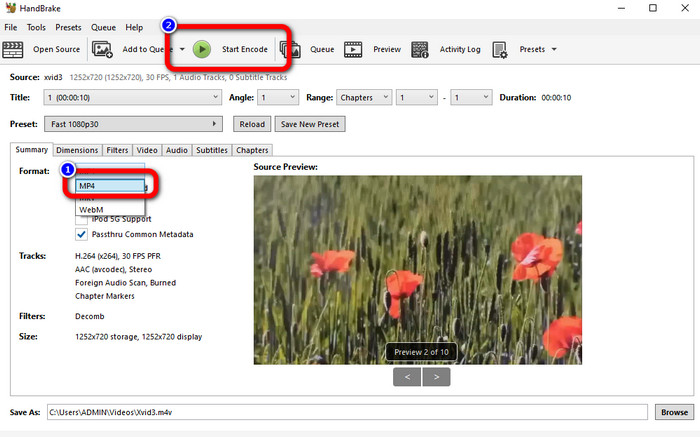
الخطوة 3: انتقل إلى خيار Format واختر صيغة ملف MP4. ثم انقر على زر Start Encode لتحويل ملف Xvid إلى صيغة MP4.
الجزء 4: عملية تحويل Xvid إلى MP4 عبر الإنترنت
يُعد FVC Free Video Converter Online أداة ممتازة لتحويل Xvid إلى MP4 عبر الإنترنت. فهو يقدّم واجهة سهلة الاستخدام مناسبة للمبتدئين. يمكنك تحويل الملفات في ثلاث خطوات بسيطة فقط. بالإضافة إلى ذلك، يمكنك أيضًا تحويل ملفات متعددة في آن واحد لأنه يتيح لك إجراء عملية تحويل دفعي. تدعم هذه الأداة صيغ فيديو مختلفة، مثل FLV وAVI وMKV وWMA وMOV وVOB وغيرها. إذا أردت استخدام FVC Free Video Converter Online، فاتّبع الإرشادات البسيطة أدناه.
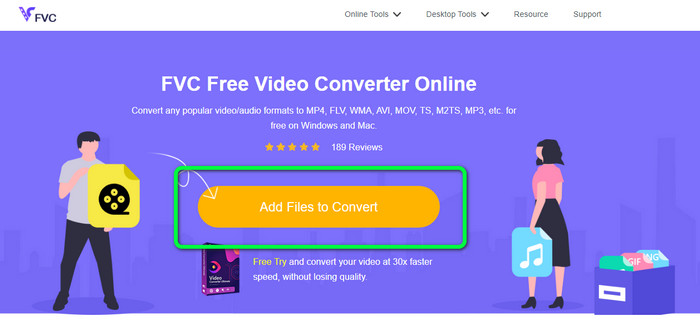
الخطوة 1: انتقل إلى موقع FVC Free Video Converter Online. في الصفحة الرئيسية، اختر زر Add Files to Convert لرفع ملف فيديو Xvid الذي تريد تحويله.
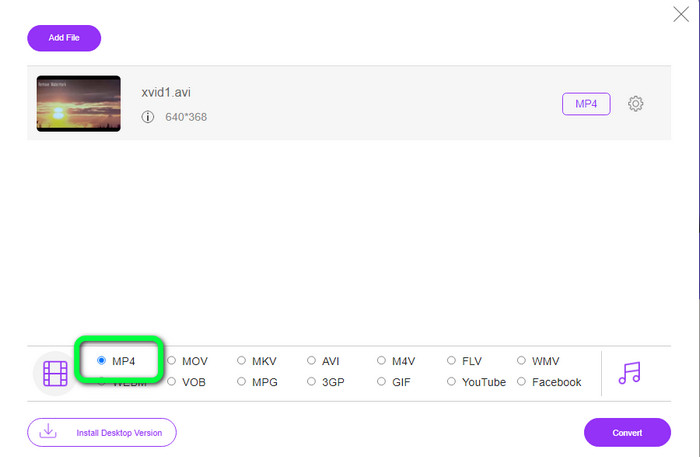
الخطوة 2: كما ترى في الجزء السفلي من الواجهة، توجد خيارات الصيغ. اختر MP4 كصيغة ملف الإخراج.
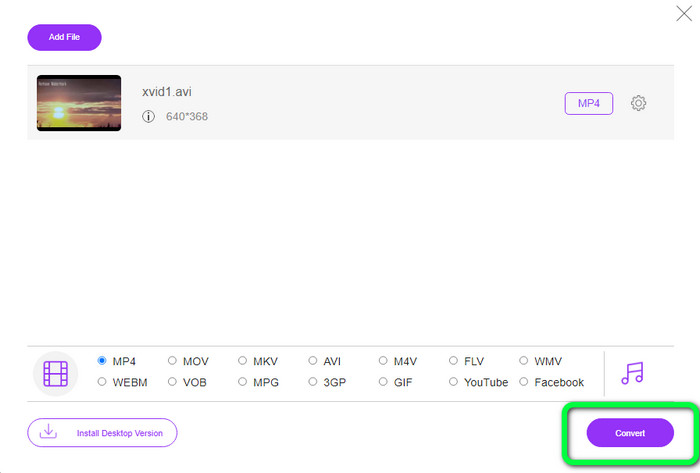
الخطوة 3: انقر على زر Convert لتحويل ملف Xvid إلى صيغة MP4. انتظر حتى تنتهي عملية التحويل ثم احفظ الفيديو النهائي.
الجزء 5: طريقة رائعة لتحويل Xvid إلى MP4 باستخدام Android
إذا كنت تريد محوّل Xvid إلى MP4 لنظام Android، يمكنك استخدام تطبيق Video Format Factory. يمكنك بسهولة تغيير ملف الفيديو إلى صيغ أخرى باستخدام هذا التطبيق. ومع ذلك، فإن عملية تحويل الفيديوهات تستغرق وقتًا طويلًا لأن سرعة التحويل بطيئة. اطّلع على الخطوات أدناه لتحويل Xvid إلى MP4.
الخطوة 1: نزّل وثبّت تطبيق Video Format Factory على جهاز Android.
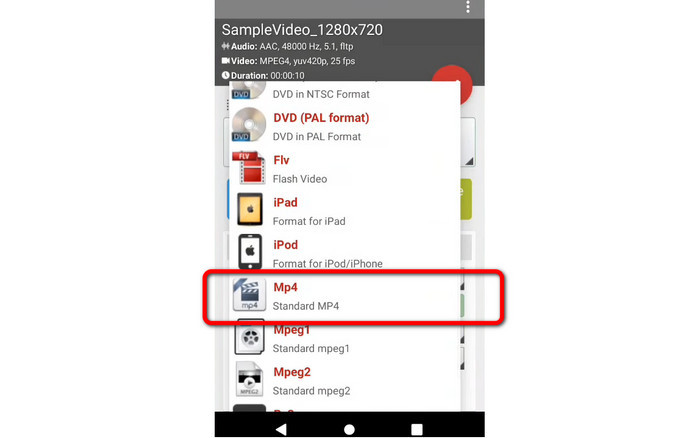
الخطوة 2: بعد تشغيل التطبيق، اختر زر Video لإدراج ملف Xvid.
الخطوة 3: اختر خيار Convert وحدّد صيغة MP4 من خيارات الصيغ. ثم ابدأ عملية التحويل بالنقر على علامة الصح.
قراءة متعمقة:
طرق سهلة التعلّم لتحويل Xvid إلى DivX
تقنيات ممتازة لتحويل XviD إلى 3GP بسرعة
الجزء 6: أسئلة وأجوبة حول تحويل Xvid إلى MP4
1. ما هو تنسيق ملف Xvid؟
تنسيق ملف Xvid هو برنامج ترميز فيديو يتبع معيار ترميز MPEG-4. يقوم برنامج الترميز هذا بضغط ملفات الفيديو باستخدام تنسيق MPEG-4 Part 2 A SP.
2. هل Xvid ذو نوعية جيدة؟
نعم. هذا الملف هو استمرار لمشروع Mayo. هدفها هو تطوير برنامج ترميز MPEG-4 مفتوح المصدر عالي الجودة.
3. هل MP4 مضغوط؟
نعم إنه كذلك. يوجد ملف MP4 مضغوط. يمكن تضمين برامج ترميز مختلفة للفيديو في ملف MP4. من بين أكثر برامج ترميز الفيديو شعبية لـ MP4 هي H.264 و H.265 و MPEG-4. باستخدام ضغط H.264 ، يمكن ضغط مقطع فيديو مدته ساعة إلى حوالي 1 جيجابايت باستخدام برنامج ترميز الفيديو MP4.
خاتمة
مع كل المعلومات المذكورة أعلاه، أصبحت تعرف بالفعل كيفية تحويل Xvid إلى MP4 أونلاين، أو دون اتصال، أو باستخدام أجهزة Android. لكن أفضل المحوّلات التي يمكنك استخدامها هما Video Converter Ultimate وFVC Free Video Converter Online. هذان المحوّلان يقدّمان لك واجهة بديهية مناسبة لجميع المستخدمين.
-
 كيفية تحويل MPG إلى M4V على نظام Mac واستخدام الأداة عبر الإنترنت
 هل أنت مستخدم Mac جديد ولا تعرف كيفية تحويل MPG إلى M4V؟ ثم يمكنك قراءة هذه المقالة لمعرفة المزيد واكتشاف كيفية تحويل الملفات باستخدام جهاز Mac الخاص بك
-
 الطرق الناجحة لتحويل DIVX إلى MP4 على الفور
 كيف أقوم بتحويل DIVX إلى MP4؟ إذا كنت تبحث عن أفضل حل ، فأنت في المقالة الصحيحة. سنوضح لك كيفية تحويل DIVX إلى MP4 بسهولة
-
 كيفية تحويل F4V إلى MP4 بأكثر الطرق فعالية
 هل مقاطع الفيديو الخاصة بك F4V ليست ذات جودة جيدة؟ ثم قم بتحويله إلى ملف MP4. سيقدم هذا المنشور أفضل طريقة حول كيفية تحويل F4V إلى MP4 عبر الإنترنت وغير متصل
