


 محول الفيديو النهائي
 مسجل الشاشة
 إصلاح الفيديو
 تنزيل آمن
قم بتغيير البيانات الوصفية للفيديو على iPhone بسرعة مثل المحترفين في أقل من دقيقة
في الوقت الحاضر أصبح ترتيب ملفاتنا أمرًا أساسيًا لكثيرين، خصوصًا لمستخدمي الآيفون. يمكننا تحديد موقع الملف وتنظيم ملف الوسائط في المكتبة أو المجلد من خلال الوسم المناسب. في بعض الحالات يجد مستخدمو iOS صعوبة في البحث عن ملف على الآيفون عندما تكون بياناته الوصفية غير مضبوطة، لأن العثور عليه يصبح صعبًا. هل تريد معرفة كيفية حل ذلك؟ الحل الأنسب لإصلاح البيانات الوصفية على الآيفون هو تعديلها وفقًا لمواصفاتك حتى تصبح ظاهرة ومنظمة جيدًا. كن على دراية وتعلّم كيفية تغيير بيانات الفيديو الوصفية على الآيفون من خلال قراءة هذا المقال.

الجزء 1. 2 من أفضل التطبيقات لتغيير البيانات الوصفية للفيديو على iPhone
Metapho - محرر علامات الفيديو والصور على iPhone
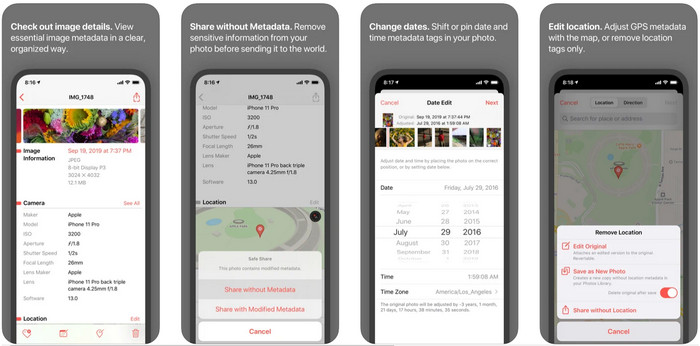
تُعد أداة Metapho واحدة من أفضل محررات الوسوم التي يمكنك تنزيلها واستخدامها لتغيير بيانات الفيديو الوصفية على الآيفون. هذا التطبيق عبارة عن محرر بسيط يتيح لك تغيير التاريخ، واسم الملف، والحجم، وطراز الجهاز، وسرعة الغالق، والموقع. ومن خلاله يمكنك أيضًا الاطلاع على البيانات الوصفية لكل صورة حية تلتقطها وتحريرها بدقة إذا رغبت في ذلك. رغم أن التطبيق يبدو واعدًا، إلا أنك ستحتاج إلى شرائه لتتمكن من تعديل بياناتك الوصفية؛ وإذا لم تفعل فستتمكن فقط من عرض البيانات الوصفية مجانًا لا أكثر. لكن لا داعي للقلق، فعملية الشراء تتم مرة واحدة فقط، وبمجرد شرائه ستتمكن من الاستفادة من التطبيق بشكل كامل.
الخطوة 1. افتح متجر App Store على الآيفون وحمّل تطبيق Metapho.
الخطوة 2. افتح التطبيق، واختر أحد الملفات التي تريد فتحها من تطبيق الصور ثم اضغط عليه للمتابعة. بعد ذلك ستظهر لك مجموعة من خيارات التحرير التي يمكنك إجراؤها على الوسوم؛ عدّلها بما يناسب احتياجاتك.
الخطوة 3. اضغط زر Save عندما تنتهي من تعديل الوسوم.
Exif Metadata - Photo and Live Photo Tag Editor على iPhone
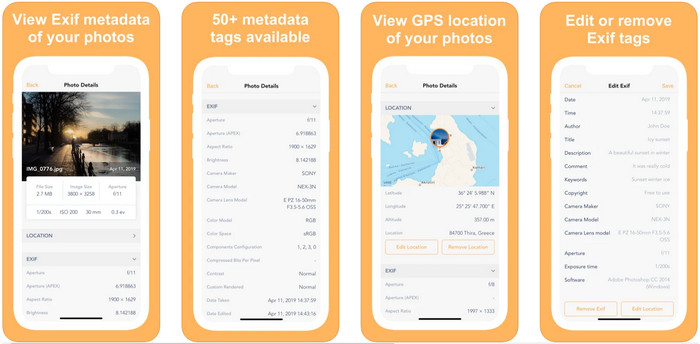
يقدّم تطبيق EXIF Metadata الوظيفة الأساسية لأي محرّر بيانات وصفية ليساعد مستخدمي الآيفون على تعديل الوسوم. يتميز هذا التطبيق بواجهة استخدام فريدة وأكثر جاذبية من Metapho. من خلاله يمكنك الاطلاع مجانًا على معلومات متعمقة عن صورتك. ورغم أن التطبيق يوفّر إصدارًا احترافيًا مدفوعًا، فإن أدوات التحرير الأساسية التي تحتاجها متاحة في الإصدار المجاني، لكن يمكنك شراء النسخة الاحترافية لإضافة المزيد من المعلومات إلى بياناتك الوصفية. من سلبيات هذا التطبيق أنه يدعم ملفات الصور فقط، لذا فإن تغيير البيانات الوصفية للفيديو غير ممكن. لذلك، إذا كنت تريد تغيير بيانات الصور الوصفية على الآيفون، فاتّبع الخطوات أدناه.
الخطوة 1. قم بتنزيل التطبيق وتثبيته على الآيفون.
الخطوة 2. افتح الأداة، واضغط زر + واختر وسم الصورة الذي تريد تغييره.
الخطوة 3. اضغط Edit، أضف المعلومات التي تحتاجها، ثم اضغط Save.
الجزء 2. أفضل محرر بيانات تعريف وسائط لنظامي التشغيل Windows و Mac - FVC Video Converter Ultimate
ليست كل المعلومات التي ترغب في تعديلها في بياناتك الوصفية مدعومة في التطبيقات المذكورة أعلاه. إذا أردت إضافة معلومات أكثر تفصيلًا إلى الوسوم، فنحن نقترح استخدام أفضل محرر وسوم على نظامي ويندوز وماك، وهو FVC Video Converter Ultimate. يمكن للبرنامج مساعدتك على إضافة المزيد من بيانات الوسوم إلى ملف الوسائط الخاص بك ببضع نقرات فقط. سواء كنت محترفًا أو مبتدئًا، سيصبح إضافة البيانات الوصفية إلى ملفك أمرًا في غاية السهولة مع هذا البرنامج الاحترافي.
ربما تكون قلقًا إذا كان ملفك مدعومًا هنا. تدعم هذه الأداة أكثر من 1000 تنسيق ، وبالفعل التنسيق الذي لديك مدعوم. لمنحك بداية حول كيفية تغيير البيانات الوصفية للفيديو الخاص بجهاز iPhone ، يرجى قراءة المعلومات التفصيلية التي ندرجها أدناه لمتابعتها وفقًا لذلك لأن النجاح في طريقه.
الخطوة 1. بالنقر على زر التنزيل أدناه يمكنك الحصول على الأداة الاحترافية على كلا النظامين، ويندوز وماك. انقر على الملف الذي قمت بتنزيله لتثبيت الأداة على جهازك، ثم شغّلها.
تحميل مجانيلنظام Windows 7 أو أحدثتنزيل آمن
تحميل مجانيلنظام MacOS 10.7 أو أحدثتنزيل آمن
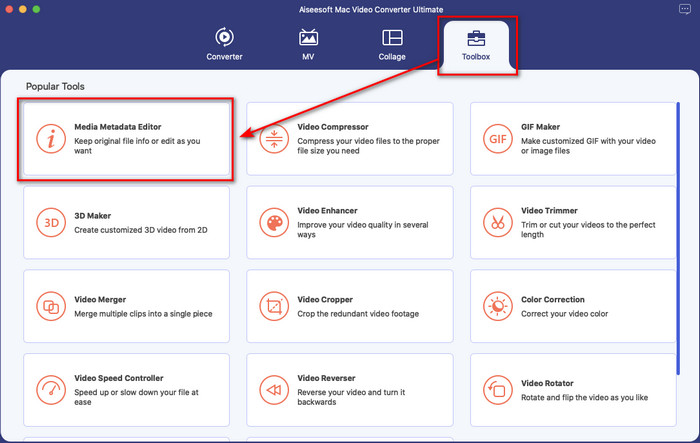
الخطوة 2. انتقل إلى قسم Toolbox، ومن بين مجموعة الميزات اضغط على Media Metadata Editor.
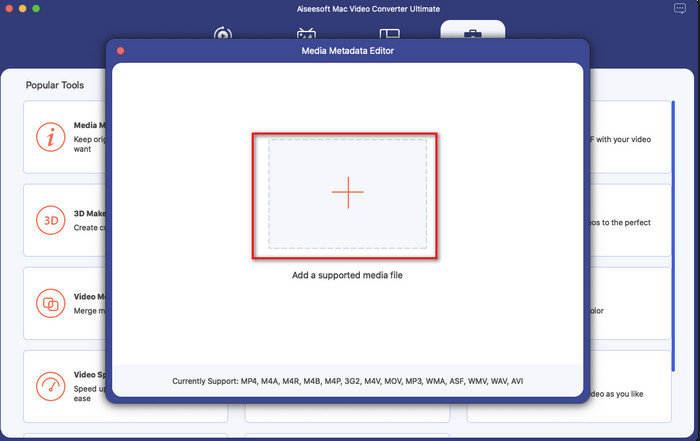
الخطوة 3. اضغط زر +، وستظهر لك نافذة لاختيار الملفات، ابحث عن الملف الذي تريد إضافة بيانات وصفية إليه، ثم اضغط Open لتحميله.
الخطوة 4. في النافذة الجديدة يمكنك الآن تعديل أو إزالة البيانات الوصفية من ملفك، انقر في كل مربع نص واكتب المعلومات التي تريد إضافتها كبيانات وصفية. بالإضافة إلى ذلك، يمكنك أيضًا إضافة غلاف ألبوم إلى ملف الوسائط إذا رغبت، وذلك بالضغط على زر + ثم اختيار صورة الغلاف من ملفاتك والضغط على Open لإدراجها.
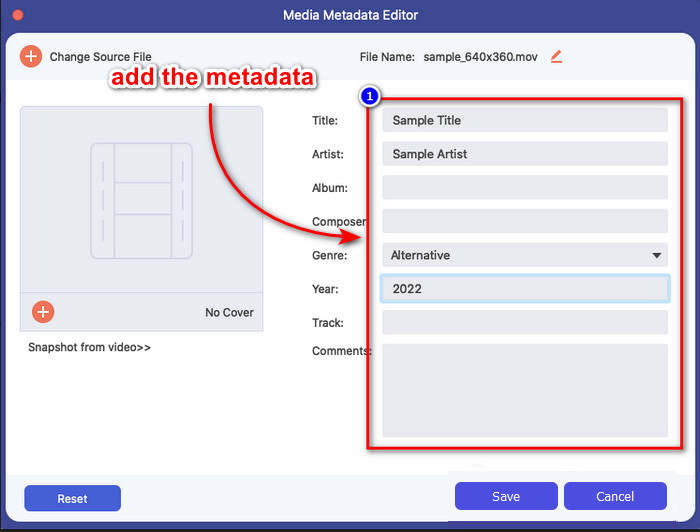
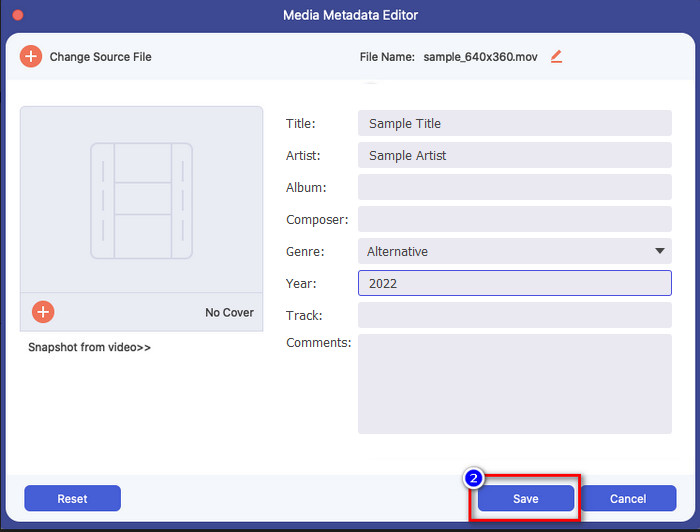
الخطوة 5. بعد الانتهاء من جميع التعديلات والتغييرات على ملف الوسائط، يمكنك الآن الضغط على Save. في لحظات تكون قد غيّرت بيانات ملف الوسائط الوصفية؛ فبضع نقرات بسيطة ومع مساعدة هذه الأداة جعلت كل ذلك ممكنًا.
الجزء 3. الأسئلة الشائعة حول محرر البيانات الوصفية لـ iPhone
هل يمكنني تحرير البيانات الوصفية على iPhone؟
نعم ، يمكنك تحرير البيانات الوصفية على جهاز iPhone الخاص بك ، ولكن يُسمح لك فقط بتعديل الموقع وعرض العلامات الأساسية للملف ، ولكن لا يُسمح لك بتحريرها. إذا كنت ترغب في تغيير البيانات الوصفية للملف بالتفصيل ، فنحن نقترح عليك استخدام تطبيق تابع لجهة خارجية يفي باحتياجاتك فيما يتعلق بمشكلة البيانات الوصفية.
لماذا أحتاج إلى إزالة البيانات الوصفية؟
نقوم أحيانًا بحذف البيانات الوصفية لأسباب تتعلق بالخصوصية. فبعض الأشخاص قد يحصلون على معلومات متعمقة عنك من خلال البيانات الوصفية؛ فربما لا تعلم أن هذه البيانات يمكن أن تتضمن موقعك الدقيق، والتاريخ، والوقت، والإحداثيات، وحتى أرقام الهواتف. إذا لم تكن ترغب في كشف معلومات عن نفسك، فنحن نقترح إزالة البيانات الوصفية من ملفاتك. هل تريد معرفة الطريقة؟ إذا كان الأمر كذلك، فسيساعدك هذا المقال على إزالة البيانات الوصفية من ملفك في أقل من دقيقة.
هل من السهل تغيير البيانات الوصفية على iPhone؟
بالتأكيد ، نعم ، يعد تغيير البيانات الوصفية على iPhone أمرًا سهلاً بمساعدة محرر البيانات الوصفية الصحيح. على الرغم من أن المهمة تبدو صعبة بعض الشيء ، إلا أنها لا تزال قابلة للإدارة لكل مستخدم. إذا كنت تريد معرفة أفضل أداة لإنجاز هذه المهمة ، فيجب عليك قراءة المعلومات حول الأداتين اللتين قدمناهما أعلاه. لمساعدتك على إنهاء تغيير العلامة على iPhone مثل المحترفين.
خاتمة
الآن بعد أن وصلت إلى النهاية، نكون قد عرفنا أن تغيير بيانات الفيديو الوصفية على الآيفون مهمة سهلة. وبمساعدة هذا المقال وحرصك على التعلم بات الأمر ممكنًا. ويبقى عليك الآن اختيار الطريقة التي تراها الأنسب لك. ورغم أن FVC Video Converter Ultimate غير متوفر على الآيفون، فإنه ما يزال واحدًا من أفضل البرامج التي يمكنك استخدامها على نظامي ماك أو ويندوز لتحرير الوسوم. تدعم هذه الأداة إضافة معلومات متعمقة حول ملفات الوسائط التي لديك لمساعدتك على تنظيمها وجعلها أكثر وضوحًا. هل تريد معرفة باقي الميزات والوظائف التي يقدمها البرنامج؟ انقر زر التنزيل أعلاه لاكتشافها.
-
 أهم 3 برامج تحرير للبيانات الوصفية لـ FLAC على نظامي التشغيل Mac و Windows [محدّث في 2022]
 هل تريد تغيير بيانات FLAC الوصفية؟ في هذه الحالة ، يجب عليك قراءة هذه المقالة لأننا نقدم معرفة كافية حول أحدث محرر بيانات تعريف FLAC يمكنك استخدامه.
-
 أفضل الطرق لتحرير البيانات الوصفية لـ MKV مثل المحترفين [سهل]
 ليس لديك فكرة عن كيفية تحرير البيانات الوصفية لـ MKV؟ يجد بعض المستخدمين صعوبة في تحرير العلامات على MKV ، إذا كنت أحدهم ، فاقرأ هذه المقالة.
-
 أفضل تقنية حول كيفية تحرير البيانات الوصفية لـ WebM بسرعة
 اقرأ التفاصيل الكاملة التي قدمناها أدناه أثناء قيامنا بإدخال برنامج تعليمي حول كيفية تحرير بيانات WebM الوصفية. انقر فوق هذا الارتباط لمعرفة المزيد عنه.
