


 محول الفيديو النهائي
 مسجل الشاشة
 إصلاح الفيديو
 تنزيل آمن
نصائح وحيل حول كيفية القيام بحركة بطيئة على CapCut بخطوات مفصلة
عند الرغبة في إبراز تفصيلة معيّنة في الفيديو، يمكن أن يساعدك إضافة تأثير الحركة البطيئة. ورغم أن تغيير عدد الإطارات في الثانية للفيديو أمر سهل، فإن اختيار الأداة المناسبة يكون مزعجًا في معظم الأحيان. لكن مع برنامج مثل CapCut يمكنك تنفيذ المهمة بسرعة وفعالية حتى لو لم تكن لديك خبرة. بدلاً من إضاعة الوقت في البحث عن شرح عن كيفية عمل حركة بطيئة في CapCut، يمكنك قراءة هذا المقال لأننا نقدّم خطوات سهلة المتابعة. وفي الجزء الأخير، سنضيف لك أفضل بديل إذا وجدت أن البرنامج الذي سنقدّمه لا يلبّي معاييرك.

الجزء 1. كيفية عمل الوضع البطيء على CapCut على أجهزة Android و iOS
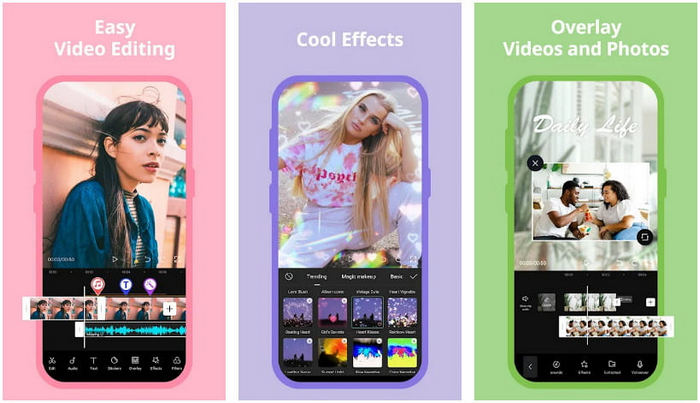
ستركز المعلومات الواردة أدناه على كيفية إبطاء الفيديو على CapCut بالتفصيل. لذلك ، إذا كنت ترغب في استخدام البرنامج الموجود على جهازك لإبطاء مقطع فيديو ، فإن هذه الخطوات أدناه مطلقة وتم تجربتها قبل إضافتها هنا. قبل أي شيء آخر ، الخطوات الواردة هنا هي أبسط وحدة تحكم في السرعة يمكنك الحصول عليها من CapCut.
الخطوة 1. حمِّل تطبيق CapCut على جهازك وافتحه مباشرة بعد تثبيته.
الخطوة 2. بعد فتح التطبيق، انقر على مشروع جديد (New Project) ثم أضف الفيديو الذي تريد جعله بالحركة البطيئة.
الخطوة 3. اضغط على الفيديو الذي قمت برفعه في المخطط الزمني (Timeline)، ثم انقر على قائمة السرعة (Speed)، وبعدها اختر بين طريقتي التحكم في السرعة العادية (Normal) أو المنحنية (Curve) حسب ما تريد. ولطريقة أسهل لإبطاء الفيديو، يجب أن تضغط على خيار Normal (عادي).
الخطوة 4. حرّك مؤشر سرعة الفيديو إلى اليسار لإبطائه، ثم انقر على علامة الصح (check) وبعدها على تصدير (Export).
الايجابيات
- إنها واحدة من أفضل وحدات التحكم في السرعة التي يمكنك تنزيلها على Android و iOS.
- محرر الكل في واحد يمكنك الحصول عليه مجانًا.
- واجهة سهلة الاستخدام لتجربة تدفق سهلة للمستخدمين.
سلبيات
- موارد معالجة محدودة على جهازك.
- ميزات التحرير الرئيسية لا تزال غير متوفرة.
- تحدث أخطاء وتعطل في بعض الأحيان.
الجزء 2. البديل النهائي لـ CapCut لإبطاء الفيديو على سطح المكتب
رغم أن CapCut يمكنه تنفيذ الإبطاء الذي تحتاجه على الفيديو الذي تملكه، إلا أننا ما زلنا نرى أن هناك أمورًا تمنعه من أن يكون الحل النهائي. بلا شك، يتمتّع FVC Video Converter Ultimate بأفضلية واضحة وأصبح الحلّ النهائي لمشكلات التحكم بسرعة الفيديو.
نظرًا لميزاته ووظائفه ، أصبح العديد من المستخدمين مغرمين به لأنه مثير للإعجاب في كل ما يقدمه. إنه يغير سرعة الفيديو بشكل لا تشوبه شائبة لإنتاج إخراج فيديو جميل في أقل من دقيقة. على الرغم من أنك لست محترفًا في التحكم في سرعة الفيديو ، فلا يزال بإمكانك إدارة استخدام البرنامج بسهولة. مثير للإعجاب أليس كذلك؟ هو أكثر من ذلك؛ يمكنك متابعة التفاصيل أدناه حيث نعلمك كيفية القيام بالحركة البطيئة على البديل النهائي لـ Capcut في أقل من دقيقة.

FVC Video Converter Ultimate
5،689،200+ التنزيلات- يدعم سرعة قصوى ويبطئ التأثير للتطبيق.
- قم باستيراد الفيديو الخاص بك هنا ، لأنه يدعم أكثر من 1000 تنسيق.
- تتوفر ميزات ووظائف إضافية متعددة الوظائف.
- يحتوي على واجهة سهلة الاستخدام لتجربة مستخدم أفضل.
- يمكنك الحصول على البرنامج على نظامي التشغيل Windows و macOS.
تحميل مجانيلنظام Windows 7 أو أحدثتنزيل آمن
تحميل مجانيلنظام MacOS 10.7 أو أحدثتنزيل آمن
الخطوة 1. يرجى الضغط على زر التنزيل أدناه للحصول على البرنامج النهائي على نظامي Windows وMac. بعد ذلك، انقر على الملف الذي قمتَ بتنزيله لتثبيته فورًا، ثم اضغط Start Now لتشغيل البرنامج على نظامك.
الخطوة 2. عندما يعمل البرنامج على نظامك، انقر على صندوق الأدوات (Toolbox) ثم ابحث عن أداة متحكم سرعة الفيديو (Video Speed Controller).
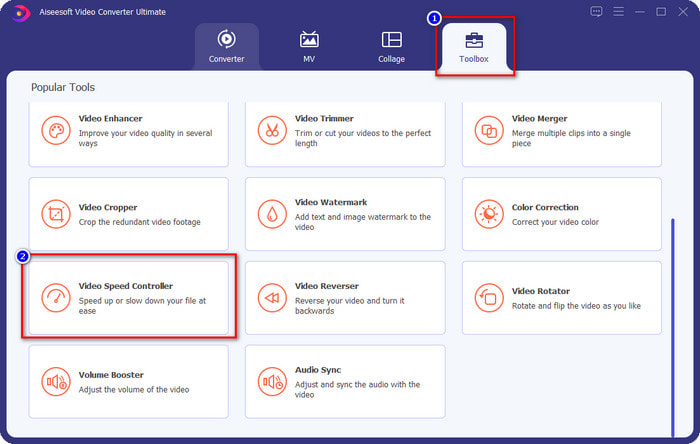
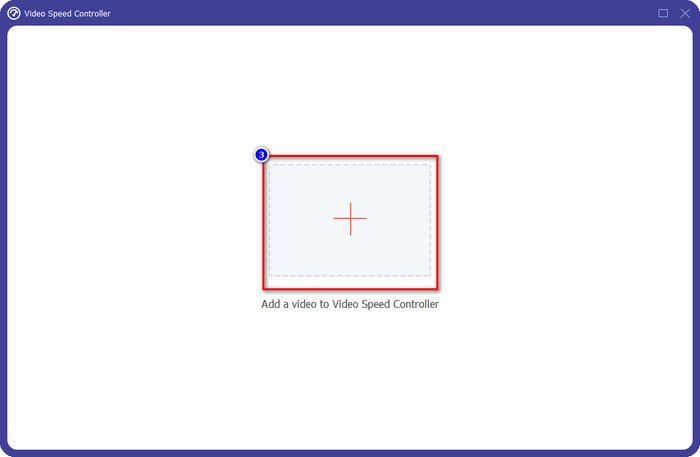
الخطوة 3. اضغط زر + لفتح المجلد على سطح المكتب. حدد ملف الفيديو الذي تريد جعله بالحركة البطيئة ثم اضغط فتح (Open) للمتابعة.
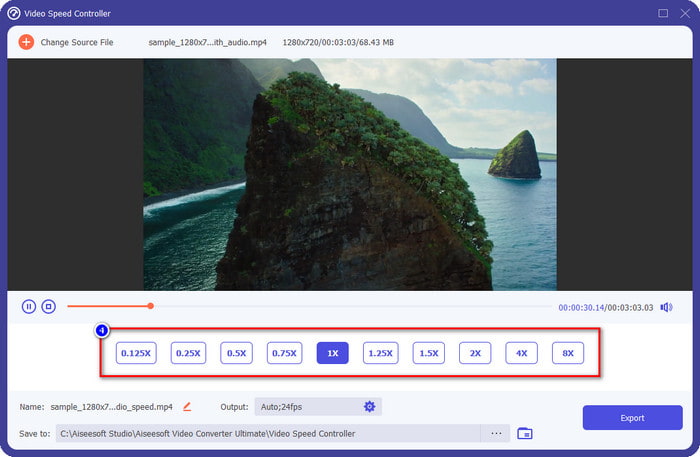
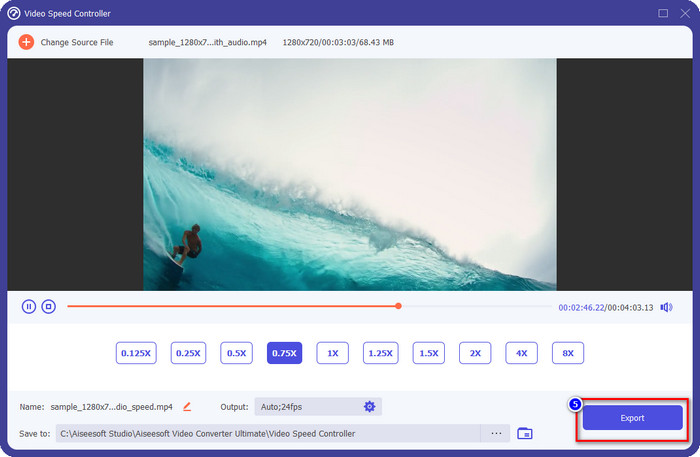
الخطوة 4. بعد رفع ملف الفيديو هنا، اختر سرعة الفيديو التي تريدها من الخيارات المعروضة في الأسفل. في كل مرة تنقر فيها على أحد الخيارات، سيتم تشغيل معاينة في نافذة المعاينة، حيث سيُعرض الفيديو الذي رفعته بالسرعة التي اخترتها.
الخطوة 5. بعد ضبط كل شيء، انقر على تصدير (Export) لبدء تحويل الفيديو من سرعته العادية إلى حركة بطيئة. الأمر سهل، أليس كذلك؟ نعم، حتى لو لم تكن خبيرًا في المونتاج، فلا داعي للقلق إذا اخترت استخدام هذا البرنامج.
الايجابيات
- إنه الحل النهائي لحل مشكلة سرعة الفيديو ومشاكل الفيديو والصوت الأخرى.
- على الرغم من أنك مبتدئ في تعديل السرعة ، يمكنك إتقان استخدامها بسرعة في أقل من دقيقة.
- يمكنه استيراد وتصدير الفيديو دون التقليل من جودة الخام.
- متوفر في جميع أنظمة تشغيل Mac و Windows.
سلبيات
- لا يتوفر على iOS و Android.
الجزء 3. الأسئلة الشائعة حول كيفية عمل Slow-Mo على CapCut
هل هناك أي نسخة سطح مكتب من CapCut؟
لسوء الحظ ، لا يتوفر CupCat على نظامي التشغيل Windows و Mac ، لذا لا يمكنك تنزيله على سطح المكتب حتى وإن كنت تريده. في هذه الحالة ، يجب ألا تقوم بتنزيل التطبيق على مواقع ويب تابعة لجهات خارجية أخرى أو قرصنة لأن ذلك غير قانوني ، وستكون هناك دائمًا عواقب بعد ذلك.
هل يمكنني شراء CapCut؟
إذا كانت ميزانيتك محدودة ، فإن الشراء أو الاشتراك في CapCut ليس ضروريًا لأنه مجاني. لا توجد رسوم خفية بمجرد تنزيل التطبيق على Android و iOS. يمكنك الاستمتاع بالإمكانات الشاملة لمحرر الفيديو هذا مجانًا.
كيفية تسريع الفيديو على Tiktok باستخدام CapCut؟
يمكنك اتباع الخطوات التي أضفناها أعلاه وتنزيل فيديو تيك توك الذي تريد تسريعه. ولكن إن كنت تريد شرحًا شاملاً ومفصلاً حول كيفية تسريع الفيديو على تيك توك، يمكنك قراءة هذا المقال والاعتماد عليه بدلًا من ذلك.
بعد تصدير الفيديو على Capcut ، هل سيتم تطبيق علامة مائية؟
لم يتم تطبيق العلامة المائية مباشرة على الفيديو الذي تقوم بتحريره هنا ، ولكن تتم إضافتها إلى الجزء الأخير من الفيديو. ولكن يمكنك قص مقطع الفيديو بعلامة مائية باستخدام محرر الفيديو المخصص أو FVC Video Converter Ultimate لإزالته نهائيًا. يمكنك تصدير مقطع فيديو بدون علامة مائية عن طريق النقر فوق التصدير بدون علامة مائية بدلاً من التحرير.
خاتمة
بعد أن عرفنا كيفية إبطاء الفيديو على CapCut، أصبح لدينا الآن إمكانية تغيير سرعة أي فيديو نريده. وعلى الرغم من أنه تطبيق مجاني على أندرويد وiOS، إلا أن هناك قيودًا قد تُعيقك أثناء استخدامه. لذا، إذا كنت تريد سد الفجوة التي لا يستطيع هذا التطبيق تغطيتها، فمن الضروري تنزيل أفضل بديل على الكمبيوتر، لأنه البرنامج الأمثل لـإبطاء الفيديو. لتنزيل هذه الأداة النهائية، عليك الضغط على زر التنزيل بالأعلى لتحصل عليها وتكون في متناولك.
-
 5 أجهزة تصوير فيديو بطيئة الحركة لأنظمة ويندوز / ماك / عبر الإنترنت
 هل تريد معرفة كيفية تشغيل الفيديو بالحركة البطيئة؟ ثم اقرأ هذه المقالة لمعرفة ماهية 5 من صانعي الفيديو بالحركة البطيئة المحترفين.
-
 أفضل الطرق لاستخدام iMovie في عمل مقاطع فيديو بطيئة الحركة [محلول]
 هل سبق لك استخدام تطبيق iMovie لتحويل فيديو السرعة العادية إلى حركة بطيئة؟ هذه هي الفرصة لمعرفة المزيد عن هذا التطبيق ، لذا استمر في القراءة.
-
 أفضل 3 كاميرات بطيئة الحركة يجب أن تفكر في شرائها
 هل تواجه صعوبة في اختيار أفضل كاميرا لعمل مقاطع فيديو بطيئة الحركة؟ استمر في القراءة وفكر في أفضل خيارات الكاميرا البطيئة المدرجة هذه من أجلك.
