


 محول الفيديو النهائي
 مسجل الشاشة
 إصلاح الفيديو
[مثبت] كيفية تحرير خصائص ملفات WAV على نظامي التشغيل Windows 10/11 و Mac بسهولة
إذا كنت تريد تخزين تدفق البِتّات الصوتي على جهاز الكمبيوتر، فبلا شك يُعد WAV هو تنسيق الصوت القياسي الذي يجب أن تستخدمه. باعتباره تقليدًا لتنسيق RIFF، تحتوي ملفات WAV على البيانات الوصفية (الميتاداتا) داخل كُتل INFO. ورغم أنه يمكنه تخزين أكثر من مجرد الصوت، فإن البيانات الموجودة في ملفات WAV قد تكون أحيانًا غير دقيقة. لذلك، إذا كانت البيانات في ملفات WAV لديك غير صحيحة، فيجب أن تستخدم هذا الدليل لتعرف كيفية تعديل خصائص ملفات WAV على نظامي Windows 10/11 وMac بخطوات تفصيلية يسهل اتباعها.

الجزء 1. كيفية تحرير خصائص ملفات WAV باستخدام أفضل الأدوات على Windows
أفضل محرر بيانات وصفية على نظامي التشغيل Windows و Mac - FVC Video Converter Ultimate
إن تعلم كيفية تحرير خصائص ملفات WAV على نظامي التشغيل Windows 10/11 و Mac ليس مشكلة كبيرة بمساعدة أفضل محرر بيانات وصفية يمكنك تنزيله على النظام الأساسي المذكور. يقدم FVC Video Converter Ultimate أفضل محول وواحد من أفضل برامج تحرير البيانات الوصفية التي يمكنك استخدامها وتنزيلها على سطح المكتب. على عكس الأدوات الأخرى الموجودة في السوق وهذه القائمة ، تقدم هذه الأداة محرر علامات قويًا لأكثر من 1000 ملف وسائط ، بما في ذلك WAV.
بالإضافة إلى ذلك ، حتى إذا كان لديك أو لم تختبر تحرير علامات البيانات الوصفية ؛ يمكنك معرفة كل ذلك بسرعة باستخدام المحول النهائي. لا يمكن التغلب على أي مهمة معقدة بسرعة باستخدام هذه الأداة ، مما يجعل البرنامج فريدًا وقويًا. هل تريد معرفة كيفية استخدام الأداة؟ يمكنك اتباع الدليل الذي أضفناه أدناه ونسخ الخطوات لإنهاء المهمة بنجاح.
الخطوة 1. يرجى النقر على زر التنزيل المعروض أدناه، ثم اختيار زر التنزيل المناسب. بعد ذلك، قم بتثبيت الأداة وإعدادها، ثم شغّلها.
تحميل مجانيلنظام Windows 7 أو أحدثتنزيل آمن
تحميل مجانيلنظام MacOS 10.7 أو أحدثتنزيل آمن
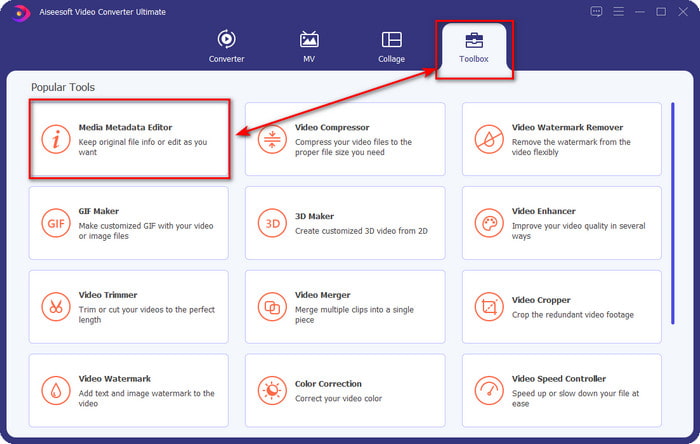
الخطوة 2. بعد فتح البرنامج، انتقل إلى قسم صندوق الأدوات (Toolbox)، ثم اختر محرر البيانات الوصفية للوسائط (Media Metadata Editor) من القائمة أدناه.
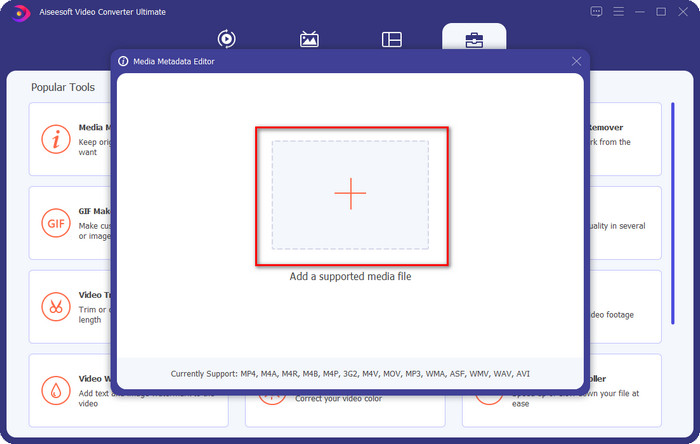
الخطوة 3. أضف الملف بالنقر على زر + الظاهر على شاشتك، ثم ابحث في مجلدات الكمبيوتر عن ملف WAV الذي تريد إضافة البيانات الوصفية إليه، وبعدها اضغط على فتح (Open).
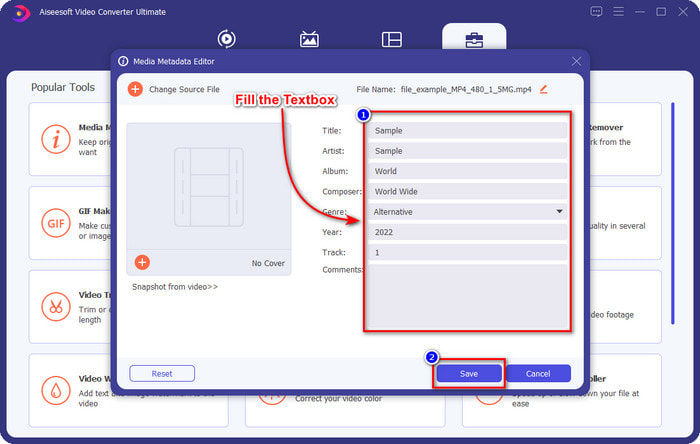
الخطوة 4. حرِّر المعلومات أو احذفها داخل مربع النص (textbox)؛ وإذا قمت بملء جميع الحقول بنجاح، يمكنك النقر على "حفظ" (Save) لتطبيق التغييرات. وبهذا تكون قد تعلّمت كيفية تعديل الوسوم (Tags) في ملفات WAV بمساعدة هذه الأداة القوية.
الجرأة
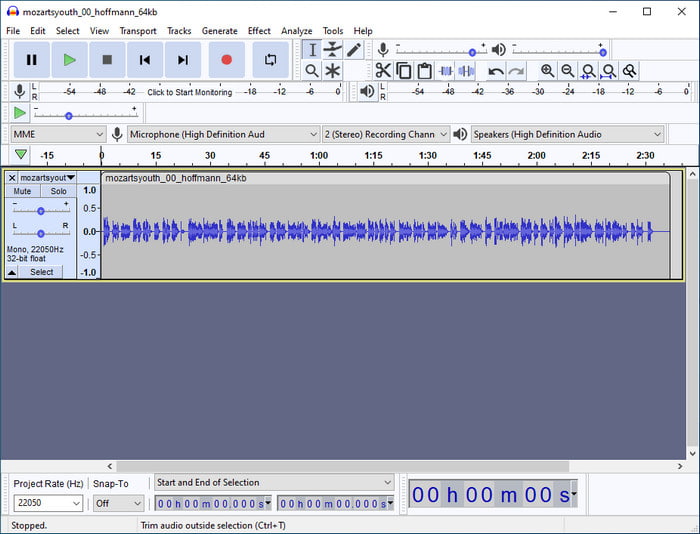
من أفضل البرامج التي يمكنك استخدامها لتحسين صوتك هو Audacity. فهذا البرنامج على ويندوز يقدّم معزِّزًا ومحررًا قويًا للصوت يمكنك الاستفادة منه مجانًا. وبالإضافة إلى تحسين ملفك الصوتي، بإمكانه أيضًا تغيير الوسوم في ملف الصوت عند الحاجة. يمكنك اتباع الدليل أدناه إذا كنت تريد معرفة كيفية تعديل خصائص ملفات WAV باستخدام هذه الأداة.
الخطوة 1. قم بتنزيل برنامج Audacity على نظام ويندوز، ثم افتحه.
الخطوة 2. بعد ذلك، اسحب وأسقط ملف WAV الذي تريده داخل البرنامج، ثم انقر على "تحرير" (Edit)، ومن القائمة المنسدلة اختر البيانات الوصفية (Metadata).
الخطوة 3. انقر على كل مربع تحت خانة "القيمة" (Value) لتحرير وسوم ملف WAV الخاص بك، ثم انقر على موافق (OK) لتطبيق التغييرات، وبعدها انقر على ملف (File) ثم حفظ المشروع (Save Project).
الجزء 2. كيفية تحرير خصائص ملفات WAV باستخدام أفضل البرامج على نظام Mac
علامة الموسيقى برو
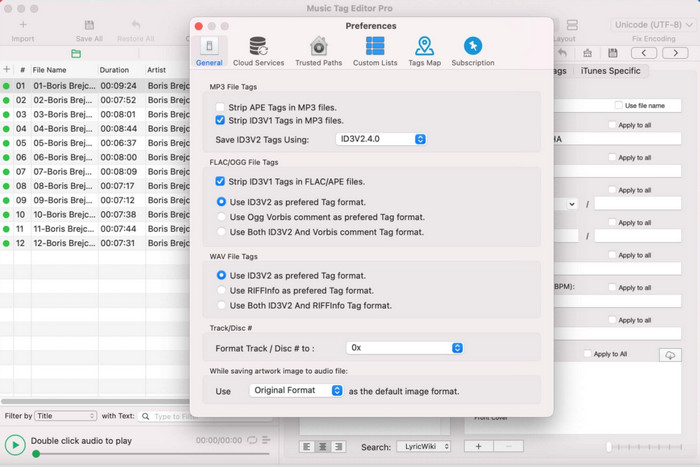
يُعد Music Tag Pro برنامجًا يمكنك تنزيله على جهاز Mac لتحرير البيانات الوصفية لملفات الصوت والفيديو. كما يمكنه تحرير وسوم البيانات الوصفية بكميات كبيرة لتعديل بيانات الملفات بكفاءة. وبفضل الأداء العام لمحرر الوسوم هذا على نظام Mac، يستمتع الكثير من المستخدمين باستخدامه وتركوا العديد من التعليقات الإيجابية على متجر App Store إذا ألقيت نظرة. ومع ذلك، تبقى المعلومات التي يمكنك تعديلها على ملف الوسائط محدودة إلى حدّ ما، لكن العمل يظل ممكنًا باستخدام الأداة. إذا كنت تريد استخدامه، فسيشرح لك هذا الشرح كيفية تعديل خصائص ملفات WAV على نظام Mac.
الخطوة 1. ابحث عن الأداة في متجر App Store، ثم قم بتنزيلها.
الخطوة 2. انقر على زر استيراد (Import) لإضافة ملفات WAV.
الخطوة 3. انقر على ملفات WAV، ثم عدّل الوسوم في كل عمود، وبعد الانتهاء من التعديل على ملف WAV انقر على حفظ الكل (Save All).
محرر العلامات لنظام التشغيل Mac
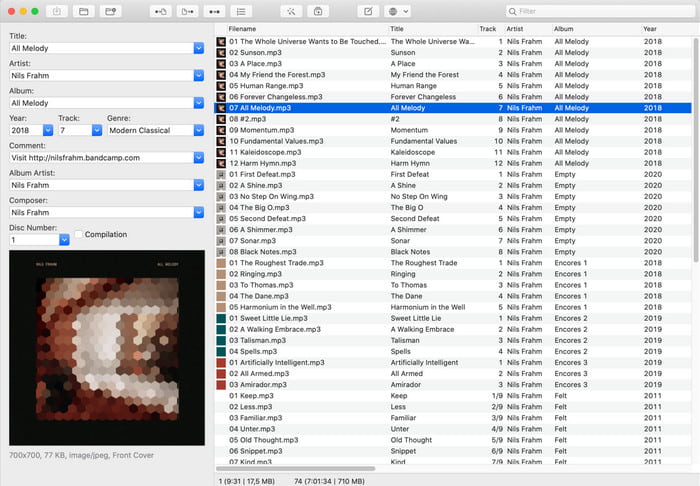
يُعتبر برنامج Tag Editor for Mac أداة مفيدة لإضافة الوسوم إلى ملفاتك الصوتية مثل WAV. فمن خلال هذا البرنامج، يمكنك بسهولة إضافة البيانات الوصفية إلى أي ملف صوتي دون التأثير في جودته، تمامًا كما تفعل الأداة الاحترافية المذكورة. كما أن هذا البرنامج لا يحظى بإشادة المستخدمين بسبب قدراته على تحرير الوسوم فحسب، بل أيضًا بسبب خدمة العملاء السريعة التي يقدّمها لمن يحتاج إلى المساعدة. إذا كنت بحاجة إلى شرح خطوة بخطوة حول كيفية تعديل خصائص ملفات WAV باستخدامه، فتابع القراءة أدناه.
الخطوة 1. افتح متجر App Store على جهازك ثم قم بتنزيل برنامج Tag Editor، وبعد ذلك افتحه.
الخطوة 2. انقر على زر + في الأعلى لإضافة ملفات WAV، وستُدرج تلقائيًا في القائمة أدناه.
الخطوة 3. انقر على تحرير (Edit) لتغيير البيانات الوصفية، ثم انقر على حفظ (Save) لتثبيت التغييرات.
الجزء 3. أسئلة وأجوبة حول تحرير الخصائص على ملفات WAV
لماذا تقل جودة الصوت في WAV بعد تحرير البيانات الوصفية؟
قد تقلل بعض الأدوات من جودة الصوت في ملف WAV الخاص بك ؛ يشتكي العديد من المستخدمين من هذه المشكلة على الرغم من أنهم لم يقوموا بتعديل جودتها. لذلك ، إذا لم تكن متأكدًا من البرنامج الذي تستخدمه ، فمن الأفضل قراءة مراجعة موثوقة لتحديد ما إذا كانت ستفقد جودة الصوت بمجرد تصديره.
هل يمكنني عرض بيانات WAV الوصفية الخاصة بي؟
بالتأكيد يمكنك ذلك. انقر على هذا الرابط إذا كنت لا تعرف كيفية عرض البيانات الوصفية لملف الوسائط لديك باستخدام ويندوز أو ماك أو الخدمات المتاحة عبر الإنترنت.
هل البيانات الوصفية ضرورية على WAV؟
نعم، بالتأكيد. تُعد البيانات الوصفية عنصرًا مهمًا في كل ملف وسائط لديك، سواء كان صوتًا أو فيديو. لذلك، فإن إضافة البيانات الوصفية إلى ملف WAV يساعدك ويساعد مكتبة الوسائط على ترتيب كل ملف WAV وفقًا لاسم المؤلف، والعنوان، والوقت، والتاريخ، والموقع، وغير ذلك الكثير. وإذا لم تكن مقتنعًا بأهمية إضافة البيانات الوصفية إلى ملف WAV، فننصحك بقراءة هذه المقالة لمعرفة المزيد عن البيانات الوصفية (Metadata).
خاتمة
بمساعدة هذه المقالة أصبح لدينا الآن معرفة كافية حول كيفية تعديل خصائص ملفات WAV على نظامي Windows 10/11 وMac. إذا كنت تستخدم كلي النظامين، فيمكنك استخدام هذه الأدوات مجانًا، بينما بعضها مدفوع. وأيًا يكن ما تختاره، فنحن نرى أن تعديل البيانات الوصفية عملية سهلة. ولكن إذا كنت ترغب في الحصول على محرر بيانات وصفية منخفض التكلفة يمكنك الاعتماد عليه لتحرير وسوم WAV بسهولة، فعليك اختيار الأداة الاحترافية القصوى. يُعد FVC Video Converter Ultimate محرر بيانات وصفية احترافيًا واقتصاديًا يمكنك استخدامه على كلٍّ من ويندوز وماك. يمكنك الاطلاع على الميزات الرائعة التي يقدّمها هذا البرنامج عند تنزيله، لذا انقر على زر التنزيل وجربه.
-
 كيفية تحرير وإصلاح بيانات MP4 الوصفية بطريقة ذكية جدًا
 هل تريد معرفة كيفية إصلاح بيانات MP4 الوصفية؟ في هذه الحالة ، اقرأ المحتوى الكامل لهذه المقالة لمعرفة الحيل حول كيفية إصلاح علامات MP4 بسهولة.
-
 4 أفضل الطرق لإصلاح وتحرير البيانات الوصفية MP3 على نظامي التشغيل Windows و Mac
 هل تريد معرفة أسرار تحرير البيانات الوصفية MP3 بسهولة؟ ستعلمك هذه المدونة تقنيات مختلفة باستخدام الأدوات المختلفة التي يمكنك الوصول إليها بسهولة.
-
 أفضل طريقتين لتحرير بيانات OGG الوصفية التي يجب أن تجربها مجانًا
 هل تحتاج إلى تحرير بيانات OGG الوصفية؟ حسنًا ، يمكنك بسهولة التعامل مع تحرير العلامات باستخدام البرنامج الصحيح. إذا لم يكن لديك & #039 ؛ ر لديك واحد يقرأ هذه المقالة أمر لا بد منه.
