


 محول الفيديو النهائي
 مسجل الشاشة
 إصلاح الفيديو
كيفية تقليل دقة الفيديو على أنظمة التشغيل Windows و Mac والهواتف المحمولة
Videos on 1080 and 720 HD have the best resolution you would love to use, especially watching. Although these resolutions are best, sooner or later, you will need to convert the video resolution into less to save some space on your drive. But the question is how to convert the video resolution to lower it? This article will identify the leading video resolution converter to lower the video resolution on Windows, Mac, Online, Android, & iPhone.

الجزء 1. لماذا تحتاج إلى خفض دقة الفيديو
كإعداد قبل خفض دقة الفيديو ، دعنا أولاً نحدد سبب حاجتنا إلى التغيير لخفض دقة الفيديو. المعلومات التي نقدمها أدناه هي المثال الأكثر شيوعًا الذي ستحتاج إليه لتقليل الدقة.
السبب 1. غير مدعوم على الأجهزة المحمولة
لا تدعم بعض الأجهزة المحمولة دقة الفيديو الأعلى لأن هاتفك المحمول لا يتعرف عليها. في بعض الأحيان ، كنا نظن أن الفيديو لم يفتح بسبب توافق التنسيق ، ولكن هذا سبب آخر وراء ذلك. إذا كنت تريد تشغيل الفيديو ، فيجب أن تضع في اعتبارك دقة الفيديو الذي قمت بحفظه على هاتفك.
السبب 2. خذ وقتًا لتحميل الملف على مشغل وسائط
يمكن لكل مشغل وسائط تشغيل الفيديو الخاص بك بأعلى دقة ممكنة ، ولكن لا يمكن للجميع تحميل الفيديو بجودة عالية على الفور. على الرغم من أن مشاهدة مقطع فيديو بدقة عالية يكون أكثر إمتاعًا من مشاهدة فيديو منخفض. يعد تعلم كيفية خفض دقة الفيديو أمرًا ضروريًا إذا كنت ترغب في مشاهدة الفيديو على الفور مع تحميل قليل أو أقل على مشغل الوسائط.
السبب 3. فيديو بجودة عالية يأكل مساحة كبيرة
هذا السبب ليس جديدا علينا. من المرجح أن يكون لملفات الفيديو ذات الجودة العالية حجم ملف هائل. نظرًا للإخراج عالي الجودة ، يجب أن تتوقع أن يكون حجم الملف كبيرًا. على سبيل المثال ، يعتبر 720 و 1080 من أفضل أنواع الجودة ، لكن حجم ملف 720 مقطع فيديو أصغر بكثير من 1080 مقطع فيديو. من ناحية أخرى ، فإن دقة 1080 أعلى بكثير من 720.
الآن بعد أن أصبح لدينا فكرة عن سبب حاجتنا إلى تقليل دقة الفيديو ، ستعلمك المعلومات التالية أدناه مجموعات مختلفة من الأدوات التي يمكنك استخدامها لتقليل دقة الفيديو الخاص بك. استمر في تدحرج الكرة للحصول على فكرة شاملة عنها.
الجزء 2. أسهل طريقة لتقليل دقة الفيديو على سطح المكتب
If you need a user-friendly video converter that can help you quickly change the video resolution, then Video Converter Ultimate will offer this to you. This tool supports 200+ formats with different presets you can choose from. Want to know what impressed us about this converter? With this tool, you can create presets that can go up to 4k or as low as 360 resolution. Moreover, you don't need to be a professional video editor to learn how to convert video to a lower resolution; by following the steps below, you can convert resolution successfully.
Step 1. Kindly click the appropriate button to get the version you are currently using, whether Windows or Mac. Open the download file to install the software follow the installation process to install it properly. After installation, open the Video Converter Ultimate and proceed to the next step.
تحميل مجانيلنظام Windows 7 أو أحدثتنزيل آمن
تحميل مجانيلنظام MacOS 10.7 أو أحدثتنزيل آمن
Step 2. Upload the video with the highest resolution by dragging and dropping it on the tool's interface. But you can click the + button to open the folder, locate the file and click Open to upload the video.
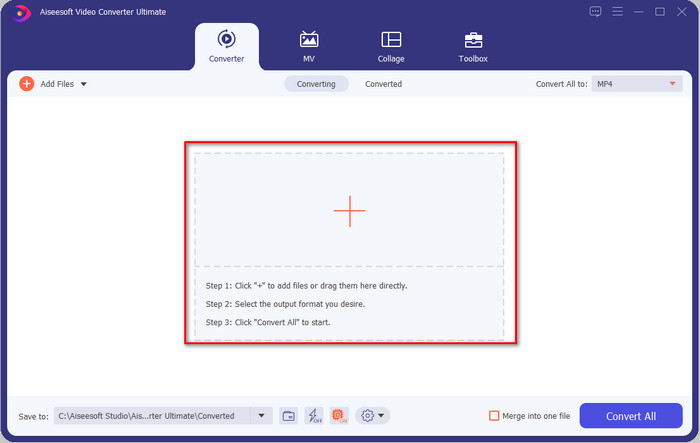
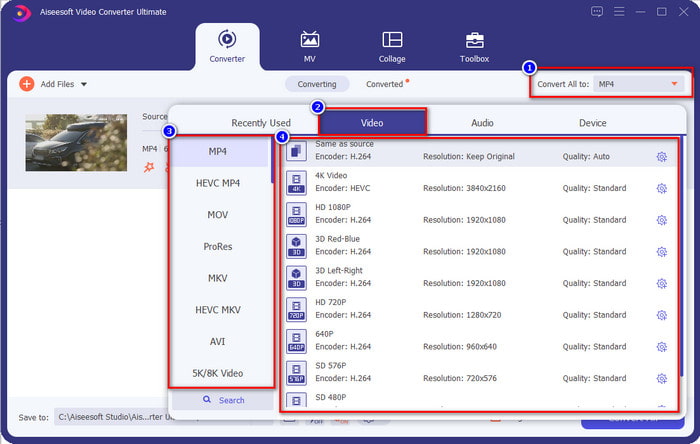
Step 3. Click Convert All to, and a setlist of the premade format will show. You can select different formats such as MP4, MOV, AVI, MKV, and 200+ more with different resolutions, click the format you want, and proceed.
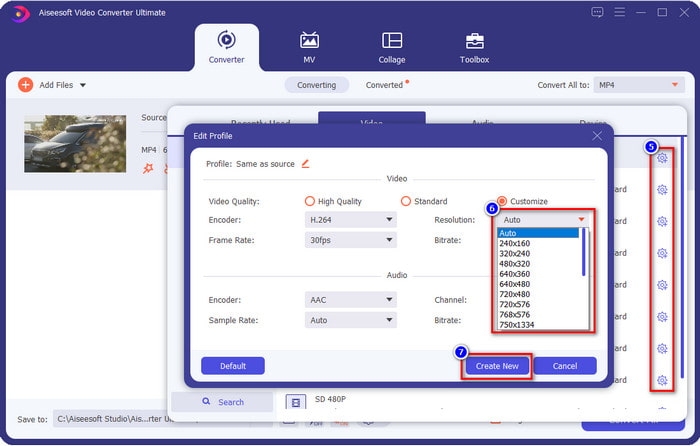
What if the resolution you want to achieve is not on the pre-made list? No need to worry; you can create your resolution. After clicking the Convert All to, choose the format you want and click the gear with a plus icon. Click the drop-down button, select the resolution you want, click Create New, and click the preset you've made.
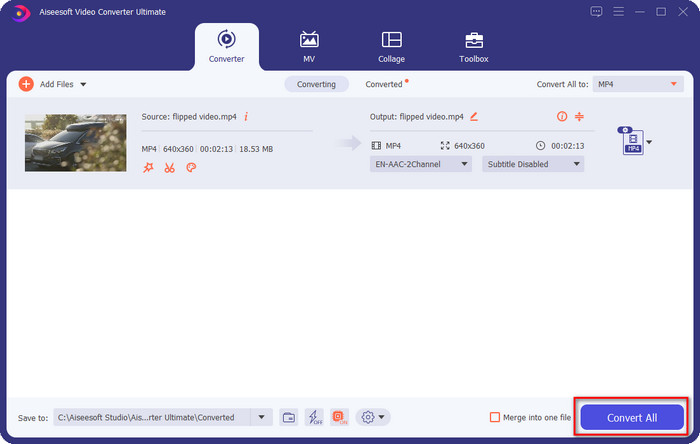
Step 4. To start lowering your video resolution, hit the Convert All button. With the ultra-fast conversion, the download will take less than a minute. And voila, the resolution of your video is now lowered, all thanks to the ultimate tool.
الجزء 3. طريقة مجانية لتحويل دقة الفيديو إلى دقة أقل على الويب
If you are looking for a way to convert HD video to lower resolution online, then you can use the FVC Free Video Converter Online as a solution. This web tool supports numerous formats you can upload and export into. Unlike the ultimate tool, you won't need to download this tool to convert the high-resolution video into a lower one. However, the tool doesn't have an ultra-fast converting process, and the supported format is not as many as the ultimate tool. So, if you want to try and use this web tool, you can follow the steps below.
Step 1. To go to the main webpage of FVC Free Video Converter Online, click this link.
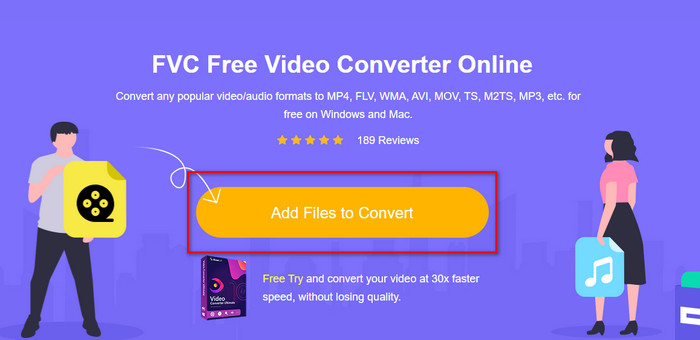
Step 2. Press Add Files to Convert to upload the video you want to lower the resolution. Additionally, if this is your first time using the tool, you must download the launcher. After that, click the Add Files to Convert again to upload the file.
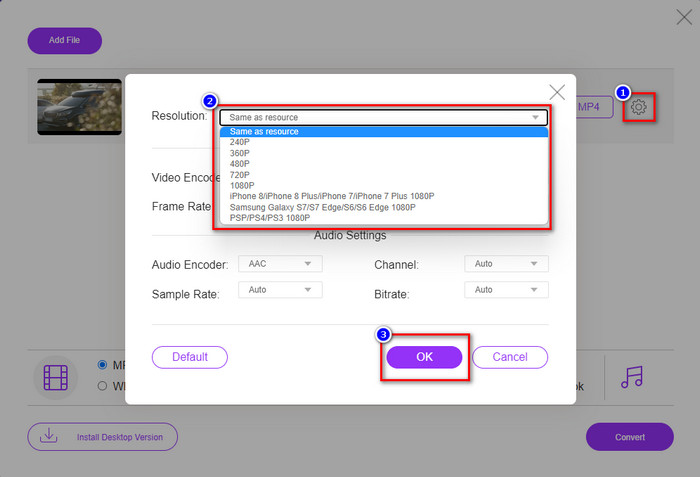
Step 3. Click the gear icon on the right side of the window that will show. Choose the resolution you want by clicking the drop-down button and pressing OK to save.
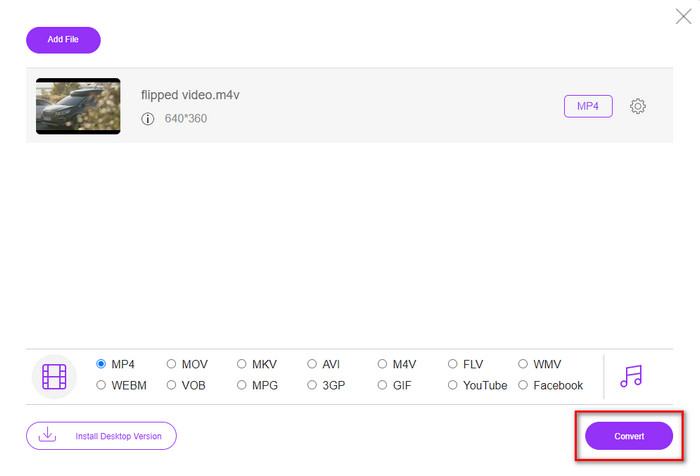
Step 4. To export the lower-quality video, click Convert and wait to download it on your drive.
الجزء 4. 2 أفضل التطبيقات لتقليل دقة الفيديو على iPhone و Android
مصنع تنسيق الفيديو (لمستخدمي أندرويد فقط)
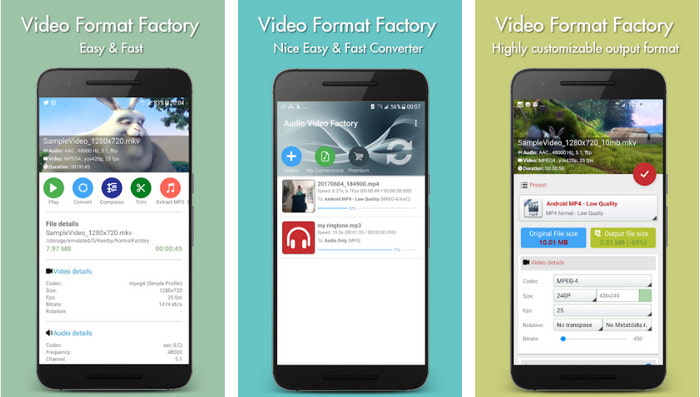
إذا كنت بحاجة إلى معرفة كيفية تقليل دقة الفيديو على Android ، فيمكن أن يساعدك Audio Video Factory. باستخدام هذا التطبيق ، يمكنك بسهولة تحويل دقة الفيديو لمقطع الفيديو الخاص بك مجانًا. ومع ذلك ، ستظهر بعض الإعلانات أثناء التحويل ، ولا يمكنك استخدام الإمكانات الكاملة للأداة إذا لم تقم بشرائها. لذا ، لتعليمك كيفية استخدامها ، اتبع الخطوات.
Step 1. Download the app on Playstore, then open it.
Step 2. Click Add to upload the video, choose where your video is, and click the video. After that, click Convert; click the Size and choose the resolution you want.
Step 3. Scroll up and click Convert Now to begin the process.
كاميرا منخفضة الدقة منخفضة جدًا (لمستخدمي iOS فقط)
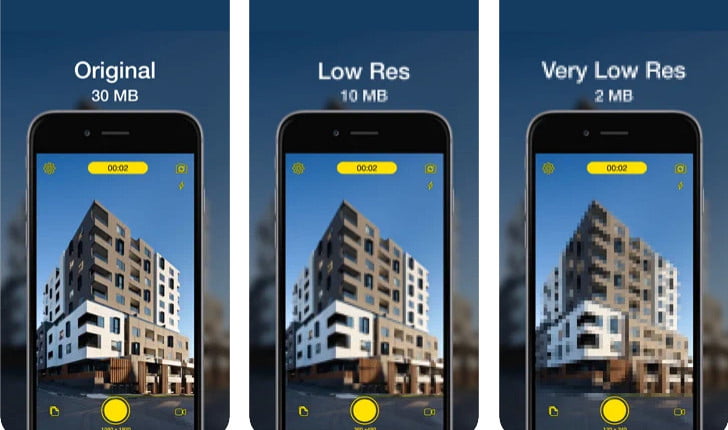
If you are an iOS user, you can still learn how to reduce the resolution of the video on the iPhone by using the Lower- Very Low Res Camera. Unlike the tools in this list, you can shoot a video with a lower resolution if you download this app on the App Store. However, the tools have some limitations, and it has pop-up ads while using the app.
Step 1. Download the app on the App Store, then click it to open.
Step 2. Click the file's icon and select the video you want to convert; after clicking the video, press Resize.
Step 3. Select the Recording Quality, and the process of converting it will begin.
الجزء 5. أسئلة وأجوبة حول خفض دقة الفيديو
هل يدعم VLC دقة 4K؟
Yes, VLC 3.0 supports playing videos that are on 4k resolution. But did you know there are many things VLC can do? If you want to explore VLC more, click this link and learn about VLC and its other perfect alternatives to use.
ما هي الأدوات الأخرى التي يمكنني استخدامها لتحويل دقة الفيديو؟
This review will learn the 8 of the best video resolution converters you can use on different platforms. By clicking this link, you will have more detailed information and different varieties of converter choices.
ما هي أعلى دقة فيديو يمكنني الحصول عليها؟
دقة فيديو 8 كيلو هي أعلى دقة فيديو يمكنك استخدامها على التلفزيون. هذه الدقة أقوى 4 مرات من 4K و 16 مرة أفضل من 1080.
خاتمة
Finally, we now have a clearer idea on how to lower the video resolution in your platform; whether you are using a Windows, Mac, Online, Android, or iPhone, you can use the converters in this list. But if you want a tool that can change your resolution without reducing the quality, we recommend using the FVC Video Converter Ultimate. As we present above, there are many reasons you should use this tool, and if you still do not believe us, you can download the tool and try if it works, as we explain in this post.
-
 الدليل النهائي كيفية تغيير دقة الفيديو المتوفرة في الأنظمة الأساسية المشتركة
 هل تحتاج إلى تغيير دقة الفيديو للفيديو؟ إذا كان الأمر كذلك ، فتعرف على الطرق المختلفة التي يمكنك القيام بها بسهولة لتغيير دقة الفيديو للفيديو الذي تشاهده.
-
 أهم 8 محولات لدقة الفيديو لاستخدامها في أنظمة تشغيل متعددة [مُحدَّث عام 2022]
 لا & #039 ؛ هل لديك أي فكرة عن أفضل محول دقة الفيديو على جهازك؟ إذا كان الأمر كذلك ، يمكنك قراءة هذه المقالة بالكامل لمعرفة المزيد عن محولات الفيديو المتاحة.
-
 أفضل مشغل فيديو عالي الدقة 1080 بكسل لنظام التشغيل Windows / Mac / iOS / Android في عام 2021
 إذا كنت تبحث عن مشغل فيديو لمشاهدة مقاطع فيديو عالية الدقة 1080 بكسل على جهاز الكمبيوتر الخاص بك ، فتحقق من اختياراتنا لأفضل مشغلات الفيديو عالية الدقة 1080 بكسل لأجهزة Mac و Windows PC و iOS و Android.
