


 محول الفيديو النهائي
 مسجل الشاشة
 إصلاح الفيديو
 تنزيل آمن
إجراء سهل لإزالة العلامات المائية من مقاطع فيديو MP4
هل تواجه مشكلات مثل عدم معرفتك كيفية إزالة العلامات المائية من مقاطع فيديو MP4 باستخدام أجهزتك مثل جهاز ماك أو ويندوز؟ إذن فهذه المقالة تحتوي على أفضل حل لك. إذا كنت من الأشخاص الذين يحبون مشاهدة الأفلام والمقاطع وغيرها، فربما يمكنك أن تتفهم مدى الإزعاج والانزعاج عند مشاهدة مقاطع الفيديو المفضلة لديك مع وجود علامات مائية أو أي كائنات غير ضرورية تظهر في مقاطع MP4 الخاصة بك. كما أنك قد لا تتمكن حتى من رؤية كامل الشاشة لأن هذه العلامات المائية تغطيها. وأكثر ما يثير الإحباط أن بعض المقاطع تحتوي على علامات مائية كبيرة جدًا، فلا تتمكن حتى من الاستمتاع بمشاهدة مقاطعك المفضلة.
لحسن الحظ ، يوجد بالفعل تطبيق برمجي هائل ورائع مع مزيل علامات مائية للفيديو يمكنك استخدامه للتخلص من تلك الكائنات غير الضرورية في مقاطع الفيديو الخاصة بك ، مثل العلامات المائية والشعارات والنصوص والصور والمزيد. يمكنك مسح هذه الكائنات أو إزالتها بسرعة والاستمتاع بمشاهدة مقاطع الفيديو أو تشغيلها باستخدام هذه التطبيقات. مع هذه التطبيقات ، لن تشعر بالإحباط أو الغضب بعد الآن. بعد ذلك ، إذا كنت مفتونًا بهذا الموضوع ، فيجب عليك قراءة هذه المقالة لتزويدك بمعلومات كافية ، خاصة لإزالة العلامات المائية على مقاطع الفيديو MP4 الخاصة بك بسهولة.

الجزء 1: أفضل طريقة لإزالة العلامة المائية من فيديو MP4
إذا كنت تبحث عن أروع وأفضل تطبيق لإزالة العلامات المائية من مقاطع فيديو MP4، فإن Video Converter Ultimate هو أفضل أداة لذلك. هذا التطبيق قادر على إزالة العناصر المزعجة في الفيديوهات، مثل العلامات المائية والشعارات والنصوص أو الصور. بالإضافة إلى ذلك، لست مضطرًا للانتظار طويلًا في أثناء عملية الحفظ، إذ يمكنك حفظ مقاطع الفيديو بسرعة بعد إزالة العلامات المائية.
علاوة على ذلك ، يحتوي Video Converter Ultimate على الكثير من أدوات التحرير التي يمكنك استخدامها ، مثل مُحسِّن الفيديو ، وإزالة العلامات المائية ، وإضافة العلامات المائية ، ووحدة التحكم في سرعة الفيديو ، وصانع GIF ، وصانع الكولاج ، ومسجل الفيديو والصوت ، وضاغط الفيديو / الصوت ، وتحويل ملفات متنوعة التنسيقات ، مثل MP4 و FLV و MOV و TRP و MTS و M2TS و MKV و AAC و MP3 والمزيد. بالإضافة إلى ذلك ، فإن أفضل جزء هو أنك لست مضطرًا إلى شراء هذا التطبيق أو شرائه بعد الآن. يمكنك تشغيل هذا مجانًا. أيضًا ، هذا التطبيق بسيط جدًا وسهل الاستخدام. إذا كنت ترغب في إزالة العلامات المائية من مقاطع الفيديو MP4 الخاصة بك ، يمكن أن يقدم لك Video Converter Ultimate طريقتين. اقرأ باستمرار لتتعلم هاتين الطريقتين لمحو العلامات المائية على مقاطع الفيديو الخاصة بك.
1. باستخدام Video Watermark Remover
الخطوة 1: قم بزيارة موقع Video Converter Ultimate. قم بتنزيل التطبيق مجانًا، ثم تابع عملية التثبيت.
تحميل مجانيلنظام Windows 7 أو أحدثتنزيل آمن
تحميل مجانيلنظام MacOS 10.7 أو أحدثتنزيل آمن
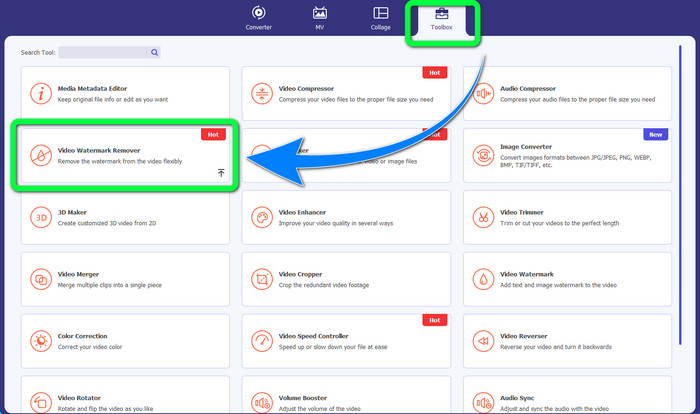
الخطوة 2: شغّل التطبيق، ثم اختر Toolbox > Video Watermark Remover.
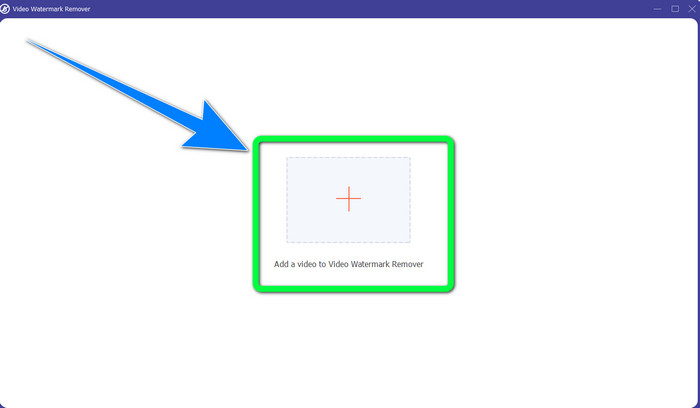
الخطوة 3: ستظهر واجهة أخرى. انقر على زر علامة الزائد وأضف ملف فيديو MP4 الذي يحتوي على علامة مائية.
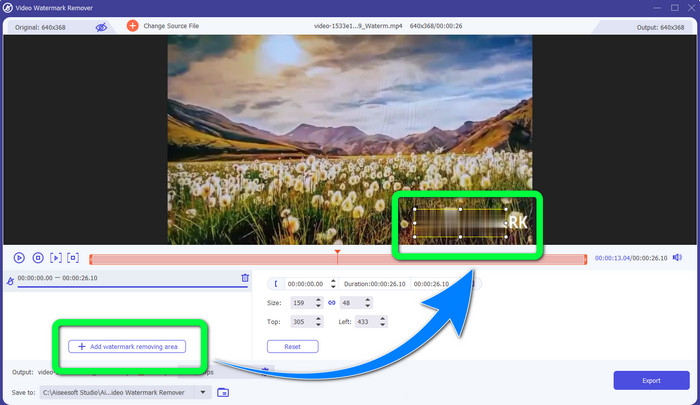
الخطوة 4: انقر على زر Add Watermark Removing Area. بعد ذلك سيظهر مربع صغير على الفيديو، اسحب هذا المربع واستخدمه لتغطية العلامات المائية على الفيديو.
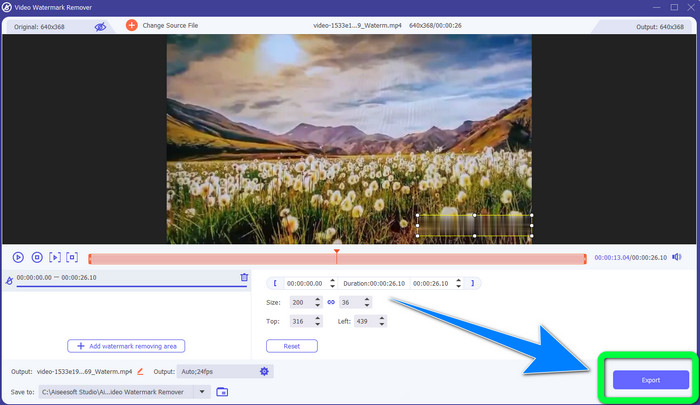
الخطوة 5: عند الانتهاء من إزالة العلامة المائية، انقر على زر Export لحفظ مقاطع الفيديو الخاصة بك. والآن يمكنك الاستمتاع بمشاهدة أفلامك المفضلة دون علامات مائية.
2. استخدام فيديو كروبر
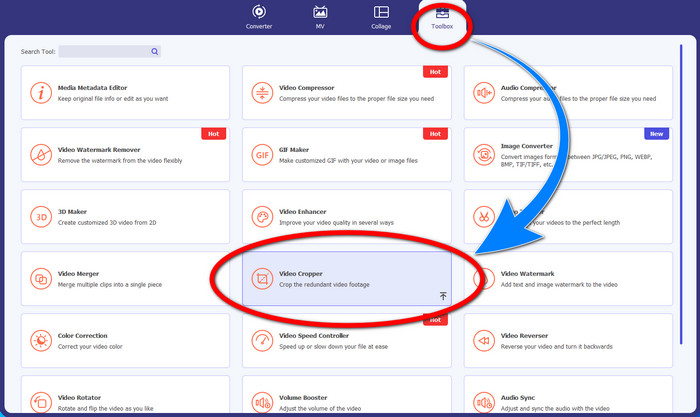
الخطوة 1: شغّل برنامج Video Converter Ultimate، ثم انقر على Toolbox > Video Cropper.
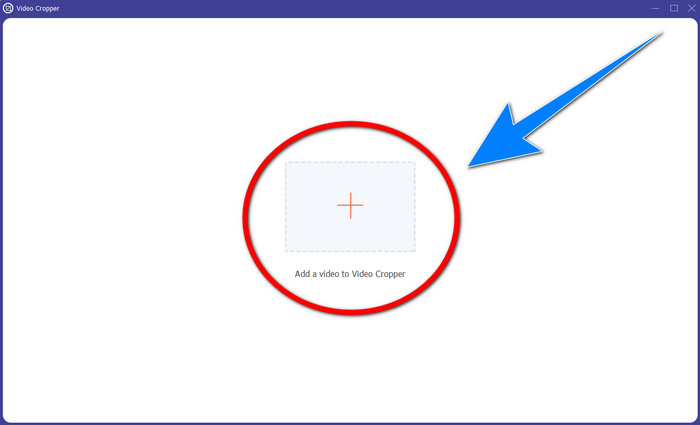
الخطوة 2: ستظهر واجهة أخرى بعد النقر على Video Cropper. انقر على رمز الزائد لإضافة ملف فيديو MP4 الذي يحتوي على علامة مائية.
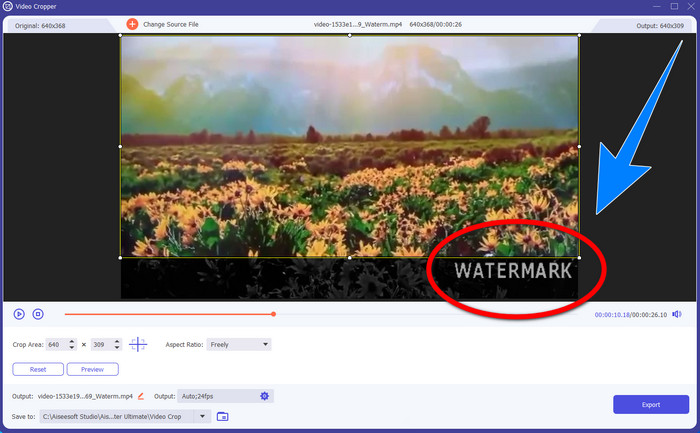
الخطوة 3: بعد إرفاق الفيديو، يمكنك قص فيديو MP4 الخاص بك والتخلص من العلامة المائية.
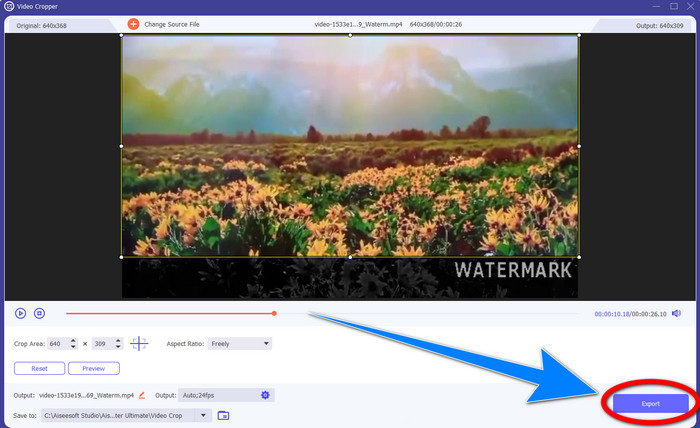
الخطوة 4: إذا انتهيت من قص الفيديو لإزالة العلامة المائية، فانقر على زر Export لحفظ الفيديو. وبهذه الطريقة يمكنك مشاهدة الفيديو دون علامة مائية.
الجزء 2: إزالة العلامة المائية من MP4 Video Online
هل تبحث عن تطبيق مميز يمكنك استخدامه لـإزالة العلامات المائية من فيديو MP4 الخاص بك مجانًا عبر الإنترنت؟ إذن فإن HitPaw Online Watermark Remover هو التطبيق الذي يمكنك الاعتماد عليه. علاوة على ذلك، يمكنك استخدام هذا التطبيق دون دفع أي رسوم لأنه مجاني بالكامل. بالإضافة إلى ذلك، يمكنك إزالة العلامات المائية والشعارات والتواقيع دون أي حدود، كما أنه خالٍ من الإعلانات. وهو أيضًا سهل وبسيط الاستخدام؛ إذ يمكنك إزالة العلامات المائية من مقاطع الفيديو في ثلاث خطوات فقط، مما يجعله مثاليًا للمبتدئين.
يمكن الوصول إلى HitPaw Online Watermark Remover من أي جهاز ، مثل Windows و Mac و iPhone و Android. هذا التطبيق آمن أيضًا ، ويضمن أنك الوحيد الذي يمكنه مشاهدة مقاطع الفيديو الخاصة بك وتعديلها. ومع ذلك ، إذا قمت بإزالة العلامات المائية من مقاطع الفيديو الخاصة بك ، فستصبح المنطقة ضبابية ومزعجة في بعض الأحيان. أيضا ، عملية الحفظ بطيئة. إذا كنت ترغب في إزالة العلامات المائية من مقاطع الفيديو MP4 الخاصة بك عبر الإنترنت ، فاتبع الخطوات السهلة أدناه.
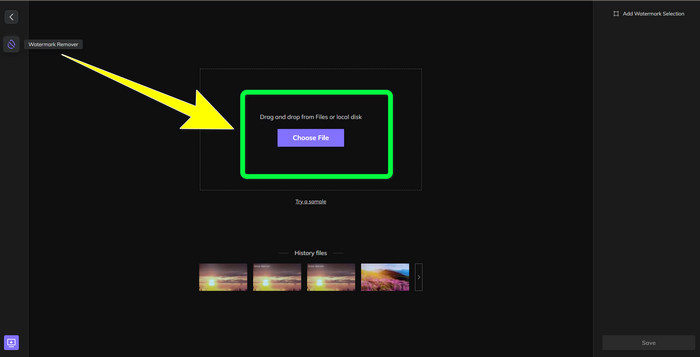
الخطوة 1: انتقل إلى موقع HitPaw Online Watermark Remover. انقر على Remove Watermark Now، ثم اختر Choose File لإضافة مقطع فيديو MP4 الذي يحتوي على علامات مائية.
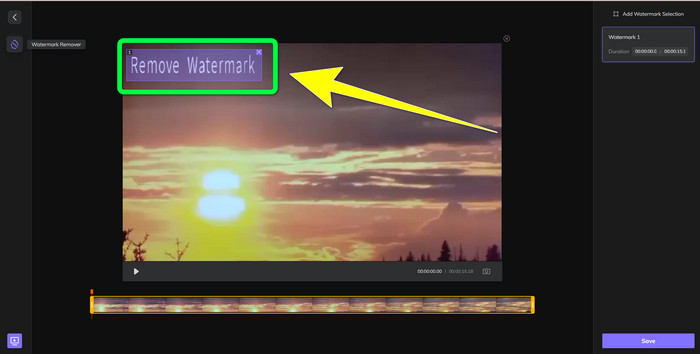
الخطوة 2: بعد إضافة الفيديو، سيظهر شكل مستطيل على الفيديو. اسحبه لتغطية العلامات المائية وإزالتها.
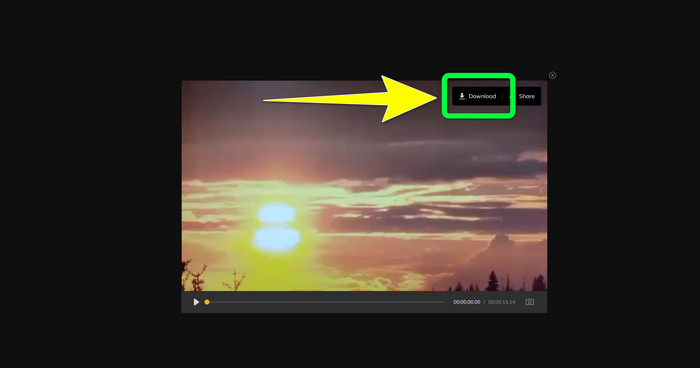
الخطوة 3: بعد إزالة العلامات المائية من الفيديو، انقر على زر Save. انتظر حتى تكتمل عملية الحفظ، ثم انقر على زر Download للاحتفاظ به على جهازك.
الجزء 3: أسئلة وأجوبة حول إزالة العلامة المائية من MP4
هل من الممكن أيضًا حذف التوقيعات على مقاطع الفيديو الخاصة بي؟
نعم، هذا ممكن. فبرنامج Video Converter Ultimate قادر أيضًا على إزالة التواقيع من مقاطع الفيديو الخاصة بك. أي عناصر غير ضرورية تفسد مشاهدة الفيديو يمكن إزالتها بسهولة باستخدام هذا التطبيق.
هل تستغرق إزالة العلامات المائية من مقاطع فيديو MP4 وقتًا طويلاً؟
يعتمد ذلك على التطبيقات التي تستخدمها. إذا كنت تريد إزالة العلامات المائية من مقاطع الفيديو MP4 ، فاستخدم Video Converter Ultimate. يمكنه إزالة العلامات المائية على الفور.
ما هو أفضل مزيل علامات مائية للفيديو يمكنني استخدامه؟
إذا كنت تبحث عن تطبيق موثوق يمكنه إزالة العلامات المائية من الفيديو الخاص بك، فإن Video Converter Ultimate برنامج ممتاز يمكنك الاعتماد عليه. يمكنك إزالة العلامات المائية وحفظ مقاطع الفيديو دون فقدان جودتها.
هل يمكنني استخدام أداة الاقتصاص في HitPaw Online Watermark Remover لإزالة العلامات المائية؟
بكل تأكيد نعم! يمكنك أيضًا استخدام أداة الاقتصاص لهذا التطبيق إذا كنت تريد إزالة العلامات المائية من مقاطع الفيديو الخاصة بك ، خاصةً إذا كانت العلامات المائية موجودة في الزاوية أو على حافة مقاطع الفيديو الخاصة بك.
بصرف النظر عن إزالة العلامات المائية ، هل من الممكن إضافة علامات مائية باستخدام Video Converter Ultimate على مقاطع الفيديو الخاصة بي؟
قطعا نعم! لا يقتصر Video Converter Ultimate على إزالة العلامات المائية من مقاطع الفيديو الخاصة بك فقط. يمكن لهذا التطبيق أيضًا إضافة علامات مائية إلى مقاطع الفيديو الخاصة بك ، خاصةً إذا كنت تريد وضع بعض النصوص والشعارات والتوقيعات وما إلى ذلك.
خاتمة
كما هو مذكور أعلاه، يمكنك بسهولة إزالة العلامات المائية من مقاطع فيديو MP4 باستخدام Video Converter Ultimate. بالإضافة إلى ذلك، توضح لك هذه المقالة بعض البرامج التي يمكنك استخدامها لإزالة العناصر غير الضرورية من مقاطع فيديو MP4 عبر الإنترنت.
-
 كيفية إزالة العلامة المائية Filmora من مقاطع الفيديو أو المشاريع الخاصة بك مجانًا
 كيفية إزالة العلامة المائية Filmora؟ ينتشر هذا السؤال عبر الويب ، وهنا نسرد طرقًا مختلفة يمكنك استخدامها!
-
 أسرع خدعة لإزالة علامة Adobe Stock المائية من الفيديو [دروس]
 هل تواجه مشكلة مع علامة Adobe Stock المائية؟ اقرأ هذا وتعرف على كيفية إزالة علامة Adobe Stock المائية من الفيديو.
-
 5 طرق لإزالة علامة مائية من مقطع فيديو بطريقة احترافية
 هل تحتاج إلى إزالة علامة مائية من مقطع فيديو لجعله يبدو احترافيًا؟ حسنًا ، اقرأ هذا المقال حيث نضيف برنامجًا تعليميًا حول كيفية القيام بذلك!
