


 محول الفيديو النهائي
 مسجل الشاشة
 إصلاح الفيديو
 تنزيل آمن
أفضل 5 تطبيقات فيديو بالحركة البطيئة لعمل فيديو بالحركة البطيئة
هل سبق لك أن شاهدت مباراة رياضية وفاتتك حركات استعراضية رائعة من اللاعبين؟ من المزعج ألا تتمكن من الاستمتاع بالحركات المذهلة بسبب سرعة تشغيل الفيديو. وأفضل طريقة لتقدير الفيديو أكثر هي جعله فيديو بالحركة البطيئة (Slow-mo). لحسن الحظ، وجدنا أفضل الأدوات التي يمكنك استخدامها لإنشاء فيديو بالحركة البطيئة. لذا استرخ واستمتع، لأنك ستتعرّف على أفضل تطبيقات الفيديو البطيء.

الجزء 1. أفضل 6 تطبيقات مجانية للفيديو بالحركة البطيئة لأجهزة Android و iPhone
هناك العديد من تطبيقات الحركة البطيئة التي يمكنك العثور عليها في Appstore و Google play games. وجميع التطبيقات التي ستجدها في Appstore و Google play تتمتع بميزات مميزة. لذلك ، اخترنا أفضل تطبيقات الفيديو بالحركة البطيئة لتستخدمها. بدون مزيد من اللغط ، إليك ستة تطبيقات رائعة للحركة البطيئة.
كاميرا فيديو بالتصوير البطيء
السعر: مجاني
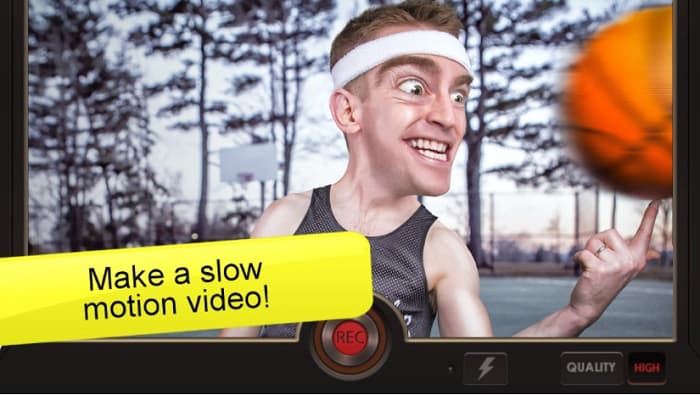
يُعد تطبيق Slow Motion Video واحدًا من أكثر تطبيقات الحركة البطيئة استخدامًا على هواتف أندرويد. باستخدام هذا التطبيق، يمكنك جعل الفيديو بسرعة أبطأ من المعتاد. كذلك، إذا كان لديك تسجيل صوتي سريع، يمكنك تحويله إلى تسجيل صوتي بالحركة البطيئة. يتميز هذا التطبيق أيضًا بواجهة بسيطة وسهولة في عملية التسجيل. كما يتضمن خصائص متقدمة، إذ يمكنك إضافة نقاط زمنية وتغيير سرعة الفيديو في أزمنة مختلفة يوفرها التطبيق. ومع ذلك، في بعض الأحيان قد يكون الفيديو الناتج ممدودًا أكثر من اللازم، مما يفسد جودة الفيديو. ومع هذا، لا يزال الكثيرون يختارون هذا التطبيق كخيار أول لتطبيقات الحركة البطيئة على أندرويد.
الايجابيات
- يحتوي على واجهة مستخدم رسومية بسيطة.
- يسمح لك بتغيير سرعة الفيديو الخاص بك باستخدام النقاط الزمنية.
- إنها تنتج مخرجات عالية الجودة.
سلبيات
- لديها مشاكل الشوائب.
محرر فيديو بطيء الحركة
السعر: مجاني
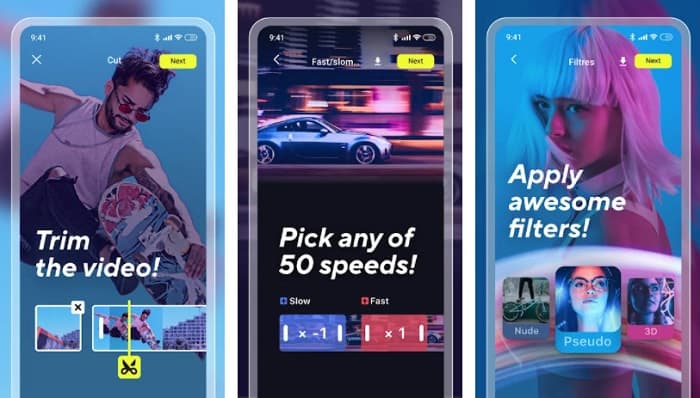
تطبيق Slow Motion Video Editor هو تطبيق لتحرير الفيديو بالحركة البطيئة سهل الاستخدام ومجاني. يمكنك من خلاله إنشاء فيديو بالحركة البطيئة ومشاركته بسهولة مع تطبيقات التواصل الاجتماعي الأخرى. إضافة إلى ذلك، يمتلك ميزات تحرير متقدمة مثل القص، إضافة المؤثرات، وإضافة الفلاتر إلى الفيديو. كما أنه يقدّم فيديو حركة بطيئة سلسًا، وهو ما يحبه كثير من المستخدمين في هذا التطبيق.
الايجابيات
- إنه مجاني 100% للاستخدام.
- يحتوي على واجهة مستخدم سهلة الاستخدام.
- يحتوي على ميزات مذهلة ، مثل التشذيب وتحرير حجم الفيديو وإضافة الموسيقى والمزيد.
سلبيات
- بعد بضعة أيام ، لا يمكن لبعض المستخدمين تخزين مقاطع الفيديو الخاصة بهم على أجهزتهم.
سلوبرو
السعر: مجاني
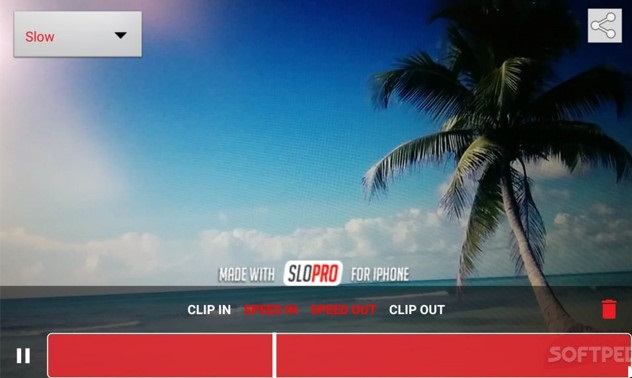
تطبيق SloPro هو تطبيق آخر يمكنه جعل الفيديو أبطأ وتحويله إلى فيديو بالحركة البطيئة. هذا التطبيق متاح لأجهزة آيفون. كما يتميز بواجهة معالجة سريعة، ما يجعله أداة سهلة الاستخدام. وباستخدام تقنية التدفق البصري (Optical Flow)، يمكنه محاكاة 500 إطار في الثانية و1000 إطار في الثانية. وأكثر ما يعجب الناس في هذا التطبيق هو أنه يتيح لك تحرير الفيديو أثناء التصوير. بالإضافة إلى ذلك، يمكنك مشاركة فيديو الحركة البطيئة بسهولة باستخدام هذا التطبيق المخصص للحركة البطيئة على آيفون.
الايجابيات
- يحتوي على واجهة مستخدم سهلة الاستخدام.
- فهو حر في استخدامها.
- يمكنه تحفيز مقاطع الفيديو بمعدل 500 و 1000 إطار في الثانية.
سلبيات
- قد تواجه مشكلات أثناء استخدام التطبيق.
TruSloMo
السعر: مجاني (الإصدار الاحترافي: 0.99)
يُعد تطبيق TruSloMo من تطبيقات الفيديو البطيء الشهيرة في متجر App Store. هذا التطبيق مخصص لأجهزة iPhone وiPad وiPod Touch. بالإضافة إلى ذلك، يتيح لك إنشاء فيديو بالحركة البطيئة من مقاطع الفيديو الموجودة في ألبوم الكاميرا لديك. ومن خلال TruSloMo، يمكنك اختيار نقطة البداية ونقطة النهاية للجزء البطيء الذي تريد تطبيقه على الفيديو. كما أنه لا يؤثر في جودة الفيديو بعد تحويله إلى فيديو بالحركة البطيئة.
الايجابيات
- إنه تطبيق مجاني للاستخدام.
- لها واجهة مباشرة.
- وهو يدعم جميع أجهزة iOS من iOS 7 والإصدارات الأحدث.
سلبيات
- تحتاج إلى شراء الإصدار المحترف للحصول على عدة أجزاء بالحركة البطيئة في مقطع فيديو واحد.
فيديو التصوير البطيء: التحرير البطيء
السعر: مجاني
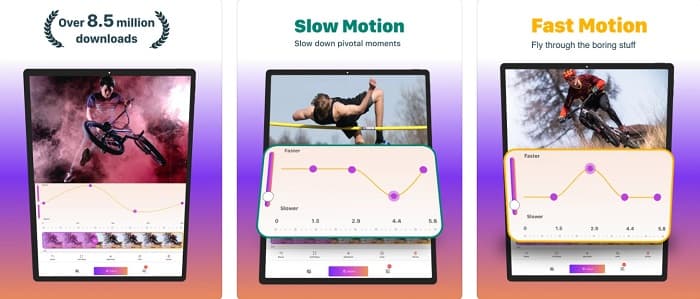
آخر تطبيق سنعرضه لك هو أيضًا تطبيق يمكنه تحويل الفيديو الخاص بك إلى فيديو بالحركة البطيئة. يسمح لك باختيار مرحلة معينة حيث تقوم بإبطاء الفيديو الخاص بك. يقدم هذا التطبيق أيضًا مجموعة متنوعة من الإعدادات المسبقة للسرعة. علاوة على ذلك ، يضمن هذا التطبيق خصوصية بياناتك.
الايجابيات
- له واجهة مستخدم بسيطة.
- لديها حماية الخصوصية.
- يسمح لك باختيار مقطع فيديو من لفة الكاميرا لإضافة تأثير الحركة البطيئة.
سلبيات
- تحتاج إلى شراء التطبيق قبل الوصول إلى ميزاته الأخرى.
Videoshop-Video Editor
السعر: مجاني
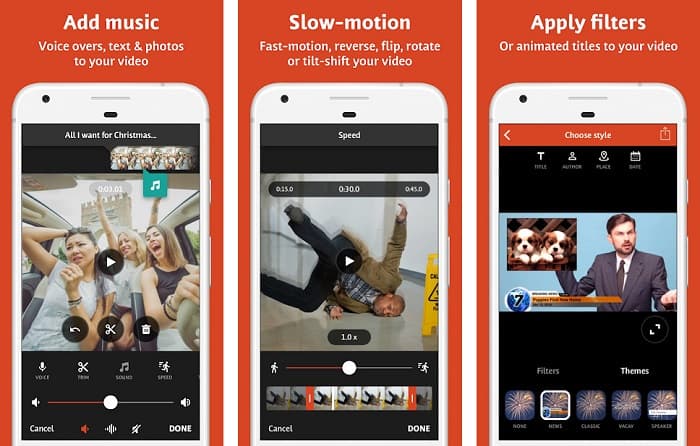
يُعتبر تطبيق Videoshop-Video Editor أيضًا من أفضل تطبيقات الحركة البطيئة لأجهزة أندرويد. يستخدم العديد من الأشخاص هذا التطبيق لأنه مناسب للمبتدئين ويمتلك واجهة بسيطة. كما يتيح لك استخدام ميزات مختلفة ورائعة، مثل الانتقالات، وعكس التشغيل، وقص الفيديو. وإذا كنت تبحث عن تطبيق مجاني ينتج فيديوهات عالية الدقة، فهذا التطبيق خيار ممتاز لك. علاوة على ذلك، يسمح لك هذا التطبيق بمشاركة الفيديو الناتج على منصات التواصل الاجتماعي الأخرى. ومع ذلك، تحتاج إلى شراء النسخة المميزة للوصول إلى الميزات الخاصة.
الايجابيات
- يحتوي على واجهة برمجية سهلة الاستخدام.
- فهو حر للتنزيل.
- يحتوي على العديد من الميزات المتقدمة ، مثل أداة القطع ، والدمج ، وإضافة الفلاتر ، وما إلى ذلك.
سلبيات
- تحتاج إلى شراء الإصدار المتميز قبل استخدام ميزاته الأخرى.
الجزء 2. أفضل محرر فيديو بطيء الحركة لجهاز الكمبيوتر الخاص بك
إذا كنت تبحث عن مُحرّر فيديو بالحركة البطيئة وتستخدم جهاز كمبيوتر بنظام ويندوز أو ماك، فنحن نوفر لك ما تحتاجه. يُعد FVC Video Converter Ultimate برنامجًا شهيرًا يتيح لك تحويل الفيديو إلى فيديو بالحركة البطيئة. يتمتع هذا البرنامج بواجهة بسيطة، مما يسهّل عليك جعل سرعة الفيديو أبطأ. وإذا أردت تحويل الفيديو إلى حركة بطيئة، يمكنك الاختيار من إعدادات السرعة الجاهزة: 0.125x، 0.25x، 0.5x، و0.75x.
علاوة على ذلك ، يوفر تطبيق البرنامج هذا أيضًا ميزات ممتازة ، مثل صانع ثلاثي الأبعاد وضاغط فيديو وصانع GIF وغير ذلك الكثير. والأفضل من ذلك أنه عندما تقوم بتغيير سرعة الفيديو الخاص بك باستخدام هذه الأداة ، فإنها لا تفسد جودته. اقرأ الأوصاف أدناه لمعرفة المزيد عن هذه الأداة.

FVC Video Converter Ultimate
5،689،200+ التنزيلات- يسمح لك بإنشاء فيديو بطيء الحركة بسهولة.
- لديها العديد من الميزات المتقدمة لاستخدامها.
- وهو يدعم العديد من تنسيقات الملفات ، بما في ذلك MP4 و WMV و WMA و MOV و MKV و AVI و 1000+ أخرى.
- يمكن تنزيله على جميع منصات الوسائط ، مثل Windows و Mac.
تحميل مجانيلنظام Windows 7 أو أحدثتنزيل آمن
تحميل مجانيلنظام MacOS 10.7 أو أحدثتنزيل آمن
الجزء 3. أسئلة وأجوبة حول تطبيق فيديو بطيء الحركة
هل ستدمر جودة الفيديو الخاص بك إذا قمت بتحويله إلى حركة بطيئة؟
تؤثر بعض الأدوات على جودة تحويل الفيديو إلى حركة بطيئة. ولكن إذا كنت تبحث عن أداة لن تفسد جودة الفيديو الخاص بك ، فاستخدم FVC Video Converter Ultimate.
هل يحتوي iPhone على أداة حركة بطيئة مضمنة؟
لا أحد. لا يحتوي iPhone على أداة الحركة البطيئة المضمنة. ومع ذلك ، يتمتع iPhone بميزة قياسية لإنشاء فيديو بالحركة البطيئة باستخدام الكاميرا.
هل يمكنك تحويل فيديو بالحركة البطيئة إلى فيديو عادي؟
نعم. يمكنك تحويل فيديو الحركة البطيئة إلى فيديو بالسرعة العادية باستخدام تطبيق الصور (Photos) على جهاز الآيفون الخاص بك.
خاتمة
كل ما تحتاج لمعرفته حول تطبيقات الفيديو بطيئة الحركة موجود هنا. وقد ثبت أن جميع تطبيقات الحركة البطيئة هي الأفضل والأكثر شهرة على الإنترنت. ومع ذلك ، إذا كنت تريد أداة تطبيق فيديو بطيئة الحركة تتسم بالكفاءة وتنتج مخرجات بجودة ممتازة ، فقم بتنزيل FVC Video Converter Ultimate واستخدمها مجانًا.
-
 5 أجهزة تصوير فيديو بطيئة الحركة لأنظمة ويندوز / ماك / عبر الإنترنت
 هل تريد معرفة كيفية تشغيل الفيديو بالحركة البطيئة؟ ثم اقرأ هذه المقالة لمعرفة ماهية 5 من صانعي الفيديو بالحركة البطيئة المحترفين.
-
 أفضل الطرق لاستخدام iMovie في عمل مقاطع فيديو بطيئة الحركة [محلول]
 هل سبق لك استخدام تطبيق iMovie لتحويل فيديو السرعة العادية إلى حركة بطيئة؟ هذه هي الفرصة لمعرفة المزيد عن هذا التطبيق ، لذا استمر في القراءة.
-
 أفضل 3 كاميرات بطيئة الحركة يجب أن تفكر في شرائها
 هل تواجه صعوبة في اختيار أفضل كاميرا لعمل مقاطع فيديو بطيئة الحركة؟ استمر في القراءة وفكر في أفضل خيارات الكاميرا البطيئة المدرجة هذه من أجلك.
