


 محول الفيديو النهائي
 مسجل الشاشة
 إصلاح الفيديو
[مراجعة كاملة] ما هو أفضل محرر بيانات وصفية للفيديو على سطح المكتب
يمكن أن تساعدك بيانات الفيديو الوصفية (الميتاداتا) بطرق عديدة؛ ومن الأمثلة الممتازة على ذلك ترتيب ملفاتك حسب الوقت والتاريخ، والمؤلفين، وحجم الملف، وغير ذلك الكثير، أي لتنظيمها أساسًا. على الرغم من أن البيانات الوصفية موجودة في كل ملف وسائط، فإننا نحتاج أحيانًا إلى تعديلها لأسباب معيّنة. ومع ذلك، قد يكون اختيار الأداة التي ينبغي عليك استخدامها مهمة صعبة، لأن هناك عددًا كبيرًا من محرِّرات البيانات الوصفية المتاحة في السوق. لذلك، ولتخفيف هذا العبء عنك، دعنا نساعدك في مراجعة مجموعة من المحررات لبياناتك المتوفرة في السوق والتي لا تقدّم إلا الأداء المتقن. تم فحص جميع التفاصيل والأدوات بدقة لنقدّم لك مراجعة صادقة لكل برنامج. لنغص أكثر في المعلومات حول أفضل خمسة محررات لبيانات الفيديو الوصفية يمكنك الاعتماد عليها.

الجزء 1. 5 من أفضل برامج تحرير البيانات الوصفية للفيديو المتوفرة على سطح المكتب في وضع عدم الاتصال
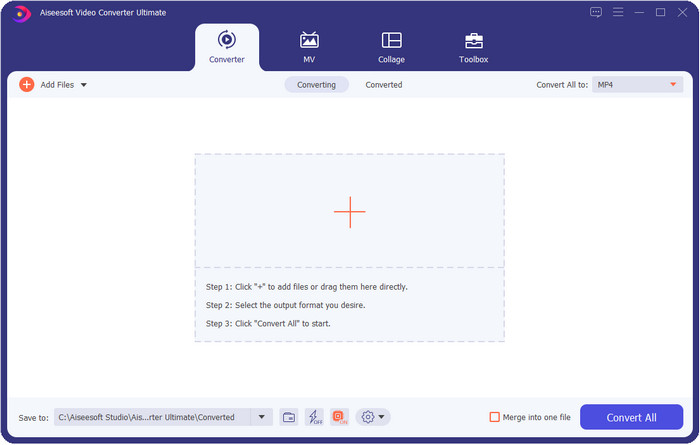
محول الفيديو النهائي [مقترح بشدة]
تحميل مجانيلنظام Windows 7 أو أحدثتنزيل آمن
تحميل مجانيلنظام MacOS 10.7 أو أحدثتنزيل آمن
أنظمة التشغيل المتوافقة: ويندوز، ماك ولينكس
يُعد Video Converter Ultimate أفضل محرر لبيانات الفيديو الوصفية لعرض هذه البيانات وإزالتها وتحريرها في ملفك. هذا المحرر ليس أداة عادية فحسب، بل هو حزمة متكاملة من المزايا يمكنك إتقانها سريعًا في وقت قصير. باستخدام هذه الأداة، يمكنك إضافة أشياء رائعة عديدة إلى البيانات الوصفية، مثل التعليقات، وصورة الغلاف، والسنة، والنوع إذا كان الملف موسيقيًا، وغير ذلك الكثير في أقل من ثانية. هل تريد أن تعرف ما الذي أذهلنا في هذه الأداة؟ على عكس البرامج الأخرى، التي تنشئ نسخة من الملف الذي قمت بتحريره، وهو ما لا يوفر المساحة، فإن هذه الأداة لا تُنشئ نسخة جديدة من الملف الذي ترفعه، بل تطبِّق البيانات الوصفية التي تضيفها مباشرة على نفس الملف؛ مما يجعلها موفِّرة للمساحة. علاوة على ذلك، إذا كنت تحتاج إلى أداة شاملة، فهذه هي الاختيار المثالي لكل المستخدمين الذين يحتاجون إلى عارض بيانات وصفية على نظامي ماك وويندوز.
الايجابيات
- وهو يدعم تنسيقات متعددة يمكنك التحميل عليها ، مثل MP4 ، و MKV ، و AVI ، و FLV ، و MP3 ، وأكثر من 1000 تنسيق وسائط أخرى لتغيير أو إزالة البيانات الوصفية بسهولة.
- يتيح لأي مستخدم الحصول على تجربة سهلة في تحرير البيانات الوصفية.
- إنه الخيار الأفضل لمستخدمي Windows و Mac لتنزيل محرر البيانات الوصفية هذا على محرك الأقراص الخاص بهم.
- قم بإزالة البيانات الوصفية متعددة الملفات بسهولة ببضع نقرات.
سلبيات
- يعد شراء الأداة وتنزيلها أمرًا ضروريًا ، ولكن الأمر يستحق كل بنس ومحرك كمبيوتر.
ExifTool
أنظمة التشغيل المتوافقة: ويندوز، ماك، ويونكس
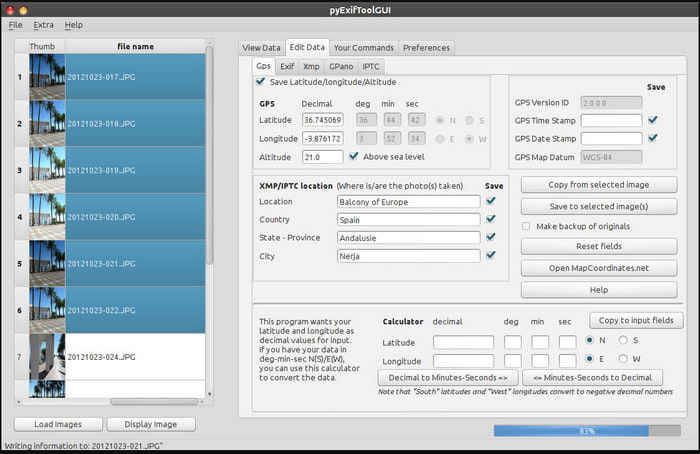
يُعد ExifTool محررًا مشهورًا لبيانات الفيديو الوصفية على أنظمة ويندوز وماك ويونكس يمكنك الوصول إليه بسهولة مجانًا. يدعم عدة تنسيقات للفيديو والصور لتغيير البيانات الوصفية أو إزالتها. كما تتيح لك هذه الأداة تحرير بيانات وصفية متعددة في ملفات مختلفة في الوقت نفسه. على عكس المحرّرات الأخرى في هذه القائمة، نلاحظ أن هناك الكثير من الخيارات والإمكانات في هذه الأداة؛ لذا إذا كنت جديدًا على تحرير البيانات الوصفية، فستحتاج إلى بعض الوقت لاستيعاب كيفية استخدامها.
الايجابيات
- مجاني للتنزيل.
- يمكنه بسهولة تحرير وعرض البيانات الوصفية.
سلبيات
- الواجهة والخيارات مربكة للاستخدام.
ميتاداتا ++
أنظمة التشغيل المتوافقة: ويندوز
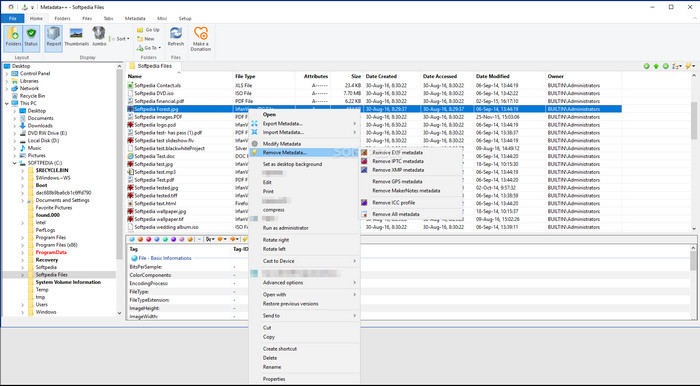
إذا كنت ترغب في الاعتماد على محرر مفتوح المصدر لبيانات الفيديو الوصفية على ويندوز، فقد ترغب في استخدام Metadata++. تساعدك هذه الأداة على إضافة البيانات الوصفية أو إزالتها من الملف بسرعة باستخدام مفاتيح الاختصار، لتقليل استخدام الفأرة. ومع ذلك، فإن هذا المحرر ليس فعّالًا بقدر الأدوات الأخرى في هذه القائمة، لكنه لا يزال أداة يمكن الاعتماد عليها إذا رغبت في استخدامه.
الايجابيات
- تتوفر مفاتيح التشغيل السريع للعملية السريعة لتحرير البيانات الوصفية.
- أضف البيانات الوصفية بسهولة إلى الملفات التي لم تقم بذلك.
- يمكن تنزيله مجانًا على نظام Windows.
سلبيات
- واجهة المستخدم الرسومية قديمة.
- يجب فهم وظائف كثيرة جدًا قبل استخدامها.
ماي ميتا
أنظمة التشغيل المتوافقة: ويندوز
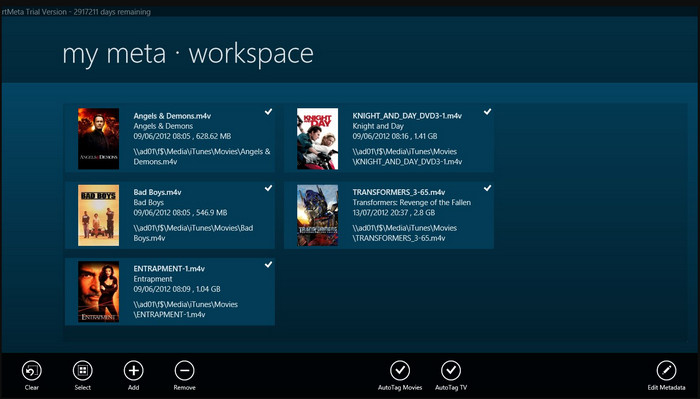
يُعد MyMeta محررًا لبيانات الفيديو الوصفية يمكنك من خلاله تعديل ملفات MP4 وM4V وMOV فورًا. تحتوي هذه الأداة على ميزة إنشاء البيانات الوصفية وصورة الغلاف تلقائيًا استنادًا إلى النتائج من الإنترنت. كما يمكنك استخدام هذه الأداة لوضع علامات على الملفات وفقًا للمعلومات المتاحة. على الرغم من أن الأداة رائعة، فإن التنسيقات التي تدعمها مقتصرة فقط على MP4 وM4V وMOV.
الايجابيات
- سهل الاستخدام.
- تسمح لك العلامة التلقائية بنسخ البيانات الوصفية لملف معين في غضون بضع نقرات.
- أنيق واجهة المستخدم الرسومية.
سلبيات
- إنه يدعم فقط MP4 و M4V و MOV. لذلك إذا كنت تحاول تحميل تنسيق آخر هنا ، فهو غير مدعوم.
- بعض الميزات لا تتناسب مع متطلبات المستخدم.
مشغل الميديا VLC
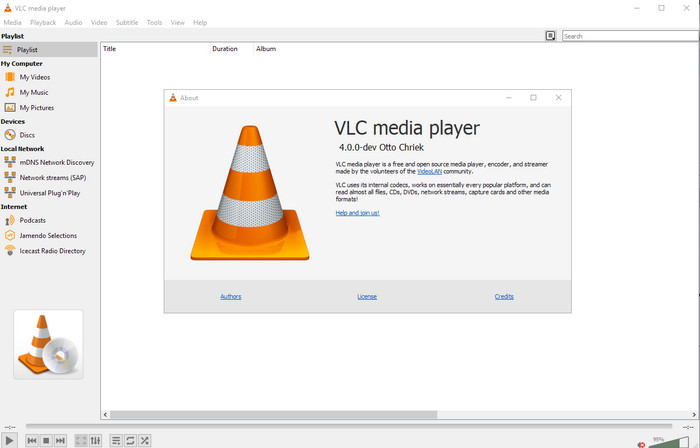
أنظمة التشغيل المتوافقة: ويندوز، ماك، لينكس
صُمّم VLC Media Player لتشغيل ملفات الوسائط، لكن يمكنك أيضًا استخدام هذا المحرر مفتوح المصدر لبيانات الفيديو الوصفية لتعديل البيانات الوصفية للملف. كما ذكرنا، يمكنه تشغيل مجموعة واسعة من التنسيقات بسهولة مع برامج ترميز مختلفة على كل منصة يمكنك تخيّلها، لأنه مشغّل فيديو من الدرجة الأولى. ورغم أنه يستطيع تشغيل صيغ ملفات متعددة، فإن أنواع الملفات التي يدعمها لتحرير البيانات الوصفية محدودة، وليست واسعة مثل الأدوات الأخرى المذكورة.
الايجابيات
- محرر البيانات الوصفية مفتوح المصدر للتنزيل.
- سهل الاستخدام.
- متوفر في جميع أنظمة التشغيل.
سلبيات
- وهو يدعم تنسيق متوسط للتحميل على.
- واجهة المستخدم الرسومية للأداة قديمة.
الجزء 2. مخطط مقارنة حول محرر البيانات الوصفية للفيديو
| ميزات | محول الفيديو النهائي [مقترح بشدة] | ExifTool | ميتاداتا ++ | ماي ميتا | مشغل الميديا VLC |
| إضافة وإزالة البيانات الوصفية |  | | | | |
| سهل الاستخدام | | | | | |
| يدعم تنسيقات واسعة النطاق | |  | | | |
| أفضل خيار للمبتدئين | | | | | |
| تحرير البيانات الوصفية الدفعية | | | | | |
الجزء 3. كيفية إضافة البيانات الوصفية وإزالتها وتحريرها باستخدام محرر البيانات الوصفية المقترح بشدة
إذا اخترت استخدام Video Converter Ultimate كمحرر لبيانات الفيديو الوصفية، فننصحك باتباع الخطوات الموضَّحة أدناه. من دون أي إطالة، فلنواصل وتيرة العمل ونبدأ في استخدام هذه الأداة القصوى لهذه المهمة القصوى.
الخطوة 1. نزّل الأداة بالنقر على زر التنزيل المعروض أدناه، ثم اختر ما إذا كنت تستخدم ويندوز أو ماك. بعد انتهاء عملية التنزيل، يجب عليك النقر على الملف لتثبيته فورًا، ثم تشغيله بعد انتهاء التثبيت بالكامل.
تحميل مجانيلنظام Windows 7 أو أحدثتنزيل آمن
تحميل مجانيلنظام MacOS 10.7 أو أحدثتنزيل آمن
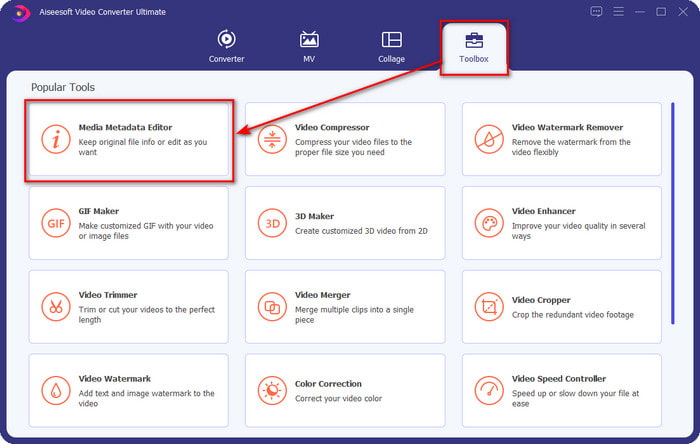
الخطوة 2. بعد تشغيل الأداة، انقر على قسم Toolbox، وتحت هذا القسم ابحث عن Media Metadata Editor، ثم انقر عليه قبل المتابعة إلى الخطوة التالية.
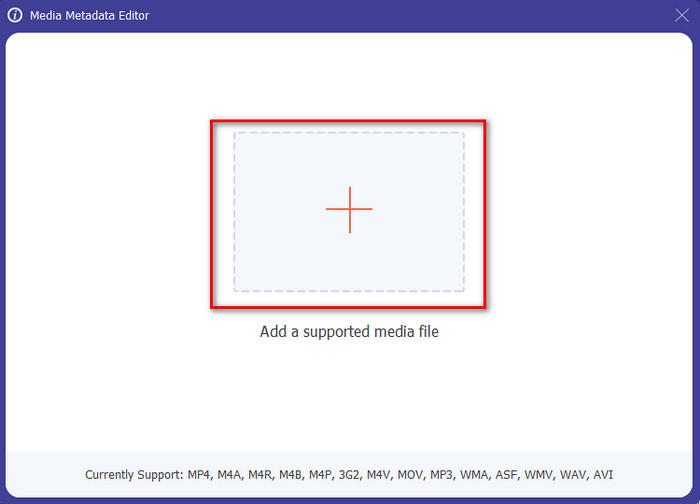
الخطوة 3. أدرج الملف بالنقر على أيقونة +، وستظهر لك نافذة مجلد على الشاشة؛ اختر ملف الوسائط الذي تريد تعديل بياناته الوصفية، ثم اضغط على Open.
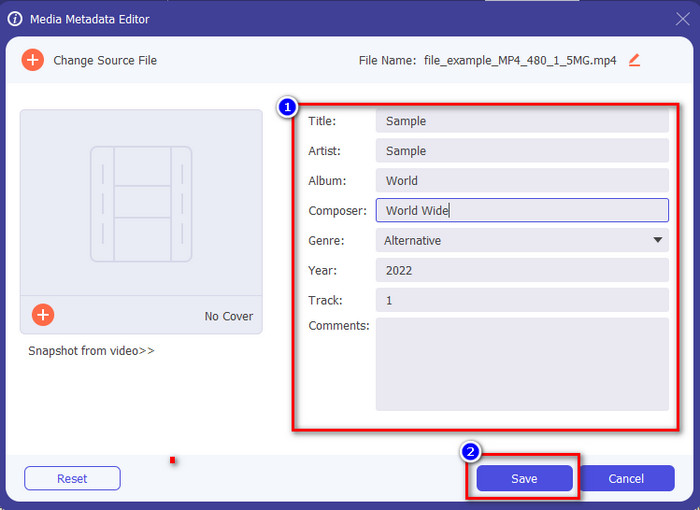
الخطوة 4. في النافذة الجديدة التي ستظهر على شاشتك، يمكنك الآن تحرير البيانات الوصفية أو إزالتها أو إضافتها في خانات النص المعروضة. إذا كنت راضيًا عن البيانات الوصفية، فانقر على Save لتطبيقها على الملف. سهلة للغاية، أليس كذلك؟ هذا بالضبط ما يمكن أن تفعله هذه الأداة القصوى.
الجزء 4. أسئلة وأجوبة حول محرر البيانات الوصفية للفيديو
هل يمكنني عرض البيانات الوصفية على الإنترنت؟
نعم، يمكنك استخدام FVC Free Video Converter Online لعرض البيانات الوصفية للفيديو عبر الإنترنت؛ اتبع الخطوات أدناه لمعرفة كيفية عرضها. أولًا، انقر على هذا الرابط لفتح علامة تبويب جديدة في المتصفح؛ سيأخذك هذا الرابط تلقائيًا إلى الموقع الرسمي لأداة FVC للتحويل عبر الإنترنت. بعد ذلك، انقر على Add Files to Convert؛ إذا كانت هذه هي المرة الأولى التي تستخدم فيها الأداة، فستحتاج إلى تنزيل المشغِّل (اللانشر) ثم النقر على الملف لتثبيته. انقر عليه مرة أخرى، وهذه المرة ستظهر نافذة مجلد على جهازك، اختر الملف الذي تريد عرض بياناته الوصفية، ثم اضغط على Open للمتابعة. ستظهر نافذة جديدة على الشاشة؛ انقر على أيقونة الحرف i، وبذلك يمكنك رؤية البيانات الوصفية للفيديو.
ما هي أجزاء البيانات الوصفية؟
تتضمّن البيانات الوصفية أنواعًا مختلفة من المعلومات عن ملف الوسائط: اسم المؤلف، والقطع (التأليف)، والموقع، والإعدادات، والجهاز المستخدم، والتاريخ، والوقت، والنوع إذا كان الملف موسيقيًا، والصورة، وغير ذلك الكثير. ولكن في أغلب الأحيان تعتمد البيانات الوصفية على طبيعة الملف نفسه؛ فإذا كان الملف كتابًا صوتيًا، فستكون بياناته الوصفية مختلفة عن ملف الفيديو.
هل ID3 عينة من البيانات الوصفية؟
ID3 عبارة عن حاوية بيانات وصفية يتم عرضها على ملفات وسائط MP3 ؛ في الأساس ، على الملفات الصوتية.
خاتمة
يمكن أن تساعدك البرامج التي عرضناها في هذه المقالة على عرض بيانات الفيديو الوصفية أو تحريرها أو إضافتها أو إزالتها حتى لو لم تكن لديك معرفة كافية بالبيانات الوصفية. الآن بعد أن أصبحت لديك أفضل خمسة محرّرات في السوق، حان وقت اختيار الأداة التي ستعتمد عليها في هذه المهمة. إذا شعرت بأنك لم تحسم أمرك بعد، فنحن نوصي باستخدام Video Converter Ultimate لعدة أسباب. فعلى عكس الأدوات الأخرى، يمكن لهذا البرنامج إنجاز هذه المهمة في غضون ثوانٍ قليلة. وإذا لم تكن لا تزال تصدّق ما نقوله، فعليك تنزيل الأداة وتجربتها بنفسك لرؤية ما تقدّمه من مزايا أخرى.
-
 4 من أفضل برامج عرض البيانات الوصفية عبر الإنترنت وخارجه [مُحدَّث في عام 2025]
 هل يمكنني التحقق من البيانات الوصفية لملفي؟ نعم ، يمكنك ، بمساعدة هذا المنشور ، أن نقدم لك مشاهدي البيانات الوصفية المختلفة التي يمكنك استخدامها.
-
 أفضل 5 برامج استخراج البيانات الوصفية المتاحة عبر الإنترنت وخارجها [2025]
 يمكنك العثور على العديد من أدوات استخراج البيانات الوصفية في السوق ، ولكننا اليوم نختار فقط أكثر خمسة أدوات لاستخراج العلامات وفقًا للجمهور.
-
 7 برامج تحرير علامات موسيقية شهيرة على أجهزة Windows و Mac والأجهزة المحمولة
 تعد علامات الموسيقى شائعة الاستخدام لترتيب الموسيقى في مكتبتك وفقًا للبيانات الموجودة بالداخل. ماذا لو كنت تريد تغييره؟ اقرأ التفاصيل أدناه لمعرفة المزيد.
