


 محول الفيديو النهائي
 مسجل الشاشة
 إصلاح الفيديو
 تنزيل آمن
ما هو تصحيح الألوان وكيف يتم تنفيذه
هل سبق لك أن شعرت بالاستياء من اللقطات الباهتة أو غير المتناغمة التي لا تحقق إبداعك؟ قل وداعا لمخاوفك! تم تطوير تصحيح الألوان المدعوم بالذكاء الاصطناعي بدقة لإضفاء الحيوية على لقطات الفيديو أو الأفلام، مما يضمن ظهور كل لون وظل ونغمة كما تريد. هذه التقنية المبتكرة هي تقنية متطورة تعمل على تعزيز قوة الذكاء الاصطناعي لتعزيز وإضفاء الكمال على الألوان في مقاطع الفيديو الخاصة بك.
سواء كان الهدف هو تعديل عيوب الألوان، أو خلق أجواء محددة، أو ببساطة تحسين الجاذبية البصرية العامة، فإن تقنية تصحيح ألوان الفيديو بالذكاء الاصطناعي تُبسِّط العملية وتقدّم نتائج استثنائية. لنمنح محتوى الفيديو لديك حياة جديدة بألوان زاهية وطبيعية تشدّ انتباه جمهورك وتترك انطباعًا دائمًا. استعد لأن ترسم عالمك ببراعة ونحن نتعمق في هذا المقال.
الجزء 1. ما هو تصحيح الألوان في الفيديو؟
إن فهم تعريف تصحيح الألوان في الفيديو أمر بسيط للغاية. يشير إلى تحسين وتعديل ألوان ونغمات الفيديو لتحقيق المظهر المطلوب أو لضمان الدقة والاتساق. إنه مثل ضبط الألوان في الصورة الفوتوغرافية ولكن للصور المتحركة. تخيل أنك تلتقط صورة، وتبدو الألوان باهتة بعض الشيء، أو باهتة، أو نابضة بالحياة بشكل مفرط. يمكن أن يحدث هذا أيضًا في مقطع فيديو، ولكن غالبًا ما يكون هناك آلاف الإطارات. يساعد تصحيح الألوان على إصلاح هذه التناقضات، مما يضمن تطابق الألوان بشكل جيد طوال الفيديو. على سبيل المثال، إذا تم تصوير مشهد في يوم غائم، فقد تظهر الألوان هادئة ومزرقة. يمكن أن يؤدي تصحيح الألوان إلى تدفئة النغمات لجعلها تبدو طبيعية أكثر أو جعل موسيقى البلوز تبرز للحصول على تأثير فني. يمكنه أيضًا ضبط التباين والتشبع والسطوع والجوانب الأخرى لإنشاء مزاج أو نمط معين في الفيديو.
الجزء 2. مواقف مختلفة مع تصحيح الألوان
يعد تصحيح الألوان أمرًا بالغ الأهمية في مجموعة متنوعة من المواقف أثناء إنتاج الفيديو. وذلك لتحقيق التأثير البصري المطلوب والحفاظ على الاتساق. فيما يلي بعض المواقف التي تتضمن تصحيح الألوان في الفيديو.
بيئات الإضاءة المختلطة - يكون تصحيح الألوان مفيدًا عند التصوير في أماكن تحتوي على مصادر إضاءة مختلفة، مثل الضوء الطبيعي والفلوري والمتوهج. يساعد تصحيح الألوان على موازنة الألوان وتوحيدها بحيث تبدو طبيعية ومتسقة في جميع اللقطات.
مشكلات توازن اللون الأبيض - تصحيح توازن اللون الأبيض يضمن أن يظهر اللون الأبيض بلونه الحقيقي من دون صبغات لونية غير مرغوبة، وهو ما يحدث غالبًا بسبب إعدادات غير صحيحة في الكاميرا أو اختلاف ظروف الإضاءة.
مشكلات التعريض - يمكن لتصحيح ألوان الفيديو معالجة اللقطات المعرَّضة بشكل زائد إذا كانت ساطعة جدًا، أو ناقصة التعريض إذا كانت مظلمة جدًا، وذلك بإظهار التفاصيل والحفاظ على توازن صحيح بين الدرجات الداكنة والفاتحة.
التدرّج اللوني للأغراض الجمالية - يشمل تصحيح الألوان أيضًا عملية التدرّج اللوني (Color Grading)، حيث تُعدَّل ألوان الفيديو لخلق مزاج أو أسلوب بصري معيّن. يشمل ذلك تعزيز التباين والتشبّع أو منح الفيديو طابعًا عتيقًا (Vintage).
إعادة إنشاء وقت معيّن من اليوم - يكون ضبط ألوان الفيديو مفيدًا لمحاكاة وقت محدد، مثل جعل مشهد النهار يبدو وكأنه تحت المطر، أو مصوَّرًا عند غروب الشمس، أو تعديل الألوان لتجسيد ضوء الصباح أو المساء.
الجزء 3. كيفية القيام بتصحيح الألوان على الفيديو؟
يُعد تصحيح الألوان في تحرير الفيديو خطوة أساسية، إذ إنه يعزز الجودة البصرية الشاملة للفيديو. واحد من أفضل الأدوات التي يمكنك الاعتماد عليها هو Video Converter Ultimate. تتيح لك أداة تصحيح الألوان القوية هذه تصحيح ألوان الفيديو بسرعة، مما يعزز جاذبيته البصرية وجودته. باستخدام هذه الأداة، يمكنك تجربة خيارات تصحيح الألوان المتعددة للوصول إلى النتيجة التي ترغب بها. كما تسمح إمكانات التحرير فيها للمستخدمين بقص الفيديو وتعديله واقتصاصه وإضافة المؤثرات إليه.
علاوة على ذلك، فهو يتيح التحويل السلس بين تنسيقات الفيديو المختلفة، مما يجعل تكييف محتوى الفيديو الخاص بك مع الأجهزة المختلفة أمرًا سهلاً. شيء آخر جدير بالثناء في هذه الأداة هو أنها سهلة الاستخدام. باستخدام Video Converter Ultimate، يمكنك بسهولة ضبط الألوان وتصحيحها لجعل الفيديو الخاص بك أكثر جاذبية. فيما يلي دليل خطوة بخطوة لمعرفة كيفية استخدام هذه الأداة:
الخطوة 1: تنزيل وتثبيت Video Converter Ultimate
إذا لم تكن تمتلك الأداة بعد، يمكنك تنزيل Video Converter Ultimate وتثبيته على جهاز الكمبيوتر. للقيام بذلك، انقر على أحد أزرار التنزيل المجاني أدناه بحسب نظام تشغيل جهازك، ثم اتبع تعليمات التثبيت.
تنزيل مجانيلنظام Windows 7 أو أحدثتنزيل آمن
تنزيل مجانيلنظام MacOS 10.7 أو أحدثتنزيل آمن
الخطوة 2: تشغيل Video Converter Ultimate
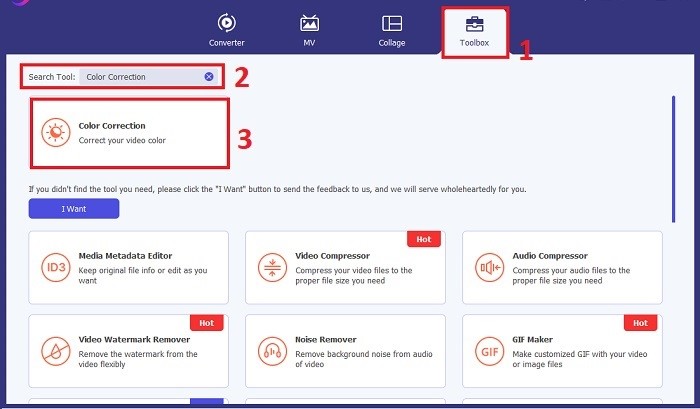
بعد الانتهاء من التثبيت، شغّل تطبيق تصحيح الفيديو على جهاز الكمبيوتر للوصول إلى الواجهة الرئيسية. من القائمة العلوية، انتقل إلى الأدوات (Toolbox). من هنا، يمكنك العثور على ميزة تصحيح الألوان في الأداة أو البحث عنها، ثم النقر عليها.
الخطوة 3: استيراد الفيديو المراد تصحيح ألوانه
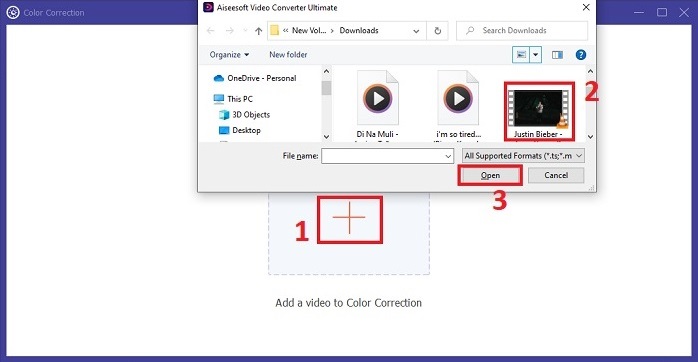
انقر على زر علامة الجمع لاستيراد الفيديو الذي تريد تصحيح ألوانه. حدِّد ملف الفيديو من جهاز الكمبيوتر لديك ثم انقر على فتح لاستيراده إلى البرنامج.
الخطوة 4: ضبط إعدادات ألوان الفيديو
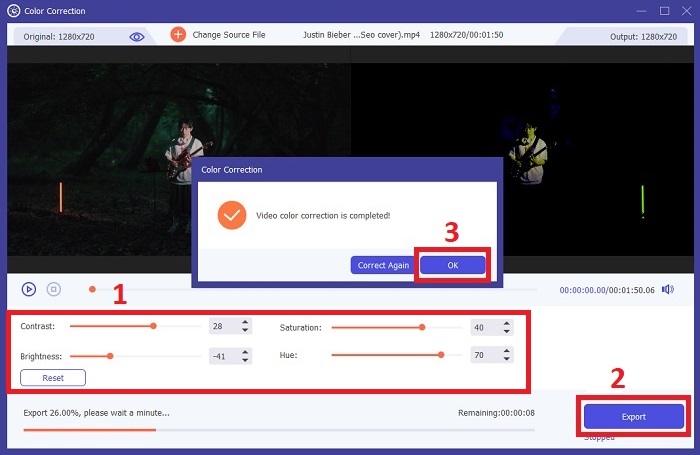
بعد استيراد الفيديو، قم بضبط الإعدادات مثل السطوع، والتباين، والتشبّع، ودرجة اللون (Hue) للوصول إلى تصحيح الألوان المطلوب. أثناء تعديل الفيديو في الأداة، يمكنك معاينة التغييرات في الوقت الفعلي في اللوحة الموجودة على الجهة اليمنى. عندما تشعر بالرضا عن تعديلات الألوان، انقر على تصدير. دع الأداة تعالج الفيديو ثم تحفظ النتيجة في الموقع الذي تختاره.
قراءة إضافية:
فلتر الفيديو: عزّز فيديوهاتك باستخدام الفلاتر والمؤثرات على أجهزة الكمبيوتر
ما هو الثلاثي الأبعاد (3D)؟ كل ما تحتاج لمعرفته عن تقنية 3D وكيفية إنشائها
الجزء 4. الأسئلة الشائعة حول تصحيح ألوان الفيديو
كيف أعرف إذا كنت بحاجة إلى تصحيح الألوان؟
هل أنت غير متأكد ما إذا كان الفيديو الخاص بك يحتاج إلى تصحيح الألوان؟ يعد تصحيح الألوان ضروريًا إذا كانت الألوان تبدو غير متساوية أو غريبة أو لا تتطابق مع الحالة المزاجية أو الموضوع المطلوب في مقطع الفيديو الخاص بك.
هل تصحيح الألوان ضروري حقًا؟
قطعاً! يعد تصحيح ألوان الفيديو بتقنية الذكاء الاصطناعي أمرًا ضروريًا في إنتاج الفيديو لضمان دقة الألوان وجذابتها بصريًا. إنه يعمل على تحسين التوحيد البصري ويمكنه رفع مستوى الفيديو اللائق إلى مقطع فيديو غير عادي.
ما هو مصحح الألوان في الفيلم؟
مصحح الألوان في الفيلم عبارة عن أداة، إما أجهزة أو برامج، تُستخدم في مرحلة ما بعد الإنتاج لتعديل الألوان وموازنتها. فهو يساعد صانعي الأفلام في تحقيق مظهر أو مزاج أو جو معين، مما يجعل العناصر المرئية أكثر جاذبية وموحدة داخل القصة.
خاتمة
ختامًا، يُعد تصحيح ألوان الفيديو عنصرًا أساسيًا للحصول على تجربة بصرية آسرة. فالأمر كله يدور حول ضبط الألوان والدرجات اللونية بدقة لتلبية رؤيتك الإبداعية والتأكد من أن كل إطار يعكس التألق المقصود. إن استخدام تصحيح الألوان المدعوم بالذكاء الاصطناعي يحوّل مقاطع الفيديو لديك، مُضفيًا ألوانًا زاهية وطبيعية تترك أثرًا لا يُنسى. من معالجة الإضاءة المختلطة إلى صياغة أجواء محددة، يرتقي هذا الابتكار بأسلوب سردك القصصي. ويبرز برنامج Video Converter Ultimate كحليف قوي، يسهّل عملية تصحيح الألوان ويطلق العنان لإمكاناتك الفنية.
-
 ما هو FPS؟ كل ما تحتاج لمعرفته حول هذا الموضوع
 ما هو FPS؟ تعرف على كل المعلومات التي تحتاجها حول إطار في الثانية (FPS) وما يمكن أن تفعله في المواقف المختلفة. اقرأ هذه المقالة للحصول على التفاصيل كاملة.
-
 أفضل تطبيق Photo Color Enhancer على Android و iOS مجانًا
 هل تريد أن يكون لديك تطبيق مُحسِّن ألوان الصور على هاتفك؟ حسنًا ، اختر المعززات التي تعتقد أنها ستناسب احتياجاتك بشكل أفضل.
-
 الدليل النهائي لتغيير دقة الفيديو متاح في الأنظمة الأساسية المشتركة
 هل تحتاج إلى تغيير دقة الفيديو للفيديو؟ إذا كان الأمر كذلك ، فتعرف على الطرق المختلفة التي يمكنك القيام بها بسهولة لتغيير دقة الفيديو للفيديو الذي تشاهده.
