


 Video Converter Ultimate
 Gravadora de pantalla
 Reparació de vídeo
Com fer vídeos a càmera lenta al Windows Movie Player
La indústria de la producció de vídeo s’ha ampliat recentment a causa de la creixent demanda de contingut de vídeo per part dels usuaris d’internet. Diverses plataformes de consum de vídeo estan creixent ràpidament, sobretot YouTube, que s’ha convertit en el segon motor de cerca més popular i continuarà sent-ho. Per aquest motiu, els creadors de contingut han explorat fins on poden portar la producció de vídeo per ser tan creatius com sigui possible i satisfer els estàndards creixents dels espectadors i possibles espectadors. Una d’aquestes maneres és posar a càmera lenta un clip del seu vídeo per afegir-hi un efecte dramàtic. No obstant això, per fer-ho cal un programari o una aplicació que probablement sigui inaccessible per als creadors novells que tot just comencen en aquest sector. Així doncs, aquest article pretén ajudar proporcionant passos senzills sobre com fer un vídeo a càmera lenta amb el Windows Movie Maker.

Part 1. Com fer vídeos a càmera lenta a Windows Movie Maker
Els vídeos a càmera lenta són un dels millors efectes dramàtics per incloure en diferents tipus de vídeos. Pot ser per emfatitzar un clip, tenir un impacte emocional en un espectador i molts altres propòsits que podeu inventar. Afortunadament, això es pot fer fàcilment mitjançant l'efecte de càmera lenta de Windows Movie Maker. Es pot descarregar fàcilment a la Microsoft Store i només cal que seguiu aquest tutorial de càmera lenta de Windows Movie Maker per aconseguir el que voleu fer al vostre vídeo.
Pas 1. Obre el Windows Movie Maker. Per pujar vídeos i imatges des de l’ordinador, selecciona Add Videos i Photos, o bé arrossega i deixa anar els vídeos a l’storyboard.
Pas 2. Selecciona el clip de vídeo i ves a la pestanya Edit dins de Video Tools.
Pas 3. Fes clic a la llista desplegable de Speed per triar una velocitat de reproducció segons el lent o ràpid que vulguis que aparegui el teu vídeo. Per comprovar si has aconseguit la velocitat desitjada, prem el botó de reproducció en forma de triangle i, quan estiguis satisfet, fes clic a la icona de desar a l’extrem superior esquerre de la finestra.
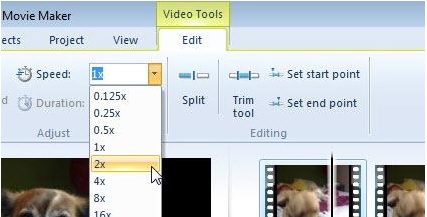
Windows Movie Maker és un excel·lent editor de vídeo gratuït, però li falten certes funcionalitats en comparació amb altres aplicacions d’edició de vídeo. Passa a la següent part per veure un altre programari d’edició de vídeo diferent de Windows Movie Maker amb efectes de càmera lenta i que alhora proporciona potents eines d’edició.
Part 2. Video Converter Ultimate: la millor alternativa per fer vídeos a càmera lenta
Si consideres que Windows Movie Maker és insuficient per a les teves necessitats d’edició de vídeo i no vols recórrer a un editor web en línia ni a un altre programari de pagament, utilitza el Video Converter Ultimate per produir els teus vídeos i afegir un efecte de càmera lenta amb només un clic. Video Converter Ultimate és una de les millors alternatives a qualsevol reproductor multimèdia, eina en línia o fins i tot programari per ajustar la velocitat de reproducció d’un vídeo. Amb la seva capacitat per augmentar o reduir la velocitat de reproducció amb un sol clic, és el programari més fàcil d’utilitzar d’internet. A més, també produeix vídeos d’alta qualitat fins i tot si converteixes vídeos a velocitat normal en càmera lenta. Per saber més sobre el procediment de com es duu a terme, aquí tens els passos a seguir:
Pas 1. Descarrega el programari fent clic al botó Free Download. I un cop s’hagi descarregat l’arxiu .exe, obre’l per continuar amb la instal·lació. Espera que acabi i fes clic al botó Start Now.
Descàrrega gratuïtaPer a Windows 7 o posteriorDescàrrega segura
Descàrrega gratuïtaPer a macOS 10.7 o posteriorDescàrrega segura
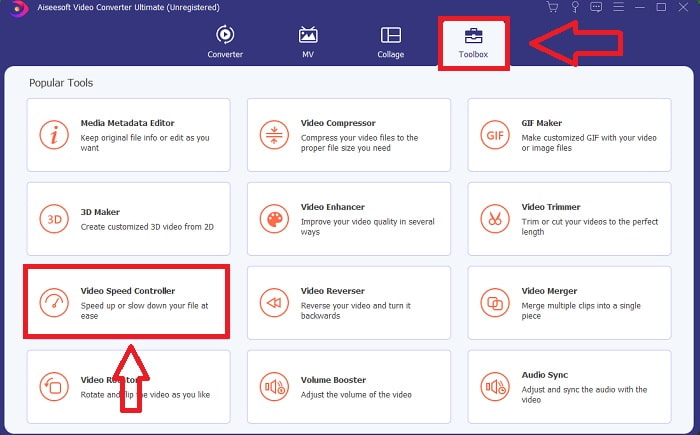
Pas 2. Després de la instal·lació, pots accedir directament al programari engegant-lo. Fes clic a la funció Toolbox a l’extrem dret de la pestanya superior i després a l’opció Video Speed Controller per començar a editar.
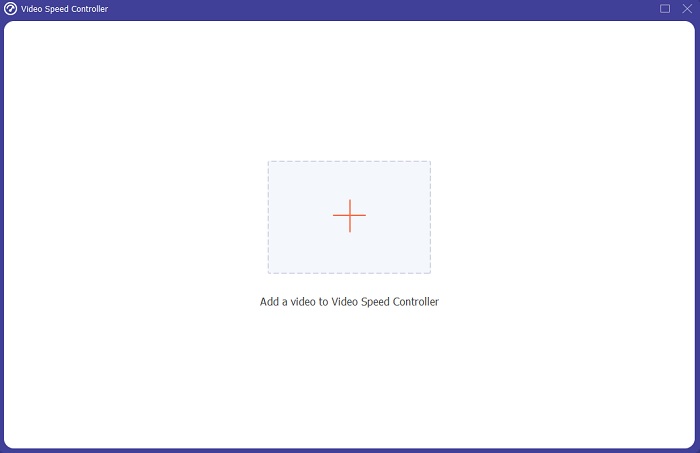
Pas 3. Es mostrarà una finestra nova al centre de la pantalla. Fes clic a + per afegir el fitxer de vídeo que vols editar.
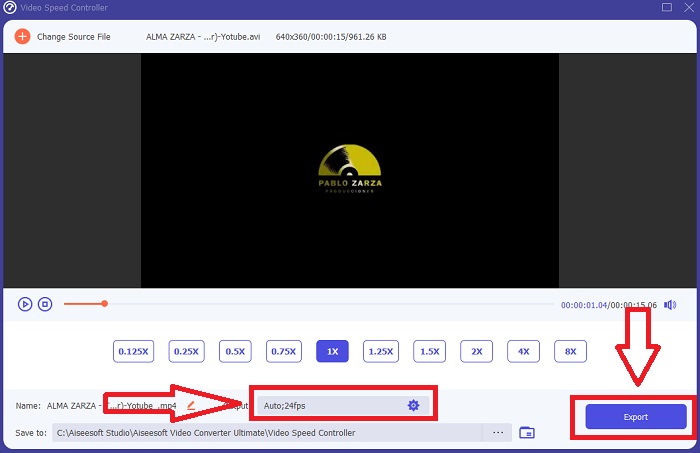
Pas 4. Un cop s’hagi obert el fitxer de vídeo, pots triar entre les diferents velocitats de reproducció mostrades sota el vídeo, depenent de fins a quin punt vulguis aplicar l’efecte de càmera lenta al teu vídeo.
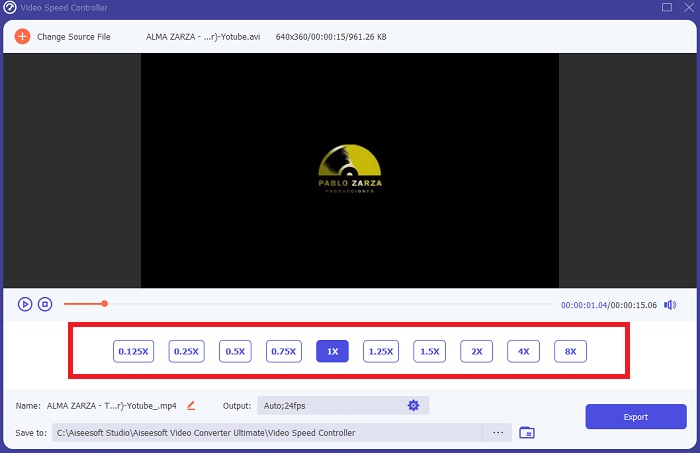
Pas 5. Pots editar el resultat del teu vídeo pel que fa a la part de vídeo, com ara el format, la resolució, la taxa de fotogrames i la qualitat, i pel que fa a l’àudio, com ara la freqüència de mostreig i la taxa de bits, a la configuració de sortida. També pots triar la destinació on s’exportarà el teu vídeo just a sota de la configuració de sortida. Per desar-lo, fes clic al botó Export a l’extrem inferior dret de la finestra i espera que acabi.
Relacionat:
Part 3. Preguntes freqüents sobre com fer vídeos a càmera lenta
Com funciona la càmera lenta?
El vídeo a càmera lenta és simplement la tècnica de reproduir imatges a una velocitat de fotogrames més lenta que quan es va gravar. Tanmateix, això no funcionarà amb qualsevol vídeo, o almenys no bé. Voleu assegurar-vos que esteu gravant a una velocitat de fotogrames raonable. Si enregistres 120 fotogrames per segon i després el reprodueixes a 24 fotogrames per segon, el clip s'executarà durant 5 segons des de 120/24 = 5. Aquest vídeo s'ha alentit cinc vegades.
Quina és la velocitat de fotogrames i què significa per a càmera lenta?
Quins FPS he d'utilitzar per a càmera lenta?
Per fer un vídeo a càmera lenta, podeu utilitzar una varietat de velocitats de fotogrames. En realitat, qualsevol velocitat de fotogrames superior a 24-30 FPS es pot utilitzar per crear vídeos a càmera lenta, però l'aspecte i la sensació seran diferents. Com a qüestió de polze, com més gran sigui la velocitat de fotogrames, més lenta pot ser la vostra pel·lícula. A més, com més ràpida sigui la velocitat de fotogrames, més durarà la vostra foto a càmera lenta. Tanmateix, això no vol dir que més lent sigui sempre millor. Tot depèn de la lentitud que voleu que sembli la vostra pel·lícula i de quant de temps voleu que duri el clip.
Conclusió
Estar a la indústria de la producció de vídeo o simplement crear contingut com a hobby vol dir explorar com feu que el vostre vídeo sigui diferent d'abans o dels altres. Per això és important afegir versatilitat al vostre arsenal: mai sabreu què cridarà l'atenció dels espectadors en cada dia que hagi passat. Un dels més senzills és aprendre a jugar amb el ritme de carrera dels teus clips. La càmera lenta ja pot estar a Internet, però sempre depèn de com l'utilitzeu i la feu vostre. Per tant, tenir un programari al vostre costat que confieu que podreu editar la velocitat de reproducció del vostre vídeo sense problemes en qualsevol moment és força essencial. Aquest article us proporcionarà l'opció més senzilla i millor per familiaritzar-vos amb quin programari utilitzar per fer vídeos a càmera lenta.
-
 Els 4 millors reproductors VOB per a mòbils Android per a diferents usos
 Quan descarregueu vídeos VOB i vulgueu veure'ls a Android, podeu triar el més adequat entre els 4 reproductors VOB principals següents en aquest article.
-
 Top 5 de les millors alternatives de reproductor de Windows Media per a mòbils Android
 Com que no podeu descarregar Windows Media Player per a Android, hauríeu de llegir aquest article i conèixer les 5 millors alternatives a Windows Media Player.
-
 Els 5 millors reproductors de vídeo per a iPhone que no us hauríeu de perdre el 2021
 Per reproduir vídeos en tots els formats i tenir una millor experiència de visualització al vostre iPhone, heu de llegir aquest article i conèixer els millors 5 reproductors de vídeo per a l'iPhone 12/11 / X / 8/7/6.
