


 Video Converter Ultimate
 Gravadora de pantalla
 Reparació de vídeo
Com convertir MTV a AVI amb alta qualitat: els millors enfocaments que hauríeu de conèixer
AVI (Audio Video Interleave) is a video container that holds and encodes both audio and video data. Despite having less compression power than some of its competitors, most DVD players can play files in this container. The AVI codec is required for multimedia players to decode AVI data. This video file is available in every video player and video editor. However, MTV's video format is not that famous for using and being converted into other formats. If you're wondering how it will happen that you will convert MTV to AVI, continue reading the article to know more about these two formats.

Part 1. Com convertir MTV a AVI a Windows i Mac
There are many different methods to convert MTV to AVI, and it varies on its purpose. It can be downloaded as an application, used in an online web tool, or installed in a program. But have you ever thought about software that can convert multiple video formats in the fastest manner? Video Converter Ultimate is software this article recommends you to use, not just because it is the fastest converter that is free to download. It has a lot of featured tools to offer that can be helpful in editing videos. One of its main features that you can't find from other applications or web tools is that it supports various formats, including converting MTV to AVI. If you're not interested yet, read these given details to learn more about the software:
Pas 1. Per començar, fes clic al botó Free Download de sota per iniciar el procés de descàrrega. Un cop finalitzada la descàrrega, tens l’opció de descarregar el programari per a Windows o per a Mac, segons prefereixis. Abans de simplement executar el programa, l’has d’instal·lar a l’escriptori de l’ordinador i fer clic a Start Now per començar.
Descàrrega gratuïtaPer a Windows 7 o posteriorDescàrrega segura
Descàrrega gratuïtaPer a macOS 10.7 o posteriorDescàrrega segura
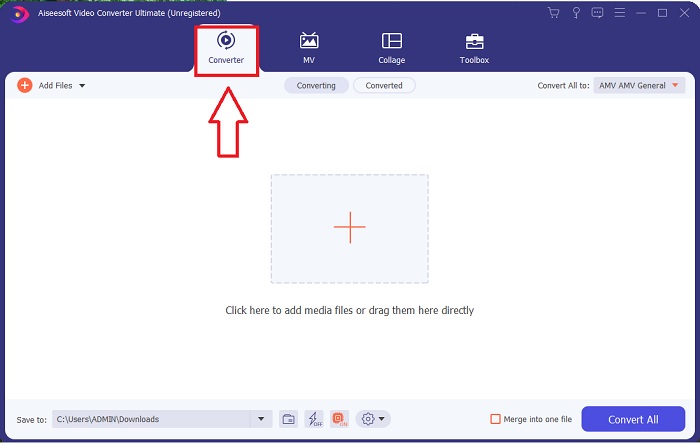
Pas 2. Inicia l’aplicació descarregada. Quan arrenquis el programa per primera vegada, apareixerà una finestra amb la interfície Converter. Aquí és on importaràs el teu fitxer de vídeo i començaràs la conversió.
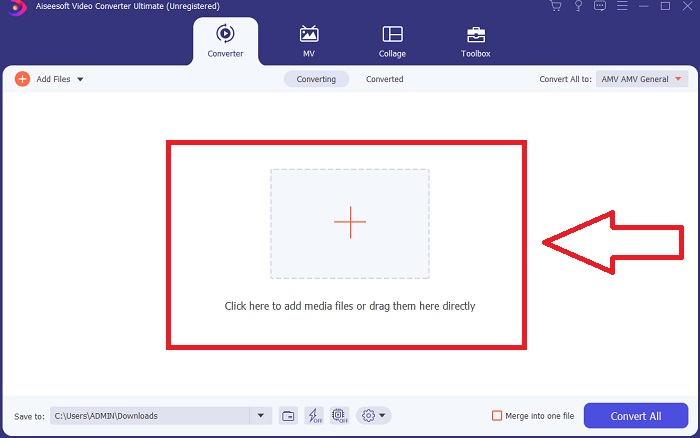
Step 3. Import your files into the converter to begin the conversion process. Drag and drop the video file you want to convert onto the + icon.
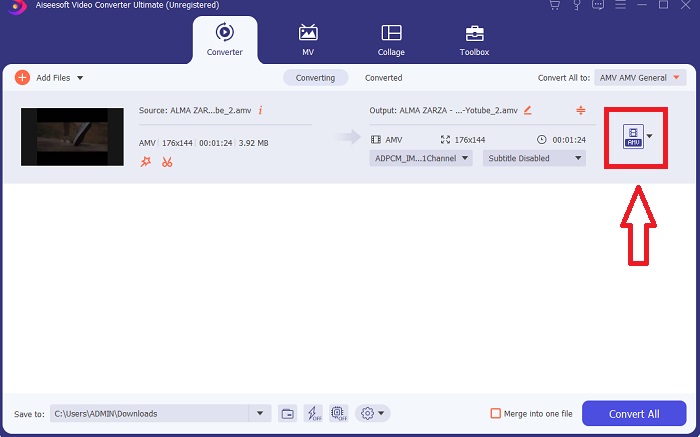
Step 4. Select a video format from the list in the upper-right corner of the screen. Locate and select the drop-down menu of Convert All to, then choose the AVI format from the video category list. However, if your preferred video output isn't listed, you can change the quality settings to suit your needs. You can alter the display's resolution, frame rate, and even audio quality by clicking the gear icon. To keep your changes, click the Create New button.
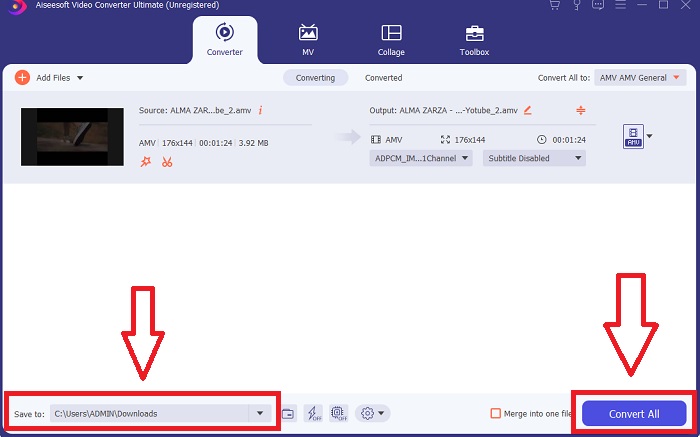
Pas 5. Quan hagis acabat d’editar el vídeo i estigui llest per convertir, fes clic a Convert All per iniciar el procés de transferir-lo a l’ordinador.
Part 2. Com convertir MTV a AVI en línia
Mètode 1: Online-Convert.com
Amb aquest convertidor de fitxers en línia gratuït, podeu transformar els vostres mitjans de manera fàcil i ràpida d'un format a un altre. Amb aquesta eina web es poden convertir molts formats, així com una àmplia gamma de destinacions. Per a més explicacions, aquí teniu els passos que us proporcionen:
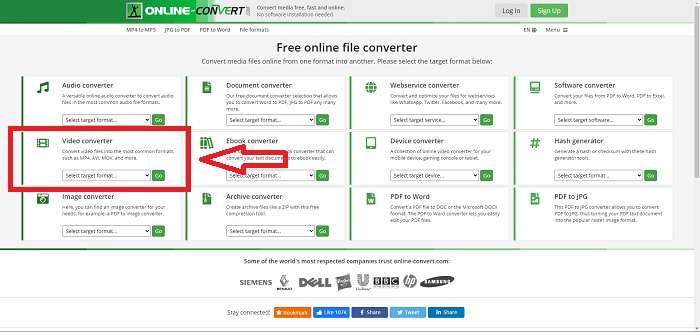
Step 1. Search for online-convert on any search engine and click the webtool. After you click the webtool, its interface will appear. The different processes of converting files will be your choices. Choose Video Converter if you wish to convert MTV to AVI; after deciding, select Convert to AVI and proceed by clicking Go.
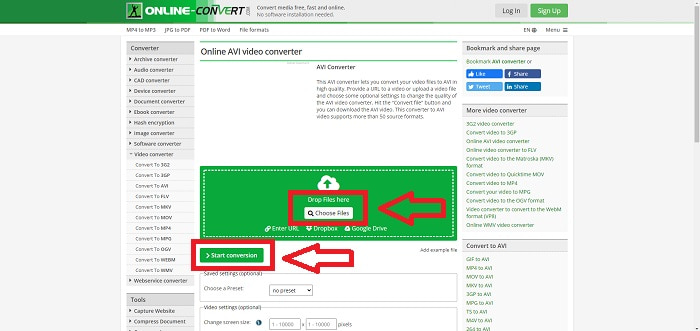
Step 2. After proceeding, another interface will going to appear. Click Choose Files to upload the file you want to convert. Wait a minute long - depending on the file size - to process your video file. Then, click Start Conversion to convert your file to AVI.
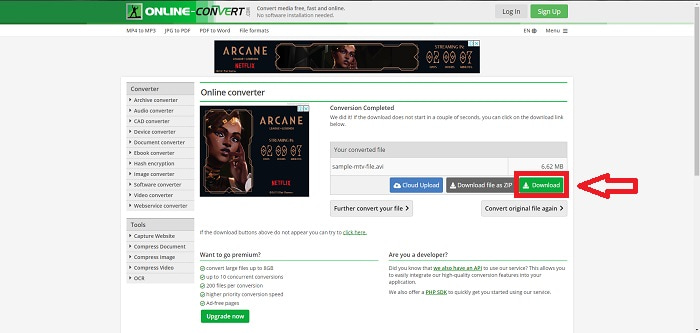
Step 3. To begin downloading the converted file, click Download.
Mètode 2: Video-Converter.com
Utilitzeu aquest convertidor de vídeo en línia gratuït per modificar la configuració del vídeo com el format, la resolució i la mida del vostre navegador web. Per saber més sobre aquesta eina web en línia, aquí teniu els procediments que heu de conèixer:
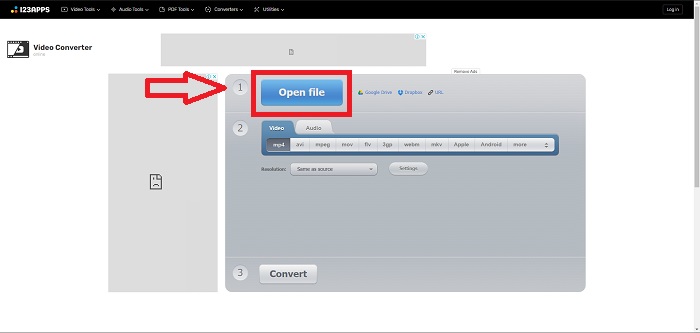
Step 1. Open the video converter in any search engine. Click the primary web tool, and another window will pop up. On the main interface, you will see the whole process of conversion already. To start, click the Open File to import any video file you wish to convert.
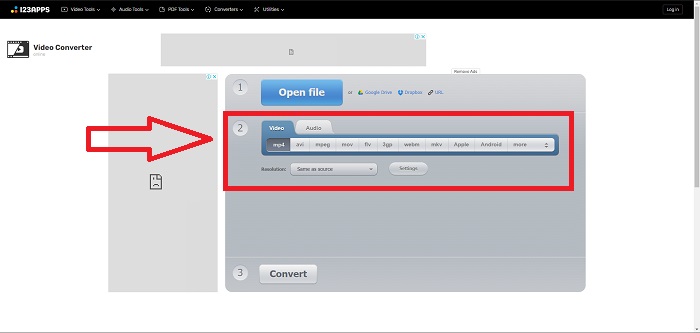
Step 2. Choose the format you want to convert your video from all the video formats given. Since you will convert MTV to AVI, choose the AVI. You can edit the resolution and the video output by clicking the Same as Source or Settings.
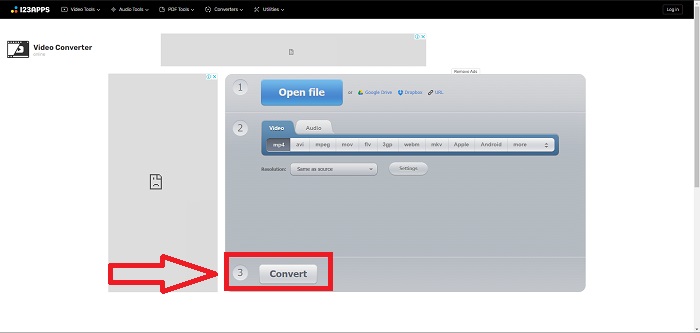
Step 3. Convert the file by clicking Convert. After you convert the file, you can now download the file by clicking the Download button after you convert.
Part 3. Dades interessants sobre MTV i AVI
Què és AVI?
This file format, also known as Audio Video Interleaved (AVI), combines audio and video data into one file to play it back simultaneously. It primarily serves as a storage space for electronic media such as televisions, movies, and other video recordings. After the release of Windows 3.1, AVI came into widespread use. Video and audio are combined using a powerful compression algorithm currently the conventional standard for Windows PC movie storage. Images and audio can be preserved in high fidelity even though AVI video is not lossless. On the contrary, AVI consumes a lot of memory, sometimes as much as a DVD does for storage. That's most likely why MPEG-1 came after it, all the way up to MPEG-4 today.
Què és MTV?
La gran majoria dels fitxers MTV són propietat de MTV. El format de fitxer MTV es va crear per permetre la reproducció de vídeo en reproductors MP4 portàtils de baix cost de fabricació xinesa sense augmentar el preu d'aquests dispositius amb drets de llicència i més potència del processador. L'MP4 Watch és un producte que fa ús d'aquest format de fitxer.
Part 4. Preguntes freqüents sobre MTV i AVI
L'AVI és d'alta qualitat?
AVI és un format de vídeo d'alta definició desenvolupat per Microsoft. És compatible amb YouTube i fa un treball excel·lent per permetre't veure la televisió a l'ordinador. El vídeo d'alta definició requereix un format de codificació de vídeo particular anomenat Advanced Video Coding HD.
On s'utilitza habitualment l'AVI?
Des de la creació de Microsoft el novembre de 1992, el format de fitxer AVI s'ha utilitzat àmpliament per transmetre i emmagatzemar dades de vídeo i àudio. Els fitxers AVI es poden reproduir en una àmplia gamma de sistemes operatius, inclosos Windows, Mac OS X, Linux i Unix, gràcies al seu alt grau de compatibilitat.
Com puc convertir un vídeo al format MTV?
Amb AVS Video Converter, podeu anar a la barra d'eines principal, anar a la pestanya Formats i fer clic al botó A MTV. Podeu cercar un fitxer d'entrada fent clic al botó Navega a la barra d'eines a la part superior. Feu clic al botó inferior Navega i escriviu el nom del fitxer de sortida que voleu crear. Decidiu l'aspecte de MTV creant un compte amb MTV.
Conclusió
Per concloure, sempre hi ha una diferència entre el programari en línia i el programari que primer cal descarregar abans d'utilitzar-lo. Hi ha avantatges i contres als diferents costats, però us recomanem que utilitzeu Video Converter Ultimate per a la comoditat i la línia de base de la sortida de qualitat. Amb això, podeu experimentar el convertidor i l'editor professional al mateix temps en un sol programari.
-
 Com convertir TS a AVI / MKV / MOV / WMV en línia i gratuïtament a Win / Mac
 Voleu convertir fitxers TS a AVI / MKV / MOV / WMV ràpidament? En aquest article es mostren els convertidors de vídeo en línia i fora de línia amb una guia completa. Potser podeu obtenir el millor convertidor gratuït de TS aquí.
-
 4 maneres eficients de convertir MOV a AVI a PC i Mac [2021]
 Vols saber quin és el millor convertidor de MOV a AVI al web? I per què el FVC Ultimate Video Converter pot ser el vostre.
-
 Excel·lent opció per convertir MKV a un format AVI
 Domineu com convertir vídeos MKV amb passos senzills que us proporcionen exclusivament. Vols saber com? A continuació, feu clic a aquest enllaç per obtenir més informació.
