


 Video Converter Ultimate
 Gravadora de pantalla
 Reparació de vídeo
Detalls que necessiteu per ser il·luminats per convertir MPG a AVI
En termes generals, un fitxer MPG és un fitxer de vídeo típic que utilitza un format de vídeo digital estandarditzat pel Moving Picture Experts Group (MPEG). Emmagatzema vídeo, àudio i metadades en un sol fitxer entrellaçat. És una pràctica habitual fer servir fitxers MPG per crear pel·lícules que es distribueixen per Internet. Aquest tipus de format de vídeo no és fàcil de convertir si no tens coneixements o experiència en cap conversor que admeti o transformi MPG a AVI. Continua llegint aquest article per conèixer amb detall els aspectes i opcions que has de tenir en compte per aconseguir el procés de conversió que desitges.
Part 1. MPG i AVI - Una visió general
MPEG és un format de fitxer de vídeo desenvolupat pel Moving Picture Experts Group, el mateix grup que va crear formats com MP3 i MP4. Depenent de l’ús que se’n vulgui fer, MPEG utilitza compressió de fitxer MPEG-1 o MPEG-2.
Per comprimir vídeo en brut de nivell VHS i música de CD fins a 1,5 megabits per segon sense sacrificar gaire qualitat, es va crear el MPEG-1. Com a resultat, s’ha convertit en un dels formats de vídeo/àudio més populars i àmpliament compatibles del món. Les dades de vídeo per a MPEG-1 se solen transmetre a 30 fotogrames per segon (fps), amb una resolució aproximada de 352×240 píxels.
Tanmateix, els ordinadors amb Windows fan servir AVI com a format de vídeo predeterminat. En un format de contenidor multimèdia, com DivX o XviD, l’àudio i el vídeo es poden emmagatzemar amb diversos còdecs. Molts formats de vídeo alternatius, com MPEG i MOV, utilitzen menys compressió i ocupen més espai d’emmagatzematge que un fitxer AVI. També és possible produir fitxers AVI sense compressió. Això dóna lloc a mides de fitxer molt més grans —uns 2-3 GB per minut de vídeo— perquè els fitxers passen a ser sense pèrdua. Independentment de quantes vegades obris o desis el fitxer, un fitxer sense pèrdua en conserva la qualitat. Altres avantatges addicionals inclouen la reproducció sense necessitat de còdecs.
Part 2. El programari més eficaç per convertir MPG a AVI
Si mai t’has preguntat com convertir un fitxer de vídeo MPG a AVI de manera gratuïta, aquest nou i excel·lent programari és el que aquest article et recomana utilitzar. Video Converter Ultimate és un programari de descàrrega gratuïta disponible per a Windows i Mac que pot convertir el teu fitxer MPG a AVI molt més ràpidament que els conversors en línia. A més d’aquests dos formats de vídeo, aquest programari també admet diversos altres formats entre els quals pots triar. És el millor gràcies a la qualitat de la sortida que obtindràs si fas servir aquest programari. Ara que ja tens una visió prèvia del que pot fer, prepara’t i descobrim com funciona aquest programari:
Pas 1. Per començar, simplement fes clic al botó Baixada gratuïta que es proporciona a continuació. Un cop finalitzada la baixada, pots triar instal·lar el programari a Windows o Mac. Un cop el programari estigui instal·lat a l’escriptori de l’ordinador, pots començar a utilitzar-lo fent clic al botó Comença ara.
Descàrrega gratuïtaPer a Windows 7 o posteriorDescàrrega segura
Descàrrega gratuïtaPer a macOS 10.7 o posteriorDescàrrega segura
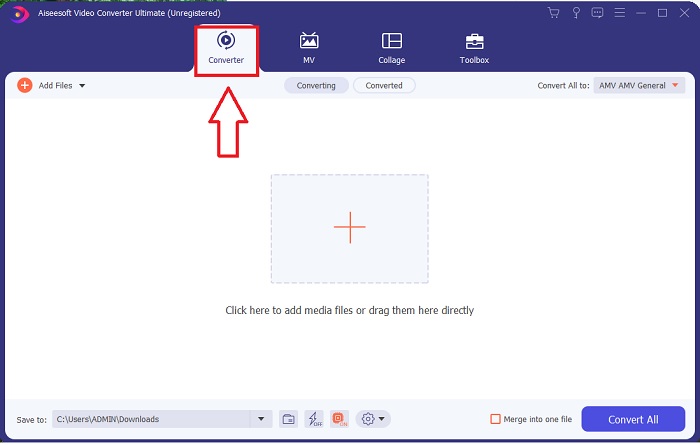
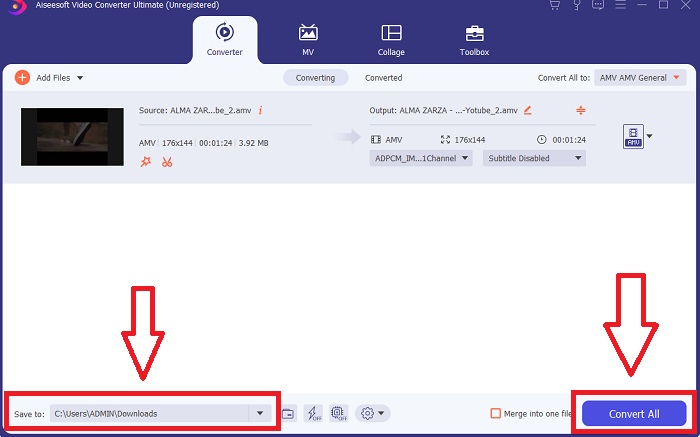
Pas 2. Obre el programari que acabes de descarregar. Quan l’obris per primera vegada, veuràs una finestra amb la interfície de Convertidor. Aquí és on iniciaràs el procés de transcodificació del teu vídeo.
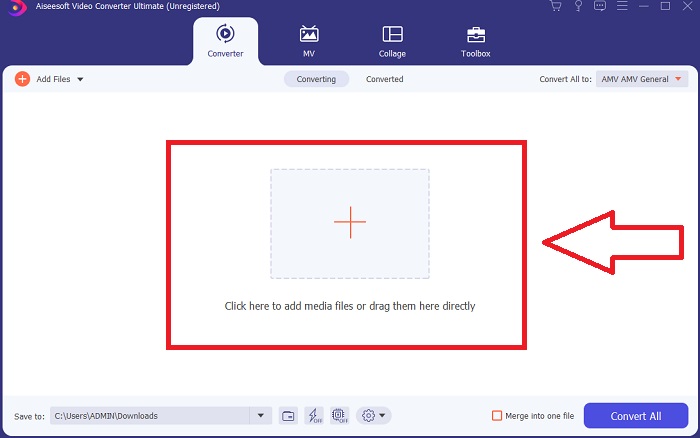
Pas 3. Pots començar el procés de conversió important els teus fitxers al programari. Convertir un vídeo és tan senzill com arrossegar-lo sobre el símbol Plus.
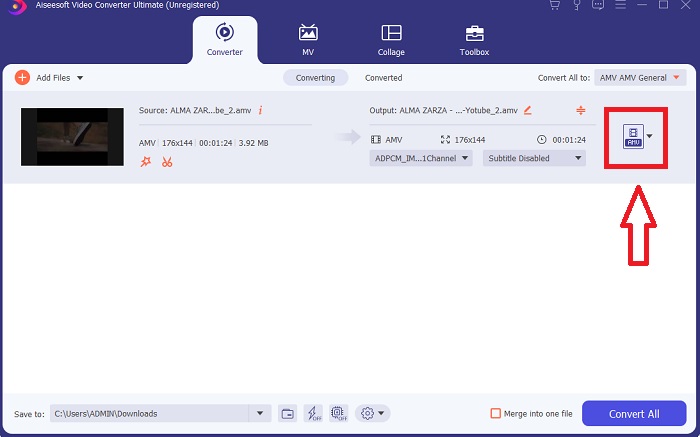
Pas 4. Fes clic amb el botó dret sobre un format de vídeo i tria Desa a o Desa a l’emmagatzematge extern. Cerca i selecciona un tipus de fitxer AVI al menú desplegable. Les opcions de configuració de qualitat de vídeo són nombroses un cop hagis escollit un tipus de fitxer de vídeo AVI. Pots modificar els paràmetres de qualitat si la sortida de vídeo desitjada no hi apareix. La icona d’engranatge et permet canviar la resolució de la pantalla, la taxa de fotogrames i la qualitat de l’àudio. Per desar els canvis, fes clic al botó Crea’n un de nou.
Pas 5. Fes clic a Converteix-ho tot quan hagis editat el vídeo seleccionat i estigui llest per transferir-lo a l’ordinador.
Part 3. Consells ràpids: altres eines efectives que hauríeu de tenir en compte
Mètode 1. Utilitzeu CloudConvert
CloudConvert és un convertidor de vídeo en línia. Aquest convertidor en línia també admet MP4, WEBM i AVI, entre altres formats. Podeu triar la qualitat, la resolució i la mida del fitxer del vídeo. Si esteu pensant en com convertir MPG a AVI en aquesta eina en línia, aquí teniu el procediment sobre com utilitzar-lo:
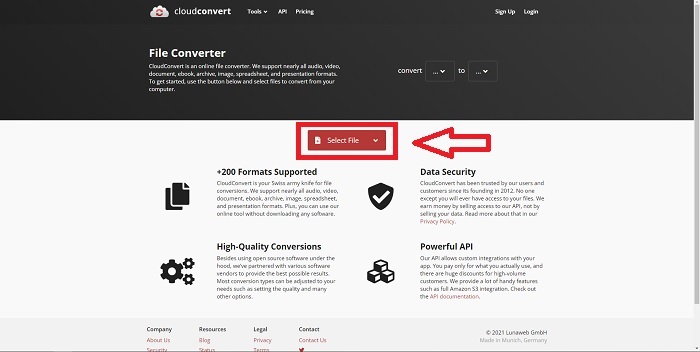
Pas 1. Puja un fitxer des del teu ordinador fent clic a Selecciona el fitxer.
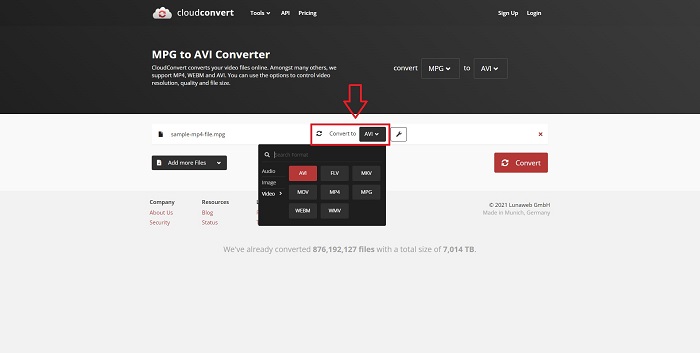
Pas 2. A continuació, escull a quin format es convertirà el teu fitxer fent clic a la secció de format al costat de la icona de clau anglesa. També tens l’opció d’afegir més fitxers per convertir.
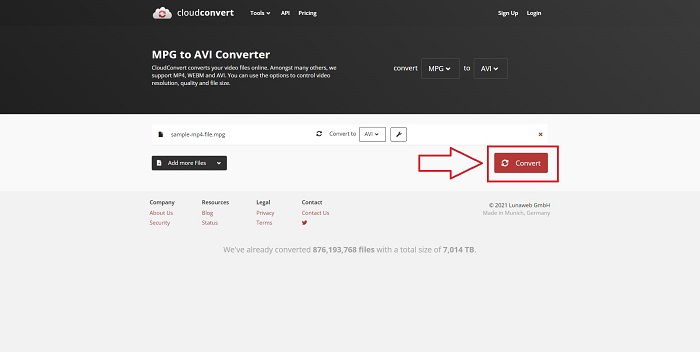
Pas 3. Fes clic a Converteix per convertir tots els fitxers que has pujat.
Mètode 2. Utilitzeu Zamzar
Zamzar és una eina web per convertir fitxers. Les conversions es poden realitzar en diversos formats sense necessitat de descarregar cap programari. Zamzar pot convertir un fitxer d'un format a un altre, com ara un PDF d'Adobe a un document de Microsoft Word, escrivint una URL o penjant un o més fitxers (sempre que estiguin tots en el mateix format). Per obtenir coneixements sobre aquesta eina en línia, aquí teniu els passos que us proporcionen:
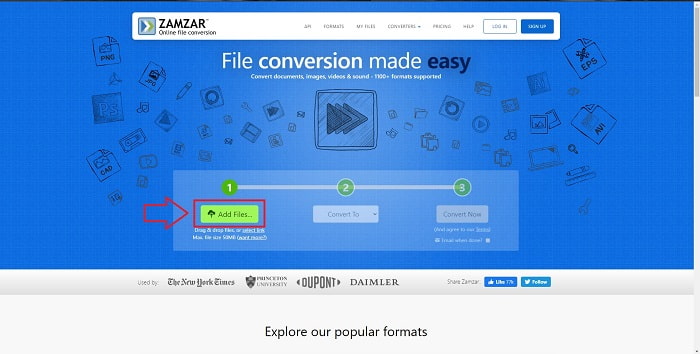
Pas 1. Cerca Zamzar en qualsevol cercador. Després de fer clic al lloc web, ja pots pujar un fitxer a la seva interfície fent clic a Afegeix fitxers.
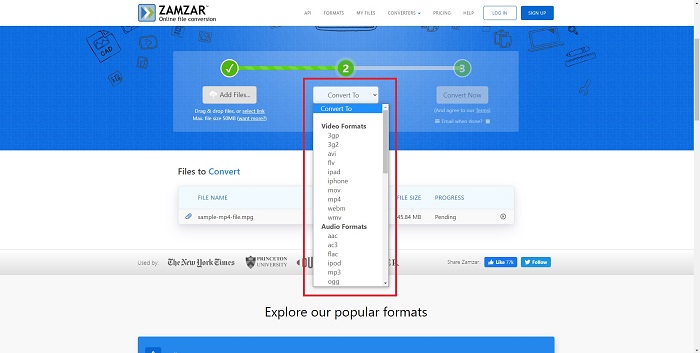
Pas 2. A continuació, ja pots convertir el fitxer triant el fitxer que vols. Fes clic a Converteix a per veure tots els formats compatibles que ofereix aquesta eina en línia.
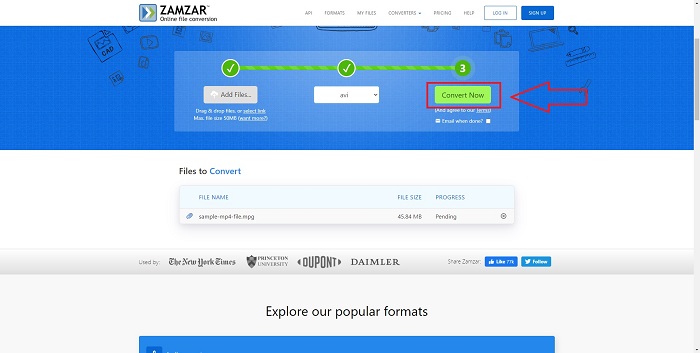
Pas 3. Per convertir el fitxer, fes clic a Converteix ara.
Part 4. Preguntes freqüents sobre MPG i AVI
És millor AVI o MPG?
L'emmagatzematge és possible amb fitxers AVI, mentre que la gravació de vídeo s'aconsegueix amb fitxers MPEG. AVI és lleugerament superior a MPEG; tanmateix, si el format a utilitzar és MPEG, voleu gravar vídeos en DVD. Microsoft Windows va desenvolupar el format de fitxer AVI en resposta al format de fitxer MOV d'Apple, mentre que el Moving Picture Group va desenvolupar el format MPG.
Quins són els avantatges i els desavantatges de l'AVI?
En comparació amb els altres formats de fitxer, els fitxers AVI poden ser extremadament grans si no es comprimeixen. Heu d'estar disposat a cedir una mica d'espai al disc a canvi dels beneficis del fitxer AVI, ja que no podreu emmagatzemar tants fitxers com ho faríeu d'una altra manera. Si comprimiu un fitxer AVI en línia més enllà d'un punt determinat, la qualitat del vídeo es reduirà com a resultat.
Quin és un format AVI o MPG més petit?
Pel que fa a Internet, els fitxers més grans triguen més a descarregar-se. Té sentit codificar els vídeos en mides de fitxer més petites, encara que això suposi una lleugera pèrdua de qualitat. Pel que fa a la reproducció, l’AVI continua sent preferit davant del MPG perquè hi ha més reproductors de sobretaula que poden reproduir fitxers AVI que no pas MPG. Si vols reproduir els teus fitxers MPG a l’ordinador, fes clic aquí per obtenir-ne més informació.
Conclusió
Per concloure tot el que hem comentat, Video Converter Ultimate és el millor conversor que has de considerar per sobre de tots els conversors en línia de MPG a AVI esmentats anteriorment. Aquest programari és gratuït i té un procés de conversió més ràpid que l’eina de conversió en línia. També admet molts formats i t’ofereix una alta qualitat en la sortida de vídeo. A més a més, no hi ha cap motiu pel qual no l’hauries d’utilitzar.
-
 Com convertir fitxers MPEG a MP4 de forma gratuïta a Windows, Mac i en línia
 Llegiu i obteniu 3 maneres gratuïtes de convertir fitxers MPEG a MP4 al vostre ordinador. Podeu utilitzar convertidors de vídeo en línia i d’escriptori per convertir fàcilment el format MPEG a MP4.
-
 [2025] Les millors eines i maneres fàcils de convertir MPEG a MP3
 Aquest article parla principalment de com podeu convertir els vostres vídeos MPEG en MP3 amb l'ús de les eines més fiables de la llista.
-
 4 maneres eficients de convertir MOV a AVI a PC i Mac [2025]
 Vols saber quin és el millor convertidor de MOV a AVI al web? I per què el FVC Ultimate Video Converter pot ser el vostre.
