


 Video Converter Ultimate
 Gravadora de pantalla
 Reparació de vídeo
Apreneu a utilitzar Premiere Pro per accelerar un vídeo amb 2 alternatives a Premiere
Premiere Pro és un dels programes de gamma alta desenvolupats per Adobe per a l’edició de vídeo professional. A més, el rendiment d’aquesta eina ha estat elogiat per molts usuaris que ja la fan servir. De fet, t’ensenyarem a accelerar els teus vídeos amb l’ajuda d’aquesta eina. Així no hauràs de fer un munt de configuracions ni preparatius previs. I ara, t’ensenyarem com accelerar un vídeo a Premiere Pro i quines alternatives hi ha.

Part 1. Com accelerar un vídeo a Premiere Pro
L’editor de vídeo de gamma alta que t’agradaria comprar i utilitzar és Adobe Premiere Pro. Aquesta eina és el paquet complet que qualsevol professional voldria fer servir. Perquè aquest programari pot gestionar treballs d’edició molt exigents que t’agradaria fer si ets un professional. A més, si vols un resultat impressionant, has d’aprendre a utilitzar aquesta eina. Però aprendre a utilitzar Premiere Pro et portarà, sens dubte, molta estona, així que si estàs molt ocupat, aquesta hauria de ser la teva última opció. Tanmateix, si tens moltes ganes d’aprendre i disposes de molt temps lliure, aleshores l’has de provar.
A més, si voleu utilitzar aquesta eina, haureu de gastar una gran quantitat de diners perquè és literalment car en comparació amb les altres eines d'edició de vídeo. Per tant, ara, si voleu aprendre a utilitzar l'Adobe Premiere Pro cc 2018 o una versió superior per accelerar el vídeo, seguiu els passos simplificats següents.
Passos sobre com accelerar un vídeo a Adobe Premiere Pro:
Pas 1. Compra i descarrega Adobe Premiere Pro des del seu lloc web oficial. Després inicia el programa per començar a accelerar el vídeo.
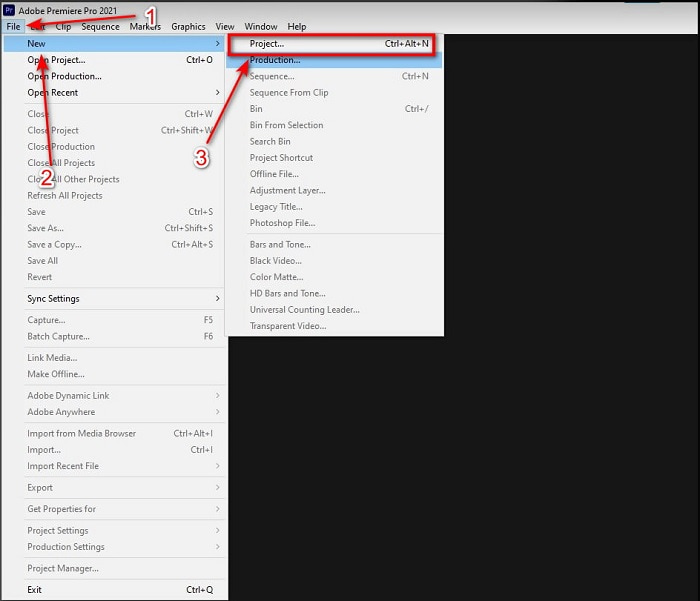
Pas 2. Fes clic a File, després ves a New i Project, espera que aparegui una interfície com aquesta i fes clic a OK per continuar. Obre la carpeta i localitza el vídeo; arrossega i deixa anar l’arxiu al Media Browser per enganxar-lo al costat de la Timeline.
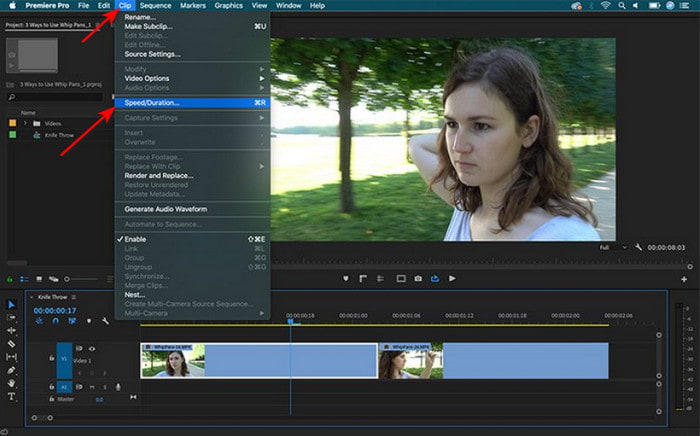
Pas 3. Fes clic al vídeo que has inserit a la Timeline i fes clic a Clip a la part superior. A continuació, selecciona Speed/Duration i prem-hi. Canvia el percentatge de velocitat segons el que vulguis i fes clic a OK per desar l’acceleració; per desar el fitxer, fes clic al botó Export.
Part 2. 2 de les millors alternatives a Premiere Pro per accelerar els vídeos
1. Video Converter Ultimate
Si el teu problema és accelerar un vídeo, aquesta ha de ser la solució: et presentem el Video Converter Ultimate. A diferència d’altres editors de vídeo, aquesta eina extraordinària és la millor per a tot tipus d’edició, conversió, creador de GIF, potenciador, revers, accelerar i molt més. A més, molts usuaris ja estimen aquest programari, ja que ofereix funcions avançades com Adobe Premiere Pro però en una versió simplificada. A part d’això, no trobem cap eina que ofereixi funcions avançades tan fàcils d’utilitzar. Bàsicament, no hi ha res com Video Converter Ultimate. Tot i que aquesta eina és de pagament, val la pena cada cèntim que hi gastis i és molt econòmica. Així que ara, si vols saber una alternativa a com accelerar un vídeo a Premiere Pro, segueix degudament els passos següents.
Passos sobre com accelerar vídeos amb l’ajuda de Video Converter Ultimate:
Pas 1. Descarrega el programari al disc dur de l’ordinador i després instal·la’l per continuar.
Descàrrega gratuïtaPer a Windows 7 o posteriorDescàrrega segura
Descàrrega gratuïtaPer a macOS 10.7 o posteriorDescàrrega segura
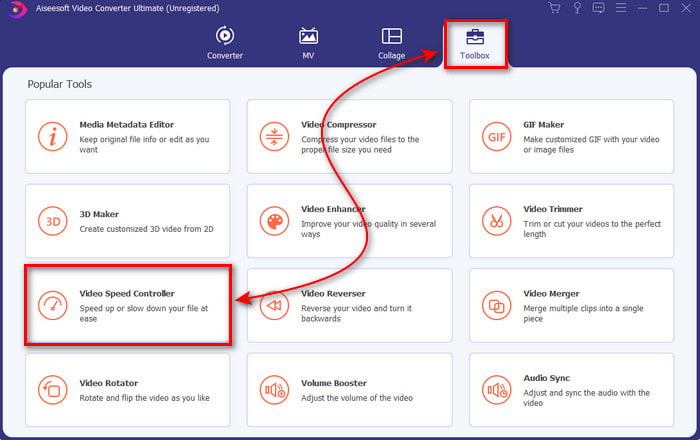
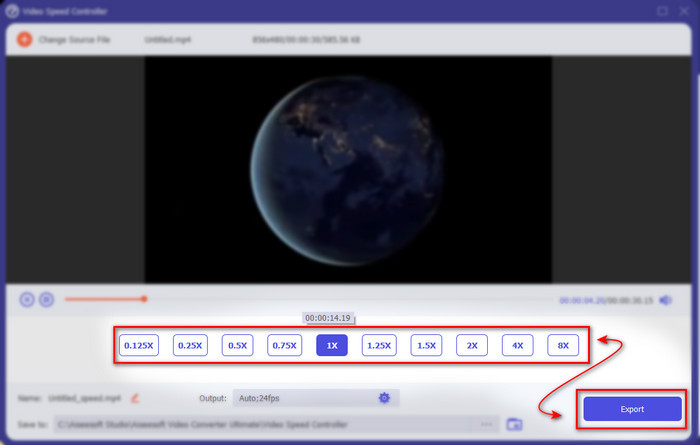
Pas 2. Inicia l’eina i fes clic a Toolbox i busca el Video Speed Controller.
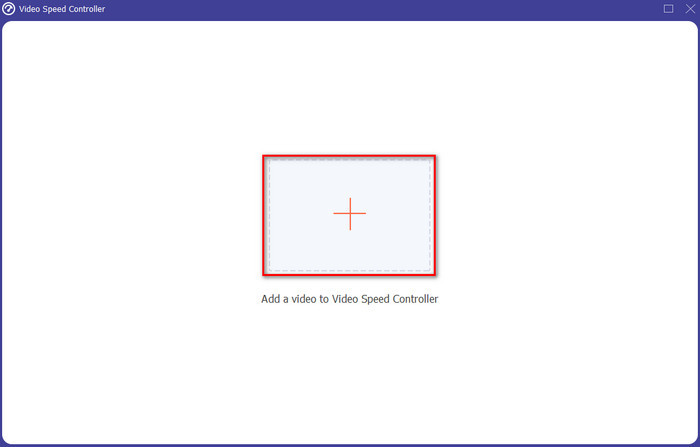
Pas 3. Per afegir el vídeo que vols accelerar, fes clic al botó +. Després localitza el fitxer a la carpeta i fes clic a Open per inserir el fitxer de vídeo.
Pas 4. A continuació, tria la velocitat que vols aplicar al teu vídeo fent clic a les opcions del box. Si ja estàs satisfet amb la velocitat del vídeo, fes clic a Export per desar-lo directament a l’ordinador.
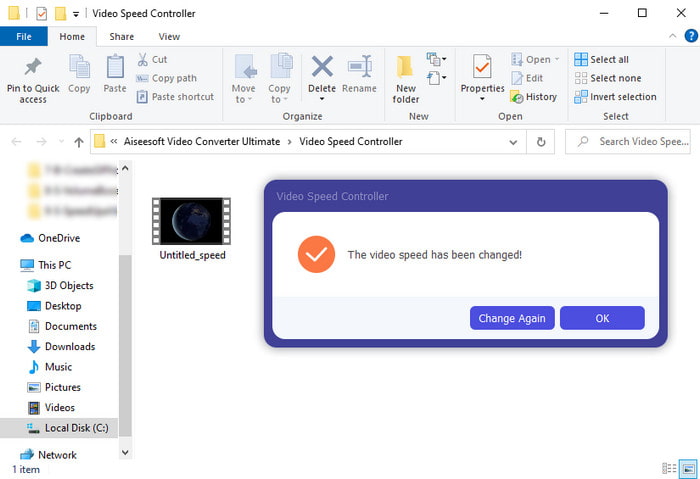
Pas 5. Quan acabi el procés d’exportació, apareixerà una carpeta emergent. Fes clic al fitxer que has accelerat abans i meravella’t de com ha augmentat la velocitat sense pèrdua de qualitat.
2. iMovie
Si tens un Mac, és gairebé obligatori utilitzar aquesta eina perquè ja ve preinstal·lada al teu Mac. iMovie és un dels editors de vídeo populars que t’agradarà utilitzar per les funcions gratuïtes que ofereix. Si ets usuari de Windows, no esperis poder utilitzar aquesta eina, perquè no està disponible per al teu PC. Encara que l’eina sigui gratuïta, té alguns inconvenients, com ara funcions d’edició avançades que potser voldries utilitzar i que no hi són. Tanmateix, si tens un pressupost ajustat, aquesta ha de ser la teva opció com a usuari de Mac. A més, si vols aconseguir un resultat tipus Premiere Pro speed up video, segueix els passos següents.
Com accelerar vídeos a iMovie:
Pas 1. Obre iMovie al teu Mac i fes clic a File i després a Import Media, tria el fitxer per continuar.
Pas 2. Arrossega el vídeo que has inserit abans a la Timeline. Després fes clic al fitxer de vídeo a la Timeline per poder-ne ajustar la velocitat. A la dreta, fes clic a Speed i tria al menú desplegable la velocitat que vols aplicar.
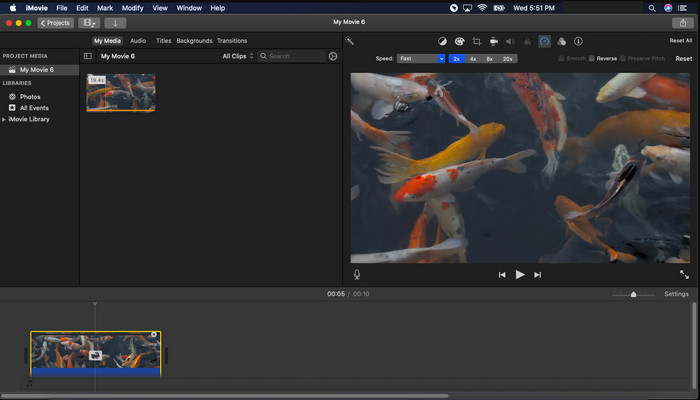
Pas 3. Després d’aplicar l’acceleració, fes clic a Export i Export File per desar la versió accelerada del vídeo.
Part 3. Preguntes freqüents sobre l'acceleració de Premiere Pro
Puc alentir un vídeo a Premiere Pro?
Sí, absolutament; només cal seguir el mateix procediment que hem descrit més amunt però ara canviant el percentatge a menys del cent per cent per fer-lo més lent. O bé pots fer clic aquí per aprendre amb detall com fer més lent un vídeo.
Amb quina rapidesa puc configurar el vídeo a Premiere Pro?
El percentatge màxim que podeu establir sobre la velocitat del vídeo és del 10.000% per cent. Per tant, si voleu saber si és real, comproveu-ho vosaltres mateixos i configureu la velocitat a 10.000%.
Adobe Premiere Pro té un requisit del sistema?
De fet, sí, hi ha requisits mínims que el programari d'Adobe necessita per poder utilitzar l'eina correctament. Com, en aquesta llista següent: GPU: Intel® i5-4590 / AMD FX 8350 equivalent o més recent; RAM: 8 GB de ram o fins i tot més; sistema operatiu: Microsoft Windows o macOS; la pantalla ha de ser de 1920 x 1080 o superior.
Conclusió
Quan arribem al final, ara ens queda més clar que fins i tot una simple acceleració es pot fer amb l'estrena professional. Tanmateix, l'estrena professional és molt car, així que enumerem alguns programes assequibles que us agradaria utilitzar per accelerar. Igual que el Video Converter Ultimate, perquè aquest programari ofereix funcions d'edició de gamma alta fins i tot si el vostre ordinador és de gamma baixa. Per tant, si voleu saber com accelerar fàcilment un vídeo a Premiere Pro, descarregueu Video Converter Ultimate per experimentar la mateixa funció, però en una versió fàcil.
-
 [4 maneres] Com accelerar fàcilment els vostres vídeos en línia
 Vols accelerar un vídeo en línia? Llegiu aquest article per obtenir més informació sobre com accelerar un vídeo de diferents maneres possibles.
-
 Maneres més fàcils d'accelerar els vídeos en format MP4 [fora de línia i en línia]
 Vols accelerar el teu vídeo, però està en format MP4? Aquest article us pot ajudar a conèixer les diferències en com accelerar el vostre vídeo en línia o fora de línia.
-
 Els 4 millors reproductors de vídeo amb Speed Controller el 2021
 No us heu adonat de la velocitat de reproducció de tots els reproductors multimèdia sempre que reproduïu un vídeo? Aquest article és adequat perquè aprenguis tot sobre els reproductors de vídeo amb control de velocitat.
