


 Video Converter Ultimate
 Gravadora de pantalla
 Reparació de vídeo
Apreneu les 3 maneres de convertir VOB a AVI en línia i fora de línia
Els fitxers VOB s'utilitzen per emmagatzemar fluxos privats i utilitza compressió de vídeo amb pèrdues com el MPEG-2. A més, tenen gairebé la mateixa estructura si els comparem. Tanmateix, els fitxers .vob tenen una limitació i una especificació abans que pugueu utilitzar-los. I per això no podeu reproduir fàcilment un fitxer VOB al vostre reproductor multimèdia local. Per tant, ara, per estalviar-vos temps a l'hora de cercar com obrir-lo, us suggerim que hàgiu de convertir-lo escollint un convertidor a continuació. En aquest cas, us presentem el millor convertidor que podem trobar i aprendre a convertir VOB a AVI en línia o fora de línia amb les eines que hi ha a la llista.
Part 1. Com convertir VOB a AVI en línia
If you are on a tight budget then we suggest that you will go with a free tool to be used by you. As we searched over the internet, we found out that there is a tool that is known as the best online converter and that is the FVC Free Video Converter. Other than that, this tool provides simplicity and simplicity to each user who already used this and all of them do feel impressed on how good this tool works. And so, if you want to be impressed as well on how good this converter is then try to change the VOB file to AVI format by following the indicated steps below.
Step 1. To go immediately to the website of the converter then click this link.
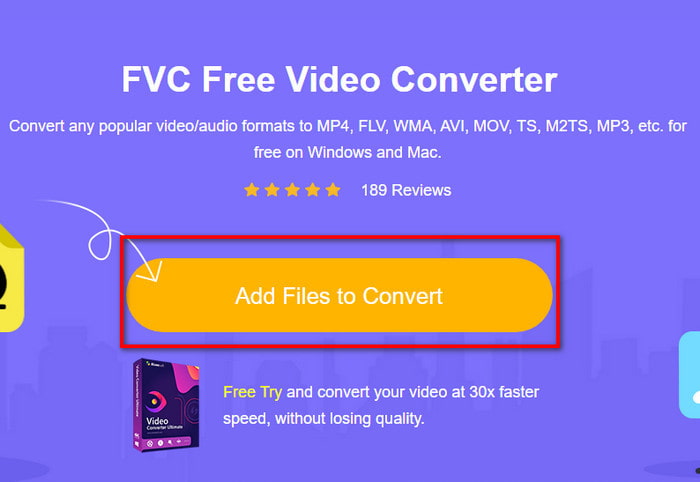
Step 2. On the website, click the Add Files to Convert to download the installer. No need to worry because it is only a few kb. Then re-click it to launch the tool and locate the file on the folder, if you already locate it click Open next.
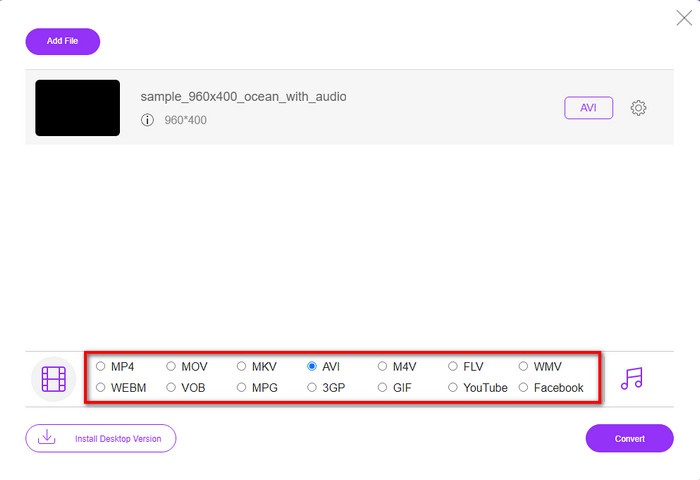
Step 3. A new interface of the FVC will show on your screen. On the list below, choose the AVI format or whatever format you want it to be transformed.
Step 4. After choosing the format is done, let's begin the converting of the file by clicking Convert.
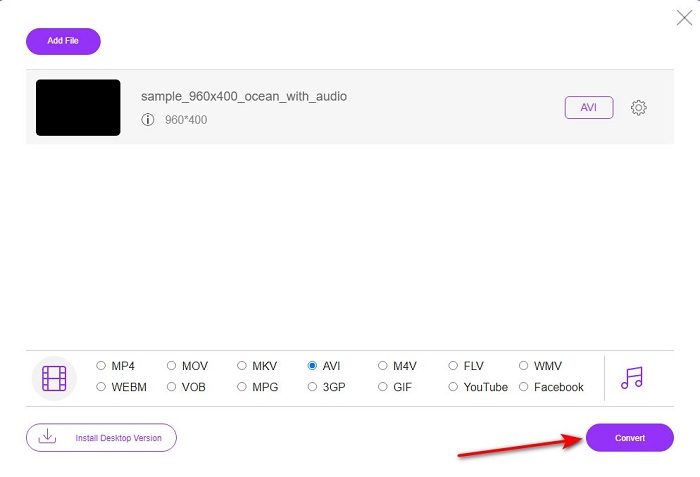
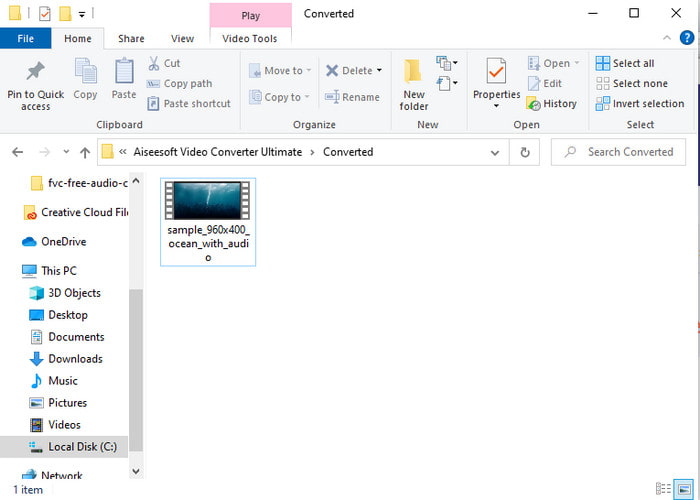
Step 5. This would take an estimated less than a minute, if the process of converting is done a folder will show with the newly converted file.
Part 2. Com convertir VOB a AVI a Windows i Mac
Utilitzeu Phenomenal Converter: FVC Video Converter Ultimate
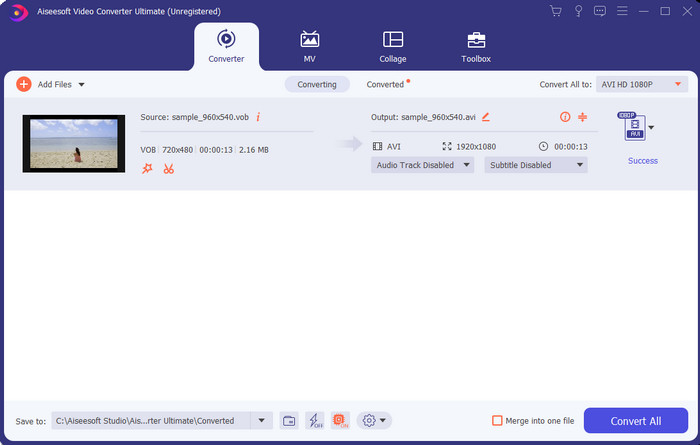
Si voleu descarregar un convertidor de VOB a AVI, aquesta ha de ser la millor opció que us agradaria fer. FVC Video Converter Ultimate sempre fa honor al seu nom com l'eina definitiva que resol totes les situacions finals que es puguin plantejar, especialment en la conversió. Aquest programari és molt diferent de les dues eines que s'esmenten. Potser estàs pensant per què, i només és perquè s'adapta perfectament a qualsevol, tant si ets un professional com un principiant. El rendiment general que experimentem quan provem aquesta eina ja és sorprenent i estem impressionats amb la rapidesa que es pot fer la conversió. I ara, si voleu experimentar la conversió fenomenal, estem parlant, seguiu els passos indicats a continuació.
Step 1. Before you can use it, you will need to download it first. Then install it after the downloading is done, do the set-up and click Start Now.
Descàrrega gratuïtaPer a Windows 7 o posteriorDescàrrega segura
Descàrrega gratuïtaPer a macOS 10.7 o posteriorDescàrrega segura
Step 2. Once the installation is done, open the software next. Then an interface like this shows on your screen. On the middle part of the interface click the + button and a folder will show on your screen. Click Open to proceed to the next step of the process.
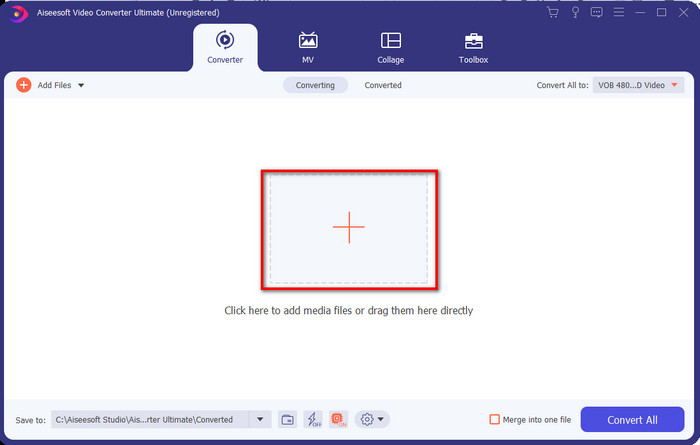
Step 3. Click the Convert All to button on the upper left side of the interface and choose AVI format from the video category list.
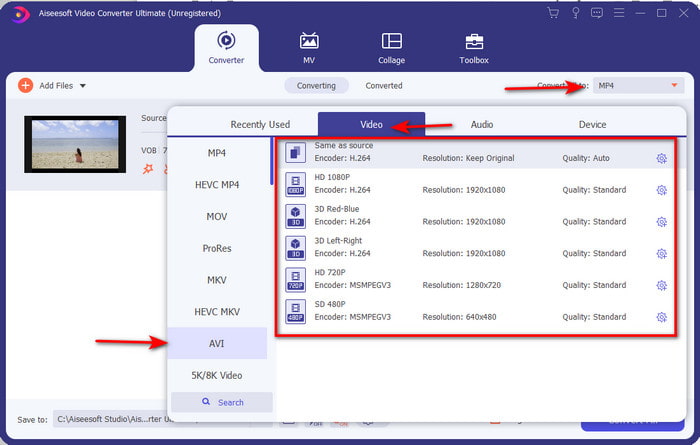
Step 4. If you are done on choosing what format, hit Convert All to start the conversion.
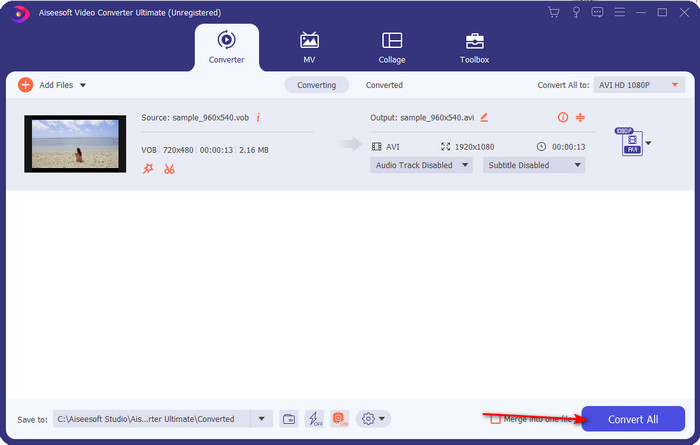
Step 5. No need to worry about waiting too long because it can be done for a few seconds. Then a folder will automatically be opened on your display with the converter media file you've made a minute ago. Then click it to watch and enjoy the newer version of your .vob file.
Utilitzeu l'eina gratuïta: fre de mà
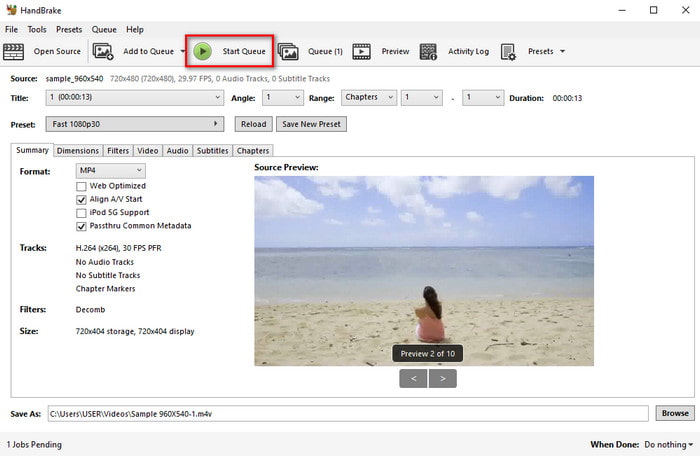
If you are looking for a free tool then HandBrake will help you on that and needed internet connectivity to function is not needed, just like the FVC Video Converter Ultimate. Also, it is free to download and to use by anyone who has a desktop on their home, work, or anywhere. However, if you download the tool you will need to download a separate file known as .NET 5.0 before you can even use it. Some users find it a little bit irritating because after you download the tool you will need to download another file one again. But if you want to do an effective and free converting process then try to use Handbrake VOB to AVI to convert and follow the steps below.
Step 1. Install the tool on your computer drive first.
Step 2. Click File and locate the .vob in your folder.
Step 3. Click the Format and choose from the list available then click Start Queue.
Part 3. Quin és el millor convertidor que s'utilitza per convertir fitxers VOB en format AVI
| Característiques | FVC convertidor de vídeo gratuït | FVC Video Converter Ultimate | Fre de mà |
| Format de conversió |  | | |
| Maquinari i acceleració de conversió |  | | |
| Connectivitat a Internet | | | |
| Potenciador o edició de vídeo | | | |
| Programa recolzat | Eina basada en web | Eina basada en escriptori | Eina basada en escriptori |
Part 4. Preguntes freqüents sobre VOB i AVI
Quins són els altres fitxers que pot contenir VOB?
VOB és un format de DVD multiplex i per això pot contenir no només vídeos i àudio, sinó també subtítols, continguts de navegació i menús.
Per què no puc reproduir fitxers VOB al meu reproductor multimèdia?
One of the reasons VOB isn't playable on your media player is that this format only gains a small scale of support to the media player. You can click here to get VOB players available. If you still have this problem then one feasible solution to it is to convert it with the converters available above.
Per què els fitxers VOB són massa grans?
L'únic motiu pel qual aquest format és tan gran és que conté diferents dades que hauria de tenir un DVD. A més, no podem deixar de banda la possibilitat de la durada del vídeo. O feu clic aquí per saber com comprimir fitxers VOB.
Conclusió
Així que ara, si voleu convertir el fitxer VOB, es pot fer fàcilment amb l'ajuda de les eines disponibles anteriorment. A part d'això, FVC Video Converter Ultimate és el convertidor que realment destaca entre les altres eines en línia i fora de línia esmentades. Perquè podeu convertir VOB a AVI a Windows i fins i tot a Mac fàcilment. Si encara no teniu ni idea de què utilitzar, us recomanem que descarregueu l'eina fenomenal per experimentar una sortida explícita i sorprendre's.
-
 VOB a MP4: 3 maneres de convertir fitxers VOB a MP4 de manera gratuïta a granel
 Aquest article presenta 3 convertidors gratuïts de VOB a MP4 i els tutorials relacionats. Podeu convertir fitxers VOB a MP4 gratuïtament a Windows / Mac / en línia amb facilitat.
-
 Les millors maneres de convertir VOB a FLV [Gratis i en línia inclòs]
 Voleu convertir un fitxer VOB a un fitxer FLV? Podeu completar la tasca fàcilment amb convertidors d'escriptori o en línia. Llegiu aquesta guia i apreneu a transformar VOB a FLV fàcilment i ràpidament.
-
 Què és el fitxer VOB i com convertir el fitxer VOB en GIF de forma gratuïta
 Voleu saber més sobre els fitxers VOB i com compartir-los després de ser arrencats? o Per què necessiteu convertir VOB a GIF? A continuació, llegiu atentament aquest article.
