


 Video Converter Ultimate
 Gravadora de pantalla
 Reparació de vídeo
2 maneres ràpides i fàcils de convertir M2TS a AVI amb els passos proporcionats
A mesura que avancem cap al futur, molts formats ja no reben gaire suport, com ara l’M2TS. Aquest format encara utilitza el contenidor antic de vídeo i àudio Blu-ray que empra el flux MPEG-2 per transportar les dades. No pots obrir aquest format en alguns dispositius com l’iPhone, l’iPod i fins i tot en molts Android perquè no en poden llegir l’estructura. Tanmateix, si encara tens aquest tipus d’extensió de fitxer i el vols veure, et recomanem convertir el format a AVI. Així doncs, vegem quina manera és millor per ajudar-te en la tasca de convertir un M2TS. A més, si continues llegint aquest article, aprendràs a convertir M2TS a AVI tant en línia com fora de línia.

Part 1. M2TS vs. AVI
Com hem explicat anteriorment, els fitxers M2TS solien ser un contenidor en Blu-ray que admet diferents vídeos, àudio i un altre flux en un únic contenidor. A més, si l'extensió de fitxer del vostre Blu-ray o AVCHD està en aquest format, espereu que la qualitat sigui excel·lent. Tot i que aquest format de fitxer funciona bé, el suport que guanya en alguns reproductors multimèdia és encara mins. Una altra és que quan vulgueu reproduir aquest tipus d'extensió de fitxer, necessitareu plug-in-play, un còdec i alguns components per veure el vídeo en aquest format. A diferència de si l'extensió de fitxer és .avi. Aquest format guanya aficionats a tot el web per la bona qualitat de vídeo que pot contenir aquest format. Tanmateix, la mida del fitxer és un gran problema perquè no té un còdec adequat per reduir la mida del fitxer. Però si comparem M2TS i AVI, tots dos són excel·lents. Tot i així, els suports són diferents i la flexibilitat del format AVI us pot aportar.
Part 2. La primera manera és convertir M2TS a AVI en línia amb l'eina web més fàcil
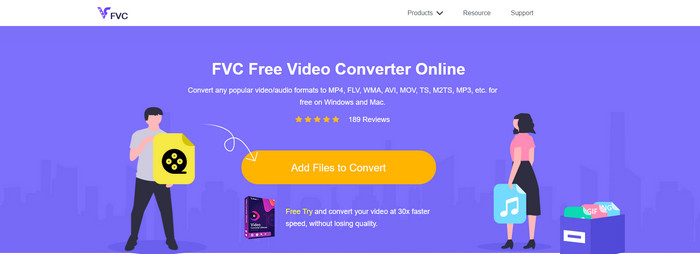
Si et preguntes si pots convertir M2TS a AVI de manera gratuïta, això és per a tu: et presentem el FVC Free Video Converter. Aquesta eina web és una de les millors eines de conversió en línia que pots trobar a Internet. A més, si tens algun problema en convertir el teu format, també és una solució: pots canviar el bitrate, la resolució i la freqüència de fotogrames. Tot i que l’eina admet una gamma mitjana de formats diferents, encara no disposa de funcions avançades per fer que el resultat final sigui excepcional, com sí que pot fer el FVC Video Converter Ultimate per a tu. Tanmateix, si no vols pagar i disposes de connexió a Internet, aquesta ha de ser la teva opció per convertir el format a una versió nova.
Pros
- No es necessita cap programari per descarregar perquè s'hi pot accedir des del web.
- Admet varietats mitjanes del format que podeu triar.
- Gratuït i sense anuncis a la interfície del lloc web.
Contres
- Necessita connexió a Internet per poder-hi accedir.
- Alguns formats no són compatibles aquí i té un suport de format limitat.
Passos per utilitzar el convertidor en línia al web
Pas 1. Fes clic en aquest enllaç per obrir el lloc web principal del convertidor en línia. No cal que et preocupis, perquè aquest enllaç és segur; l’hem provat nosaltres mateixos.
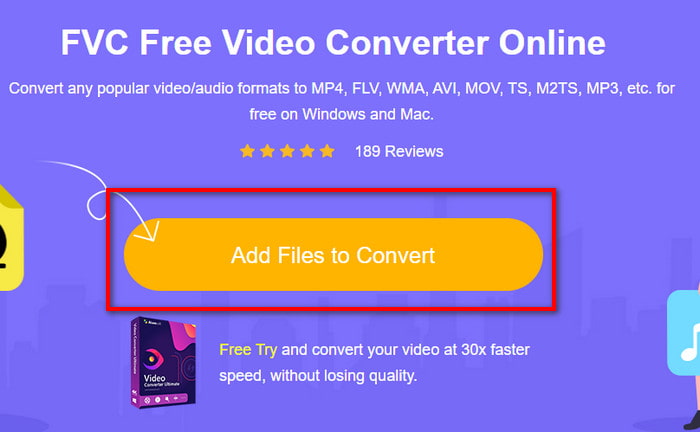
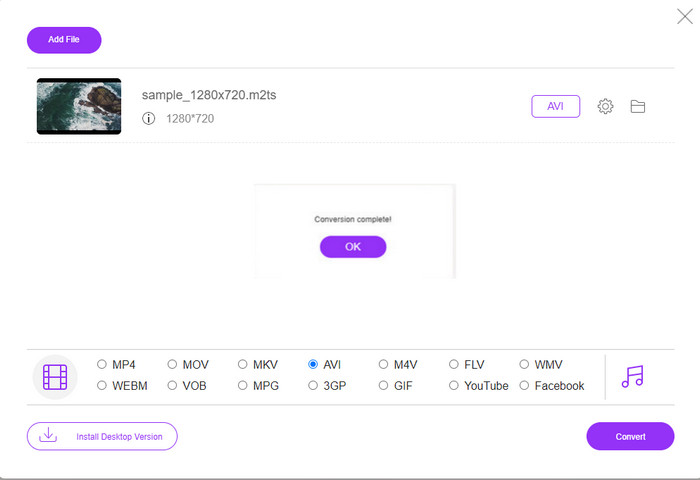
Pas 2. A continuació, fes clic a Add Files to Convert, i es mostrarà una carpeta a la pantalla; selecciona el fitxer amb l’extensió .m2ts i fes clic a Open.
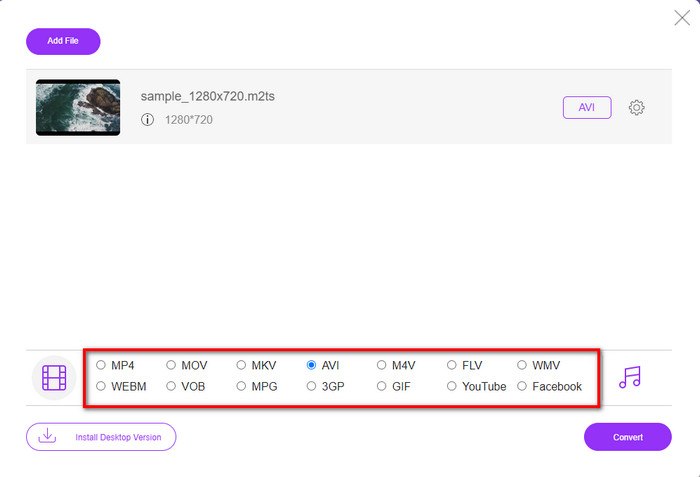
Pas 3. Després d’inserir el fitxer, veuràs que apareix una interfície a la pantalla amb les opcions de format disponibles a la part inferior; tria el format AVI de la llista.
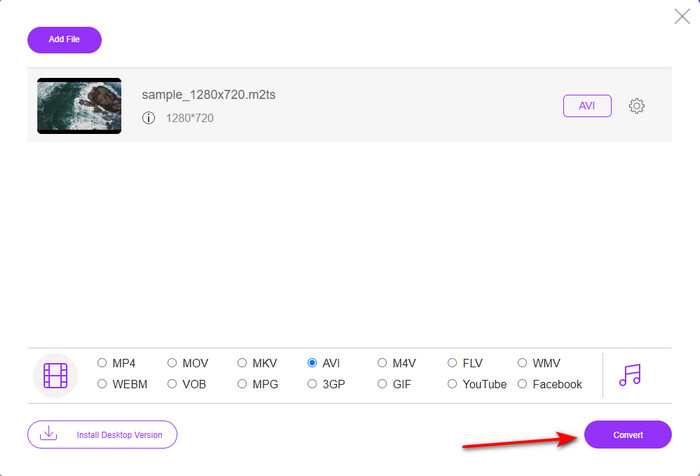
Pas 4. Un cop hagis seleccionat el format, fes clic a Convert per començar a canviar el format a AVI.
Pas 5. La conversió del format trigarà aproximadament un minut; després s’obrirà una carpeta amb el fitxer convertit que has creat abans.
Part 3. La segona manera és utilitzar l'eina definitiva per convertir M2TS a AVI fora de línia
Si vols una eina que funcioni molt millor que els convertidors en línia o fora de línia disponibles, el FVC Video Converter Ultimate és l’eina perfecta per a tu. Aquesta eina ofereix un rendiment excel·lent en diferents tasques: edició, creació de GIF, canvi de format, augment de volum i moltes més. Ja s’hi han afegit moltes funcions avançades però simplificades per oferir el millor resultat als seus clients. Sí, és cert: hauràs de ser client abans d’accedir a aquesta eina definitiva. Però no cal desanimar-se, perquè no és cara i funciona molt millor que altres convertidors. A més, aquesta eina admet tots els formats coneguts i, sens dubte, el format de fitxer que admeten els teus dispositius o el teu ordinador. Si vols viure la millor experiència de conversió possible, segueix els passos indicats sobre com utilitzar aquest convertidor de M2TS a AVI.
Pros
- Admet funcions molt més avançades que us agradaria utilitzar.
- Pot convertir un fitxer en pocs segons a causa de l'acceleració de maquinari i la conversió ràpida que ofereix aquesta eina.
- Disponible a totes les plataformes i admet tots els formats.
Contres
- Per accedir a l'eina, hauràs de pagar.
- Primer s'ha de descarregar a la unitat de l'ordinador.
Passos per convertir el format de vídeo M2TS a format AVI fora de línia
Pas 1. Descarrega el programari a la teva plataforma fent clic al botó de descàrrega següent. Després instal·la’l, fes-ne la configuració i obre l’eina.
Descàrrega gratuïtaPer a Windows 7 o posteriorDescàrrega segura
Descàrrega gratuïtaPer a macOS 10.7 o posteriorDescàrrega segura
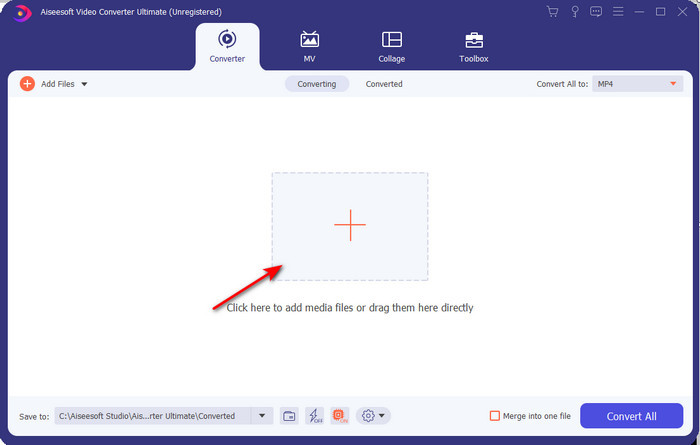
Pas 2. Inicia el programari, fes clic al botó + per col·locar el fitxer .m2ts a la carpeta i després fes clic a Open.
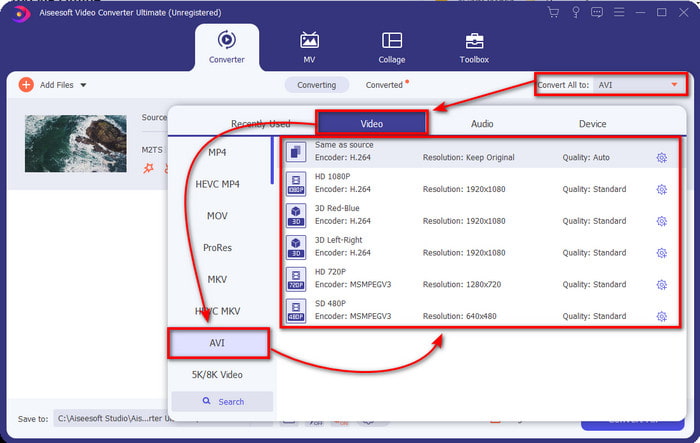
Pas 3. Ara, a la part superior dreta de la interfície, veuràs el menú Convert All to; fes-hi clic. Després de fer-hi clic, apareixerà un submenú; localitza el format AVI a la llista.
Pas 4. Un cop hagis seleccionat el format, comencem la conversió fent clic a Convert All.
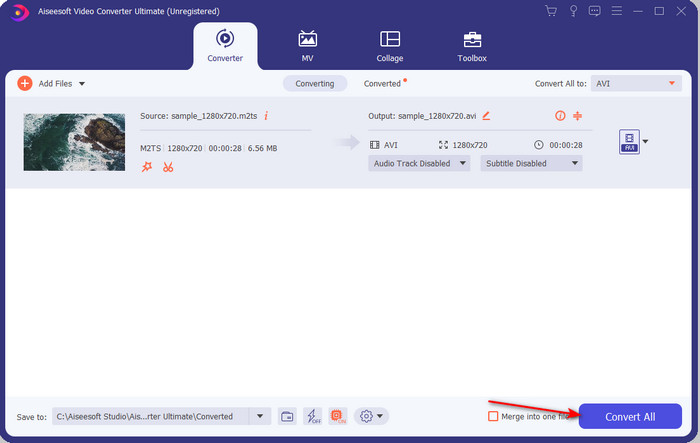
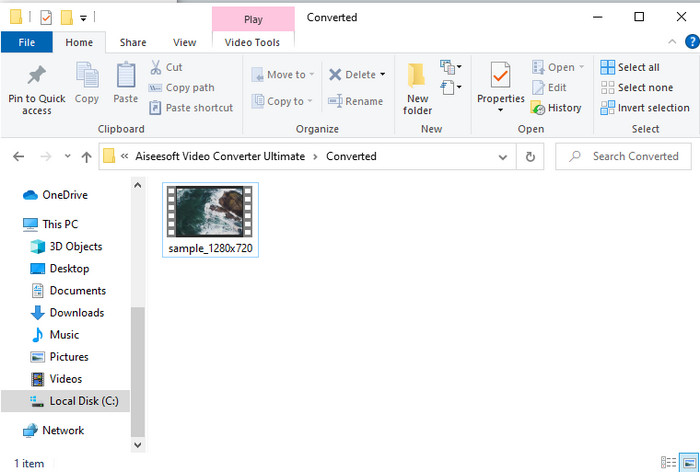
Pas 5. Quan la conversió hagi finalitzat, apareixerà una carpeta a la pantalla; fes clic al fitxer per veure el .m2ts convertit.
Part 4. Preguntes freqüents sobre M2TS i AVI
Després de convertir M2TS a AVI, es manté la qualitat?
Després de convertir el M2TS a AVI, la qualitat del vídeo s'ha de mantenir. Tanmateix, hi ha la possibilitat que la qualitat canviï si configureu la sortida de qualitat a mitjana o baixa. Això es pot evitar si el configureu en 1080 o 4k, però la mida del fitxer serà més gran en comparació amb els de baixa qualitat.
Per què no puc jugar a M2TS al meu Windows Media Player?
Hi ha un motiu pel qual no pots reproduir el fitxer amb l’extensió .m2ts: perquè no és compatible. Així doncs, si encara vols veure el teu fitxer .m2ts, és imprescindible convertir-lo o bé trobar un altre reproductor multimèdia de tercers que pugui reproduir fitxers M2TS.
MTS i M2TS són diferents?
Si comparéssim aquests dos formats, veuries que no hi ha gaire diferència establerta. A més, tots dos utilitzen el format de vídeo AVCHD, que emmagatzema el teu vídeo amb la màxima qualitat possible. Per obtenir més informació sobre els fitxers MTS i M2TS, llegeix Quina és la diferència entre MTS i M2TS.
Conclusió
Junts hem trobat ara les diferents tècniques sobre com convertir el vostre fitxer M2TS a AVI. Quan vam investigar cada eina individualment, vam descobrir que FVC Video Converter Ultimate funciona bé en la conversió de fitxers. Per tant, al final us suggerim que descarregueu el convertidor fenomenal per a una conversió més fàcil i experimenteu el procés de conversió més ràpid que mai.
-
 Com convertir M2TS a MKV gratis i en línia
 Voleu convertir M2TS a MKV mantenint la qualitat original? Aquesta publicació us mostra mètodes gratuïts i en línia per canviar M2TS a MKV sense pèrdues.
-
 [2021] Les 6 millors maneres gratuïtes i en línia de convertir M2TS a MP3
 Es pot convertir un fitxer M2TS a MP3? En aquest post, hem llistat les 6 maneres gratuïtes i en línia que us ajudaran a convertir M2TS a MP3, AAC, AIFF i més formats d’àudio.
-
 Com convertir M2TS a MOV de forma gratuïta [en línia i fora de línia]
 Necessiteu convertir M2TS a MOV per reproduir fitxers de vídeo en diversos reproductors i plataformes? Aquest article us ajudarà a trobar el millor mètode en línia / fora de línia per convertir M2TS a MOV a Windows / Mac.
