


 Video Converter Ultimate
 Gravadora de pantalla
 Reparació de vídeo
Descobriu quins són els 3 millors convertidors de FLV a MKV per convertir els vostres fitxers FLV a MKV
Estàs cansat de navegar per internet buscant la millor manera de convertir FLV a MKV gratuïtament? Potser és una coincidència, però avui hem trobat els millors conversors FLV que pots utilitzar; és clar, només hem escollit els millors. Perquè la teva recerca sigui molt més fàcil, has de continuar llegint l’article següent, ja que hi aprendràs molt sobre FLV i MKV i sobre els conversors que pots fer servir.

Part 1. 2 maneres de convertir FLV a MKV de forma gratuïta
1a via. Utilitzeu el convertidor en línia per convertir FLV a MKV
Aquest convertidor en línia és sens dubte un dels grans transcodificadors per convertir FLV a MKV en línia. FVC Free Video Converter Online és un convertidor senzill i fàcil d’entendre que pots utilitzar en línia. Però aquesta eina depèn d’internet, la qual cosa vol dir que, si no tens connexió, és l’últim recurs per convertir. Tot i que l’eina és en línia, no té anuncis a la interfície que et puguin molestar i està lliure de programari maliciós. Així doncs, si vols tenir una experiència pràctica amb aquesta eina, segueix els passos següents.
Pas 1. Fes clic en aquest enllaç per obrir el FVC Free Video Converter Online en una pestanya nova.
Pas 2. Prem el botó Add Files to Convert per obrir la carpeta de l’ordinador que estàs utilitzant. Tria el fitxer FLV que vols convertir i prem Open per pujar el fitxer.
Baixa la versió d’escriptori per convertir fitxers per lots.
Pas 3. Tria el format MKV a la llista de formats presentada a continuació.
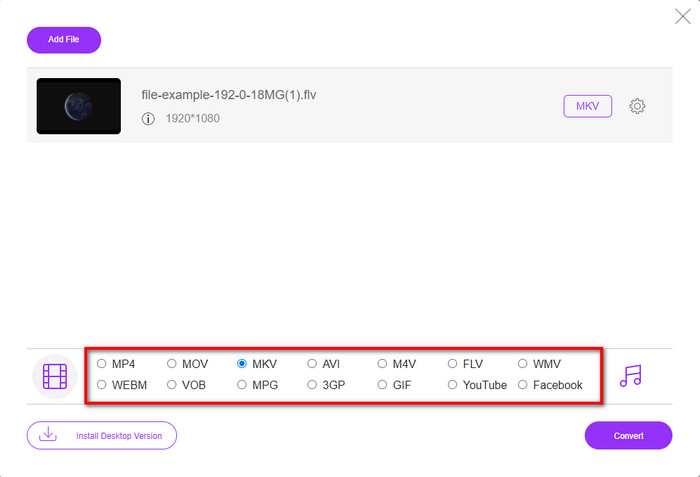
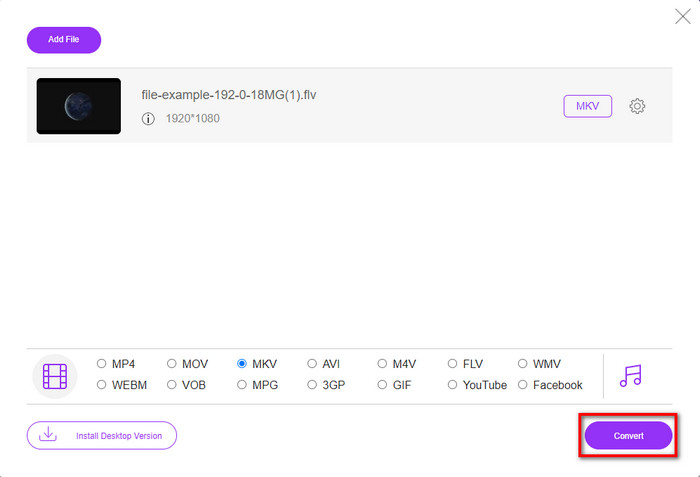
Pas 4. Comença el procés de conversió fent clic al botó Convert, i el fitxer convertit se desarà automàticament al disc dur de l’ordinador.
2n Camí. Utilitzeu el convertidor gratuït disponible per descarregar a Windows i Mac
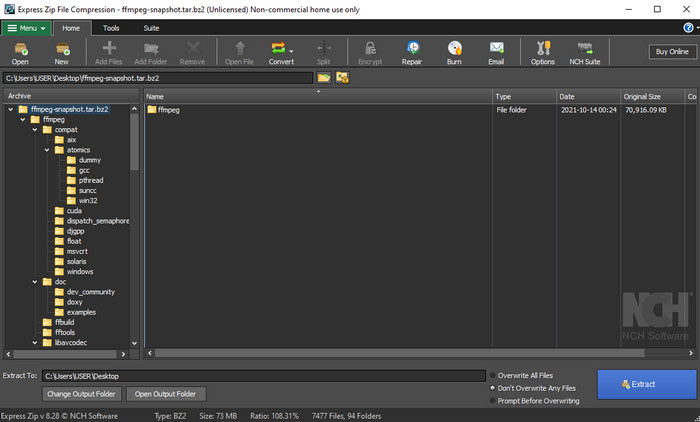
FFmpeg no és el convertidor clàssic que ja utilitzes. Encara que no sigui el convertidor habitual, pot convertir igualment el teu fitxer FLV. Allò que fa aquesta eina diferent és que utilitza una interfície basada en CLI, és a dir, abans de fer la conversió l’has d’ordenar codificant o, dit més senzillament, teclejant instruccions. Si trobes aquest convertidor interessant, llegeix els detalls següents per utilitzar aquest FFmpeg per passar de FLV a MKV seguint els passos.
Pas 1. Baixa i obre l’arxiu FFmpeg.exe.
Pas 2. Obre l’intèrpret d’ordres (Command Prompt) del teu ordinador.
Pas 3. Navega fins al fitxer FLV utilitzant el CMD. Després, copia aquest codi i enganxa’l a l’intèrpret d’ordres: ffmpeg -i input.flv -vn -ar 44100 -ac 2 -b:a 192k output.mkv i, tot seguit, prem Enter al teclat perquè comenci el procés.
Part 2. Converteix FLV a MKV amb el millor convertidor de FLV a MKV sense pèrdues
3a via. Utilitzeu el convertidor professional per convertir FLV a WMV
Encara no estàs satisfet amb els dos primers conversors presentats més amunt? Si és així, has de provar el FVC Video Converter Ultimate. Per què? Doncs perquè ofereix un resultat professional encara que no hi posis gaire esforç en la conversió. A més, admet més formats per convertir el teu fitxer FLV a MKV, AVI, MOV, AVI, MP4 i més de 200 formats addicionals. Encara no t’impressiona? Potser vols afegir màgia al teu vídeo? En aquest cas, tens sort de disposar d’aquest conversor, perquè ofereix funcions avançades d’edició de vídeo que pots fer servir. Tens dubtes perquè penses que l’eina pot ser massa complexa? Si és així, segueix els passos indicats a continuació per experimentar-la i aprendre com utilitzar aquest conversor de FLV a MKV.
Pas 1. Abans d’utilitzar aquest convertidor, primer l’has de descarregar fent clic al botó de descàrrega que trobaràs a continuació. Després de baixar-lo, segueix les instruccions d’instal·lació i executa’l.
Descàrrega gratuïtaPer a Windows 7 o posteriorDescàrrega segura
Descàrrega gratuïtaPer a macOS 10.7 o posteriorDescàrrega segura
Pas 2. Per afegir el fitxer FLV que vols convertir, prem el botó +. Navega fins al fitxer FLV a la carpeta que apareixerà a la interfície i prem Open per passar al següent pas.
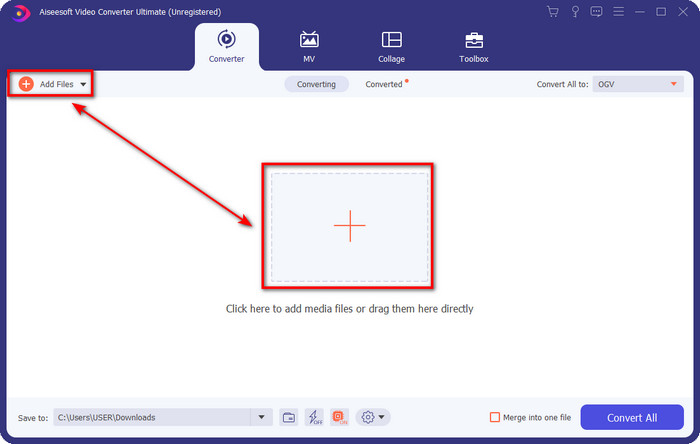
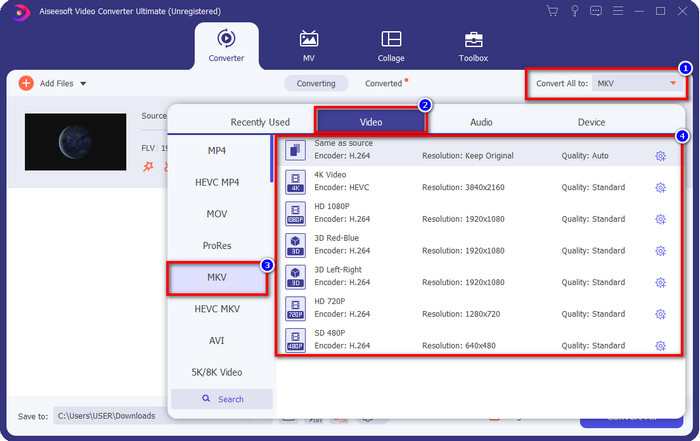
Pas 3. Després, canviem el format a MKV fent clic al botó drop-down a la part superior dreta de la interfície d’usuari.
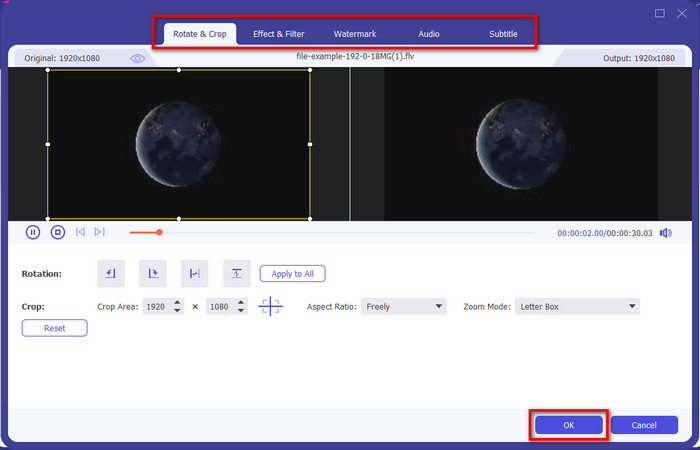
Opcional. Si necessites editar el vídeo, pots fer clic al botó amb la vareta si ho desitges. Apareixerà una nova interfície; en aquesta pantalla podràs Girar, Retallar, aplicar Efectes, Filtres, afegir una Marca d’aigua, editar l’Àudio i els Subtítols. No limitis la teva imaginació, fes tot el que vulguis i, per aplicar tota la màgia que hagis creat, fes clic a OK.
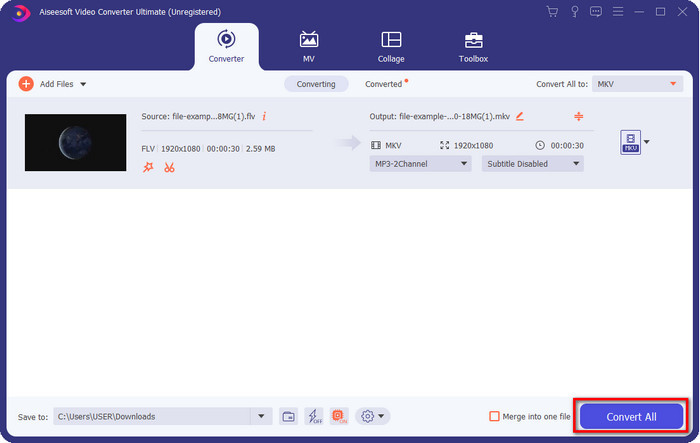
Pas 4. Finalment, fes clic a Convert All per convertir el FLV al format MKV. El procés només trigarà menys d’un minut, així que no caldrà esperar gaire. Es mostrarà una carpeta a la pantalla amb el FLV convertit.
Relacionat:
Part 3. Quina diferència hi ha entre FLV i MKV
FLV i MKV són coneguts per estar entre els millors contenidors que tothom coneix. Però abans de res, comparem i veiem informació més detallada sobre els dos formats.
FLV és conegut a tots els llocs web perquè és popular a les pàgines web, principalment perquè l'ha creat Adobe. A més, .flv reprodueix fluxos de vídeo en línia perquè són molt més fàcils de carregar que l'altre format. A més, aquest format necessita un plug-in-play abans de poder veure o veure el vídeo en aquest format, o bé podeu descarregar Flash Player fàcilment. Tot i que el format és excel·lent, els plug-in-plays que utilitza ja han enlairat, la qual cosa significa que el format no és la millor opció. Tanmateix, molts reproductors multimèdia encara admeten aquest format i els usuaris que encara el fan servir.
MKV és conegut per ser el format més futur disponible. Aquest format no seria com cap altre format en molts sentits si estiguéssim a punt de comparar-lo. Per exemple, l'estructura construïda en aquest format no és la mateixa que l'MP4 o l'AVI, però és diferent. El disseny i el seu únic emmagatzematge de fitxers multimèdia el fan més impressionant. Avui en dia, és difícil triar quin format està obsolet, i un és el MKV.
Si aprofundim més en detalls, trobarem moltes raons per les quals necessiteu convertir FLV a MKV. Tot i que els dos formats contenen contingut multimèdia, MKV és més potent que FLV. Per tant, si voleu tenir el poder únic MKV, heu de convertir el vostre fitxer en aquest format.
FLV contra MKV
Adobe Flash Player va utilitzar FLV per oferir contingut de vídeo com pel·lícules i programes de televisió. Avui en dia, Adobe ja no desenvolupa el reproductor i recomana als usuaris que el desinstal·lin per motius de seguretat. Tanmateix, encara podeu utilitzar el format FLV en molts programes que no són d'Adobe/Macromedia.
El format de contenidor multimèdia Matroska, llançat l'any 2002, és un format de codi obert que pot incloure una sèrie de pistes de vídeo, àudio, imatge i subtítols. Per tant, podeu utilitzar-lo per emmagatzemar vídeos curts, programes de televisió i pel·lícules fàcilment. És força popular per a la substitució de fans d'anime.
Part 4. Preguntes freqüents sobre la conversió de FLV a MKV
És segur convertir FLV a MKV en línia?
Bé, convertir el format hauria de ser segur si utilitzeu una eina web. Tanmateix, no tots els convertidors en línia són segurs per convertir el vostre format de fitxer. Com que hi ha algunes tendències, hi haurà molts errors inesperats quan utilitzeu el convertidor incorrecte. Per exemple, la pèrdua de qualitat és un problema generalitzat, virus en descarregar el fitxer després de convertir-lo, diversos anuncis emergents, programari maliciós infecciós i molts més. Per tant, si voleu tenir un procés de conversió segur en línia, heu d'utilitzar FVC Free Video Converter Online.
La conversió de FLV trigarà temps?
El procés de conversió dependrà de molts factors, i un d'ells és l'eina que utilitzeu i la mida del fitxer. Si teniu un fitxer FLV gran, heu d'utilitzar FVC Video Converter Ultimate, sobretot amb pressa. Com que aquesta eina ofereix un procés a la velocitat del llamp, no necessitareu una connexió a Internet per utilitzar-la. I ara, si esteu buscant un convertidor que pugui processar el vostre format més ràpidament, l'eina definitiva és l'elecció.
Per què no puc obrir el meu fitxer FLV?
Hi ha diversos motius pels quals no podeu obrir els fitxers FLV. Prendre nota; aquest detall següent és un dels centèsims motius pels quals no podeu obrir el fitxer FLV. En primer lloc, no podeu obrir un FLV si el fitxer està trencat o hi ha un virus. En segon lloc, el problema més comú és que el fitxer de vídeo no és compatible amb l'aplicació que utilitzeu. En tercer lloc, si descarregueu un fitxer FLV a Internet, hi haurà un cas que el fitxer perdi informació vital per reproduir-lo. Tot i que això és un problema, encara podem ajudar-ho convertint el vostre FLV a un altre format. Però recordeu que no podeu restaurar el FLV canviant el format si està danyat o incomplet.
Conclusió
Hem après allò que necessitàvem saber per convertir FLV a MKV de diverses maneres. Les eines anteriors són excel·lents per utilitzar quan convertim el format a una versió nova. Ara és a les teves mans triar el format que creus que s’adapta millor a tu a l’hora de transformar el teu fitxer. Qualsevol de les tres eines et garanteix l’èxit, però si vols un resultat professional i treure el màxim profit del teu fitxer de vídeo, has d’escollir el FVC Video Converter Ultimate. No cal cap explicació, perquè aquesta eina omplirà totes les teves necessitats.
-
 3 solucions sobre com convertir FLV a PSP sense pèrdues
 Com convertir FLV a PSP? Aquí obtindreu la guia pas a pas per convertir vídeos Flash a formats compatibles amb PSP (WMV, MP4, AVI, FLV, etc.) a Windows i Mac.
-
 2 mètodes per convertir FLV a WMA àudio [gratis i en línia]
 Voleu extreure àudio WMA del vídeo FLV? Aquí hi ha 2 extractors d’àudio WMA gratuïts per convertir FLV (Flash Video) a WMA (Windows Media Audio) amb una velocitat de conversió ràpida a Mac OS X i Windows 10/8/7.
-
 [Resolt] Com convertir vídeos FLV a fitxers GIF animats de forma gratuïta
 Si voleu crear GIFs des dels segments de vídeo FLV per a un millor enviament, podeu obtenir més informació sobre com convertir vídeos FLV a fitxers GIF fàcilment des d’aquest article.

