


 Video Converter Ultimate
 Gravadora de pantalla
 Reparació de vídeo
Entendre què són les metadades: tipus, exemple, importància i com visualitzar-les
Les metadades són essencials per a qualsevol fitxer perquè expliquen moltes coses sobre el fitxer multimèdia. Però les preguntes són: què són les metadades? Per a què serveixen? Quins són alguns exemples de metadades? És necessari tenir metadades? Més endavant en aquest article coneixeràs les respostes a totes aquestes preguntes. A més a més, també et proporcionarem un editor de metadades perfecte que pots utilitzar per afegir o editar les metadades del teu fitxer multimèdia. Llegeix a continuació tot l’abast del contingut i aprèn més sobre les metadades.

Part 1. Què són les metadades
Definició
Les metadades són dades sobre les dades ocultes del fitxer multimèdia. Què són les metadades? Suposem que voleu reconèixer el contingut del fitxer i altres característiques, aleshores les metadades són un codi de trampes. Tots els fitxers multimèdia tenen metadades i, si teniu un fitxer multimèdia organitzat, les metadades us ajudaran a organitzar el fitxer si esteu tractant amb biblioteques de fitxers multimèdia. Ara que tenim una idea de les metadades, mirem a continuació els tipus de metadades.
Quins són els diferents tipus de metadades
Sabíeu que les metadades tenen diferents tipus? Si no és així, a continuació us ajudarà a entendre les altres sis estructures de metadades i la seva finalitat per emmagatzemar dades. Ara, per saber quins són els exemples de metadades, llegiu el gràfic següent.
| Tipus de metadades | Descripció |
| Metadades descriptives | Identifica els recursos d'un objecte concret, incloent diversos elements com el títol, el resum, l'autor i la paraula clau. |
| Metadades administratives | S'utilitza per gestionar informació com quin tipus de recurs, creació o adquisició de dades, permís i disposició. |
| Metadades de referència o metadades explicatives | Les dades internes descriuen el contingut i les dades estadístiques de qualitat des de la perspectiva d'un. |
| Metadades estadístiques | Descriu el procés de dades estadístiques recopilant-les, processant-les i produint-les. |
| Metadades legals | La informació inclou dades sobre el propietari dels drets d'autor, les llicències públiques i la propietat. |
| Metadades estructurals | Les dades descriuen el seu tipus, versió, relacions i altres característiques del material digital. |
Quina és la importància de les metadades?
Què són les metadades i els seus tipus ja s'han explicat més amunt; Ara, hem de determinar la seva importància. Amb les metadades, podeu conèixer la resta d'informació sobre el fitxer multimèdia, com ara l'autor, la data i l'hora, diferents materials digitals i molts més. A més, si voleu protegir el vostre fitxer multimèdia, aquesta és una de les millors maneres d'utilitzar-lo en lloc d'utilitzar una marca d'aigua. Per tant, si el vostre fitxer multimèdia té metadades, podeu fer moltes coses que no us podeu creure que pugueu fer, com ara organitzar-lo a la vostra carpeta o biblioteca.
Part 2. Com visualitzar les metadades en diferents plataformes
Sabíeu que podeu comprovar les metadades del vostre fitxer multimèdia a través dels vostres dispositius sense instal·lar cap eina especial? Vols saber com fer-ho? En aquest cas, heu de llegir els detalls següents per saber més sobre quines metadades hi ha al vostre fitxer multimèdia.
Per a usuaris de Windows
Pas 1. Cerca el fitxer a l’escriptori i prem el botó de clic dret del ratolí.
Pas 2. Després fes clic a Propietats i cerca Detalls; hi veuràs les metadades del teu vídeo.
Per a usuaris de Mac
Pas 1. Cerca el fitxer multimèdia al Finder, prem el botó dret del ratolí i fes clic a Eines.
Pas 2. A continuació, fes clic a Mostra l’inspector.
Pas 3. Es mostrarà una altra finestra, després prem Surt, i veuràs les metadades del teu fitxer.
Per a usuaris d'iPhone
Pas 1. Obre l’app Fotos.
Pas 2. Fes clic al vídeo o a la imatge de la qual vulguis comprovar les metadades.
Pas 3. Prem la icona amb una i, i les metadades apareixeran a la pantalla.
Per a usuaris d'Android
Pas 1. Obre Google Fotos al teu dispositiu; si encara no l’has descarregat al telèfon, primer l’has de descarregar des de Play Store.
Pas 2. Obre el fitxer i fes clic a la icona amb una i per revisar-ne les metadades.
Part 3. Com editar o afegir metadades amb el millor editor de metadades a l'escriptori
Amb el millor editor de metadades, pots afegir fàcilment metadades a un fitxer multimèdia que no en tingui o bé editar-ne unes que ja existeixin. FVC Video Converter Ultimate és l’eina perfecta que hauries d’utilitzar per canviar o afegir metadades a qualsevol fitxer multimèdia amb facilitat. Així doncs, per saber per a què s’utilitzen les metadades, pots seguir els passos i aprendre fàcilment quines altres coses pots afegir a les metadades.
Pas 1. Prem el botó de descàrrega de sota per descarregar l’eina a Windows o macOS, fes clic al fitxer descarregat, segueix el procediment d’instal·lació i obre-la.
Descàrrega gratuïtaPer a Windows 7 o posteriorDescàrrega segura
Descàrrega gratuïtaPer a macOS 10.7 o posteriorDescàrrega segura
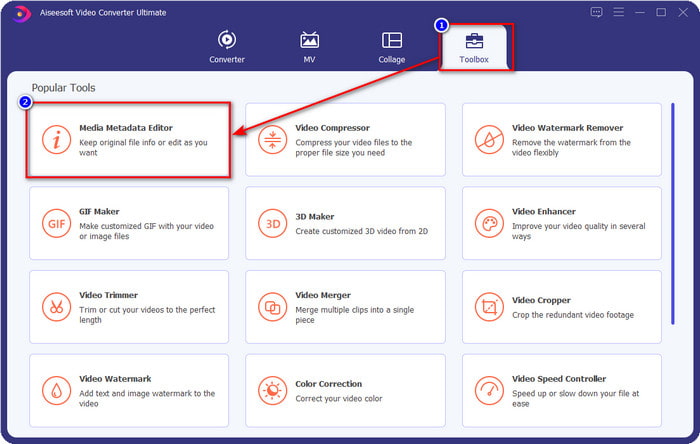
Pas 2. Ves a la secció Caixa d’eines i cerca Editor de metadades multimèdia; fes-hi clic per obrir-lo.
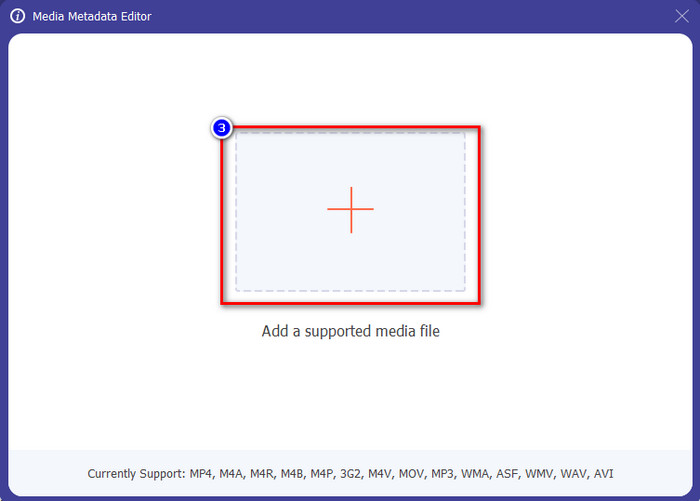
Pas 3. Es mostrarà una finestra nova a la pantalla; prem el botó + per afegir el vídeo al qual vols afegir o editar les metadades. Localitza el vídeo a la carpeta de l’ordinador i fes clic a Obre per continuar.
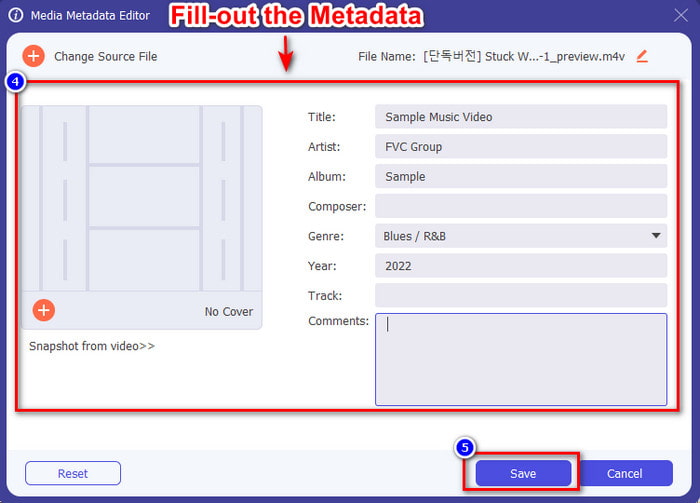
Pas 4. Espera que l’eina carregui i es mostrarà l’editor de metadades; en aquesta àrea pots afegir les teves metadades personalitzades omplint el quadre de text. Després d’afegir-hi les dades essencials, fes clic a Desa per descarregar el fitxer multimèdia amb les metadades incorporades. Sense cap esforç, hauràs afegit o editat les metadades del teu fitxer.
Relacionat:
Com afegir una imatge a un vídeo
Com afegir una marca d’aigua a iMovie
Part 4. Preguntes freqüents sobre metadades
Per què la mida del fitxer augmenta després d'afegir metadades?
No us hauríeu de sorprendre si la mida del fitxer multimèdia augmenta a causa de les metadades perquè ho farà. El motiu és que les metadades són un element emmagatzemat a cada fitxer multimèdia; les metadades contribueixen a la mida del vídeo.
Les metadades afecten la qualitat del vídeo?
La qualitat del vídeo no canviarà encara que afegiu, editeu o baixeu un vídeo amb metadades.
Quines són les metadades importants que cal afegir?
Suposem que voleu afegir metadades al fitxer sense metainformació. Haureu d'omplir les coses importants: el nom de l'autor, el títol, la data i l'hora. Totes les coses són importants, però aquestes són la part essencial de les metadades.
Conclusió
Finalment, ara ja tenim un coneixement ampli sobre les metadades; totes les preguntes que et preocupaven ja han estat respostes en aquesta publicació. Ara que ja saps què són les metadades, has d’afegir metadades als teus fitxers per afegir-hi una capa de protecció amb l’ajuda del millor editor de metadades per a escriptori. Sens dubte, FVC Video Converter Ultimate és l’eina perfecta que tothom pot utilitzar per aplicar fàcilment metadades als seus fitxers o editar-les si ja n’hi ha. Amb l’ajuda d’aquest programari pots fer moltes coses; vols saber quines són? Doncs, fent clic al botó de descàrrega, veuràs les altres funcions sorprenents que ofereix.
-
 3 maneres efectives d'afegir vídeos i imatges junts a Tiktok
 Vols saber com afegir imatges als vídeos de Tiktok? En aquest cas, feu clic i llegiu aquest article per saber com afegir les imatges al vostre vídeo de Tiktok fàcilment.
-
 Afegiu text al vídeo amb els 3 millors editors de vídeo [sense esforç]
 Afegir text a un vídeo és una tasca fàcil amb l'eina adequada. Així doncs, avui us presentarem les diferents eines que podeu utilitzar per afegir text al vostre vídeo abans de compartir-lo.
-
 Revisió de Bona Fide sobre 6 aplicacions de vídeo de text [2022]
 Voleu saber què són les aplicacions de vídeo de text que podeu utilitzar a la plataforma? Aquest article oferirà una revisió de bona fe de les sis aplicacions de vídeo de text que hi ha al mercat.
