


 Video Converter Ultimate
 Gravadora de pantalla
 Reparació de vídeo
Una guia ràpida per convertir WMV a MKV fàcilment a Mac i Windows
Si sou un entusiasta del cinema i voleu un format de fitxer que pugui gestionar diverses pistes d'àudio amb subtítols, potser voldreu convertir el vostre fitxer WMV a fitxer MKV. I si teniu problemes per buscar un convertidor de WMV a MKV compatible amb Windows i Mac, hem trobat els millors convertidors que podeu utilitzar en línia i fora de línia. Aquest article us presenta els millors convertidors per convertir WMV a MKV a Mac i Windows.

Part 1. Per què convertir WMV a MKV
WMV o Windows Media Video és un format de fitxer que gairebé tots els reproductors multimèdia admeten àmpliament. És un format de fitxer que pot emmagatzemar videoclips, animacions, episodis de televisió i pel·lícules. A més, és un fitxer comprimit; per tant, té una mida de fitxer petita. Aleshores, per què necessiteu convertir WMV a MKV? MKV o Matroska és un contenidor de fitxers que pot incorporar pistes d'àudio, vídeo i subtítols il·limitades.
A més, aquest format de fitxer és a prova de futur, la qual cosa significa que no estarà obsolet en el futur. També pot gestionar múltiples fluxos de subtítols i pistes d'àudio en nombrosos idiomes. Per tant, si sou un entusiasta de les pel·lícules, potser voldreu convertir el vostre fitxer WMV a format de fitxer MKV.
Part 2. Converteix WMV a MKV amb el millor convertidor fora de línia
S’ha demostrat que aquest convertidor és el millor convertidor fora de línia disponible al mercat. FVC Video Converter Ultimate és una eina gratuïta fora de línia que pot oferir resultats d’aspecte professional sense complicacions. També admet diversos formats de fitxer per convertir el teu fitxer WMV a MKV, AVI, MP4, MOV, FLV i més. Encara no estàs satisfet amb el que pot fer? També pots editar el teu vídeo utilitzant les seves funcions avançades d’edició de vídeo amb aquest convertidor. Segueix els senzills passos següents per saber com utilitzar aquest convertidor de WMV a MKV de manera gratuïta.
Pas 1. Descarrega l’aplicació clicant el botó Download de sota. Hi ha dues opcions entre les quals pots triar per descarregar-la a Mac o Windows. Després obre l’aplicació.
Descàrrega gratuïtaPer a Windows 7 o posteriorDescàrrega segura
Descàrrega gratuïtaPer a macOS 10.7 o posteriorDescàrrega segura
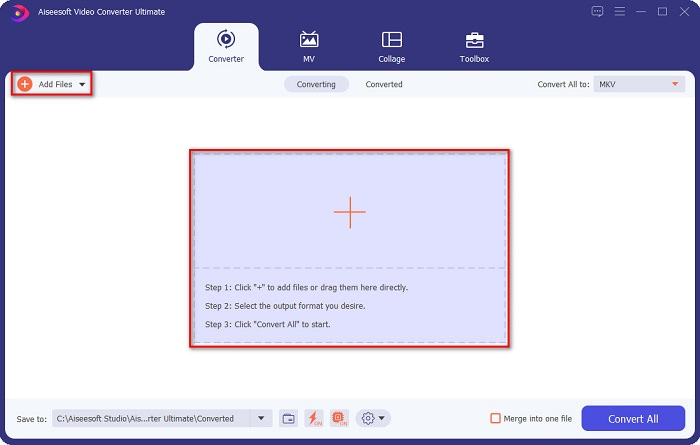
Pas 2. Després d’obrir l’aplicació, fes clic al botó Add Files o al botó + per pujar el teu fitxer a la primera interfície del programari. A continuació, apareixerà una finestra nova on seleccionaràs el teu fitxer WMV.
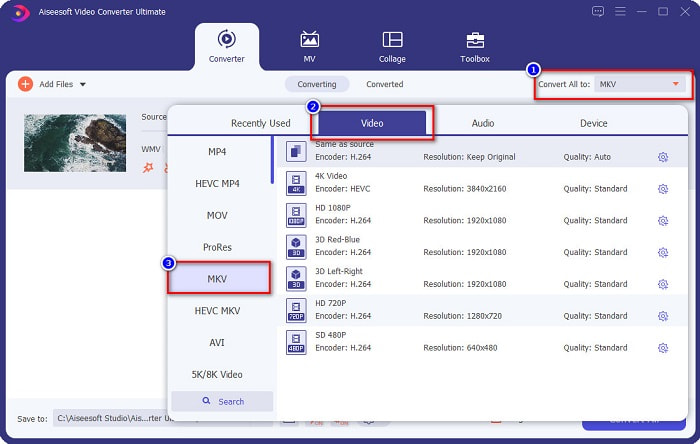
Pas 3. Després fes clic al botó Convert All to per seleccionar el format de sortida desitjat. En el teu cas, tria el format MKV.
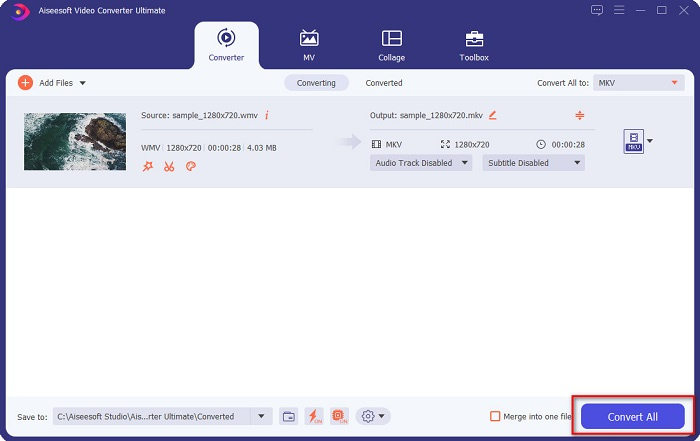
Pas 4. Finalment, fes clic al botó Convert All per convertir el teu WMV en un fitxer MKV. A continuació, només has d’esperar uns segons. I ja està! Per cert, també pots convertir ràpidament WMV a fitxers MOV seguint aquests senzills passos.
Part 3. Converteix WMV a MKV amb les 3 millors eines en línia
No hi ha dubte que les eines en línia són les millors per a la comoditat perquè no caldrà descarregar res. Aquesta part presenta els millors convertidors de WMV a MKV disponibles al web.
FVC convertidor de vídeo en línia gratuït
FVC Free Online Video Converter és un convertidor en línia amb una interfície fàcil d’utilitzar. Admet diversos formats de fitxer i pot convertir WMV a MKV, AVI, MOV, MP4, MP3, TS i més. Tanmateix, aquest transcodificador depèn d’Internet, és a dir, la velocitat de la conversió dependrà de la connexió. Tot i així, és sens dubte un dels millors convertidors en línia de WMV a MKV.
Aquests són els passos per convertir fitxers WMV a MKV mitjançant FVC Free Online Video Converter:
Pas 1. Ves a la seva pàgina web clicant aquest enllaç, o busca FVC Free Online Video Converter al teu navegador.
Pas 2. A continuació, fes clic al botó Add Files to Convert i després inicia l’aplicació. Un cop l’aplicació s’hagi iniciat, selecciona el teu fitxer WMV quan apareguin els fitxers de l’ordinador.
Baixa la versió d’escriptori per convertir fitxers per lots.
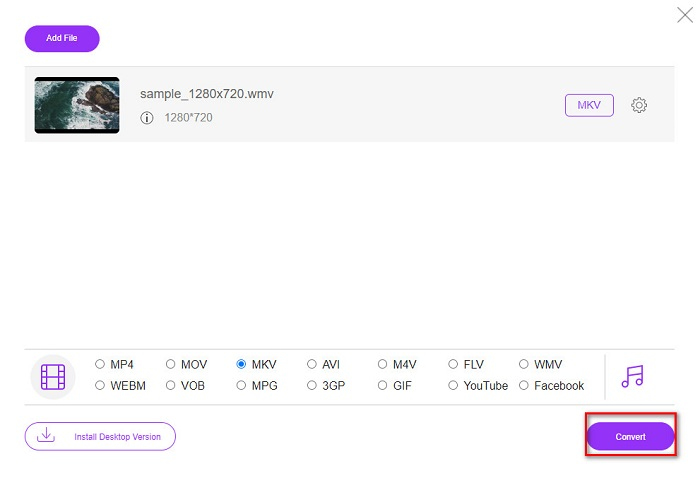
Pas 3. I després, per seleccionar el format de fitxer de sortida desitjat, fes clic a MKV, situat a sota de la segona interfície del programari.
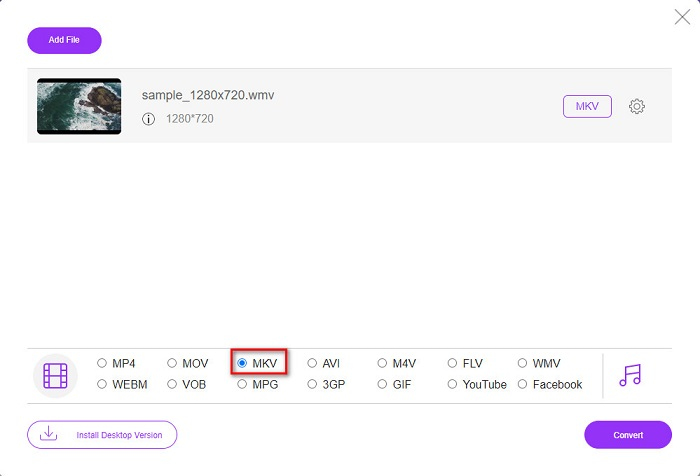
Pas 4. Per acabar, fes clic al botó Convert, i el teu fitxer WMV a MKV començarà a convertir-se. Només has d’esperar que la conversió acabi, i ja està! Seguint aquests passos, pots convertir fàcilment WMV a MKV en línia.
Convertio
Un altre convertidor en línia que és tendència a la xarxa és Convertio. Aquest convertidor gratuït en línia també és fàcil d’utilitzar. Tot i això, aquest convertidor conté anuncis que et poden molestar. Però continua sent molt pràctic d’utilitzar quan converteixes el teu fitxer WMV a MKV.
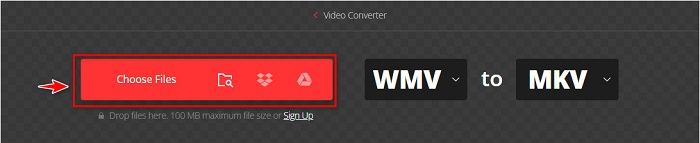
Pas 1. Al navegador, cerca Convertio. Després, fes clic al botó Choose Files a la interfície principal del programari per seleccionar el teu fitxer WMV.
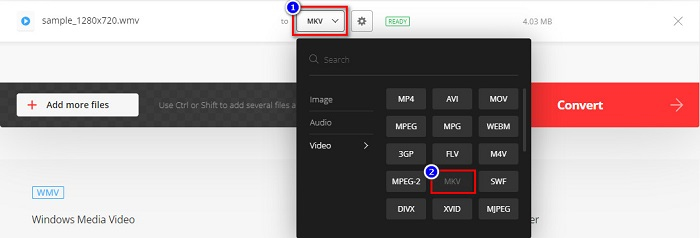
Pas 2. Després, fes clic al botó drop-down per seleccionar el fitxer MKV com a format de sortida.
Pas 3. Per a l’últim pas, fes clic al botó Convert situat al cantó inferior dret de la interfície del programari. Llavors el teu fitxer començarà a convertir-se.

MConverter
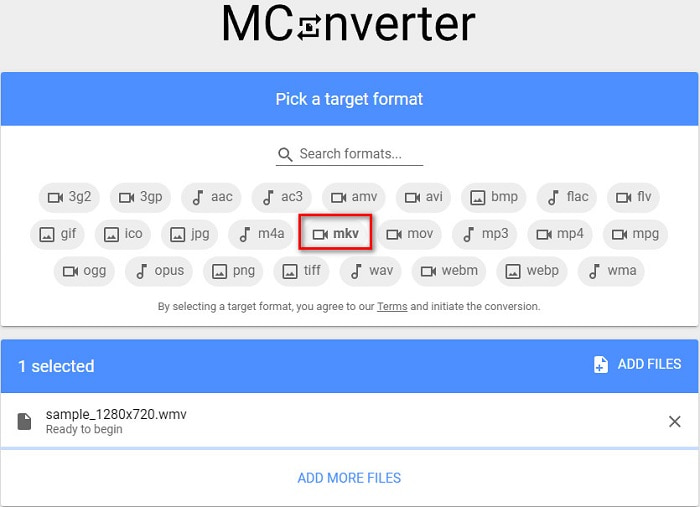
MConverter és un convertidor en línia de WMV a MKV que admet diversos fitxers d’àudio, vídeo i imatge. Té passos senzills per convertir el teu WMV en un fitxer MKV. No obstant això, hi ha un límit de mida de fitxer per utilitzar aquest convertidor. Tot i així, pot transformar el teu fitxer WMV a MKV de manera eficaç i senzilla.
Pas 1. Escriu MConverter al navegador que utilitzes i se t’adreçarà a la seva pàgina web.
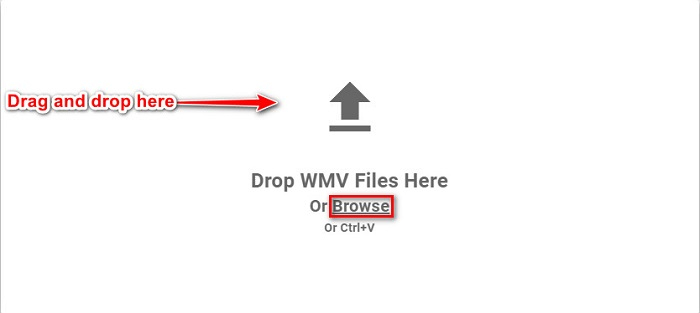
Pas 2. Després, deixa anar el teu fitxer WMV al requadre rectangular, o bé pots clicar la paraula browse per seleccionar el teu fitxer WMV.
Pas 3. Després de seleccionar el teu fitxer WMV, tria el fitxer MKV com a format de sortida clicant el botó MKV. Just després de clicar MKV, començarà la teva conversió de WMV a MKV. Després espera que el fitxer es converteixi.
WMV vs. MKV
Produït per Microsoft, WMV era un dels formats de vídeo més comuns als anys 2000. Es pot veure a la xarxa i reproduir-lo per diversos reproductors multimèdia a Windows. I també és el format de fitxer de vídeo predeterminat de Windows Media Player. Però recentment ha estat assumit per altres formats.
El format de contenidor multimèdia Matroska, llançat l'any 2002, és un format de codi obert que pot incloure una sèrie de pistes de vídeo, àudio, imatge i subtítols. Per tant, podeu utilitzar-lo per emmagatzemar vídeos curts, programes de televisió i pel·lícules fàcilment. És força popular per a la substitució de fans d'anime.
Part 4. Preguntes freqüents sobre la conversió de WMV a MKV
Es pot jugar a MKV al Mac?
No. MacOS no admet el format de fitxer MKV. Tanmateix, pots utilitzar un reproductor de tercers o convertir el teu fitxer MKV a un format que Mac admeti. MP4 és un dels formats de fitxer més comuns que Mac admet. Per saber-ne més sobre convertir MKV a MP4, clica aquest enllaç.
Podeu comprimir la mida dels fitxers MKV?
Sí. Pots comprimir els teus fitxers utilitzant un compressor. FVC Video Converter Ultimate també disposa d’una funció que pot comprimir fitxers.
El Windows Media Player admet fitxers MKV?
Windows Media Player no admet fitxers MKV. És possible que només se senti l’àudio o que hi hagi problemes de reproducció quan reprodueixis un fitxer MKV al Windows Media Player. Per reproduir fitxers MKV al Windows Media Player, has de descarregar i instal·lar el còdec MKV.
Conclusió
Hi ha moltes maneres de convertir WMV a MKV a Mac i Windows per resumir-ho. Les eines en línia i fora de línia que es presenten anteriorment mostren un rendiment prometedor quan es tracta de convertir els vostres fitxers WMV a MKV. Tanmateix, si voleu un convertidor que us permeti tenir un format de sortida esplèndid, feu servir FVC Video Converter Ultimate perquè té totes les característiques especials que necessiteu per convertir fitxers.
-
 WMV a MP3: com convertir vídeo a àudio de forma gratuïta [escriptori/en línia]
 Mentre mireu un vídeo WMV, trobeu fascinant la part d'àudio. Per tant, voleu reproduir-lo al vostre reproductor de MP3. Però és evident que el vostre reproductor no admet el format WMV. Això fa que us pregunteu si hi ha una manera de convertir WMV a MP3.
-
 2 maneres més fàcils de convertir fitxers WMV a FLV en PC / Mac
 Com es pot convertir WMV a FLV? En primer lloc, heu de llegir la nostra recomanació i trobar el vostre mètode preferit, i després seguir la nostra guia per fer la feina ràpidament.
-
 [2 solucions] Com convertir vídeos WMV a fitxers GIF de forma gratuïta
 Si voleu retallar les meravelloses parts dels vídeos WMV i fer-ne GIF, podeu obtenir més informació sobre dos mètodes senzills per transferir vídeos WMV a GIF en aquest article.

