


 Video Converter Ultimate
 Gravadora de pantalla
 Reparació de vídeo
Millor canviador de dates de fitxers per editar l'hora i la data del fitxer [Sense desafiament]
La data del fitxer ens pot ajudar, especialment si voleu ordenar-ho tot segons la data de creació. Tanmateix, quan editem el vídeo o el fitxer d’imatge a l’editor, la data de creació canviarà al dia en què editeu el fitxer. Això no és gaire agradable per a tothom! Per tant, si això us passa, heu d’utilitzar un canviador de data de fitxer fiable per restaurar la configuració original de l’hora i la data del fitxer multimèdia que heu editat.

Part 1. 2 del millor canviador de dades de fitxers per canviar la data de creació o modificació a Windows
Canviador de dates de fitxers FMS
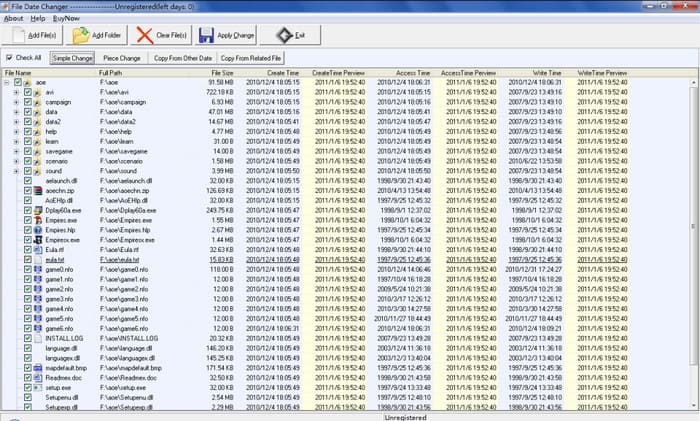
FMS File Date Changer és un editor d'etiquetes basat en Windows que us permet canviar la data de creació del fitxer. Amb aquesta eina, podeu anomenar la data de creació de l'eina, l'últim accés o l'última modificació per marcar-les una a una o en conjunt, si ho necessiteu. A diferència de qualsevol altre programari que fa servir un gran consum de recursos, aquesta eina no requereix que tingueu una unitat de sistema de gamma alta. Funciona per a una versió baixa i consumeix un mínim de CPU i RAM mentre s'executa al vostre sistema. Per tant, no experimentaràs errors, bloqueigs o errors mentre l'utilitzes.
A més, la GUI del programari és molt senzilla, de manera que la poden gestionar usuaris que no tinguin experiència en l'edició de metadades, com ara l'hora i la data. Però alguns usuaris troben que no va assolir l'expectativa de ser un editor de metadades professional. Per aquest motiu, els usuaris solen suprimir-lo després de descarregar-lo, però eliminar-lo no és tan senzill com l'altre. Haureu de seguir un procés per eliminar completament el programari del vostre sistema.
BulkFileChanger
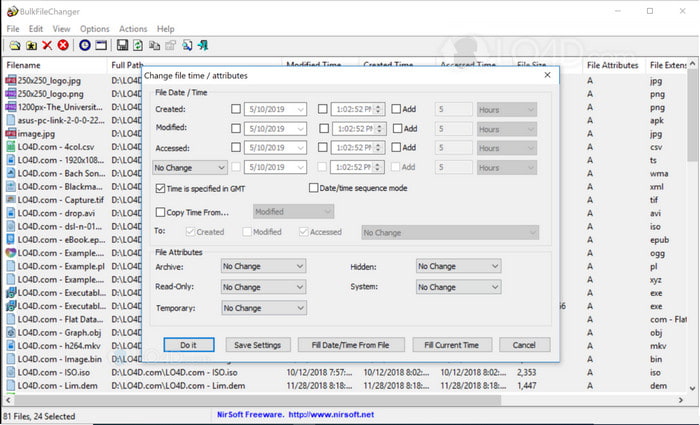
Podeu aprendre ràpidament a canviar la data creada en un fitxer amb BulkFireChanger. Amb aquest petit programari d'utilitat, podeu modificar, crear i accedir fàcilment a la data del fitxer i fins i tot modificar l'atribut del fitxer si voleu. A diferència de qualsevol altre programari, no haureu d'instal·lar l'editor i extreure la informació perquè pot funcionar a la unitat de memòria de tots els Windows. Per tant, si voleu descarregar l'eina, heu de visitar el lloc web oficial i, a continuació, feu-hi una donació si voleu.
A més, l'eina sembla senzilla i petita; tot i que la GUI és petita, és bo de mirar-la. Com hem dit anteriorment, no cal que instal·leu el programari perquè és compacte; a diferència d'altres programaris, haureu d'esperar el procés d'instal·lació abans de realitzar la tasca. No hi ha molt a dir sobre l'avantatge de l'eina perquè compleix el seu propòsit principal de canviar les metadades de la data. Si voleu acabar una altra tasca, aquesta eina no us ajudarà amb una altra tasca no relacionada.
Part 2. Altres maneres de canviar la data del fitxer utilitzant el sistema integrat a Windows
Si voleu canviar la data dels fitxers a Windows 10 o Mac, podeu anar a l’opció Hora del sistema de l’ordinador. Aquesta aplicació permet que la resta d’aplicacions accedeixin a l’hora i la data correctes. Es pot basar en el sistema horari de la llista UCT. Aquest mètode funciona en sistemes operatius com Windows, Mac i Linux per canviar lliurement la metadata d’hora i data.
A diferència de l'eina anterior, aquesta eina no és un editor dedicat de data i hora que podeu utilitzar. Perquè si voleu canviar el fitxer, primer heu de canviar-ne l'hora i després fer clic a Desa com a per desar l'hora actual a la vostra data i hora. Tot i que no heu baixat l'eina, encara és una opció per editar la data i l'hora del fitxer multimèdia.
Part 3. Programari definitiu per editar la data dels fitxers a Windows i Mac [la manera més fàcil]
A diferència de l’eina esmentada anteriorment, FVC Video Converter Ultimate és la més compatible per modificar la data del fitxer canviat. Amb aquesta eina, podeu afegir molt més que l’etiqueta de data i hora al fitxer; també hi podeu afegir el nom de l’autor, el títol, les pistes, el gènere, comentaris, etc., i fins i tot una imatge com a portada de l’àlbum del fitxer. Aquesta eina s’ha convertit en el programari més competitiu del mercat, i la podeu descarregar tant per a Windows com per a Mac.
Amb els punts forts i la compatibilitat del programari, podeu acabar totes les tasques de vídeo i àudio relacionades. Si voleu accelerar la reproducció del vídeo, aquesta és l'eina adequada per a aquesta feina, però és possible fer una càmera lenta? Bé, sí, amb aquest programari. A diferència de les eines esmentades, no poden fer-ho perquè són incapaços de fer coses fora d'editar les metadades. I ara, si us pregunteu com utilitzar el programari final per canviar les metadades de la data. Seguint els passos, aprendràs en molt poc temps com canviar la data creat en un fitxer a Mac i Windows amb una sortida professional.
Pas 1. Descarregueu l’eina definitiva a l’ordinador de taula, trieu si feu servir Windows o Mac i, a continuació, instal·leu-la. Seguiu el procés i obriu-la per començar.
Descàrrega gratuïtaPer a Windows 7 o posteriorDescàrrega segura
Descàrrega gratuïtaPer a macOS 10.7 o posteriorDescàrrega segura
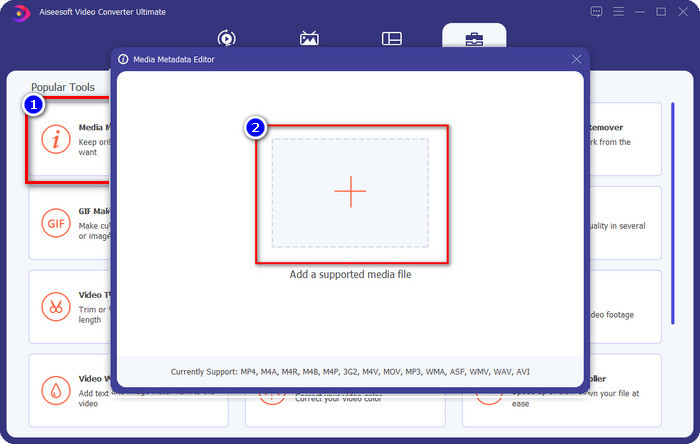
Pas 2. Amb l’eina oberta, feu clic a Eines i després a Editor de metadades multimèdia. Es mostrarà una nova finestra petita; feu clic al botó + per afegir-hi el fitxer multimèdia del qual voleu canviar les metadades de data i hora i feu clic a Obre per continuar.
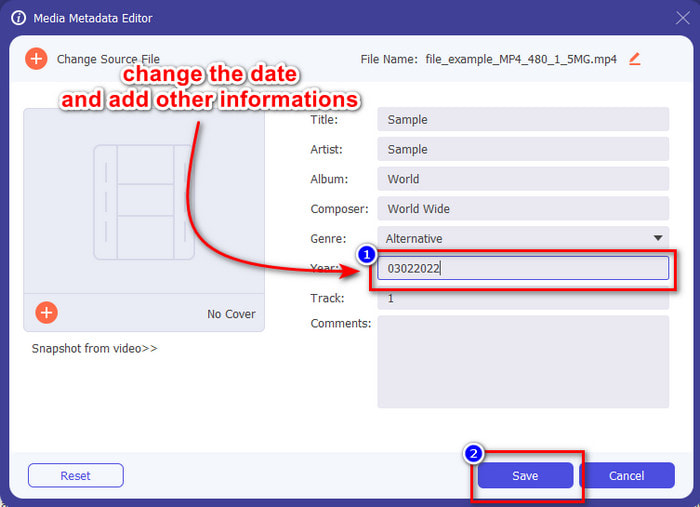
Pas 3. Ara ja podeu canviar la data del fitxer multimèdia que heu pujat, triar l’any i fer clic a Desa quan hàgiu acabat. Recordeu que també podeu canviar la resta de metadades abans de fer clic al botó Desa, si ho voleu. Fàcil, oi? L’eina definitiva ofereix una gran experiència d’usuari a qui vulgui gaudir d’una gran edició de metadades.
Part 4. Preguntes freqüents sobre File Date Changer
Com veure les metadades de data i hora?
Veure les etiquetes de data i hora és fàcil si llegiu i seguiu les instruccions d’aquest article. Si voleu saber-ne més sobre com veure les metadades dels fitxers, podeu fer clic en aquest enllaç i llegir-ho amb atenció.
És tan important afegir metadades?
Doncs sí, és important; amb els detalls més senzills sobre el fitxer, podem determinar què conté abans d’obrir-lo. O bé podeu utilitzar aquestes metadades per ordenar els fitxers correctament. Si necessiteu tota la informació sobre les metadades, podeu fer clic en aquest enllaç.
Per què es perden les meves etiquetes de data i hora?
Hi ha milions de motius pels quals es perden les nostres metadades sobre l'hora i la data. En primer lloc, si el fitxer multimèdia es baixa al web, el propietari original del fitxer podria eliminar la informació de data i hora. Però si no us heu baixat el fitxer multimèdia i l'heu pres vosaltres mateixos, el problema pot ser el procés de desar el fitxer. Si voleu recordar la data i l'hora exactes, heu de llegir aquest article per saber com d'importants són les etiquetes de data i hora.
Conclusió
Fer servir un canviador de data de fitxer adequat per modificar l’hora i la data és important; amb aquesta ressenya hem trobat la millor opció per acabar la tasca. Ara heu d’escollir el mètode que creieu que us encaixa millor. Encara que tots funcionin bé, el FVC Video Converter Ultimate continua essent imbatible per a aquesta tasca. Per què és imbatible? Només ho podreu descobrir si descarregueu el programari i el feu servir. Què esteu esperant? Ara heu de seguir els passos anteriors per utilitzar la millor eina per solucionar aquest problema.
-
 Els millors editors d'etiquetes ID3 a Windows/Mac/iOS/Android [provat]
 L'edició de les etiquetes ID3 és un problema per a vostè? Si és així, aquest article és per a tu. Llegiu els detalls complets a continuació sobre els editors d'etiquetes ID3 que cal utilitzar.
-
 Com canviar els detalls del fitxer a Windows 10/11 [la manera més fàcil]
 Necessites saber com canviar els detalls del fitxer a Windows 10/11? Si és així, aquest és l'article adequat que heu de llegir amb els detalls importants i les eines a utilitzar.
-
 7 millors editors de metadades per a mitjans/fotos/documents [web i fora de línia]
 Vols conèixer el millor editor de metadades? Afortunadament, aquest article ofereix el millor editor de metadades que podeu utilitzar per canviar fàcilment les etiquetes de cada fitxer.
