


 Video Converter Ultimate
 Gravadora de pantalla
 Reparació de vídeo
 Baixada segura
4 maneres més fàcils de canviar la velocitat de reproducció del vídeo a l'escriptori, al web i als telèfons
La majoria d’usuaris troben una manera eficaç de mirar un vídeo d’una hora en menys d’una hora. L’única solució que pot resoldre aquest problema és canviar la velocitat de reproducció del vídeo que esteu veient. La majoria dels editors de vídeo que trobareu al mercat us poden ajudar a acabar aquesta tasca, però la pregunta és: són fiables? Durant la investigació de cadascun, vam descobrir que podeu canviar la velocitat del vídeo a l’escriptori, en línia, en dispositius iOS i Android. Si voleu saber com fer-ho, heu de continuar llegint aquest blog, ja que hi incloem eines i aplicacions que us poden ajudar.

Part 1. Millor manera recomanada de canviar la velocitat del vídeo a Windows i Mac sense esforç
Per canviar fàcilment la velocitat del vídeo, heu d’escollir la millor eina, una que ofereixi resultats extraordinaris amb només uns quants clics: us presentem FVC Video Converter Ultimate. Aquesta eina manipula de manera eficaç la velocitat del vídeo que teniu, en qualsevol moment i a qualsevol lloc. A més, podeu canviar la velocitat del vídeo encara que els formats siguin MP4, MOV, AVI, FLV, TS, RMVB i més de 1000 formats; pujar-hi el vostre fitxer és ràpid i fàcil. Tant si sou usuari de Windows com de Mac, descarregar el programari en aquest sistema operatiu us pot ajudar a completar la tasca de canviar la velocitat de reproducció amb pocs clics.
A més de la seva funció de controlador de velocitat de vídeo, l'eina també té una caixa d'eines multifuncional que podria ajudar a altres tasques. Com ara afegir metadades, crear un GIF, eliminar filigranes i molts més. Tot i que l'eina es pot descarregar, quan l'utilitzeu notareu que no necessitareu molta experiència en edició, perquè és fàcil d'utilitzar. Hi ha funcions i característiques que encara no hem escrit que destacaran aquest producte. Però si voleu aprendre a canviar la velocitat d'un vídeo, llegiu els detalls per saber fer-ho.
Avantatges d'utilitzar el programari definitiu com a canviador de velocitat de vídeo:
◆ Interfície intuïtiva, perquè aprenguin a utilitzar-la en pocs minuts.
◆ Carregueu més de 1000 vídeos per accelerar la reproducció que té.
◆ Fàcil d'utilitzar per ajudar els usuaris a gaudir-ne al màxim.
◆ Altres funcions es troben a Toolbox, com ara l'edició de vídeo bàsica i avançada.
◆ És la primera opció de gairebé un milió d'usuaris que el descarreguen.
◆ Disponible a Windows i Mac per descarregar l'eina sense esforç.
Passos sobre com canviar la velocitat del vídeo amb el programari definitiu:
Pas 1. Podeu tenir aquest programari definitiu tant en sistemes Windows com Mac fent clic al botó de descàrrega. Completeu el procés d’instal·lació després de fer clic al fitxer que heu descarregat i, a continuació, obriu el programari per continuar.
Descàrrega gratuïtaPer a Windows 7 o posteriorDescàrrega segura
Descàrrega gratuïtaPer a macOS 10.7 o posteriorDescàrrega segura
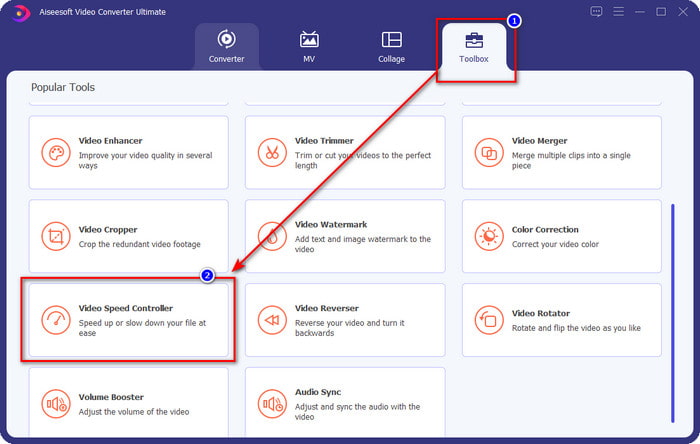
Pas 2. Un cop hàgiu obert el programari, heu d’anar a la secció Caixa d’eines; dins d’aquesta, obriu el Controlador de velocitat de vídeo. No us preocupeu, no haureu de descarregar recursos addicionals per utilitzar l’eina.
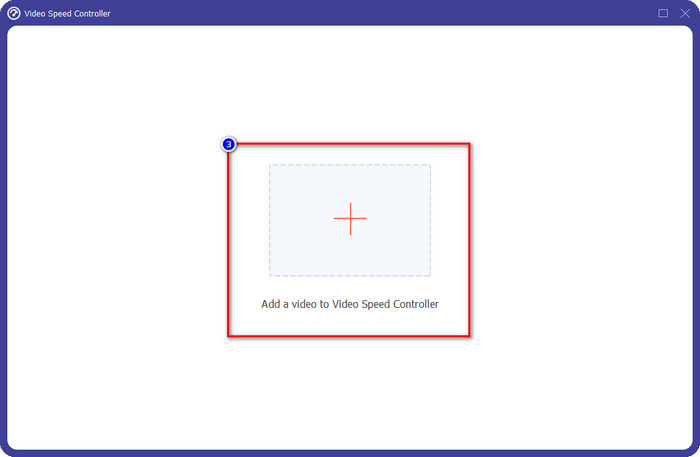
Pas 3. Premeu la icona +, afegiu el fitxer que teniu a la carpeta, cliqueu-hi i premeu Obre per pujar el fitxer de vídeo que teniu.
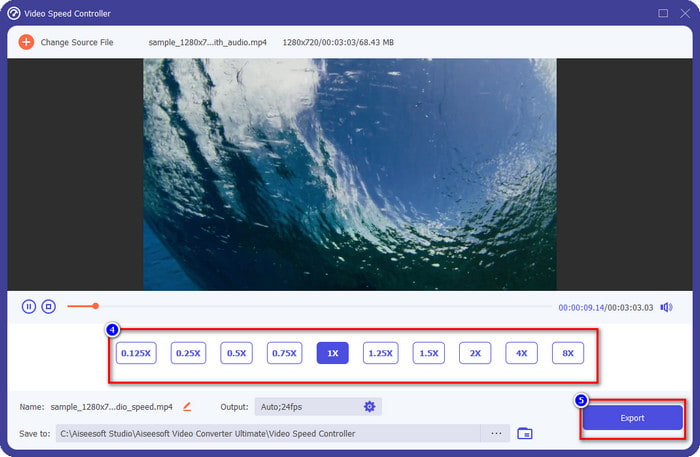
Pas 4. Trieu de la llista la velocitat de reproducció que voleu aconseguir, ja que tots tenim una reproducció diferent que desitgem. Feu clic a Exporta per desar el resultat final del vídeo al qual heu canviat la velocitat. En menys d’un minut ja haureu canviat la velocitat del vídeo que teniu. Ara ja podeu gaudir de veure’l en menys temps.
Part 2. La millor manera gratuïta de canviar la velocitat del vídeo al web
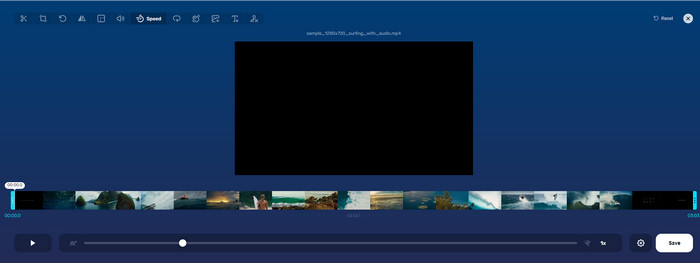
Amb l’ajuda de Online Video Cutter, podeu canviar la velocitat del vídeo en línia de manera gratuïta. A diferència de la primera eina, no cal que descarregueu recursos addicionals ni cap instal·lador a l’ordinador per utilitzar aquesta eina web. A més de la funció de canviar la velocitat, també podeu fer servir aquesta eina per fer-hi algunes edicions bàsiques. Tot i que l’eina és bona, no hi podeu pujar tots els formats que tingueu, perquè els formats compatibles són limitats. Per utilitzar-la, seguiu els passos següents.
Pas 1. Obriu el navegador que vulgueu utilitzar i busqueu l’eina web.
Pas 2. Obriu l’eina web, feu clic a Obre fitxer, busqueu el fitxer de vídeo que teniu i pugeu-lo.
Pas 3. Arrossegueu els controls lliscants cap a l’esquerra o cap a la dreta i canvieu-ne la velocitat; feu clic al botó Desa si esteu satisfets amb la velocitat.
Part 3. Millor editor de vídeo a iOS per canviar la velocitat del vídeo de forma gratuïta
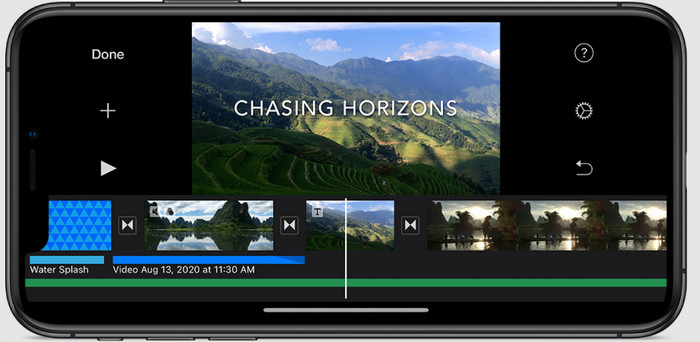
Per als usuaris d'iOS, podeu utilitzar l'iMovie per aprendre a canviar la velocitat del vídeo a l'iPhone de forma gratuïta. Tot i que l'eina és un editor de vídeo natiu a Mac, encara teniu l'opció de descarregar l'aplicació al vostre dispositiu o no. Aquesta elecció demostra que els usuaris d'iOS poden mantenir l'editor o no, per estalviar una mica d'espai al seu emmagatzematge. Però si teniu l'aplicació al vostre iPhone, podeu seguir els passos que afegim a continuació per saber com funciona aquesta eina.
Pas 1. Descarregueu i després obriu l’aplicació a l’iPhone i, a Projecte, feu clic al signe + i després feu clic a Pel·lícula.
Pas 2. Toqueu el vídeo que voleu accelerar i, a la part inferior de la pantalla, toqueu Crea pel·lícula per pujar-lo a la línia de temps.
Pas 3. Tocant el clip que heu pujat, feu clic a la icona del controlador de velocitat i ajusteu la velocitat del vídeo arrossegant els controls lliscants al vostre iPhone. Feu clic a Fet per desar-lo i, si voleu, exporteu-lo.
Part 4. La millor manera de canviar la velocitat de reproducció del vídeo en dispositius Android mitjançant l'editor integrat
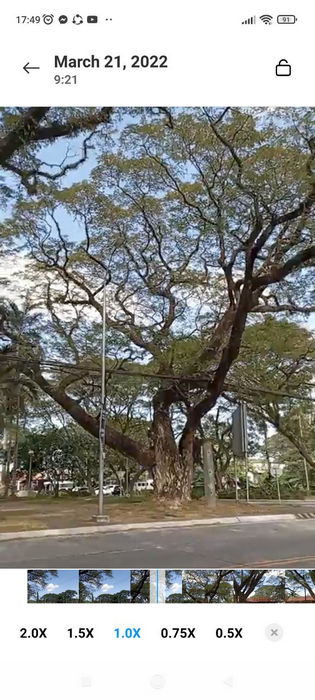
Descarregar una aplicació no és el cas si sou un usuari d'Android; Canvieu la velocitat del vídeo al vostre telèfon amb l'editor de vídeo integrat. Amb aquest editor, podeu fer l'edició bàsica necessària al vostre vídeo per fer-lo veure millor que abans. Podeu trobar aquest editor a la Galeria o àlbum del vostre Android. Si voleu saber com utilitzar-lo, la informació següent us ajudarà.
Pas 1. Obriu la Galeria o Àlbum i després toqueu el vídeo al qual voleu canviar la velocitat.
Pas 2. Feu clic a Edita per continuar.
Pas 3. Toqueu la secció Velocitat de reproducció i després canvieu la velocitat segons les vostres necessitats.
Part 5. Preguntes freqüents sobre el canvi de la velocitat del vídeo
Puc canviar la velocitat a YouTube?
Absolutament sí, podeu canviar la reproducció del vídeo a YouTube encara que no us descarregueu programari per fer-ho. Seguiu els passos per saber com canviar la velocitat del vídeo a YouTube. En primer lloc, obriu YouTube, cerqueu el vídeo que voleu veure amb un moviment modificat, feu clic a la icona de l'engranatge i, a sota, la velocitat de reproducció, trieu la velocitat que voleu assolir i gaudiu-ne.
Canviar la velocitat escurça la durada del vídeo?
Depèn de com canvieu la velocitat; si alentiu el vídeo, espereu que la seva durada s'estengui perquè el reproduïu en mode lent. Però si canvieu la velocitat a alta, la durada del vídeo que esteu reproduint serà més curta que l'original. Per saber més sobre com canviar la velocitat del vídeo, heu de llegir els detalls següents que afegim més amunt.
Després de canviar la velocitat, tindrà efecte la qualitat?
En funció de la velocitat de vídeo que hàgiu establert, la qualitat pot disminuir o mantenir-se. Si reproduïu un vídeo vuit vegades o més, espereu el vídeo que reproduireu. Tanmateix, no notareu gaires diferències a part de la reproducció, pel que fa a la qualitat, seguirà sent la mateixa.
Conclusió
Ara que tenim una idea de com canviar la velocitat del vídeo en ordinadors d’escriptori, en línia i en telèfons, és hora de decidir què hauríem d’utilitzar. Si no voleu descarregar programari a l’ordinador per estalviar espai i passos d’instal·lació, aleshores heu de llegir la segona part d’aquest article. Però si sou usuari d’iOS o Android, les parts tres i quatre són per a vosaltres. Si voleu utilitzar el millor editor de vídeo en Windows i Mac, heu de descarregar el FVC Video Converter Ultimate. És el millor controlador de velocitat de vídeo per canviar fàcilment la reproducció del vídeo que teniu a l’ordinador. Què esteu esperant? Descarregueu-lo ara i aprofiteu la nostra promoció només per a vosaltres!
-
 Com accelerar el vídeo a Premiere Pro i amb les seves alternatives
 Vols saber com utilitzar l'estrena professional per accelerar un vídeo? Aleshores esteu a l'article correcte, ja que us oferim passos i altres alternatives assequibles.
-
 2 maneres sense esforç de com accelerar un vídeo a TikTok
 Vols saber el secret de com accelerar el vídeo a TikTok? A continuació, llegiu aquest article per tenir una idea de com fer-ho i saber quines són les altres 2 eines que us ajudaran.
-
 Excel·lents consells del 2021: com accelerar un vídeo a iMovie
 El teu amic et suggereix que iMovie t'ajudi amb el teu problema de com accelerar un vídeo amb el sistema operatiu iOS, però no saps què fer? Vegeu més sobre això a mesura que llegiu més a través d'aquest article.
