


 Video Converter Ultimate
 Gravadora de pantalla
 Reparació de vídeo
 Baixada segura
Com accelerar el vídeo a After Effects fàcilment
Si vols accelerar el teu vídeo, has d’utilitzar una eina per augmentar-ne la velocitat. Tanmateix, no totes les eines ofereixen les mateixes funcions. I probablement la millor eina que trobaràs a internet per canviar la velocitat del teu vídeo és Adobe After Effects. Molts professionals la fan servir com la seva primera opció quan utilitzen una eina per accelerar vídeos. En aquest article, coneixeràs les millors eines per accelerar vídeos i aprendràs com accelerar un vídeo a After Effects.

Part 1. Com accelerar o alentir el vostre vídeo a After Effects
Adobe After Effects és probablement una de les eines per accelerar vídeos més utilitzades que trobaràs al mercat. Molts professionals utilitzen aquesta eina perquè té funcions avançades, com afegir efectes, crear la teva pròpia plantilla, animar text, etc. El més impressionant d’aquesta eina és que pot crear grans gràfics en moviment i efectes visuals. I si ets un cineasta professional, probablement voldràs utilitzar aquesta eina per totes les funcions i eines que ofereix. A més a més, està disponible tant per a Windows com per a Mac.
Tot i que pot crear una sortida professional, la seva interfície d'usuari és difícil d'entendre. Necessiteu una guia perquè domini la seva interfície. No obstant això, molts cineastes i editors professionals utilitzen aquesta eina i la troben com la millor eina d'acceleració de vídeo. I si esteu interessats a utilitzar l'eina de vídeo d'acceleració d'After Effects, seguiu els passos següents.
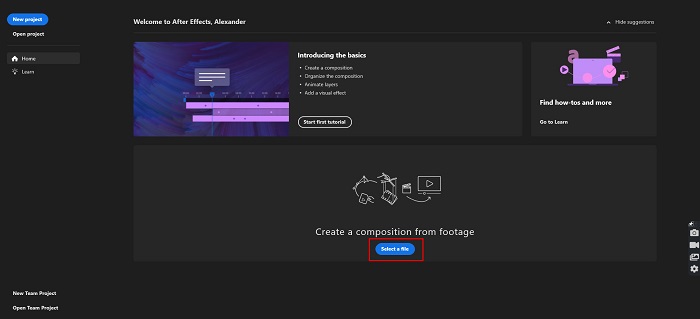
Pas 1. Primer, descarrega Adobe After Effects a l’ordinador. Després, obre l’aplicació. A la interfície principal del programa, fes clic al botó Select a File per pujar el vídeo que vols accelerar. Seguidament, apareixeran els fitxers del teu ordinador, on seleccionaràs el teu vídeo.
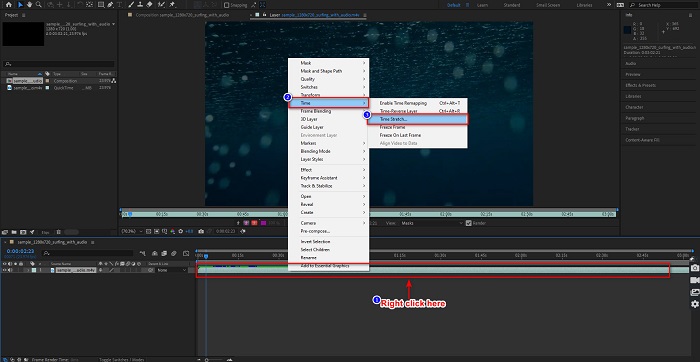
Pas 2. A continuació, fes clic dret a la línia de temps del teu vídeo. Apareixerà un menú on hauràs de fer clic a Time > Time Stretch.
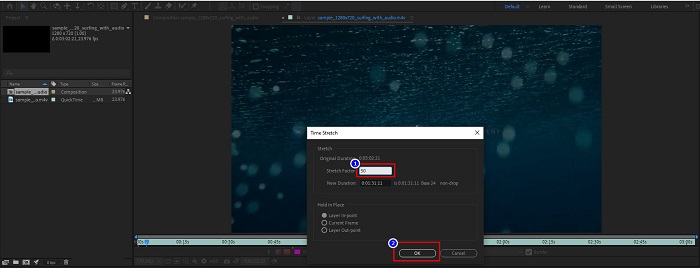
Pas 3. Després, escriu el percentatge del factor d’estirament que vulguis i fes clic al botó OK. A continuació veuràs el canvi en la velocitat del teu vídeo.
Pros
- Aquesta eina s'utilitza en la indústria cinematogràfica i les carreres cinematogràfiques
- Té moltes funcions avançades, com ara fer 3D, realitat virtual, afegir efectes i molt més
- Està disponible a gairebé totes les plataformes multimèdia, incloses Windows i Mac
Contres
- Heu de pagar una quota de subscripció per utilitzar l'eina durant molt de temps.
- Té una interfície de programari difícil d'utilitzar.
Part 2. Maneres més fàcils d'accelerar el vostre vídeo
Però si estàs buscant una eina amb una interfície de programari més senzilla, aquesta és l’eina que cerques. FVC Video Converter Ultimate també és una eina popular per accelerar o alentir el teu vídeo. Té una interfície d’usuari simple, que moltes persones utilitzen per accelerar els seus vídeos. A més, pots ajustar la velocitat del vídeo a 0.125x, 0.25x, 0.5x, 0.75x, 1.25x, 1.5x, 2x, 4x i 8x.
A més, aquesta eina ofereix més funcions que podeu utilitzar, com ara un retallador de vídeo, GIF maker, 3D maker i molt més. El que és més impressionant en aquesta eina és que podeu canviar la resolució del vostre vídeo i la velocitat de fotogrames del mateix. Llegiu la descripció següent per obtenir més informació sobre aquesta eina.

FVC Video Converter Ultimate
Més de 5.689.200 descàrregues- Accelera un vídeo a Windows i Mac.
- Té funcions avançades com un inversor de vídeo, una marca d'aigua de vídeo, un reforç de volum, etc.
- Admet nombrosos formats de fitxer, com MP4, WMV, AVI, M4V, FLV i més.
- Et permet ajustar la taxa de bits i la resolució del teu vídeo.
Descàrrega gratuïtaPer a Windows 7 o posteriorDescàrrega segura
Descàrrega gratuïtaPer a macOS 10.7 o posteriorDescàrrega segura
A continuació t’expliquem com utilitzar FVC Video Converter Ultimate per accelerar el teu vídeo
Pas 1. Descarrega FVC Video Converter Ultimate fent clic al botó Download per a Windows o Mac. Segueix el procés d’instal·lació i executa l’aplicació.
Descàrrega gratuïtaPer a Windows 7 o posteriorDescàrrega segura
Descàrrega gratuïtaPer a macOS 10.7 o posteriorDescàrrega segura
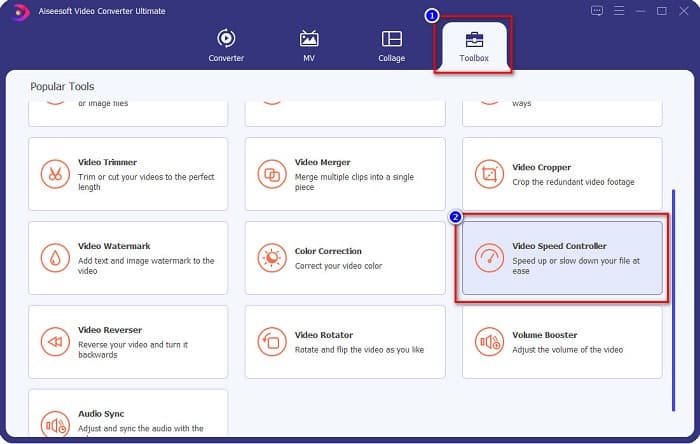
Pas 2. Fes clic a l’opció Toolbox al panell superior de la interfície principal del programa. Després, fes clic a l’opció Video Speed Controller.
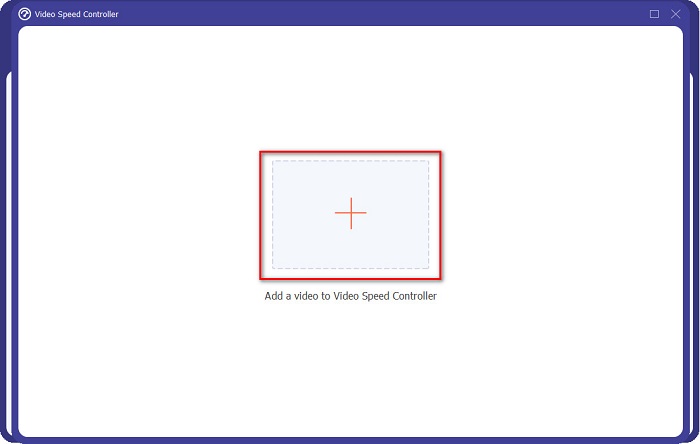
Pas 3. Després de fer clic a Video Speed Controller, se t’adreçarà a una altra interfície. Fes clic al botó amb el signe + o arrossega i deixa anar el teu vídeo sobre el signe +.
Pas 4. A continuació, selecciona la velocitat de vídeo que vulguis a les opcions que hi ha sota la previsualització del teu vídeo i, després, fes clic al botó Export.
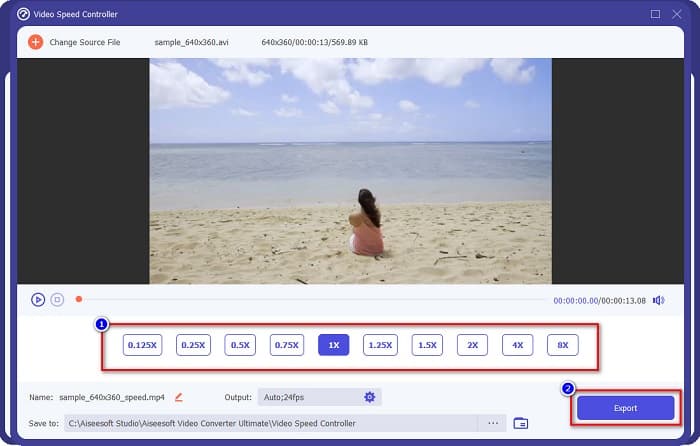
Es desarà automàticament als fitxers de l'escriptori quan acabi.
Part 3. Adobe After Effects vs. FVC Video Converter Ultimate
Teniu dificultats per triar la millor eina de vídeo d'acceleració per utilitzar? Aleshores, no us preocupeu perquè us proporcionarem una visió més detallada i clara de les eines esmentades anteriorment. Malgrat això, aquestes dues eines tenen bones valoracions dels usuaris i poden accelerar o alentir el vostre vídeo.
| vs. | Adobe After Effects | FVC Video Converter Ultimate |
| Compatibilitat | Windows i Mac | Gairebé totes les plataformes multimèdia, incloses Windows i Mac |
| Fàcil d'usar |  |  |
| Té altres funcions per utilitzar | | |
| Preu | El preu comença a $20,99/mes | El preu de la seva versió d'1 mes és $23.30 |
| Millor utilitzat per | Realització de cinema | Conversió i edició de vídeos |
Ara que coneixeu la distinció i les similituds, quina eina de vídeo acceleradora utilitzareu està a les vostres mans.
Part 4. Preguntes freqüents sobre com accelerar el vídeo a After Effects
És millor utilitzar una eina en línia per accelerar el vídeo?
Sí. Hi ha moltes eines d'acceleració de vídeo en línia que podeu trobar a Internet. Tanmateix, les eines en línia d'acceleració depenen d'Internet, el que significa que quan la connexió a Internet és lenta, el procés de càrrega pot ser lent.
Es pot crear un GIF amb After Effects?
No. Adobe After Effects no té cap creador de GIF. Però si voleu una eina que pugui crear un GIF animat, utilitzeu FVC Video Converter Ultimate. Té un creador de GIF integrat que és fàcil d'utilitzar.
Adobe After Effects admet tots els formats de fitxer?
Adobe After Effects admet nombrosos formats de fitxers de vídeo/imatge, inclosos MPEG, WAV, WMV, SWF, FLV, MP4, M4V i molts més.
Conclusió
Dit això, aquest article demostra que accelerar vídeos amb Adobe After Effects és realment una opció única i de les millors que es poden utilitzar. Les funcions que inclou i el resultat professional que produeix són extraordinaris. Ara ja pots veure clarament per què molts cineastes i editors de vídeo professionals fan servir aquesta eina per a molts propòsits. Però si ets principiant i busques una eina per accelerar vídeos amb una interfície d’usuari més senzilla, aleshores FVC Video Converter Ultimate és el millor controlador de velocitat de vídeo per a tu. Doncs, què estàs esperant? Descarrega’l ara i prova les fantàstiques funcions que ofereix.
-
 Com accelerar el vídeo a Premiere Pro i amb les seves alternatives
 Vols saber com utilitzar l'estrena professional per accelerar un vídeo? Aleshores esteu a l'article correcte, ja que us oferim passos i altres alternatives assequibles.
-
 2 maneres sense esforç de com accelerar un vídeo a TikTok
 Vols saber el secret de com accelerar el vídeo a TikTok? A continuació, llegiu aquest article per tenir una idea de com fer-ho i saber quines són les altres 2 eines que us ajudaran.
-
 Excel·lents consells del 2021: com accelerar un vídeo a iMovie
 El teu amic et suggereix que iMovie t'ajudi amb el teu problema de com accelerar un vídeo amb el sistema operatiu iOS, però no saps què fer? Vegeu més sobre això a mesura que llegiu més a través d'aquest article.
