


 Video Converter Ultimate
 Gravadora de pantalla
 Reparació de vídeo
 Baixada segura
Com convertir gratuïtament Cisco WebEx ARF a MP4 a PC i Mac
Rebo un fitxer ARF que m’envia el meu company amb l’enregistrament de la reunió en un Mac, i el vull convertir a MP4 perquè el vull reproduir al meu telèfon Android. Tanmateix, no he vist cap manera de convertir ARF a MP4. Qualsevol ajuda serà molt apreciada.
Un fitxer AFR (Advanced Recording Format) és un fitxer de gravació generat per Cisco WebEx. El fitxer ARF es pot compartir mitjançant un enllaç i obrir-lo directament. Com a alternativa, el fitxer ARF es pot descarregar a l’ordinador local i reproduir-lo amb el reproductor de gravació de xarxa Webex.
Sí, és possible que hagueu trobat alguna cosa que el fitxer ARF no sigui tan popular com MP4 i que res no pugui obrir-lo excepte WebEx Player.
Per obrir els fitxers ARF fàcilment, cal convertir ARF a MP4. Això és el que t’ensenyarem en aquesta pàgina amb 2 maneres gratuïtes.

Part 1. Com convertir gratuïtament ARF a MP4 a l'ordinador Windows
Cisco WebEx ha introduït la forma oficial d’ajudar-vos a canviar ARF a MP4. No cal res, sinó descarregar el reproductor de gravació de xarxa Webex.
Webex Network Recording Player és el programari per convertir els fitxers ARF en vídeos MP4, WMV i SWF a l'ordinador Windows.
Els passos detallats són els següents:
Assegureu-vos que heu descarregat els fitxers de gravació ARF del compte de l’amfitrió.
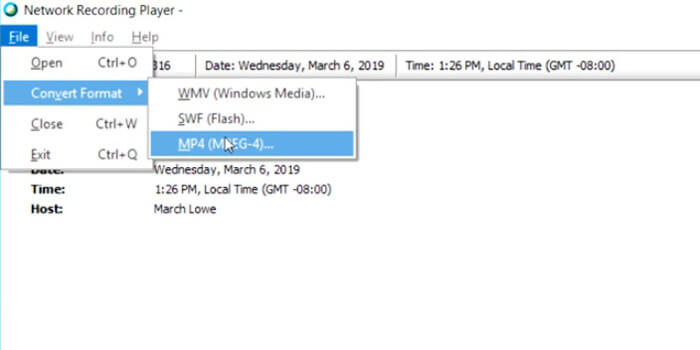
Pas 1. Obre el Network Recording Player i ves al menú File per seleccionar Open i localitzar i obrir el fitxer d’enregistrament ARF.
Pas 2. Mentre reprodueixes el fitxer d’enregistrament ARF, selecciona File, tria Convert Format i escull MP4 (MPEG-4).
Pas 3. Al quadre de diàleg Save as, especifica on vols desar els fitxers MP4 convertits i personalitza la qualitat de vídeo, el còdec, etc.
A continuació, començarà a convertir el fitxer ARF immediatament o a una hora programada com vulgueu.
Això és tot. Després podràs obrir els fitxers MP4 amb el teu reproductor MP4 fàcilment.
És fàcil convertir ARF a MP4 en equips Windows. No obstant això, hi ha alguns inconvenients que hauríeu de notar:
- 1. Només l'amfitrió pot descarregar el fitxer ARF. O bé, el receptor amb l'opció d'administrador pot descarregar el fitxer de gravació ARF.
- 2. La tasca de conversió es pot fer a l'ordinador Windows i el Mac no està disponible.
- 3. Alguns usuaris van informar que el fitxer MP4 convertit és de mala qualitat en comparació amb el fitxer ARF original.
Part 2. Com desar gratis ARF a MP4 al Mac / PC en línia
És fàcil reproduir un fitxer ARF a Mac, però no pot convertir fitxers ARF. Per convertir els vídeos ARF a Mac, necessitareu programari de tercers. Els convertidors de vídeo convencionals com HandBrake, VLC, FFmpeg, etc., no admeten conversions ARF. Per exportar ARF com a MP4, podeu fer la gravació.
Free Screen Recorder és el programari de captura de pantalla en línia per a Windows i Mac, que pot gravar qualsevol cosa que s’estigui reproduint a l’ordinador, inclosos els vídeos i l’àudio.
Per desar el fitxer de gravació ARF en format MP4 al Mac o WMV al Windows, només cal que utilitzeu el programari gratuït de captura de pantalla per gravar el fitxer de vídeo mentre es reprodueix al Mac.
Pas 1. Visita el gravador ARF gratuït en línia, fes clic a Start Recording i tot seguit se’t demanarà que descarreguis el llançador del gravador.
Pas 2. A la finestra del llançador després de la instal·lació correcta, has de moure la vora del marc per ajustar la regió d’enregistrament perquè cobreixi tota la finestra de reproducció del fitxer ARF. Habilita Speaker per gravar el so del fitxer ARF.
Les altres 2 opcions, Microphone i Camera, són opcionals per a tu.
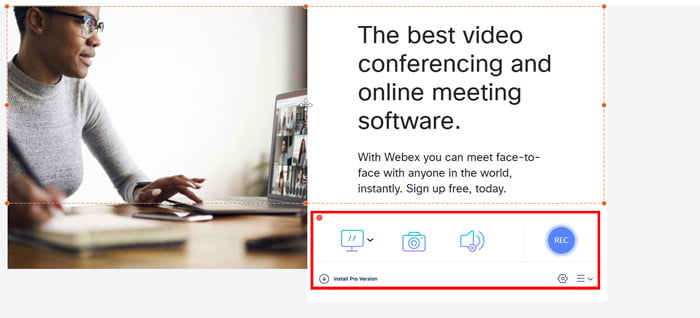
Pas 3. Fes clic al botó REC mentre reprodueixes el fitxer ARF amb Network-Recording Player al Mac per començar a gravar.
Feu clic al botó Atura per desar i descarregar el fitxer MP4 gravat.
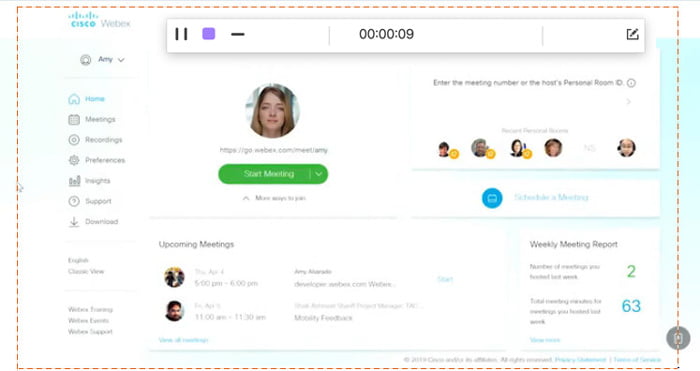
D’aquesta manera, fins i tot si obriu el fitxer ARF mitjançant un enllaç per compartir, podeu desar-lo fàcilment com a fitxer MP4.
Part 3. Preguntes més freqüents sobre la conversió d'ARF a MP4
Quant triga a convertir ARF a MP4?
El temps que convertiu ARF a MP4 depèn de la mida i longitud del fitxer de gravació. Segons la nostra prova, el temps que heu dedicat a convertir ARF a MP4 a Windows és més llarg que el de gravar a Mac.
Quines diferències hi ha entre ARF i WRF?
1. El fitxer WRF és el format més antic, que emmagatzema una qualitat d’àudio i vídeo inferior a l’ARF.
2. Els fitxers ARF només es creen dins d’una reunió, sessió o esdeveniment WebEx, mentre que el WRF es crea fora d’una reunió per qualsevol usuari amb el WebEx Recorder.
3. Un fitxer ARF es pot obrir amb Network-Recording Player, mentre que el fitxer WRF es pot reproduir mitjançant WebEx Player.
4. El fitxer ARF es pot convertir a WMV, SWF o MP4, mentre que WRF es pot convertir a WMV amb el reproductor.
Què obre un fitxer ARF?
Si rebeu un correu electrònic amb un enllaç a una gravació de WebEx, feu clic a l’enllaç per obrir-lo. Si heu descarregat un fitxer, obteniu que Webex Player obri els fitxers ARF. Com a alternativa, podeu convertir ARF a MP4 per reproduir-lo convenientment.
Conclusió
Quan obteniu un fitxer ARF, és fàcil obrir-lo directament. Tanmateix, si descarregueu un fitxer ARF, es fa més complicat reproduir-lo al vostre reproductor que no sigui WebEx. Aquesta pàgina comparteix 2 maneres de convertir ARF a MP4 en PC i Mac, de manera que pugueu utilitzar el fitxer ARF de manera universal.
Teniu algun problema en convertir ARF a MP4?
Hi ha altres maneres de convertir ARF a MP4?
Avisa’m deixant els teus comentaris a continuació.
-
 Com convertir gratuïtament MP4 a MPEG
 Aquesta publicació és la guia pas a pas per convertir MP4 a MPEG. Podeu utilitzar els 4 convertidors de vídeo gratuïts principals per canviar MP4 a MPEG-1 o MPEG-2 com vulgueu.
-
 Com combinar diversos fitxers MP4 en 3 passos
 Voleu combinar els fitxers MP4 en brut per al vostre projecte? Aquesta publicació recull les 6 maneres principals d’ajudar-vos a combinar fàcilment vídeos MP4 a Windows, Mac i en línia
- Com convertir gratuïtament WebM a MP4 de les 10 maneres principals
Com veure fitxers WebM sense navegador web? Cal convertir WebM a MP4. Aquests són els 10 principals convertidors gratuïts de WebM a MP4 per canviar WebM a MP4 en línia i en ordinadors Mac i Windows.
