


 Video Converter Ultimate
 Gravadora de pantalla
 Reparació de vídeo
 Baixada segura
Com eliminar fàcilment la marca d'aigua de Fiverr fora de línia i en línia
A causa de la pandèmia, molta gent prefereix treballar des de casa. Per aquest motiu han aparegut en línia molts llocs web de treball freelance, i un d’ells és Fiverr. Fiverr és un mercat en línia i una pàgina web de treball independent. Tanmateix, compradors i venedors tenen problemes per eliminar la marca d’aigua de Fiverr. Hem buscat solucions i hem trobat aquestes eines sorprenents que poden eliminar fàcilment la marca d’aigua de Fiverr. Per tant, llegeix aquest article si vols eliminar la marca d’aigua de Fiverr.

Part 1. Introducció a Fiverr
Però què és Fiverr? Com s'ha esmentat anteriorment, Fiverr és un mercat en línia i un lloc web autònom utilitzat per venedors i compradors per comprar i vendre productes en línia. Fiverr és un dels llocs web d'autònoms famosos per la seva gran comunitat. Ofereix serveis d'alta qualitat sense tarifes horàries. A més d'això, si teniu un negoci i voleu promocionar i vendre els vostres productes, Fiverr pot trobar fàcilment l'autònom adequat per fer la feina per vosaltres. Fiverr també és un lloc web segur i us assegura que tots els pagaments estan protegits perquè no alliberaran cap pagament fins que no aproveu el treball.
A més, pots promocionar un producte amb aquestes opcions: Gràfic i Disseny, Màrqueting Digital, Escriptura i Traducció, Vídeo i Animació, Música i Àudio, Programació i Tecnologia, etc. Tampoc tindreu dificultats per utilitzar aquest lloc web independent perquè té interfície senzilla.
Ara que coneixeu Fiverr, passem a la següent part, on aprendreu a eliminar la marca d'aigua de Fiverr.
Part 2. Eliminar la marca d'aigua de Fiverr amb l'eina en línia definitiva
Molta gent està buscant mètodes per eliminar la marca d'aigua de Fiverr. Hem buscat solucions i eines per ajudar-vos amb aquest problema. Afortunadament, hem trobat l'eliminador de filigrana Fiverr més destacat que podeu utilitzar en línia.
FVC Free Watermark Remover és l’eina més destacada que t’ajudarà a eliminar la marca d’aigua de Fiverr de la teva imatge. Aquesta aplicació és coneguda perquè té una interfície molt senzilla d’utilitzar, cosa que la fa ideal per a principiants. Sigui quin sigui el format de la teva imatge, la pots pujar a aquesta aplicació, ja que admet nombrosos formats d’imatge, com ara PNG, JPG, JPEG, BMP i més. A més, et permet dibuixar un contorn poligonal o utilitzar l’eina de llaç per eliminar qualsevol marca d’aigua, logotip o text de la teva imatge. També disposa de diferents presets de pinzell per triar l’amplada del pinzell segons el que desitgis. A més, aquesta eina en línia té una goma d’esborrar per eliminar altres elements innecessaris de la teva imatge.
Avantatges
És 100% d'ús gratuït.
És segur d'utilitzar.
Us permet eliminar fàcilment qualsevol marca d'aigua, com ara textos, logotips, imatges, etc.
Accessible a tots els navegadors web, inclosos Google, Mozilla Firefox i Safari.
Com eliminar la filigrana de Fiverr mitjançant l'eliminador de marques d'aigua gratuït de FVC:
Pas 1. Primer, busca FVC Free Watermark Remover al navegador o ves al seu lloc web fent clic en aquest enllaç.
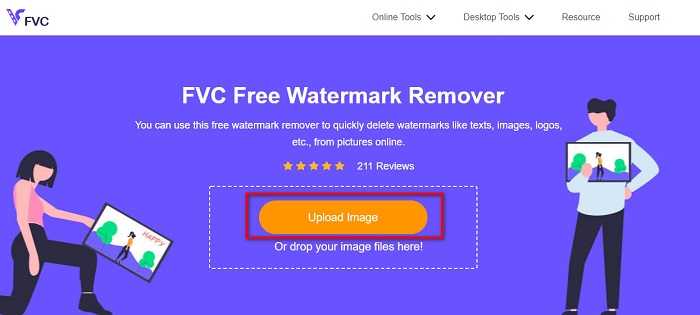
Pas 2. A continuació, fes clic al botó Upload Image a la interfície principal del programa. Es mostraran els fitxers de l’ordinador. Selecciona la teva imatge de Fiverr i fes clic a Open per pujar-la.
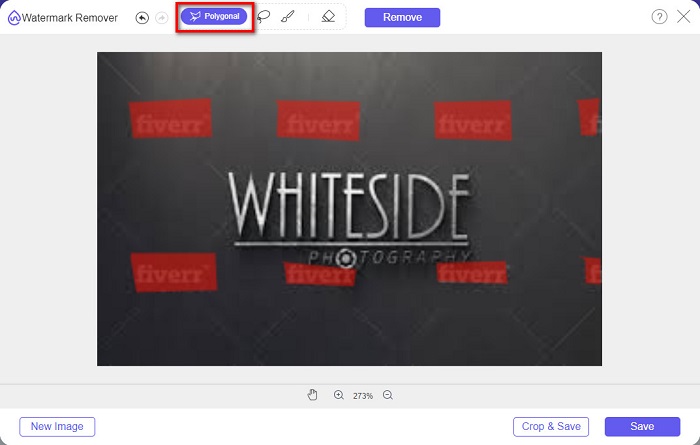
Pas 3. Després, selecciona l’eina d’eliminació que vulguis (Polygonal, Lasso, Brush). Després selecciona la zona de la marca d’aigua que vols eliminar. En aquest cas, farem servir l’eina Polygonal com a exemple.
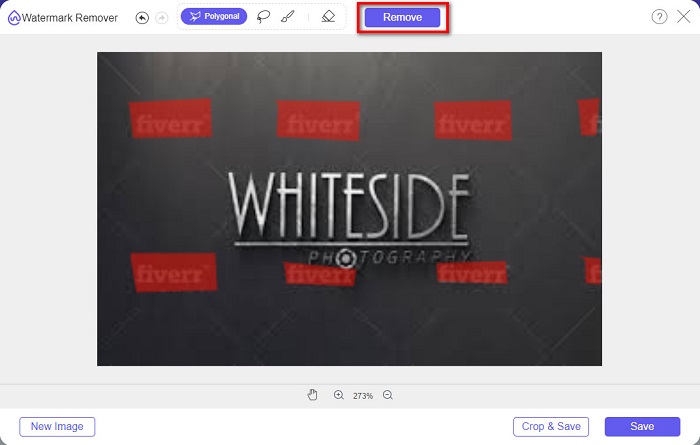
Pas 4. Tot seguit, fes clic al botó Remove per eliminar la marca d’aigua que has seleccionat.
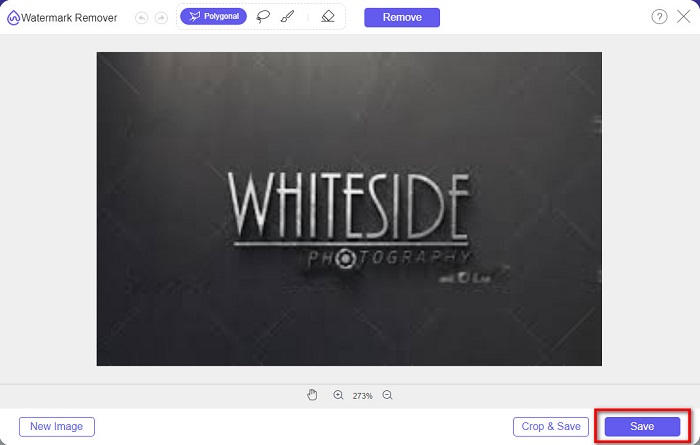
Pas 5. Veureu que la marca d’aigua de la imatge ha desaparegut. Després, fes clic al botó Save per desar la imatge al teu dispositiu.
I això és tot! Pots eliminar la marca d’aigua de Fiverr de la teva imatge tan fàcilment com l’A-B-C. També pots utilitzar aquest programa per eliminar marques d’aigua de fotos de graduació.
Part 3. Altres maneres d'eliminar la marca d'aigua de Fiverr
També hi ha algunes eines que podeu utilitzar per eliminar la marca d'aigua Fiverr de la vostra imatge. Aquesta part us donarà més opcions per triar quina eina voleu. Per tant, llegiu aquesta part exhaustivament.
WatermarkRemover.io
WatermarkRemover.io és un eliminador de marques d’aigua en línia que suprimeix la marca d’aigua de la teva imatge sense complicacions. Aquest eliminador en línia utilitza un algoritme d’IA capaç de predir la ubicació de la marca d’aigua a la teva imatge. També disposa d’una funció de separació de color que segrega el color de la marca d’aigua del fons. Però no t’amoïnis, perquè recrea el fons després del procés. El més fantàstic d’aquesta eina és que pot eliminar diferents tipus de marques d’aigua presents a la teva imatge.
Pros
- Utilitza la detecció automàtica de filigranes.
- És una eina fàcil d'utilitzar.
- No es requereix cap instal·lació.
- No conté cap anunci inquietant.
Contres
- Experimentaràs un procés de càrrega lent si la teva connectivitat a Internet és lenta.
Pas 1. Al navegador, cerca WatermarkRemover.io. Després, a la interfície principal, fes clic al botó Upload Image.
Pas 2. A continuació, espera que la imatge es pugi. Veureu que la marca d’aigua de la imatge s’eliminarà automàticament.
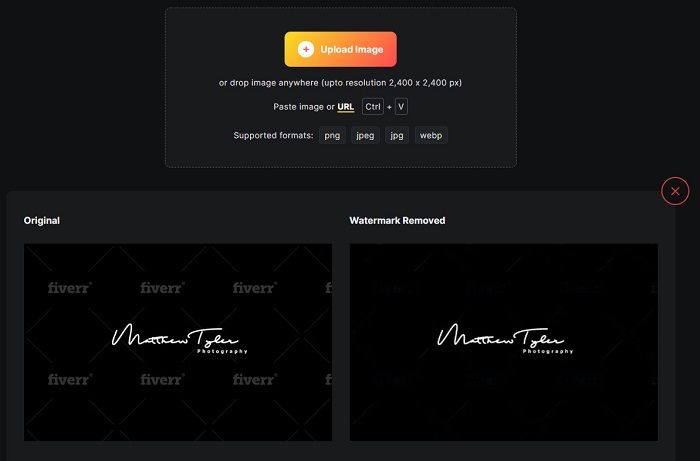
Pas 3. Finalment, fes clic al botó Download Image per descarregar la imatge al teu dispositiu.
Imgkits
Una altra eina en línia per eliminar marques d’aigua que has de provar és Imgkits. Aquesta eina en línia és coneguda perquè té una interfície senzilla, cosa que la fa molt fàcil d’usar. També inclou molts presets d’eines d’eliminació, com ara reparació per difuminat, reparació per punts i poligonal. I si comets un error, pots restaurar la teva imatge. A més, a diferència d’altres eines en línia, Imgkits no conté anuncis. Tot i això, molts usuaris estan descontents perquè, de vegades, la marca d’aigua no desapareix completament. Malgrat això, continua sent pràctica per eliminar la marca d’aigua de la teva imatge. Aquesta eina també és un eliminador de marques d’aigua de Photobucket.
Pros
- Admet els formats d'imatge més comuns, com ara PNG, JPG, BMP i WEBP.
- Té una interfície d'usuari intuïtiva.
- És gratuït i segur d'utilitzar.
Contres
- Depèn d'Internet.
Pas 1. Cerca Imgkits al navegador i ves a la seva pàgina principal. A la interfície principal del programa, fes clic al botó Upload Image.
Pas 2. Després, tria el preset d’eliminació que vulguis. Després, selecciona la zona de la marca d’aigua de la teva imatge. Veureu que la marca d’aigua s’esborrarà automàticament.
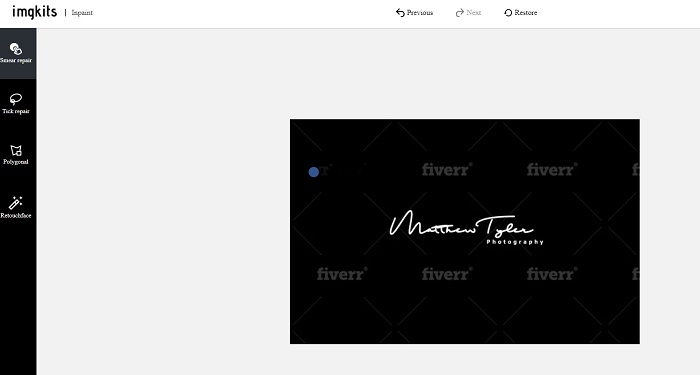
Pas 3. Fes clic al botó Download per acabar el procés i descarregar la teva imatge.
Part 4. Preguntes freqüents sobre l'eliminació de la marca d'aigua de Fiverr
Hi ha aplicacions que puguin eliminar les marques d'aigua?
Sí. Podeu descarregar aplicacions al vostre Android que poden eliminar les marques d'aigua. Alguns d'ells són PicLab, Photo Retouch, AirBrush i més.
Eliminar la filigrana de la imatge arruïna la qualitat?
Hi ha eliminadors de filigrana que afectaran la qualitat de la vostra imatge quan elimineu la filigrana. Algunes eines deixaran marques a l'àrea de la marca d'aigua que heu eliminat.
Per què no hauríeu de posar una marca d'aigua a les vostres fotos?
Molts fotògrafs no posen una filigrana a les seves fotos perquè les filigranes són una llàstima i poden reduir l'atractiu de la teva foto. Tanmateix, les filigranes també són necessàries perquè indiquen l'originalitat de la vostra imatge o vídeo.
Conclusió
I ja està! Aquestes són les eines que t’ajudaran a eliminar la marca d’aigua de Fiverr. Ara depèn de tu quina eina vols utilitzar per eliminar la marca d’aigua de Fiverr. Qualsevol de les eines presentades més amunt t’ajudarà a eliminar marques d’aigua de manera pràctica. Però si vols un eliminador de marques d’aigua amb les millors funcions i la interfície més senzilla, fes servir FVC Free Watermark Remover.
-
 Com eliminar la filigrana Lumion a Windows i Mac fàcilment
 Necessites eliminar la marca d'aigua Lumion per presentar-la professionalment? Bé, hi ha eines que podeu utilitzar per ajudar-vos a desfer-vos de la marca d'aigua que deixa.
-
 Com treure la marca d'aigua de Weibo en vídeos i imatges fàcilment
 Teniu problemes per eliminar la marca d'aigua de Weibo al vídeo i la imatge exportats? En aquest cas, necessiteu un eliminador de filigrana que us enumerem a continuació que us pugui ajudar.
-
 Obteniu informació sobre com eliminar la marca d'aigua de Movavi de forma gratuïta [imprescindible!]
 Exportar un vídeo o una imatge a Movavi deixarà una marca d'aigua, però és possible eliminar-la? Per ensenyar a eliminar la filigrana de forma gratuïta, llegiu això.
