


 Video Converter Ultimate
 Gravadora de pantalla
 Reparació de vídeo
 Baixada segura
Apreneu-ho tot sobre què és 3D o tridimensional
Vols saber què és el 3D? Les pel·lícules i les imatges en 3D o tridimensionals són cada cop més populars. Com que estem en els dies moderns, és fàcil crear una pel·lícula en 3D amb diferents eines. Però primer, hem d'entendre tot sobre el 3D: el fons, la definició i com fer un vídeo en 3D.
En aquest article aprofundirem en el 3D i els seus paràmetres. Així que, si vols aprendre què és el 3D, llegeix aquest article.

Part 1. Què és el 3D
Els objectes 3D o tridimensionals mostren l'amplada, l'alçada i la profunditat. Cada dia veiem objectes en 3D perquè el nostre entorn físic és tridimensional. A causa de la percepció 3D que tenim els humans, podem percebre els objectes 3D, també anomenats percepció de profunditat. Quan mireu al vostre voltant, la retina dels nostres ulls forma una imatge bidimensional i el nostre cervell processa les dues imatges com a visuals en 3D. Però ho sabies? Nosaltres, els humans, tenim eines que fem servir per a la percepció de la profunditat?
Aquestes són les eines humanes que fem servir per a la percepció de la profunditat:
Visió estereoscòpica - La visió estereoscòpica és el sentit de profunditat percebut pels dos ulls. És una de les capacitats del cervell per registrar formes i imatges en 3D. En aquest tipus de visió, els objectes semblen més separats quan són a prop que no pas els que són llunyans.
Paral·laxi - Els angles entre dues línies mesuren aquest tipus de visió. Quan mous el cap d’un costat a l’altre, els objectes més propers es mouen més que els objectes llunyans.
Familiaritat amb la mida - Si estàs familiaritzat amb la mida d’un objecte, encara que estigui lluny, pots saber aproximadament com de gran ha d’aparèixer. De la mateixa manera, si dos objectes tenen la mateixa mida però un es veu més gran, s’assumeix que el més gran és més a prop.
Acomodació - Quan et concentres en un objecte proper, els cristal·lins dels ulls canvien físicament. D’aquesta manera, sabràs a quina distància és l’objecte. A més, és la manera que té l’ull de mantenir l’enfocament sobre un objecte.
Perspectiva aèria - En la perspectiva aèria, veus els objectes més petits perquè la vista és llunyana. Els objectes llunyans també semblen tenir menys contrast i saturació de color.
També hi ha diferents tipus de 3D al nostre món físic. El 3D també es descriu com una imatge que dóna la il·lusió de profunditat a diferents distàncies, que s'utilitza habitualment en jocs d'ordinador, gràfics, realitat virtual i pel·lícules.
Diferents tipus de 3D:
Gràfics 3D per ordinador - Els gràfics 3D per ordinador poden generar objectes 3D en una pantalla o en un espai bidimensional. Els píxels en gràfics 2D tenen diferents propietats, com ara posició, color i brillantor. Els píxels 3D se situen sobre un eix Z. Quan es combinen els píxels amb la seva profunditat, es forma una superfície 3D, també anomenada textura.
Pel·lícules 3D - Les pel·lícules 3D són pel·lícules amb profunditat tridimensional. Amb l’ajuda d’ulleres 3D, podem veure una pel·lícula en 3D. Per fer aquest tipus de pel·lícules, els creadors utilitzen la visió estereoscòpica, que significa que es mostren dues imatges simultàniament, una per a cada ull.
Impressió 3D - La impressió 3D també es coneix com a fabricació additiva. És un procés de creació d’un objecte 3D sòlid a partir d’un fitxer digital. Utilitzant un disseny assistit per ordinador (CAD), pots imprimir un objecte 3D a partir d’un model digital.
Part 2. Com reproduir pel·lícules en 3D
Ara que coneixeu el significat del 3D, feu-nos saber com reproduir pel·lícules en 3D amb l'aplicació de programari més destacada que podeu utilitzar.
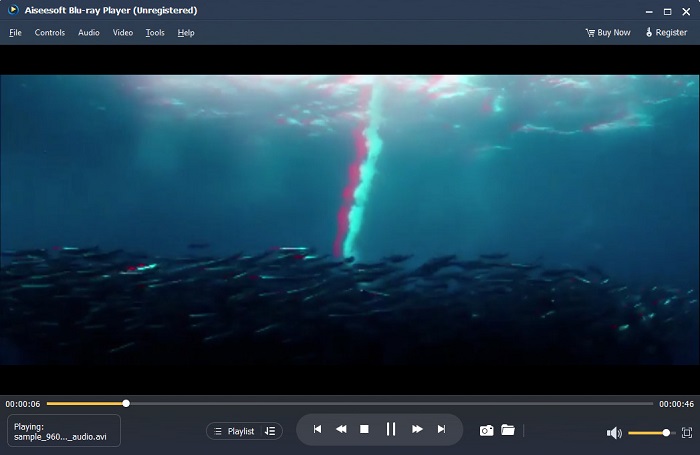
Blu-ray Player és una aplicació d'escriptori on podeu reproduir qualsevol tipus de vídeo. Amb aquesta eina, també podeu reproduir pel·lícules en 3D sense utilitzar cap connector. A més, moltes persones recomanen aquest reproductor multimèdia per la seva interfície d'usuari senzilla i neta. A més, aquest potent reproductor multimèdia pot reproduir discos Blu-ray, carpetes Blu-ray, DVD/carpeta/arxius ISO, que altres reproductors multimèdia no admeten. També podeu gaudir mirant vídeos HD amb un àudio 100% sense pèrdues i un so envoltant HD espectacular. El que és fins i tot sorprenent és que podeu crear la vostra llista de reproducció perquè no us costarà separar els vídeos o els àudios que vulgueu.
Com reproduir una pel·lícula en 3D al reproductor de Blu-ray:
Pas 1. Descarrega el Blu-ray Player al teu dispositiu. Segueix el procés d’instal·lació i després executa l’aplicació.
Pas 2. A la interfície principal del programari, fes clic al botó Open File. Apareixeran els fitxers del teu dispositiu, on seleccionaràs la teva pel·lícula 3D.
Pas 3. Després, el teu vídeo començarà a carregar-se. Ara ja et pots posar les teves ulleres especials 3D i gaudir veient la teva pel·lícula 3D.
Part 3. Què són els televisors 3D i les ulleres 3D
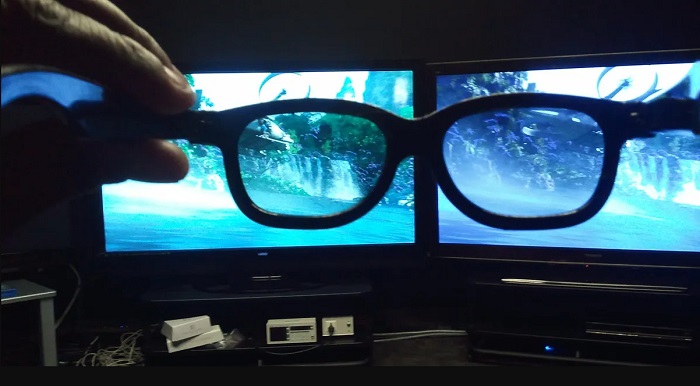
Hi ha dos tipus de televisors 3D: 3D amb obturador actiu, 3D actiu i 3D passiu. Aquesta part distingirà les seves diferències i determinarà quin tipus d'ulleres 3D s'han d'utilitzar quan es veuen els televisors 3D actius o passius.
L’Active-shutter o 3D actiu és un tipus de televisió 3D que mostra imatges 3D d’alta qualitat de manera alterna a la pantalla. El televisor 3D actiu mostra imatges alternes a la pantalla per a l’ull dret i l’esquerre. Les ulleres 3D, al seu torn, obturen en negre de manera alterna per representar l’efecte 3D que veus a la pantalla del televisor. Això fa que cada ull vegi la imatge creada per a ell. Les ulleres 3D que has d’utilitzar quan mires un 3D amb Active-shutter són les ulleres 3D actives. Aquest tipus d’ulleres 3D necessita una bateria que s’utilitza per bloquejar i obrir els lents electrònicament. Aquestes ulleres incorporen lents LCD per coordinar-se amb els fotogrames alterns.
En canvi, el televisor 3D passiu és en certa manera similar a la tecnologia 3D que s’utilitza als cinemes. Aquest tipus de televisor 3D utilitza filtres especials a la pantalla per veure el 3D mitjançant lents polaritzades a les ulleres. A més, els televisors 3D passius combinen els dos fotogrames en un, alternant entre les línies horitzontals per a l’ull esquerre i el dret. Les ulleres que utilitzen aquests televisors 3D són ulleres 3D passives, que contenen una polarització diferent a cada lent. Un ull només veu les línies senars, mentre que l’altre veu les línies parelles per produir una imatge 3D. Les ulleres 3D passives no requereixen bateries per funcionar.
Part 4. 2D vs. 3D
2D i 3D són dimensions reals en un espai de treball informàtic. 2D o bidimensionals són objectes plans que utilitzen les dimensions horitzontal i vertical (els eixos X i Y). Com que 2D només té dues dimensions, només veureu una línia quan les gireu cap al costat. Només té una alçada i una amplada però no té profunditat. Mentre que, d'altra banda, 3D o tridimensional conté alçada, amplada i profunditat. Les imatges tridimensionals necessiten l'efecte de dos ulls que treballen en tàndem per veure un perceptiu tridimensional. Si 2D utilitza els eixos X i Y, 3D afegeix la dimensió Z, que us permetrà veure la profunditat d'un objecte.
Si us pregunteu què és bo per utilitzar, 2D i 3D, la resposta és ambdues coses. El 2D i el 3D tenen diferents avantatges i desavantatges. Per exemple, podeu veure vídeos o pel·lícules en 2D a qualsevol lloc des de qualsevol dispositiu sense portar ulleres 3D especials. Tanmateix, l'efecte 3D que produeixen les pel·lícules en 3D és sorprenent i més divertit de veure que el 2D.
Part 5. Com convertir pel·lícules 2D a 3D
Si voleu veure una pel·lícula o un clip en 3D increïbles a casa vostra sense ulleres 3D, podeu convertir la vostra pel·lícula 2D a 3D amb el convertidor de vídeo definitiu. Per tant, si voleu convertir la vostra pel·lícula 2D en una pel·lícula 3D, feu servir aquesta increïble aplicació de programari.
FVC Video Converter Ultimate és una aplicació popular per a la conversió de vídeos. Aquest programari no només pot convertir formats de fitxer. També et permet convertir el teu vídeo 2D en un vídeo 3D, com ara 3D anàglif i 3D de pantalla dividida. FVC Video Converter Ultimate és famós entre els usuaris perquè admet gairebé tots els formats de fitxer, com MP4, MKV, AVI, FLV, WEBM, MOV, DIVX i més de 1000 formats més. També inclou un munt de funcions avançades d’edició, com un creador 3D, creador de GIF, eliminador de marques d’aigua de vídeo, etc.
Com convertir pel·lícules en 2D a pel·lícules en 3D amb FVC Video Converter Ultimate:
Pas 1. Primer, descarrega FVC Video Converter Ultimate fent clic al botó Download de més avall.
Descàrrega gratuïtaPer a Windows 7 o posteriorDescàrrega segura
Descàrrega gratuïtaPer a macOS 10.7 o posteriorDescàrrega segura
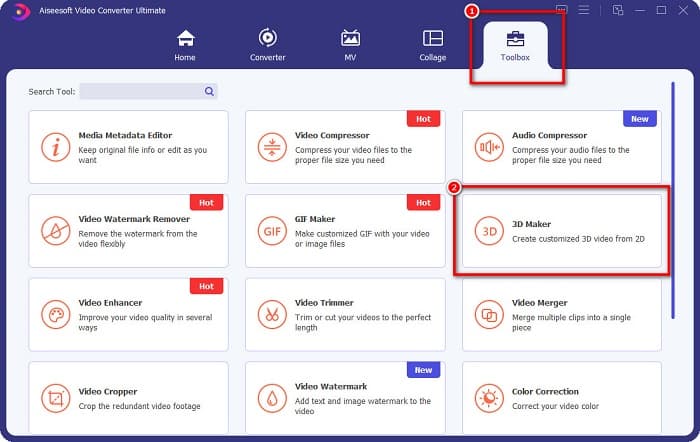
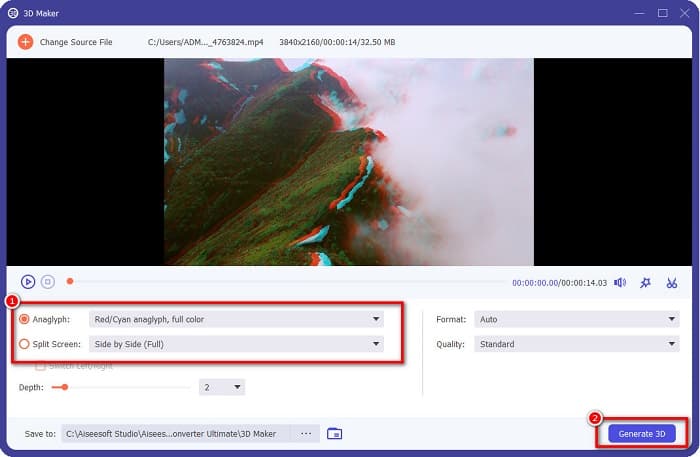
Pas 2. Obre l’aplicació, després ves al panell Toolbox i selecciona 3D Maker.
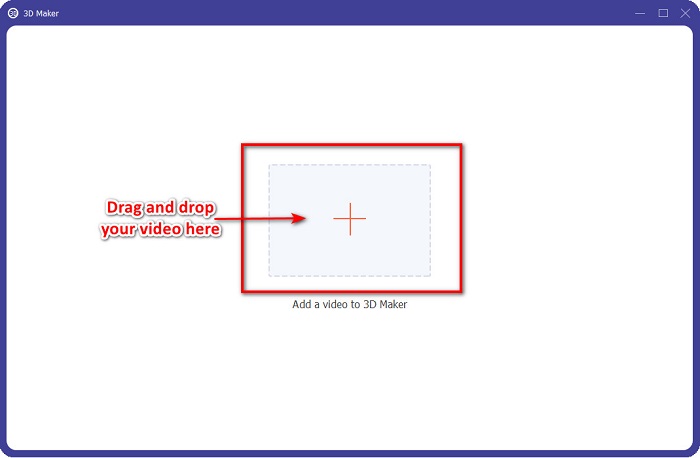
Pas 3. Fes clic al botó amb el signe + o arrossega i deixa anar el teu vídeo 2D al quadre de la següent interfície.
Pas 4. Després, tria entre Anaglyph 3D o Split Screen 3D. I tot seguit, fes clic al botó Generate 3D.
Relacionat amb:
Maneres més ràpides de convertir AVI a WMV [Millors convertidors]
Converteix fàcilment MOV a WMV amb aquests impressionants convertidors
Part 6. Preguntes freqüents sobre Què és el 3D
Podeu veure vídeos en 3D al VLC Media Player?
Sí. VLC Media Player admet tots els formats de fitxer. També podeu reproduir pel·lícules en 3D al reproductor multimèdia VLC.
Pots convertir vídeos 3D a 2D?
FVC Video Converter Ultimate pot convertir vídeos 3D a 2D. També podeu canviar el format del fitxer del vostre vídeo amb aquest convertidor.
Què és més utilitzat, 2D o 3D?
Avui en dia, a la indústria cinematogràfica, les pel·lícules en 3D són més dominants que les pel·lícules en 2D. A causa dels gràfics interessants i l'animació realista, les pel·lícules en 3D són més populars que les pel·lícules en 2D.
Conclusió
El 3D o tridimensional és àmpliament conegut en la indústria cinematogràfica i, especialment, en la informàtica. Ara que ja saps què és el 3D, tens els coneixements bàsics sobre com en pots crear un. Si vols fer un vídeo 3D fàcilment, utilitza FVC Video Converter Ultimate.
-
 3 maneres de convertir MPG a 3GP a Windows i Mac [Gratis]
 Si esteu buscant maneres de convertir MPG a 3GP, llegiu aquest article per conèixer les millors maneres de convertir MPG a 3GP a Windows i Mac.
-
 Els 5 millors convertidors gratuïts de MPEG a DivX per a Windows i Mac
 Convertiu fàcilment el vostre fitxer MPEG a un fitxer DivX utilitzant els millors convertidors de MPEG a DivX. Llegiu aquest article per conèixer més detalls sobre ells.
-
 Els millors convertidors gratuïts d'utilitzar MOV a DivX per a Mac i Windows
 Tenim la solució per a vostè si busqueu convertidors gratuïts de MOV a DivX. Aquest article presenta els principals convertidors de MOV a DivX per a Mac i Windows.
