


 Video Converter Ultimate
 Gravadora de pantalla
 Reparació de vídeo
 Baixada segura
Com eliminar la marca d'aigua de WeVideo al vídeo editat com un professional
No voleu descarregar-vos cap editor de vídeo mensual al vostre escriptori ni utilitzar-lo perquè no teniu prou pressupost? WeVideo és una eina que cal provar si voleu un editor de vídeo gratuït que no us arrenqui diners. Aquesta eina web us permet fer una sortida de vídeo increïble al vostre abast i d'una manera més bella fent uns quants passos senzills. A causa de la seva popularitat, l'eina s'ha convertit en un dels editors de vídeo més visitats als quals podeu accedir al web.
A partir d’avui, augmentaran les possibilitats que els usuaris visitin el lloc web pel seu editor de vídeo. Però els usuaris tenen alguns dubtes sobre aquest editor de vídeo en línia i, molt sovint, pregunten: WeVideo posa una marca d’aigua al vídeo editat? Per respondre aquesta pregunta, has de llegir tot l’article per esbrinar si realment deixa una marca d’aigua al vídeo que hi has editat.

Part 1. WeVideo té una marca d'aigua
Sí, afegeix la marca d'aigua de WeVideo un cop exporteu el vídeo que editeu aquí. Hi ha diferents mètodes per eliminar la filigrana de WeVideo, però no tots els eliminadors de filigranes que podeu veure al mercat són tan efectius com els altres. En lloc de provar totes les eines per veure quina us convé, aquí es consideren les millors coses, ja que us oferim l'eliminador de filigrana que escollim a mà que ofereix la millor sortida per eliminar la filigrana. Encara que siguis un professional o no, pots utilitzar aquest eliminador de filigrana per eliminar fàcilment la marca d'aigua del teu vídeo.
Part 2. Com desfer-se de la marca d'aigua de WeVideo
FVC Video Converter Ultimate
FVC Video Converter Ultimate ofereix la millor sortida de vídeo tant per a principiants com per a professionals. Amb la seva capacitat per eliminar la marca d’aigua del vídeo, s’ha fet popular entre molts usuaris i s’ha convertit en la seva primera opció per treure la marca d’aigua dels vídeos. És compatible amb Windows i macOS, així que admet múltiples plataformes, des de les més antigues fins a les més recents. Encara que l’eina no sigui gratuïta, aconseguiràs el millor resultat un cop facis servir aquest programari. Per als usuaris que el volen utilitzar, i per als qui ja l’han provat però volen saber com treure la marca d’aigua de WeVideo, la guia pas a pas que trobaràs a continuació t’orientarà perquè puguis eliminar de manera efectiva la marca d’aigua que hi ha al teu vídeo.
Pas 1. Pots descarregar aquest programari fent clic al botó de descàrrega que es mostra a continuació, triant el sistema operatiu que estàs utilitzant actualment i assegurant-te de prémer el botó correcte. Després, instal·la el programari, segueix la guia de configuració i obre’l.
Descàrrega gratuïtaPer a Windows 7 o posteriorDescàrrega segura
Descàrrega gratuïtaPer a macOS 10.7 o posteriorDescàrrega segura
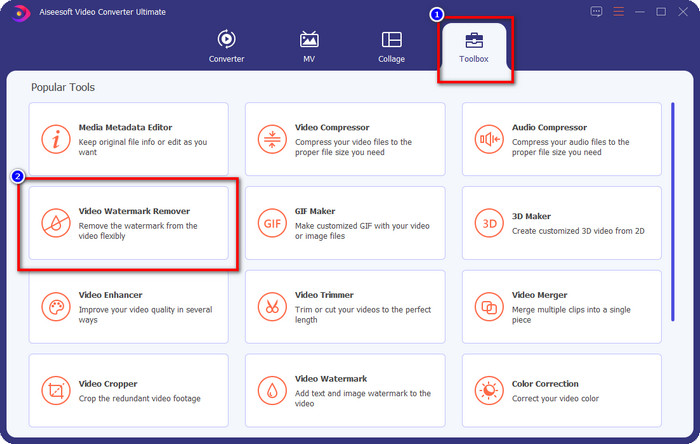
Pas 2. A la Caixa d’eines, localitza el Removedor de marca d’aigua de vídeo que incorpora aquesta eina i fes-hi clic per continuar.
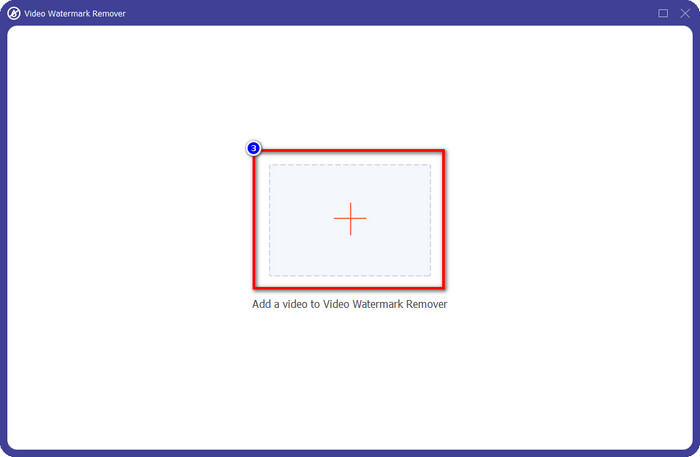
Pas 3. Fent clic a la icona +, pujaràs el vídeo que conté una marca d’aigua. Busca’l a la carpeta que apareixerà a la pantalla, fes-hi clic una vegada i després prem Obre per carregar-lo.
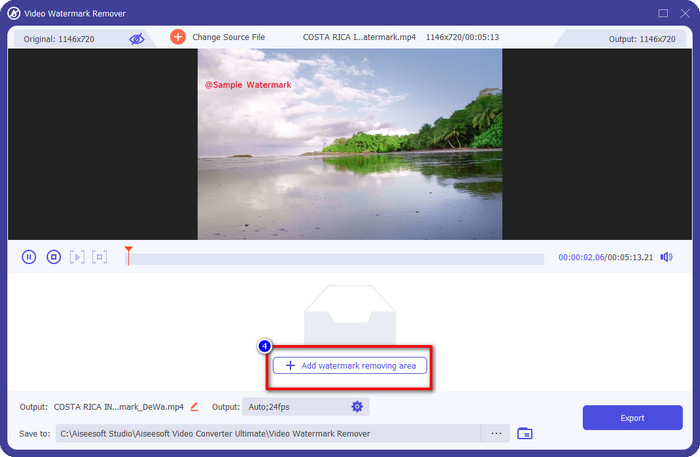
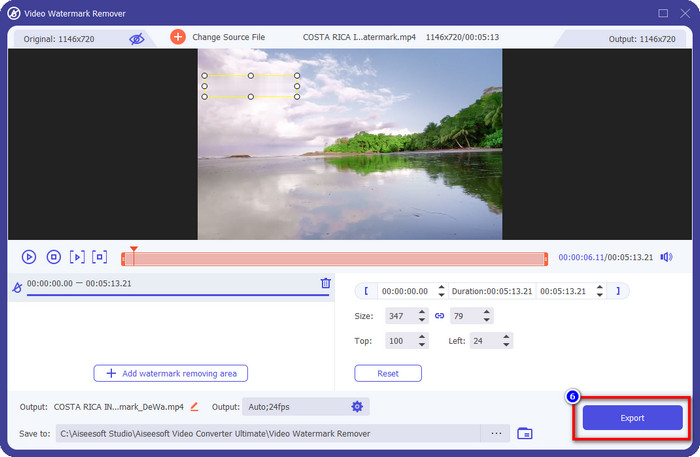
Pas 4. Un cop hagis pujat el vídeo amb marca d’aigua, prem Afegeix àrea d’eliminació de marca d’aigua i espera el breu procés de càrrega.
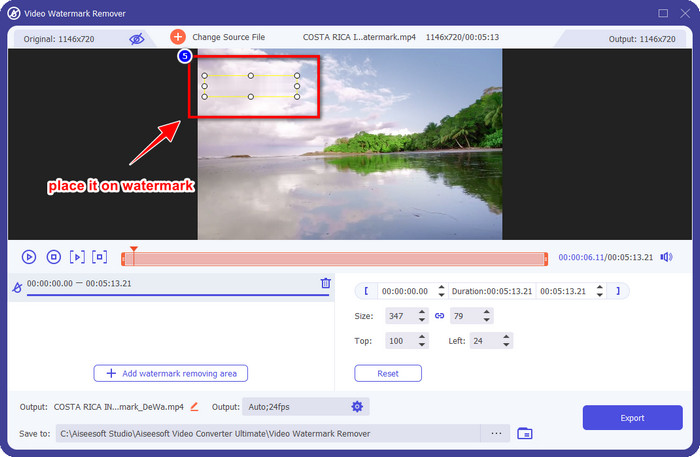
Pas 5. Col·loca el quadre de selecció sobre la marca d’aigua de WeVideo i cobreix-la tota perquè, quan exportis el vídeo, no en quedi cap rastre al final del vídeo.
Pas 6. Ara ja pots desar el vídeo; aquí n’has eliminat la marca d’aigua fent clic al botó Exporta. El procés de desat no trigarà gaire perquè admet processos ultraràpids i acceleració per maquinari.
iMyFone Mark Go
iMyFone Mark Go és un altre removedor de marques d’aigua que pots descarregar al teu Windows i Mac per ajudar-te a treure la marca d’aigua de WeVideo. Aquesta eina elimina la marca d’aigua del vídeo de manera efectiva, de manera similar al que et pot oferir l’eina «ultimate». Com amb qualsevol altre programari d’escriptori, hauràs de comprar la llicència per eliminar la marca d’aigua i aprofitar la versió premium per treure la marca d’aigua del teu vídeo. Tot i que té un cost, no és tan car comparat amb altres programes per eliminar marques d’aigua que pots descarregar. Així que, si vols treure la marca d’aigua del teu vídeo de manera fàcil i efectiva, pots seguir els passos indicats a continuació, on t’ensenyem com fer-ho pas a pas.
Pas 1. Descarrega el programari al teu ordinador anant al seu lloc web oficial.
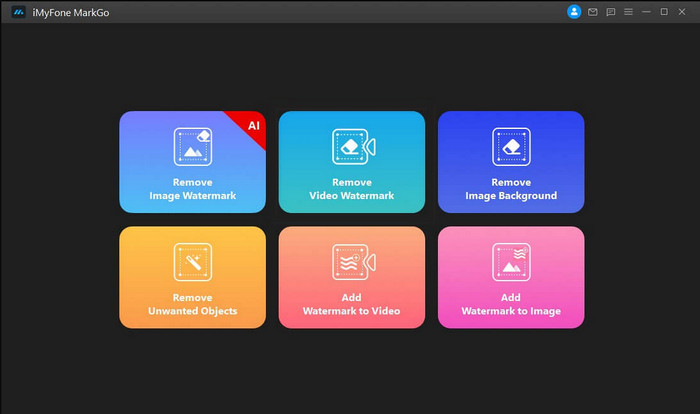
Pas 2. Després d’haver iniciat el programari, fes clic a Remove Video Watermark.
Pas 3. Afegeix el fitxer de vídeo fent clic a Add the Video. Tria el fitxer de vídeo que tingui una marca d’aigua.
Pas 4. Mou la forma rectangular que apareixerà i col·loca-la sobre la marca d’aigua per cobrir-la. Tot i que hi ha tres opcions més per eliminar la marca d’aigua, no hi podràs accedir perquè són per a usuaris premium.
Pas 5. Fes clic al botó Export per desar el vídeo al qual li has eliminat la marca d’aigua.
Tallador de vídeo en línia: elimina el logotip del vídeo
Com treure la marca d’aigua de WeVideo de franc? Fes servir Online Video Cutter – Remove Logo From Video. Aquest programari és una eina web gratuïta que pots utilitzar per eliminar la marca d’aigua del teu vídeo al navegador sense haver de descarregar ni pagar res. Aquesta eina és tan efectiva com altres removedors de marques d’aigua del mercat si ho comparem, encara que no arriba al nivell del programari «ultimate». Pot tapar la marca d’aigua del teu vídeo i millorar-ne l’aparença visual. Tanmateix, si no tens connexió a Internet, aquesta no seria la millor opció per treure la marca d’aigua del teu vídeo. Però si en tens, aleshores pots seguir els passos següents per començar a utilitzar aquesta eina i eliminar la marca d’aigua del teu vídeo.
Pas 1. Obre una pestanya nova i cerca el nom de l’eina per començar a treure la marca d’aigua del vídeo.
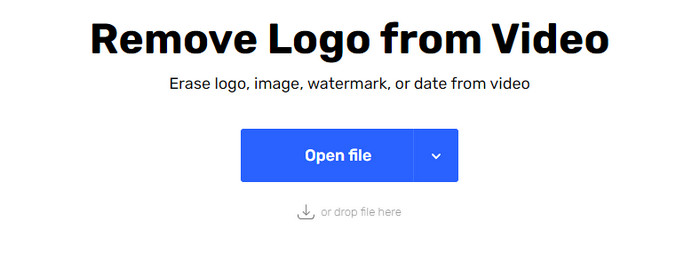
Pas 2. Fes clic a Open File per pujar aquí el vídeo de WeVideo i que es generi la previsualització del vídeo que has carregat.
Pas 3. Fes clic sobre la marca d’aigua per aplicar l’àrea d’eliminació que ofereix aquesta eina. Un cop facis clic a qualsevol part del vídeo, hi apareixerà un quadre de selecció.
Pas 4. Prem Save per obtenir el vídeo sense la marca d’aigua.
Relacionat:
Com eliminar la marca d’aigua de Movavi
Com eliminar la marca d’aigua de Weibo
Part 3. Preguntes freqüents sobre l'eliminació de la marca d'aigua de WeVideo
Quina eina és la millor per eliminar WeVideo Watermark?
Sense cap segon dubte, és el FVC Video Converter Ultimate; aquesta eina proporciona la millor sortida per eliminar la filigrana del vostre vídeo. Entre els eliminadors de filigranes seleccionats, no podem negar que l'eina definitiva és superior a l'altre eliminador de filigranes.
Puc retallar la marca d'aigua de WeVideo?
Sí, podeu retallar la marca d'aigua que WeVideo deixa al vostre vídeo. Però la dimensió del vídeo es reduirà i hi ha la possibilitat que la seva qualitat es redueixi perquè talleu la relació d'aspecte.
Què fa que WeVideo sigui el millor editor de vídeo del web?
Amb les seves funcions d'edició de vídeo fonamentals completes, us podeu acostumar i com de fàcil és utilitzar l'eina. Aquests són els coneixements més comuns sobre què fa que WeVideo sigui un dels millors editors de vídeo que podeu utilitzar al web. Però no és tan bo com l'altre editor de vídeo Adobe Premiere Pro, Final Cut Pro, etc.
Conclusió
Per fi, amb els mètodes que oferim anteriorment, ara teniu una idea de com desfer-vos de la marca d'aigua de WeVideo. Però, què en penseu de l'eina que tenim? Si encara no teniu ni idea de què utilitzar, heu de provar el FVC Video Converter Ultimate al nostre parer. Proporciona el millor del millor per eliminar la marca d'aigua i també és fàcil d'utilitzar. Aleshores, a què esperes? Feu clic al botó de descàrrega per tenir l'eliminador de filigrana i utilitzar-lo immediatament.
-
 Eliminadors de filigrana 123rf: revisió exhaustiva de les eines definitives
 Si voleu saber quins són els eliminadors de filigrana 123rf més destacats, llegiu aquest article detingudament. Aquest article ofereix una revisió en profunditat de les eines.
-
 Com eliminar la marca d'aigua de DeviantArt a Windows i Mac
 Vols aprendre a eliminar la filigrana de DeviantArt a les teves imatges? Utilitzant els eliminadors de filigranes de DeviantArt més destacats, podeu eliminar fàcilment aquestes molestes marques d'aigua.
-
 Programari final per eliminar la filigrana de Video Helper als vídeos exportats [2022]
 Voleu saber com eliminar la marca d'aigua del vídeo que baixeu a Video Helper? Si és així, llegiu aquest article per saber-ho.
