


 Video Converter Ultimate
 Gravadora de pantalla
 Reparació de vídeo
 Baixada segura
Elimina la marca d'aigua de Dreamstime amb les 4 maneres que necessites saber
Si necessiteu imatges llestes per utilitzar per a la vostra presentació o projecte, no us podeu equivocar mai en triar el Dreamstime. Aquesta aplicació us pot oferir fotografies d'estoc lliures de drets d'autor a punt per utilitzar-les en qualsevol moment. Ja ajuda els usuaris a buscar una imatge específica amb una sortida d'alta qualitat a un preu baix. Tot i que aquí podeu descarregar 15 imatges gratuïtament, aquest producte deixa una marca d'aigua per promocionar l'aplicació quan feu servir la imatge que descarregueu aquí.
No podem negar que la seva usabilitat és excel·lent i que els preus de les imatges són baixos, però no tots ens podem permetre comprar crèdits a la plataforma. No et preocupis més! Perquè et tenim cobert: a continuació t’expliquem diverses maneres que pots seguir per eliminar la marca d’aigua de Dreamstime que apareix al resultat final.

Part 1. Com eliminar la marca d'aigua de Dreamstime comprant els crèdits
No ens podem deixar enrere l'opció de compra perquè és l'opció d'eliminació de filigranes de Dreamstime més eficaç que podeu utilitzar. Abans de continuar, haureu de saber que Dreamstime necessita que tingueu perquè pugueu comprar una imatge sense filigrana. El crèdit del nom és una moneda de Dreamstime; utilitza diners reals i els converteix en un de digital que accepta Dreamstime. Suposem que no teniu cap crèdit a Dreamstime. En aquest cas, podeu seguir els passos següents per adquirir un crèdit per descarregar i tenir la imatge sense cap logotip dels productes.
Pas 1. Obre el lloc web oficial de Dreamstime i crea un compte abans de comprar crèdits a Dreamstime. Si ja tens un compte, primer has d’iniciar sessió per poder-lo utilitzar correctament.
Pas 2. Un cop hagis iniciat sessió al teu compte de Dreamstime, fes clic a Preus i plans de descàrrega i després ves a Paquet de crèdits per veure quines tarifes hi ha disponibles.
Pas 3. Introdueix completament totes les dades que et demana la plataforma i, a continuació, fes clic a Completa la compra per processar el pagament que hi has indicat. Així de fàcil: ara ja has comprat crèdits com a moneda per adquirir imatges a Dreamstime.
Part 2. Com eliminar la marca d'aigua de Dreamstime gratuïtament al web
Eliminador de filigranes gratuït de FVC en línia
Un dels eliminadors de filigranes de Dreamstime més coneguts en línia que podeu utilitzar no és un altre que l'eliminador de marques d'aigua gratuït en línia FVC. Podeu aprofitar aquesta eina per eliminar la marca d'aigua que hi ha a la imatge que teniu. Pel que fa al rendiment, aquesta eina en línia és més capaç de fer el que penseu, especialment en eliminar el logotip, la marca d'aigua, els segells, les dates, l'objecte, etc., de la imatge. Encara no dubtes d'aquesta eina? En aquest cas, llegiu els passos que hem afegit a continuació i també podeu seguir-los per eliminar la marca d'aigua que ha afegit Dreamstime.
Pas 1. En fer clic en aquest enllaç, s’obrirà una pestanya nova al teu navegador.
Pas 2. Fes clic a Puja imatge per importar les fotos que has descarregat de Dreamstime amb marca d’aigua.
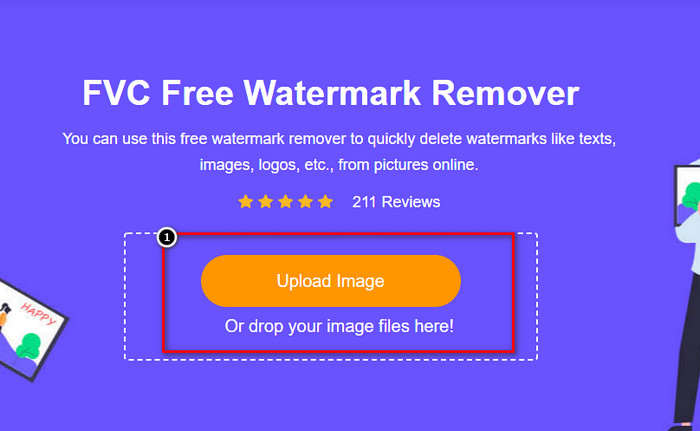
Pas 3. Pots utilitzar eines per resseguir la marca d’aigua; tria’n una i utilitza-la per delimitar la marca d’aigua.
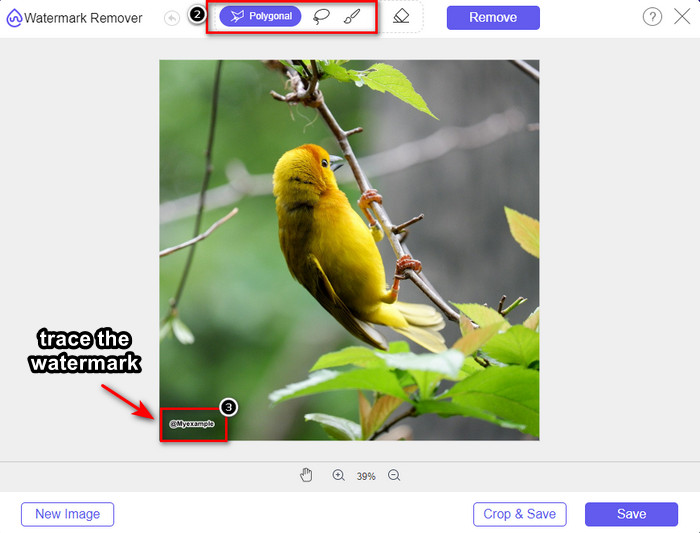
Pas 4. Fes clic primer a la icona Elimina abans de continuar amb l’exportació de la imatge.

Pas 5. Finalment, fes clic a Descarrega per desar la imatge sense la marca d’aigua incrustada que has seleccionat aquí.

WatermarkRemover.IO
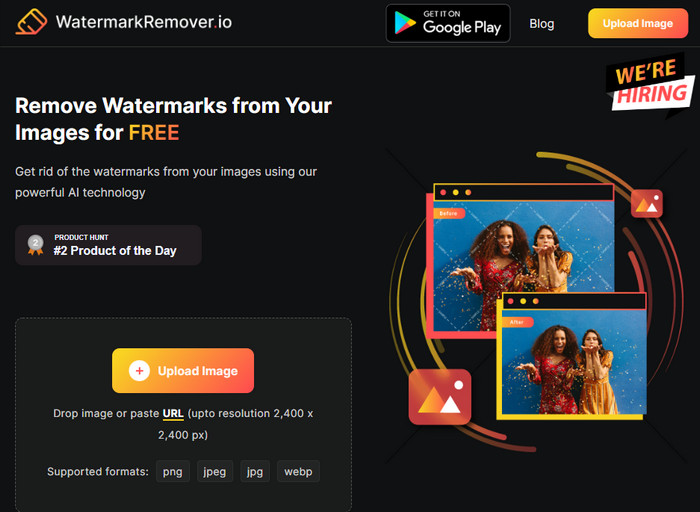
WatermarkRemover.io és una eina en línia per eliminar marques d’aigua de fotos de Dreamstime que pots utilitzar per ajudar-te en aquest procés. Aquesta eina és gratuïta, igual que el primer eliminador de marques d’aigua en línia que hem esmentat. No t’has de preocupar de registrar‑hi cap compte, perquè es pot utilitzar en qualsevol navegador. També fa servir tecnologia d’IA per eliminar la marca d’aigua de les teves imatges quan fas servir aquesta eina. Per saber com fer-ho, continua llegint la informació que trobaràs a continuació.
Pas 1. Obre el lloc web oficial d’aquest eliminador de marques d’aigua cercant-lo al teu navegador.
Pas 2. Fes clic a la icona Puja imatge per pujar la foto amb la marca d’aigua que vols eliminar.
Pas 3. Quan hagis acabat de pujar la imatge amb la marca d’aigua, fes clic a Descarrega imatge, ja que l’eina eliminarà automàticament la marca d’aigua de la teva imatge.
Part 3. Com eliminar la marca d'aigua de Dreamstime als vídeos amb la solució definitiva
Pots descarregar un programa per eliminar la marca d’aigua de Dreamstime dels vídeos, com ara el FVC Video Converter Ultimate. És l’eina més flexible, sempre a punt per funcionar i acabar la feina en qualsevol moment. Aquest programa resol els problemes que pots trobar en els teus vídeos, com ara àudio de baixa qualitat, resolució, format no compatible i marques d’aigua molestes. En comparació amb altres programes que pots instal·lar per eliminar marques d’aigua, aquest destaca per la seva excel·lent rendiment, velocitat de processament i facilitat d’ús. Mantén el ritme, perquè t’ensenyarem com eliminar la marca d’aigua dels teus vídeos amb passos detallats.
Pas 1. Abans de res, hauràs de descarregar el programa a l’ordinador fent clic al botó de descàrrega que trobaràs a continuació. Tria la versió correcta per instal·lar, completa la ràpida configuració i obre el programa.
Descàrrega gratuïtaPer a Windows 7 o posteriorDescàrrega segura
Descàrrega gratuïtaPer a macOS 10.7 o posteriorDescàrrega segura
Pas 2. Obre la Caixa d’eines multifuncional que inclou aquest programa i selecciona Eliminador de marca d’aigua de vídeo.
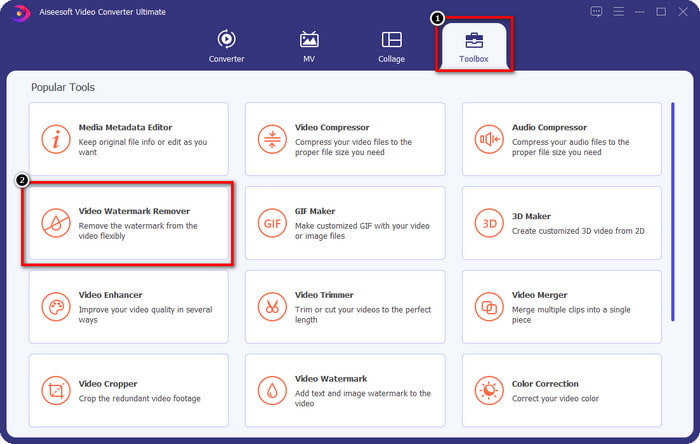
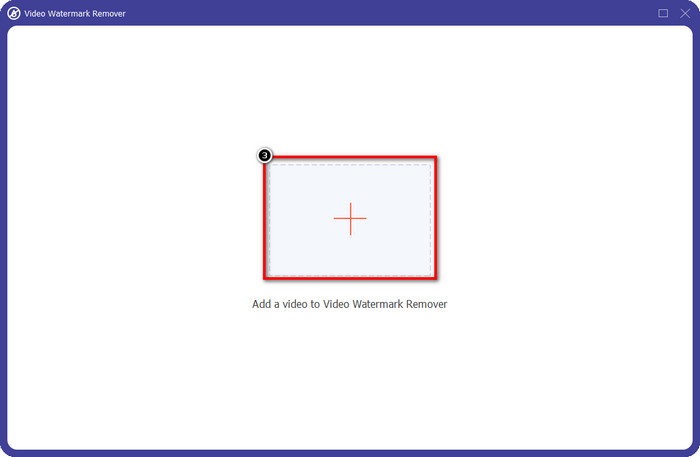
Pas 3. Després, fes clic a la icona + per pujar el vídeo que has descarregat i començar a eliminar la marca d’aigua de Dreamstime.
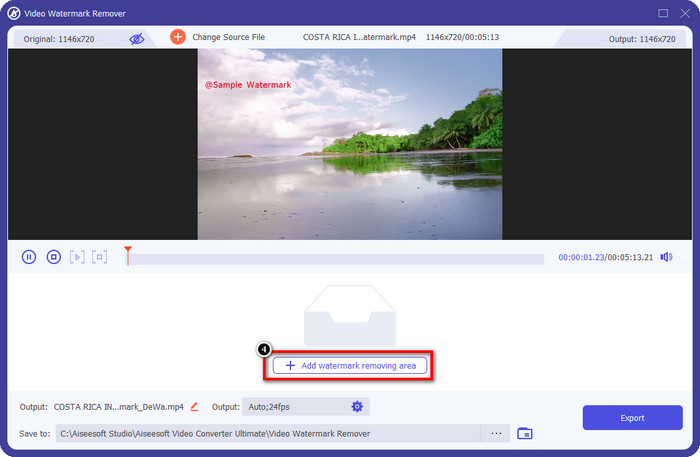
Pas 4. A continuació, fes clic a Afegeix àrea d’eliminació de marca d’aigua per col·locar el quadre de selecció sobre la marca d’aigua.
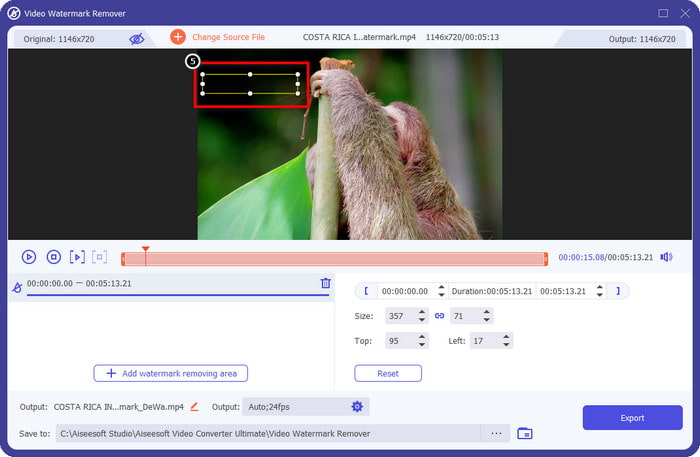
Pas 5. Després de fer clic a Afegeix àrea d’eliminació de marca d’aigua, apareixerà un rectangle a la pantalla; col·loca’l sobre la marca d’aigua per eliminar-la.
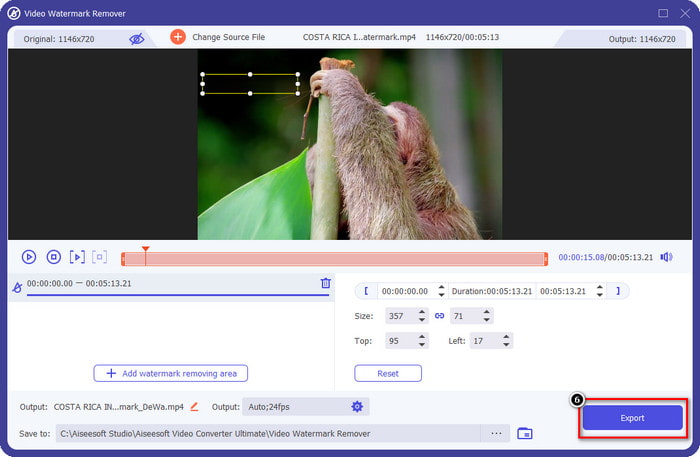
Pas 6. Fes clic al botó Exporta per descarregar el vídeo sense la marca d’aigua de Dreamstime.
Relacionat:
Eliminar marca d’aigua d’un PDF
Eliminar marca d’aigua de Coub
Part 4. Preguntes freqüents sobre com eliminar la marca d'aigua de Dreamtime
Puc eliminar la marca d'aigua de manera il·limitada a Dreamtime després de comprar-la?
No podeu si heu comprat un crèdit, però podeu continuar i desplaçar-vos una mica més cap avall, i veureu que hi ha accés il·limitat a les imatges que podeu fer servir si ho feu servir regularment. El seu preu no és el mateix en diferents regions o llocs del món.
Quin tipus de targeta admet Dreamstime?
Ara que heu decidit comprar un crèdit o una quota de subscripció aquí, podeu utilitzar la vostra Master Card, Visa, AMEX i altres targetes de crèdit principals; podeu consultar-ho al lloc web oficial per conèixer els altres.
Puc utilitzar crèdits a Dreamstime per comprar vídeos sense marca d'aigua?
Podeu utilitzar el crèdit per comprar el vídeo o qualsevol producte que tingui aquesta plataforma. La finalitat del crèdit no és només per a imatges i vídeos; també podeu utilitzar-lo per comprar àudio aquí.
Conclusió
Com eliminar la marca d'aigua de Dreamstime? Bé, ja sabeu com fer front a la filigrana de les vostres imatges amb les dues eines que disposem i el vídeo amb l'eliminador de filigrana definitiu que podeu utilitzar. Per tant, si teniu un problema de marca d'aigua en vídeos o imatges, podeu utilitzar lliurement el programari anterior i seguir el tutorial que hem afegit. No us digueu adéu al problema perquè està solucionat!
-
 2 maneres d'eliminar la marca d'aigua VSDC a Windows i Mac ràpidament
 Esteu buscant una manera d'eliminar la marca d'aigua VSDC dels vostres vídeos? Amb aquest article, oferim eines que podeu utilitzar per desfer-vos de la marca d'aigua.
-
 Elimineu la marca d'aigua d'Animoto als vídeos de manera fàcil i eficaç
 Com eliminar la marca d'aigua d'Animoto al vídeo? Continueu llegint aquest article ja que us oferim un tutorial complet sobre com fer-ho.
-
 Com eliminar la filigrana del vídeo amb Final Cut Pro [Guia completa]
 Tens algun problema amb la marca d'aigua dels vídeos? No hem dit més, perquè vam oferir un tutorial sobre com eliminar la filigrana del vídeo amb Final Cut Pro.
