


 Video Converter Ultimate
 Gravadora de pantalla
 Reparació de vídeo
 Baixada segura
Formes completes per eliminar la marca d'aigua del filtre Picsart dels vostres vídeos de manera eficaç
Nowadays, it is an in-need weapon to have a visual media editing software you can depend on your desktop like the Picsart. With it, you can tweak a few options to turn your normal image into photography, as no one has ever seen! You can get more customers or audiences with an eye-catchy image you create. But there is a problem with using the Picsart, which is the watermark it adds after exporting it. The watermark is pretty annoying and could become distractive on visual if it is not removed. So, if you want the software and a tutorial on removing the Picsart filter watermark, you must keep digging this article and learn more about it!

Part 1. Com eliminar la filigrana del filtre Picsart utilitzant el programari lliure a l'escriptori
FVC Video Converter Ultimate - Eliminador de filigrana número u a Windows i Mac
Let’s start introducing the software with our number one pick that could help and teach you how to remove the watermark Picsart. FVC Video Converter Ultimate is the indispensable weapon in the arsenal; you will need to remove the watermark on videos easily while having a professional output. Due to its performance and incomparable features, many users have already tried it, and the tool didn’t disappoint them. If you require help removing the watermark on your video, then you can try to copy the steps we add below and perform them by following.
Step 1. You can have the ultimate software on your device by clicking the appropriate download button below. After that, you must install the software on your computer and click Start Now to open the software.
Descàrrega gratuïtaPer a Windows 7 o posteriorDescàrrega segura
Descàrrega gratuïtaPer a macOS 10.7 o posteriorDescàrrega segura
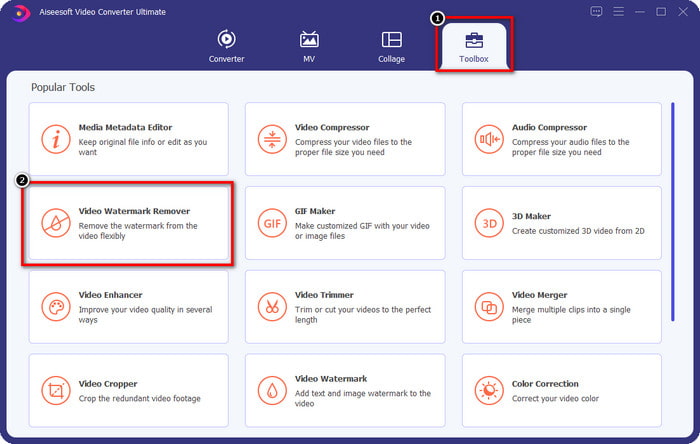
Step 2. In the Toolbox section, you will see other features you can use that could help you make a flourishing touch on your video. But today, click the Video Watermark Remover.
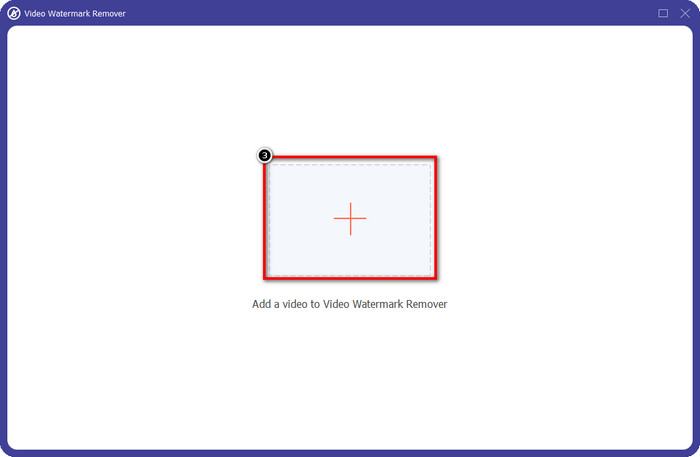
Step 3. Upload the video you edited on the Picsart by clicking the + icon. Search over the file on the folder that will show on your screen, then click Open.
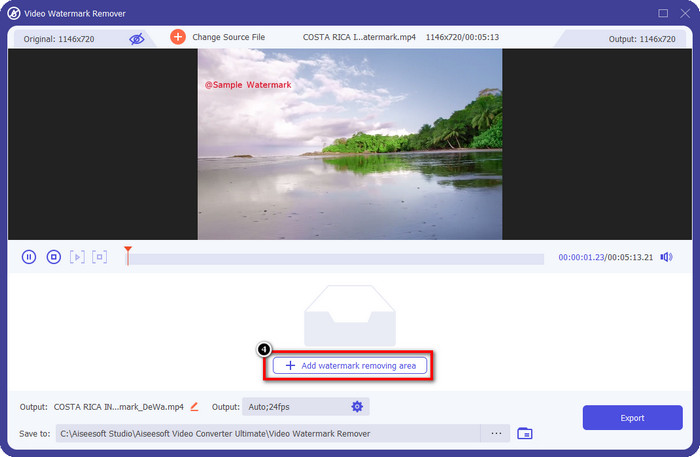
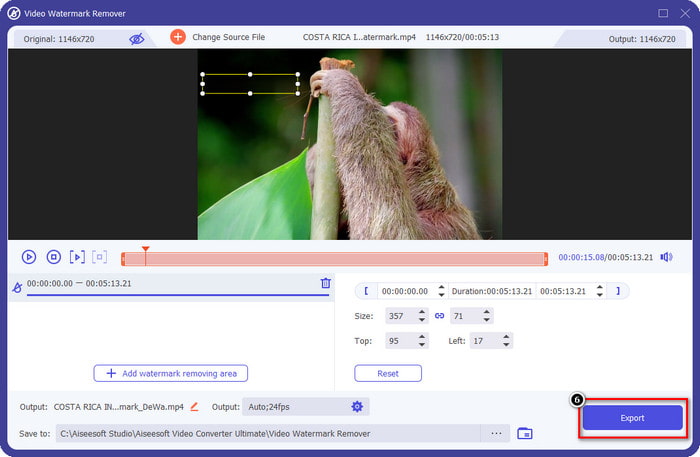
Step 4. Press the Add Watermark Removing Area to remove the watermark embedded on the video you upload.
Step 5. Hold and place the selection box to the watermark and cover it up. You can extend or minimize the box according to your preferences.
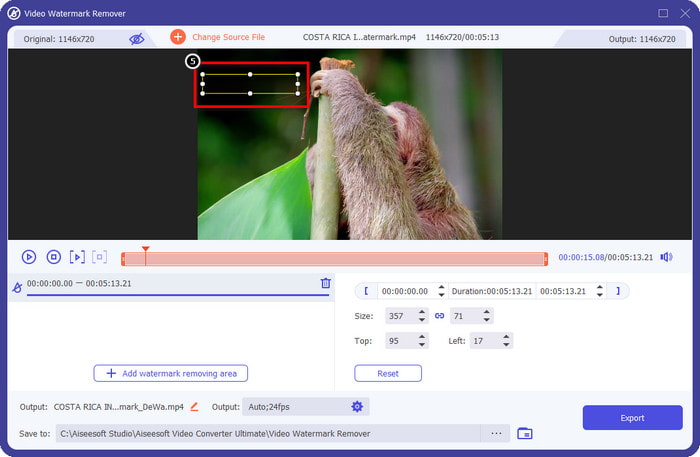
Step 6. Now that you have finished covering up the watermark with the selection box click Export to save the final output on your local drive.
Fotos a Windows: marca d'aigua de coberta amb disseny 3D
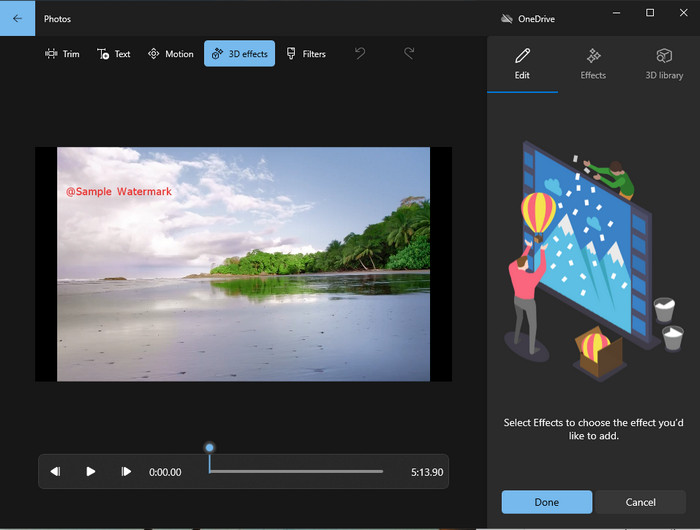
If downloading software is not your forte and you are a Windows user, you must try using the Photos to edit the watermark in your video. Learning how to remove the Picsart watermark with this tool will become even faster because you wouldn’t go to the phase of downloading the app. The tool doesn’t remove the watermark on the video, but you can cover up the watermark with the 3D designs. Nevertheless, the performance of this default visual media viewer and editor is good. Not sure about it? Then you can try to read the steps below and follow them if you want.
Step 1. Click the Window button on the taskbar and search the name of Photos to open it.
Step 2. After opening the built-in editor, you must click the + sign to upload the video you want to edit here
Step 3. Go to the 3D Effects, click the 3D Library, and search for the design you want to use to cover up the watermark. Place the design you’ve selected on the part that has a watermark.
Step 4. Press Finish Video to save the final output on your Windows local drive.
PickFrom Blur Video Online

PickFrom Blur Video Online can assist you on to remove the PicsArt watermark on the videos you have on the web. The tool is unknown to many, but we will introduce it today. We include this software because of its efficiency in removing the watermark on videos you upload. Its GUI is simple and plain; you won't get lost if you are about to use this software. So, if you want to remove the watermark, let’s go into the process below.
Step 1. Open your web browser, search its name, and click the first result to open the watermark remover online.
Step 2. Click the Click to Add File so that you can upload the video here.
Step 3. Tick the Blur Part of the Video, then place the selection box to the watermark.
Step 4. Press Start to download the video without the watermark on it.
Part 2. Com eliminar Picsart Watermark comprant la versió Premium
Heu de comprar el programari si no voleu tenir problemes amb l'eliminació de la filigrana daurada de Picsart. Us costarà una certa quantitat perquè haureu de pagar-lo abans de poder-lo utilitzar i després exportar el vídeo sense cap marca d'aigua incrustada. Per tant, si voleu un tutorial pas a pas sobre la compra del Picsart, heu de seguir el següent tutorial que afegim.
Step 1. Open the official website of Picsart and open your account here. If you don’t have an account, you must create one by Signing up here.
Step 2. On the main website, click Pricing and see the prices for each available product.
Step 3. Choose the plan you want, monthly or yearly, then click Go to Payment.
Step 4. Add the billing statement by filling in the details it needs to be filled in, then click Purchase Now.
Relacionat:
Remove Watermark From Graduation Pictures
Part 3. Preguntes freqüents sobre com eliminar la marca d'aigua de Picsart
Puc comprar el Picsart Gold de manera permanent?
No admet una base ni un pla de pagament únic, de manera que si voleu utilitzar Picsart Gold, haureu de fer ús del pla mensual o anual. Consulteu el preu de cada pla accedint al seu lloc web oficial.
Puc crear una subscripció personalitzada a Picsart?
Sí, podeu crear una subscripció per a un equip a Picsart. Podeu definir el nombre de persones que utilitzaran l'aplicació.
On puc accedir al Picsart?
Podeu descarregar Picsart a Windows, Android i iOS. Malauradament, l'aplicació no té una versió per a Mac ara mateix, però no us entristigueu perquè podeu utilitzar un altre programari d'edició multimèdia disponible al vostre sistema.
Conclusió
El tutorial que vam ensenyar anteriorment us dóna una idea de com eliminar les marques d'aigua amb PicsArt i els millors eliminadors de marques d'aigua que podeu utilitzar. Ara podeu gaudir del vídeo que editeu a Picsart sense molestar-vos amb la marca d'aigua del producte que afegeix a la sortida final. Per tant, si encara no esteu convençuts de les eines que presentem, és imprescindible provar-les primer, especialment el FVC Video Converter Ultimate. Feu clic al botó de descàrrega i tingueu-lo al vostre Windows i Mac de manera gratuïta i, a continuació, gaudiu de les característiques i funcions que ofereix que podeu aprofitar.
-
 Com eliminar la filigrana de Pond5 amb les eines definitives
 Apreneu a eliminar la filigrana de Pond5 seguint els senzills passos següents. Podeu eliminar fàcilment la marca d'aigua Pond5 de la vostra imatge amb aquestes impressionants eines.
-
 2 maneres potents de com eliminar la marca d'aigua de Dxtory
 Apreneu a eliminar la marca d'aigua de Dxtory seguint els dos millors mètodes. Si esteu buscant l'eina més adequada per eliminar la marca d'aigua Dxtory, llegiu aquí.
-
 Eliminadors de filigrana Arnold Maya excepcionals que no us podeu perdre
 Molts eliminadors de filigranes poden eliminar la filigrana Arnold Maya. Però si voleu saber quins són els millors eliminadors de filigranes d'Arnold Maya, llegiu aquesta pàgina.
