


 Video Converter Ultimate
 Gravadora de pantalla
 Reparació de vídeo
 Baixada segura
Com eliminar la marca d'aigua a Lunapic utilitzant 3 maneres efectives [ús gratuït]
For a beginner's choice image editor, you can try to access the Lunapic on the web to edit your image. In fact, this tool can add and remove the watermark you have on your images with its two practical tools. Here, we will specify the techniques you can apply to the images and remove the watermark. Have patience reading this article to learn how to remove the watermark in Lunapic with the steps we add below.

Part 1. 2 Tècniques per eliminar la filigrana de la imatge amb Lunapic que has de conèixer
Lunapic elimina les filigranes d'una imatge de dues maneres diferents; retall i eliminació d'objectes. Però quina via és més eficaç i quina és menys efectiva? Parlem-ne primer abans de continuar amb els passos.
1r Mètode. Retalla la marca d'aigua a les imatges
La funció de retall que ofereix no té res especial, el que significa que fa el que indica el nom per retallar una imatge. Podeu utilitzar aquesta funció si la marca d'aigua es troba als costats. Retalla la marca d'aigua i desa la part de la imatge sense filigrana. Si us interessa, podeu seguir els passos que hem afegit.
Step 1. Open the official website of Lunapic by searching it on your browser, click Upload, choose the image on the folder that will show, then press Open to upload it.
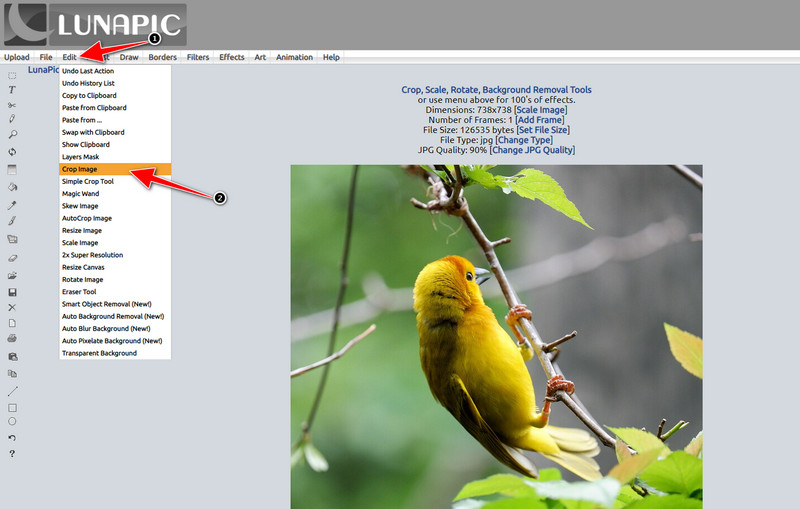
Step 2. Click Edit at the top menu, then select Crop Image to use its cropping feature.
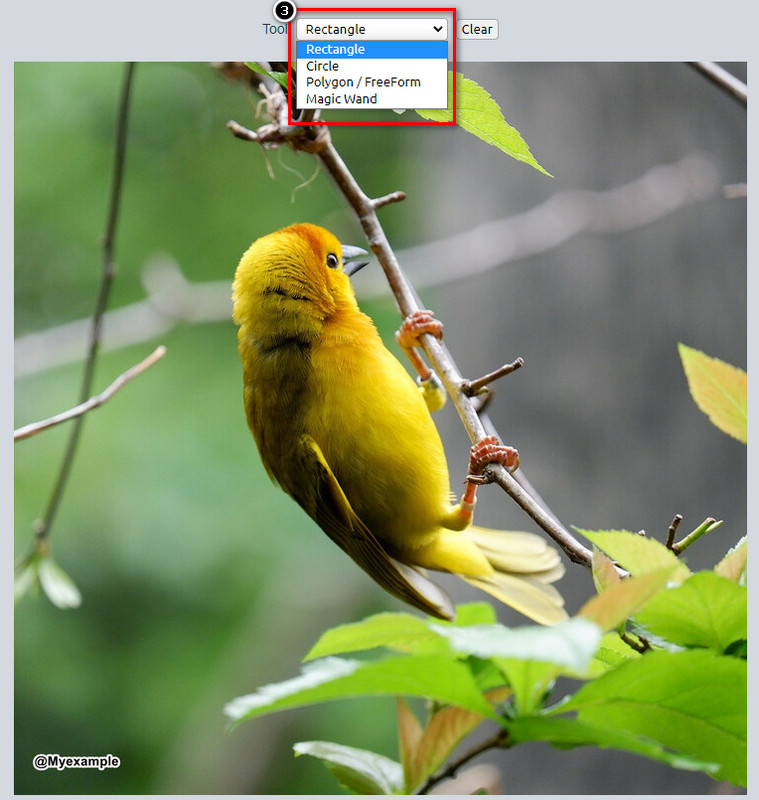
Step 3. Press the drop-down button on the Tool and select the cropping tool you want to use. Adjust it and ensure that the watermark is not included.
Step 4. By clicking the Crop button, you will see that sample of the final output once you export it. If you are satisfied with the result, press Save to download the crop version of it on your local drive.
2n Mètode. Elimina la filigrana de la imatge amb l'eliminació d'objectes
A diferència del retall, l'eliminació d'objectes tracta més d'eliminar l'objecte de la imatge sense canviar la dimensió de la imatge. En aquesta funció, haureu de ressaltar la marca d'aigua; llavors, podeu eliminar-lo amb l'eina. No és sorprenent? Si us sorprèn prou que voleu utilitzar-lo, els passos següents us donaran maneres completes d'esborrar la marca d'aigua amb Lunapic.
Step 1. Repeat the same step on the first step on the cropping feature to import the image with the watermark.
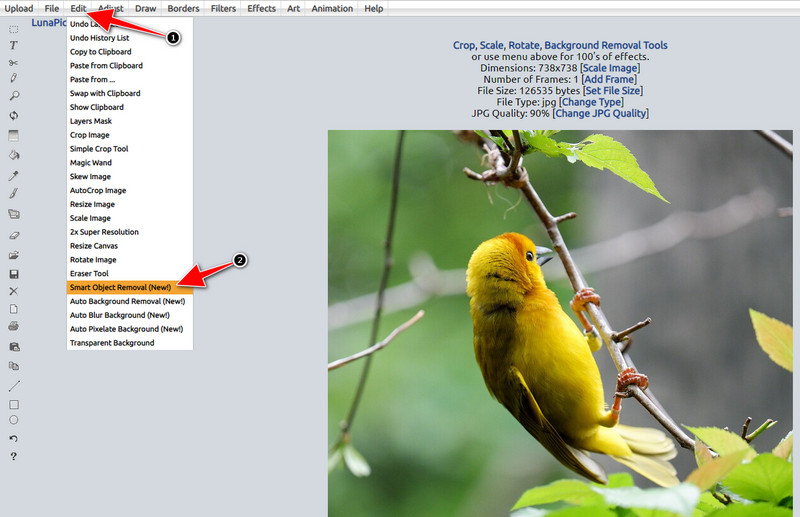
Step 2. Open Edit but now select the Smart Object Removal to use the other feature you can use to eliminate watermarks.
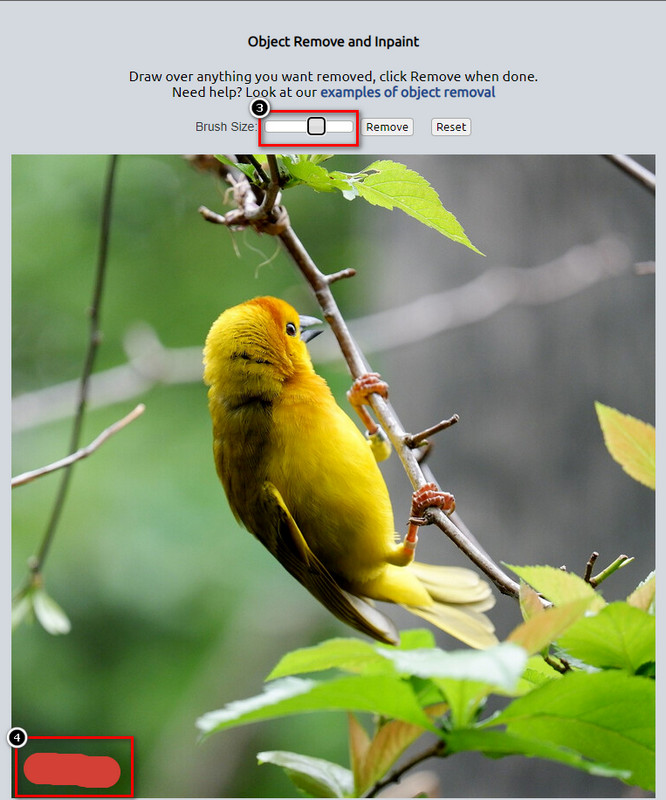
Step 3. Highlight the watermark with the help of the brush it provides; you can also adjust the brush size according to your preferences.
Step 4. Click the Remove button to erase the watermark and see what it would look like before exporting the image.
Step 5. Click Save to download the finished product on your local drive.
Part 2. Millor alternativa a Lunapic per eliminar la marca d'aigua amb un sol clic de forma gratuïta
If you need a Lunapic watermark remover alternative, you can use the FVC Free Watermark Remover. Like Lunapic, you can use this tool on the web without registration, downloading, or ads on the web interface. You can enjoy using this web tool without limitations, and its performance has been effective since its start. It already aids millions of users on the web. If you need help removing objects on your image, you can start following the steps we add below.
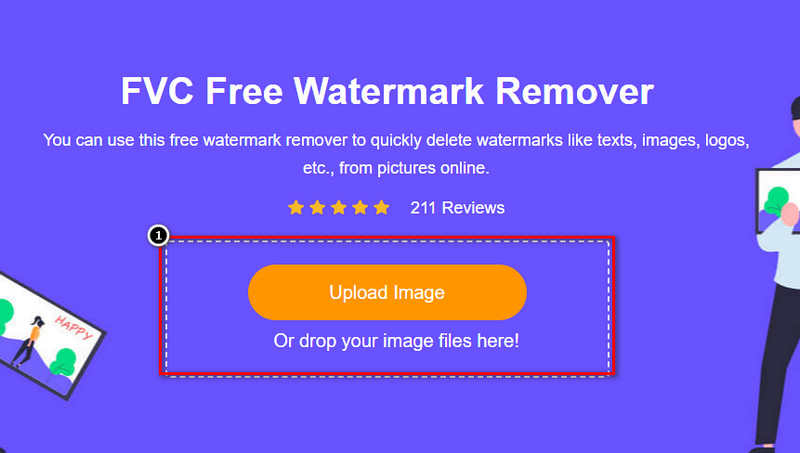
Step 1. Open its official website by clicking this link, it will directly open a new tab on the browser you are currently using, and you will see the interface of this watermark remover.
Step 2. By pressing the Upload Photo, you can import the image you have on your local drive with a watermark or an unnecessary object you want to remove.
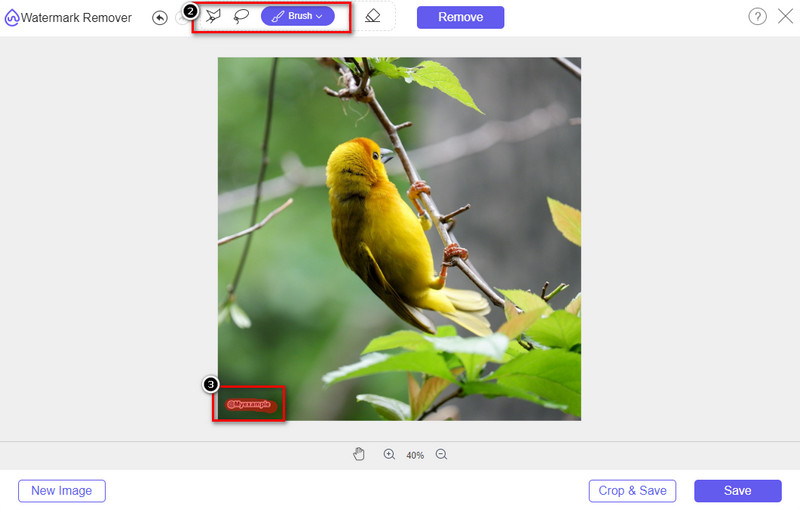
Step 3. There will be three options you can use to highlight the watermark on the image you upload. Choose one and highlight the watermark with the tool you choose.
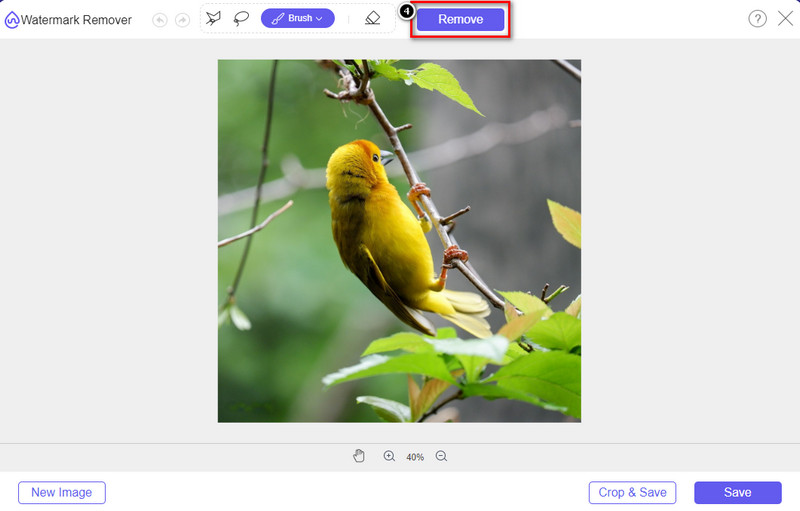
Step 4. Press the Remove button to remove the object you highlight earlier in step 3. Everything that you highlight in the image will be removed.
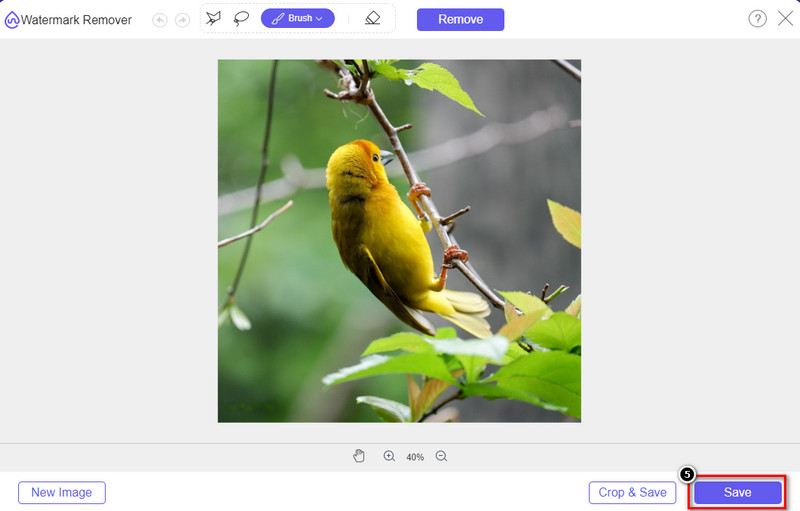
Step 5. Press the Save button to download the finished product, and you can look for the image on the folder that will show on your screen.
Lectures relacionades:
How to Remove B612 Watermark from Your Images
How to Remove the WOW Slider Watermark for Free
Part 3. Preguntes freqüents sobre com eliminar la marca d'aigua a Lunapic
Lunapic afegeix una marca d'aigua a les imatges editades?
Tot i que aquest editor en línia té accés gratuït al web, no inclou una marca d'aigua de producte a la imatge que editeu aquí. No necessitareu una subscripció per utilitzar les eines premium que ofereix. Gaudeix utilitzant l'eina sense cap limitació! Visiteu el seu lloc web oficial per veure i utilitzar les eines que podeu utilitzar per editar les imatges.
Puc afegir la meva marca d'aigua a Lunapic?
Absolutament, podeu afegir la vostra distinció a la imatge que heu creat per dificultar que l'altre copi la imatge. En obrir el lloc web, feu clic a Carrega per afegir la imatge que voleu editar, feu clic a la icona T a la part esquerra de la barra d'eines i afegiu la marca d'aigua de text que voleu afegir a la imatge que pengeu.
Lunapic té un eliminador de fons?
Sí, Lunapic admet una tecnologia d'IA que podria detectar el fons de la imatge i eliminar-la de manera efectiva a l'instant. El nom de la funció és Eliminació automàtica de fons. Obriu l'eina i feu clic a Edita; veureu la funció de la qual estem parlant que us pot ajudar a eliminar el fons de la imatge. A més, admet afegir un fons borrós si el voleu utilitzar.
Quins són els efectes disponibles a Lunapic?
Lunapic admet diverses seleccions en termes d'efectes, que podeu utilitzar per afegir imatges, imatges, degradats, emmascarament, dibuixos animats, errors i molts més que podeu aplicar a les vostres imatges.
Conclusió
Eliminar una filigrana d'una imatge amb Lunapic és increïblement fàcil amb el tutorial que afegim en aquest article. Pots seguir els passos que afegim a aquest bloc per retallar o eliminar la marca d'aigua de la imatge que has desat a la teva unitat local. Tot i que no teniu prou experiència per eliminar la marca d'aigua, podeu dominar l'eina en molt poc temps. Però si voleu experimentar un nou nivell d'eliminació automàtica de la marca d'aigua, podeu utilitzar l'alternativa que afegim en aquest article. Visiteu el seu lloc web oficial fent clic al seu nom i mireu quines capacitats d'aquesta eina ens perdem. Si us agrada llegir aquest bloc, puntueu-nos amb 5 estrelles.
-
 Consells i trucs per eliminar la filigrana del filtre Picsart fàcilment
 Per eliminar la filigrana del filtre Picsart necessitareu una eina. Continueu llegint aquest article per aconseguir un eliminador de filigrana.
-
 Com convertir imatges de baixa resolució en alta resolució en línia
 Si voleu aprendre a convertir imatges de baixa resolució en imatges d'alta resolució en línia, aquest article és per a vosaltres. Llegeix completament per saber com.
-
 Mètodes fàcils sobre com eliminar la filigrana a prova de trets
 Elimineu la marca d'aigua Shootproof seguint aquests senzills mètodes. Utilitzeu aquests increïbles eliminadors de filigrana per eliminar fàcilment la filigrana Shootproof de la vostra imatge.
