


 Video Converter Ultimate
 Gravadora de pantalla
 Reparació de vídeo
 Baixada segura
Com extreure MP3 de M4V amb 4 mètodes excel·lents que heu de conèixer
Si ja heu comprat alguns vídeos M4V a la botiga iTunes, com podeu convertir M4V a MP3 amb facilitat? A diferència dels altres formats de vídeo, M4V és un format de vídeo protegit DRM Fair-Play. Quan necessiteu extreure fitxers MP3 de M4V, heu de desxifrar la protecció prèviament. Simplement apreneu més detalls sobre els 4 millors convertidors de M4V a MP3 i trieu el que desitgeu segons el vostre requisit.

Part 1: l'últim mètode per convertir M4V a MP3
FVC Video Converter Ultimate és un desitjat convertidor de M4V a MP3, que no només converteix el vídeo M4V a MP3 amb la qualitat que vulguis, sinó que també et permet desencriptar la protecció DRM. També et permet ajustar la configuració de vídeo i àudio, o fins i tot convertir els fitxers de vídeo amb una acceleració de maquinari avançada.
- 1. Extraieu els fitxers d'àudio MP3 de M4V, MP4 i altres formats de vídeo.
- 2. Ajusta la velocitat de fotogrames, la qualitat del vídeo, el còdec de vídeo, la configuració d'àudio i molt més.
- 3. Acceleració de maquinari avançada per convertir el vídeo amb velocitat ràpida.
Descàrrega gratuïtaPer a Windows 7 o posteriorDescàrrega segura
Descàrrega gratuïtaPer a macOS 10.7 o posteriorDescàrrega segura
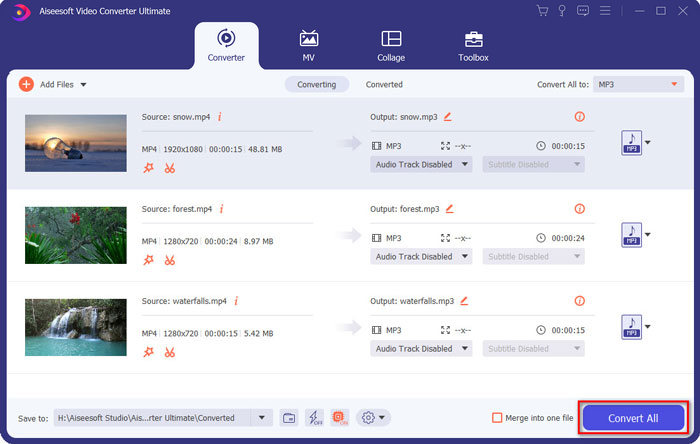
Pas 1. Descarrega i instal·la el convertidor de M4V a MP3 i inicia el programa a l’ordinador. Fes clic al menú Add Files o arrossega directament diversos vídeos M4V dins d’aquest programa.

Pas 2. Un cop hagis importat els vídeos M4V, tria MP3 com a format de sortida. Per descomptat, pots fer clic a la icona de l'engranatge per ajustar la configuració de vídeo i àudio, com ara la freqüència de mostreig, el canal d’àudio, etc.

Pas 3. A més, també pots fer clic al botó Edit o al botó Clip per editar els teus vídeos de sortida. També et permet ajustar la brillantor, el contrast, la saturació, el to i seleccionar el desentrellaçat segons les teves necessitats.
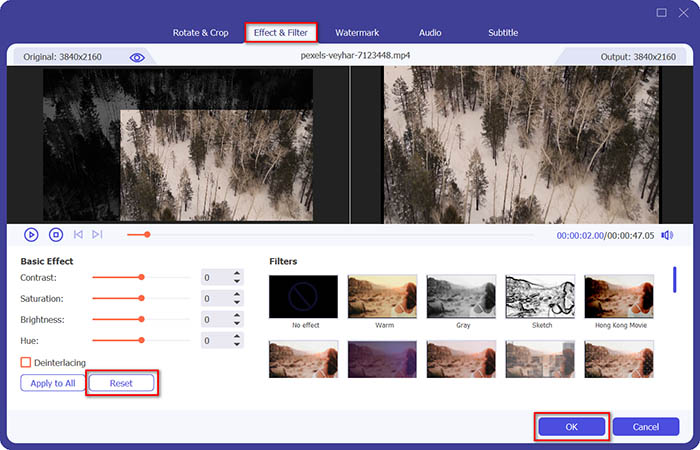
Pas 4. Si ja estàs satisfet amb el fitxer MP3, o si necessites ajuntar diversos fitxers MP3, pots marcar la casella Merge into one file i fer clic al botó Convert per començar a convertir de MP4 a MP3 fàcilment.
Part 2: 3 mètodes per extreure MP3 de M4V amb facilitat
Mètode 1: Com convertir M4V a MP3 en línia
FVC Free Online Video Converter és un versàtil convertidor en línia de M4V a MP3 que et permet extreure l’MP3 d’un MP4 amb facilitat. A més, també pots ajustar la taxa de bits del vídeo, la freqüència de mostreig, la taxa de fotogrames, la resolució, etc.
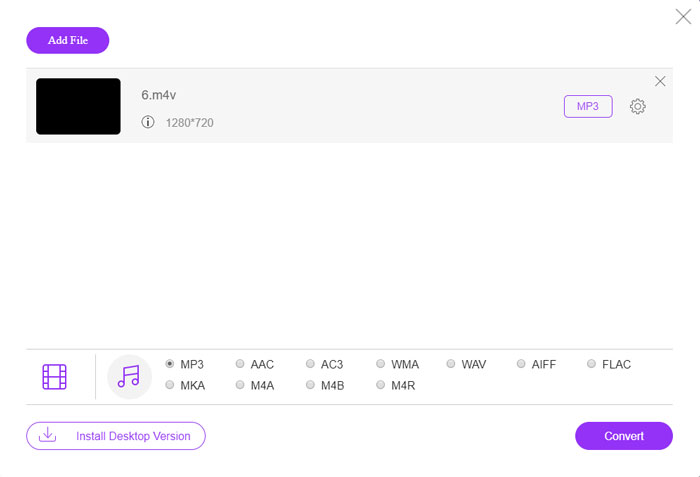
Pas 1. Ves al convertidor en línia de M4V a MP3 i fes clic al botó Add Files to Convert per carregar els fitxers M4V al programa. El primer cop, hauràs de descarregar prèviament l’instal·lador.

Pas 2. Un cop hagis carregat els fitxers M4V, pots triar l’opció MP3 al menú Audio. També et permet ajustar la configuració d’àudio, com ara la freqüència de mostreig, el còdec d’àudio i més.

Pas 3. Després, pots fer clic al botó Convert per iniciar la conversió de M4V a MP3. No es perdrà cap dada durant el procés de conversió. Pots desar l’àudio de sortida al disc dur.
Mètode 2: Com convertir M4V a MP3 mitjançant HandBrake
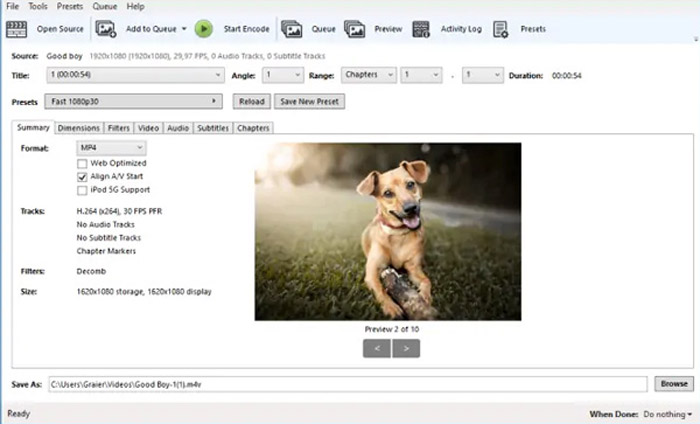
HandBrake és un convertidor de codi obert M4V a MP3 que us permet personalitzar el procés de transformació. Té alguns paràmetres avançats que permeten ajustar la resolució del vídeo, la velocitat de fotogrames i molt més.
Pas 1. Descarrega i instal·la el programa a l’ordinador, inicia’l i localitza el fitxer M4V que vols convertir. A continuació, podràs trobar el vídeo dins de la interfície d’usuari.
Pas 2. Després, pots fer clic al botó Browse a la part inferior i introduir el nou nom de fitxer i la carpeta de destinació. Després pots escollir MP3 com a format de sortida i ajustar la configuració.
Pas 3. Quan estiguis satisfet amb l’MP3 de sortida, pots fer clic al botó Start Encode al menú superior per convertir de M4V a MP3 en conseqüència. El procés de conversió pot trigar una estona.
Mètode 3: Com convertir M4V a MP3 mitjançant el Rèquiem
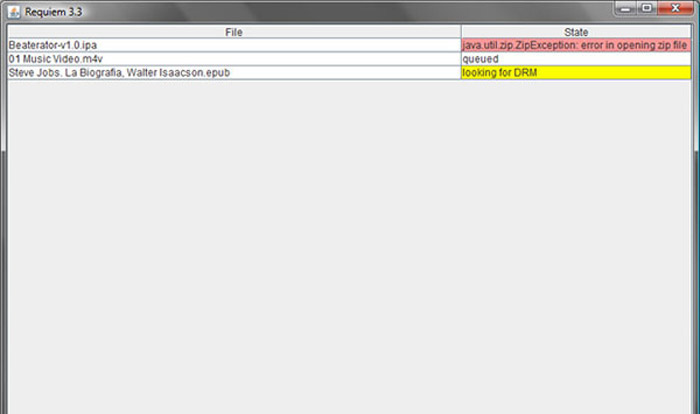
Hi ha dotzenes de convertidors en línia de M4V a MP3 quan necessiteu desfer-vos de la protecció DRM dels fitxers M4V. El Rèquiem és un dels millors programes gratuïts que podeu tenir en compte.
Pas 1. Un cop hagis instal·lat el desencriptador de DRM, pots iniciar el programa perquè detecti els fitxers protegits amb DRM, incloent-hi música, vídeos o audiollibres de la teva biblioteca d’iTunes.
Pas 2. Després, pots començar a eliminar el DRM d’aquests fitxers M4V. Els teus fitxers originals es mouran a la paperera, i ara els fitxers a la teva biblioteca d’iTunes estaran lliures de DRM.
Pas 3. Quan obtinguis els fitxers M4V desitjats sense protecció DRM, podràs simplement convertir el vídeo amb els convertidors en línia de M4V a MP3, o transferir-lo directament a un telèfon intel·ligent. (Consulta com convertir FLV a MP3)
Part 2: Preguntes més freqüents sobre la conversió de M4V a MP3
1. Què és el format de fitxer M4V?
L'extensió de fitxer M4V és un vídeo MPEG-4, que també es coneix com a fitxer de vídeo d'iTunes. Quan compreu o llogueu fitxers de vídeo des de l'iTunes Store, podeu obtenir els vídeos a M4V amb protecció DRM. Però el fitxer de vídeo és factible per als dispositius autoritzats. Quan convertiu M4V a MP3, podeu utilitzar el fitxer d’àudio per a altres dispositius.
2. Què és un mètode viable 100% per convertir M4V a MP3?
Si no podeu convertir directament M4V a MP3, cosa que està restringida per la protecció DRM, podeu utilitzar la gravadora de pantalla per capturar el vídeo M4V com a àudio MP3. FVC Free Screen Recorder és una solució en línia versàtil que us permet obtenir el fitxer d’àudio satisfet sense cap cost.
3. Com convertir M4V a MP3 amb protecció DRM mitjançant HandBrake?
Quan necessiteu convertir M4V a MP3 amb protecció DRM, podeu fer servir HandBrake per desxifrar els vídeos? Sí, podeu instal·lar alguns connectors addicionals per desxifrar els vídeos abans de la conversió.
Conclusió
Quan necessiteu convertir M4V a MP3, heu d’aprendre més sobre els factors importants per obtenir els fitxers desitjats amb facilitat. Si només teniu fitxers M4V senzills sense protecció DRM, podeu triar qualsevol convertidor de vídeo M4V a MP3 o programari gratuït en línia. FVC Video Converter Ultimate és l’últim convertidor que permet convertir els vídeos i desxifrar la protecció DRM amb facilitat.
-
 Com convertir MP4 a MP3 al Windows / Mac / iPhone / Android / en línia
 Si voleu extreure àudio MP3 de vídeo MP4, podeu consultar aquest article i obtenir 8 solucions. Hi ha maneres en línia i fora de línia de convertir MP4 a MP3 al telèfon o a l'ordinador amb facilitat.
-
 Com convertir fitxers M2TS a MP3 de forma gratuïta
 Es pot convertir un fitxer M2TS a MP3? En aquest post, hem llistat les 6 maneres gratuïtes i en línia que us ajudaran a convertir M2TS a MP3, AAC, AIFF i més formats d’àudio.
-
 Quina és la diferència entre MP3 i MP4
 MP3 o MP4, què és millor? Quina diferència hi ha entre MP3 i MP4? Aquest article compararà MP3 amb MP4 des de tots els aspectes que podeu imaginar.
