


 Video Converter Ultimate
 Gravadora de pantalla
 Reparació de vídeo
 Baixada segura
Maneres notables de com eliminar les filigranes de la foto
Desitges aprendre com eliminar marques d’aigua de les fotos? Però hi ha alguns casos en què les imatges que vols desar tenen marques d’aigua, que molesten a la vista i impedeixen gaudir de tota la bellesa de les imatges. Afortunadament, pots utilitzar aplicacions de programari per eliminar aquestes marques d’aigua innecessàries a l’ordinador, l’iPhone i l’Android. D’aquesta manera, ja pots desar les fotos que vulguis utilitzant aquestes aplicacions per eliminar marques d’aigua. Llegir aquest article és la millor opció per aprendre més mètodes senzills per eliminar marques d’aigua.

Part 1. Com eliminar la filigrana de la foto de l'ordinador
1. Eliminador de filigrana sense FVC
Si vols eliminar una marca d’aigua d’una foto gratuïtament en línia, pots fer servir FVC Free Watermark Remover. Aquesta aplicació pot ajudar a eliminar qualsevol marca d’aigua de les teves imatges, com logotips, textos, imatges i més. A més, admet diferents formats d’imatge, com ara JPG, PNG, JPEG, BMP i altres. A més a més, aquest programari és fàcil d’utilitzar i d’entendre perquè té una interfície senzilla, una guia detallada i botons simples. Pel que fa a l’eliminació real de marques d’aigua, FVC Free Watermark Remover et permet usar el ratolí per dibuixar una línia poligonal o un llaç sobre la imatge per triar la marca d’aigua que vols eliminar. El pinzell és una altra opció per suprimir marques d’aigua de les teves imatges. Si vols eliminar la marca d’aigua de la foto de manera gratuïta, segueix els passos senzills següents.
Pas 1: Ves al lloc web de FVC Free Watermark Remover i fes clic a Upload Image. Després afegeix la imatge amb la marca d’aigua que vols eliminar.

Pas 2: Després d’obrir la imatge amb marques d’aigua, pots utilitzar les opcions per eliminar marques d’aigua, com l’eina Polygonal, Lasso i l’eina Brush, per suprimir-les.
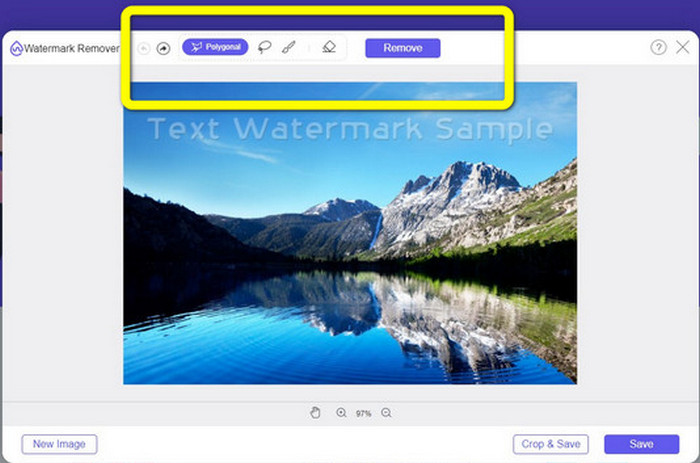
Pas 3: Utilitzant l’eina Brush, el Lasso o l’eina Brush, ressalta les marques d’aigua de la teva foto.
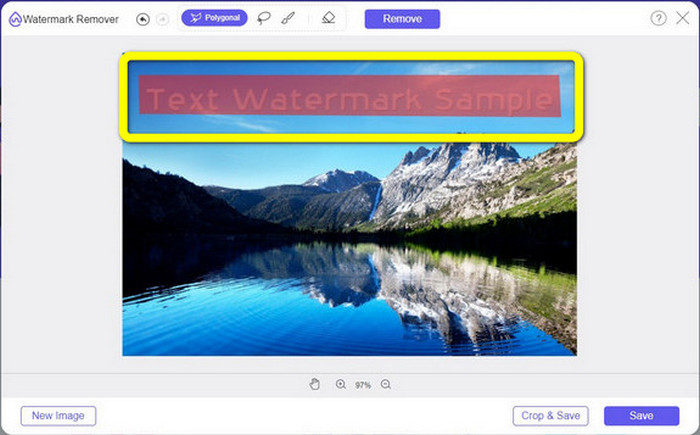
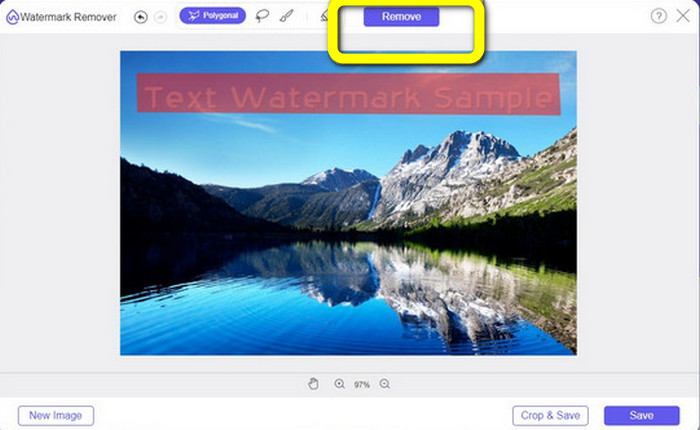
Pas 4: Quan hagis acabat de ressaltar les marques d’aigua de la teva foto, fes clic al botó Remove.
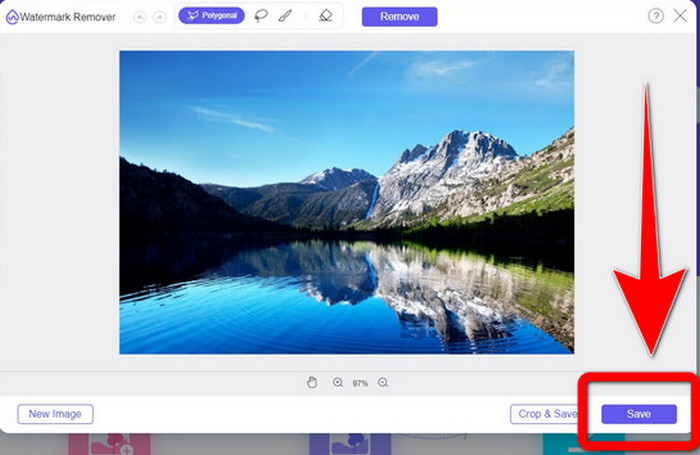
Pas 5: Si la marca d’aigua ja s’ha eliminat de la teva foto, fes clic al botó Save per descarregar la imatge, i ja podràs gaudir de les teves fotos sense sentir-te molest per les marques d’aigua.
2. Photoshop
Si també estàs buscant una aplicació excel·lent i fiable per descarregar a l’ordinador, Adobe Photoshop és una de les aplicacions més fiables que pots utilitzar. En aquesta part t’ensenyarem com Photoshop elimina les marques d’aigua de les fotos. Aquesta aplicació és adequada per a fotògrafs, dissenyadors web, dissenyadors gràfics, creadors de mems, etc. Tot i això, has de comprar Adobe Photoshop perquè només disposa d’una prova gratuïta de 7 dies. A més, Photoshop no és adequat per a treballs per lots amb fotos i té una corba d’aprenentatge complicada. Si vols conèixer la manera més senzilla d’eliminar marques d’aigua de les teves imatges, segueix aquests passos simples.
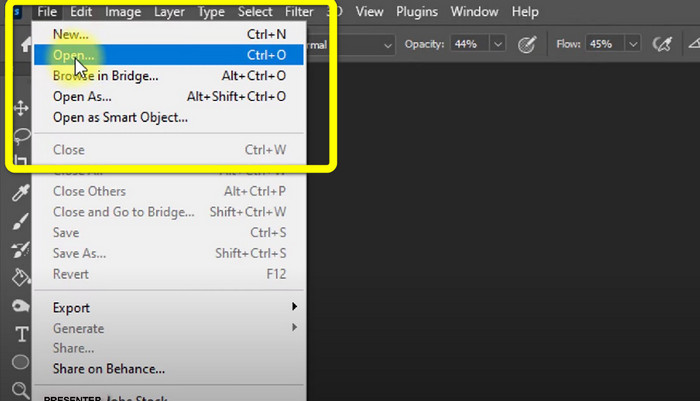
Pas 1: Obre el teu Adobe Photoshop. Selecciona File > Open i afegeix la foto amb marques d’aigua.
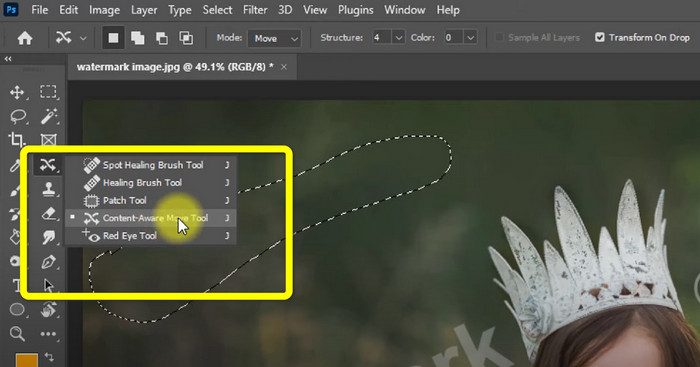
Pas 2: Fes clic a l’eina Content-Aware Move Tool a les eines d’edició.
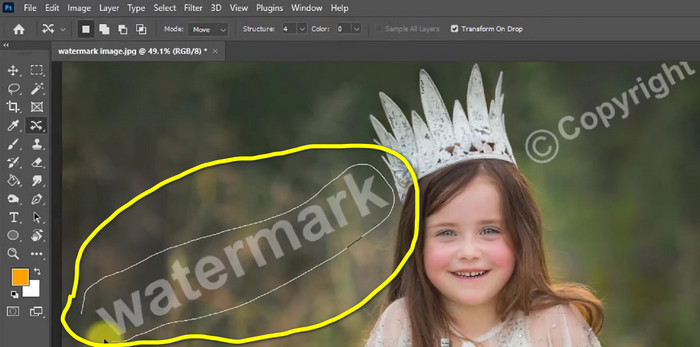
Pas 3: Després de fer clic a Content-Aware Move Tool, selecciona l’àrea de la marca d’aigua a les teves fotos i prem Delete al teclat.
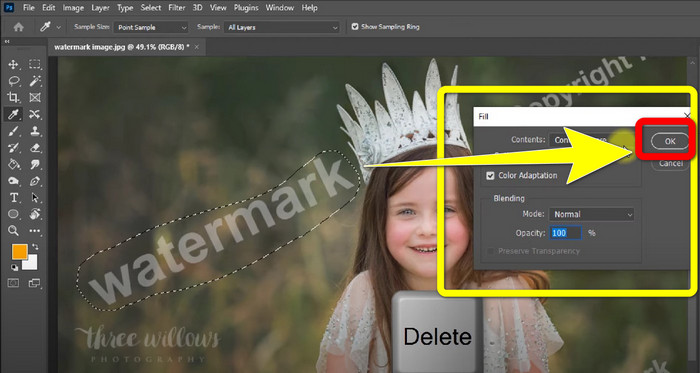
Pas 4: Quan ja hagis premut Delete, apareixerà una altra mini interfície; aleshores fes clic a OK.
3. GIMP
Una altra aplicació adequada per eliminar marques d’aigua de les teves fotos és el GIMP. És un editor de gràfics raster de codi obert que s’utilitza per manipular i editar imatges, cosa que el converteix en una eina útil per a l’edició d’imatges. A més, és compatible amb molts formats de fitxer, com ara JPG, PNG, TIFF, GIF i més. Tot i això, de vegades es tanca de cop, i també és difícil organitzar les capes. Si vols saber com eliminar marques d’aigua de les teves fotos amb GIMP, segueix aquests passos senzills.
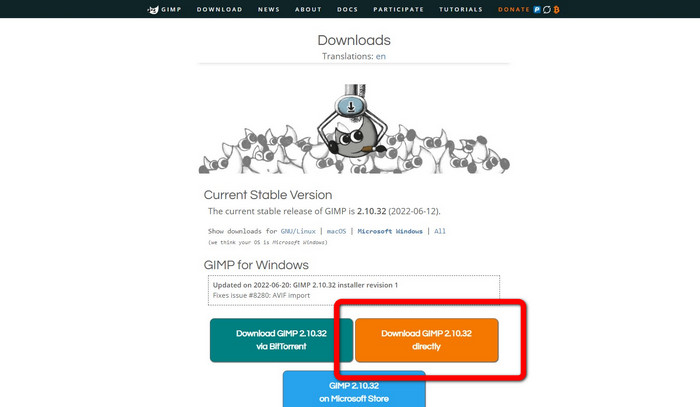
Pas 1: Si ets al lloc web de GIMP, fes clic a Download Directly per descarregar l’aplicació i segueix el procés d’instal·lació.
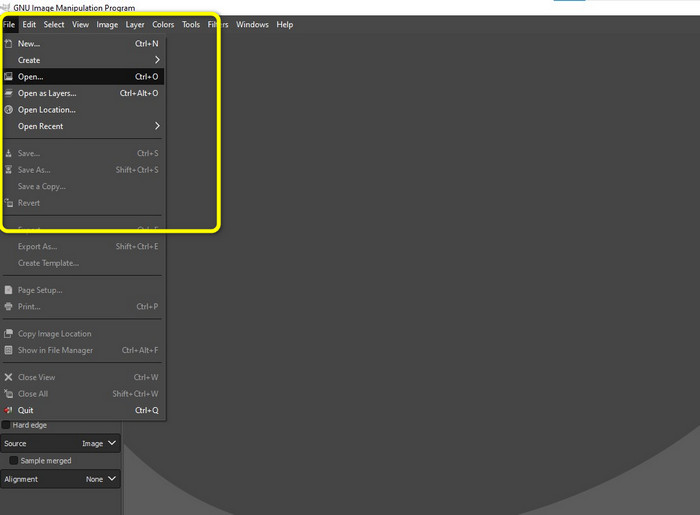
Pas 2: Obre l’aplicació i fes clic a File > Open per afegir la teva foto amb marques d’aigua.
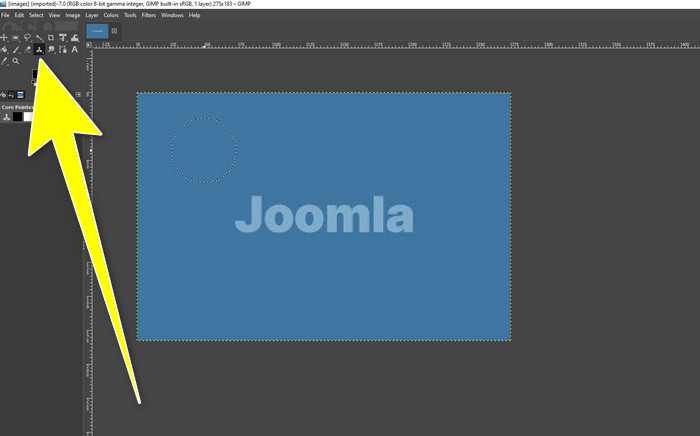
Pas 3: Fes clic a l’eina Clone i situa el cursor en una zona en blanc. Prem Ctrl i fes clic a la zona buida.
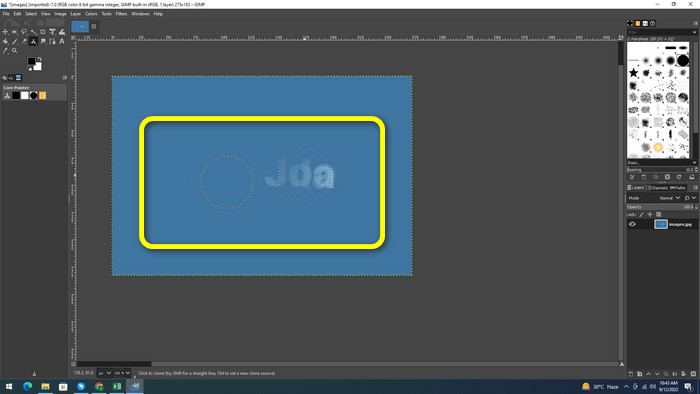
Pas 4: Arrossega el cursor sobre les marques d’aigua per eliminar-les. La marca d’aigua ja haurà desaparegut. Ara pots desar la foto.
4. Aiseesoft Free Watermark Remover Online
Si vols el millor eliminador de marques d’aigua de fotos en línia, Aiseesoft Free Watermark Remover Online és per a tu. Aquesta aplicació pot ajudar a eliminar múltiples marques d’aigua, textos, marques de data, logotips i més de les teves fotos. A més, és fàcil d’utilitzar, perfecta per a principiants. També admet diversos formats d’imatge, com PNG, JPEG, BMP, JPG i més. Tot i això, aquesta aplicació no és 100% gratuïta; has de comprar-ne la llicència per gaudir de les funcions avançades. Si vols eliminar marques d’aigua de les teves imatges, segueix aquests passos.
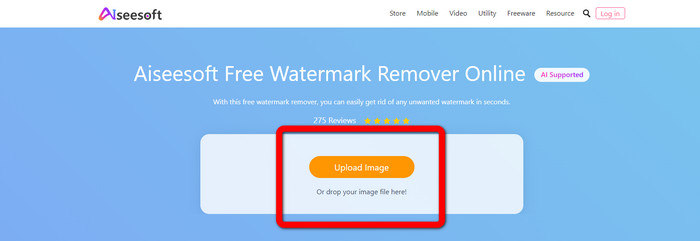
Pas 1: Ves al lloc web de Aiseesoft Free Watermark Remover Online. Després fes clic a Upload Image per afegir la teva foto amb marques d’aigua.
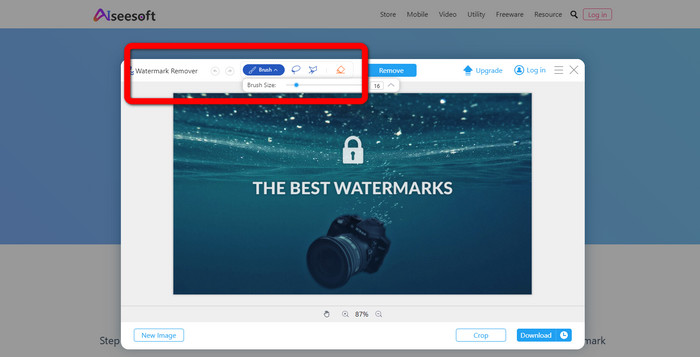
Pas 2: Un cop hagis adjuntat la foto, ves a l’eina per eliminar marques d’aigua. Aleshores podràs veure les eines d’eliminació, com Brush, Polygonal i Lasso.
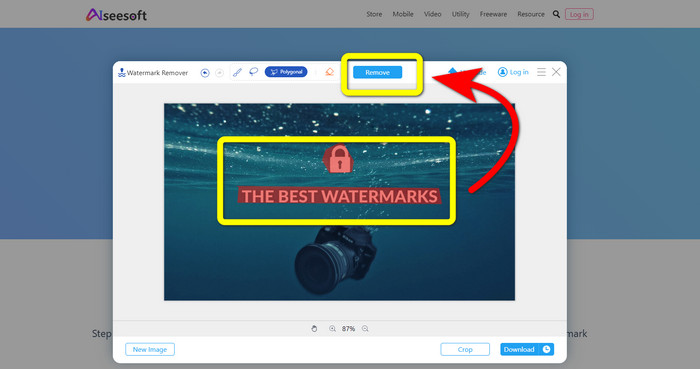
Pas 3: Utilitza aquestes eines i ressalta les marques d’aigua de la teva foto i fes clic a Remove.
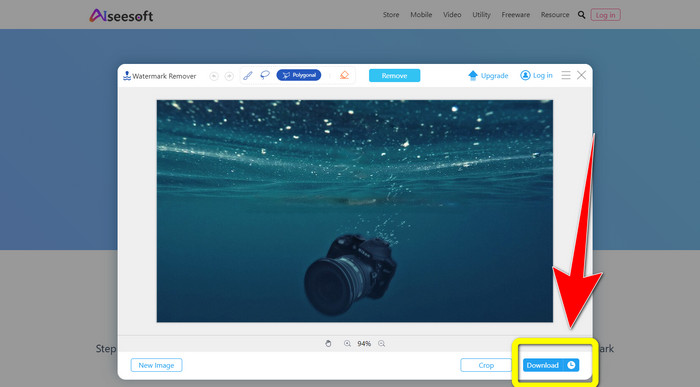
Pas 4: Si ja estàs satisfet amb el resultat, fes clic a Download per desar la teva foto.
5. Pixlr
Pixlr és una altra eina en línia que pots utilitzar per eliminar marques d’aigua de les teves fotos. És fàcil d’utilitzar i adequada per a principiants. Admet diferents formats d’imatge, com PSD, PNG, JPEG, WEBP i PXZ. A més, pots utilitzar aquesta aplicació en els teus dispositius, com iPhone, Android, ordinador d’escriptori i portàtil. Però no té tantes opcions com altres aplicacions i disposa d’efectes limitats. Si vols aprendre com esborrar la marca d’aigua d’una imatge, segueix els passos següents.
Pas 1: Ves al lloc web de Pixlr. Fes clic a Open Image per afegir la imatge amb la marca d’aigua.

Pas 2: Després d’afegir la foto, ves a l’eina retouch > heal.
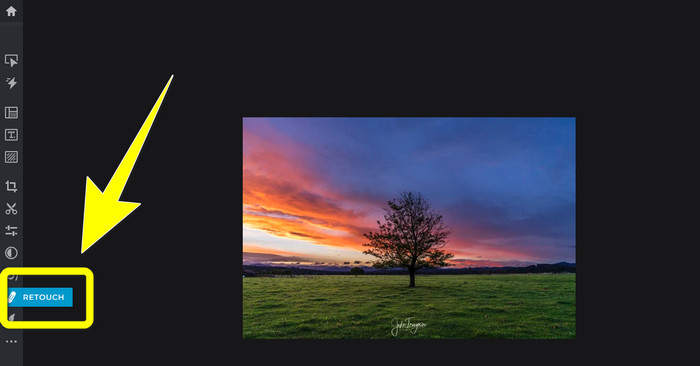
Pas 3: Després de fer clic a l’eina retouch > heal, fes clic a la marca d’aigua de la teva imatge.
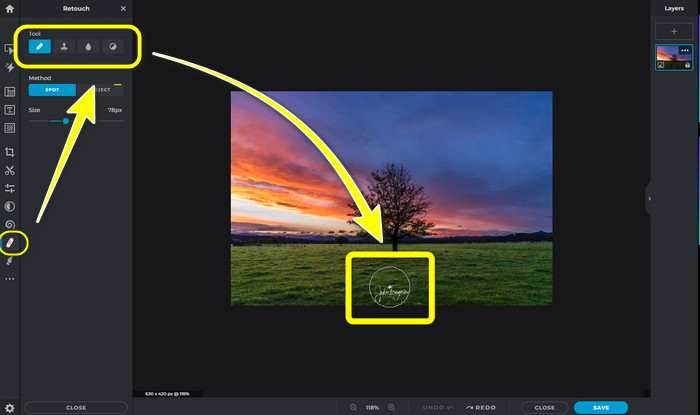
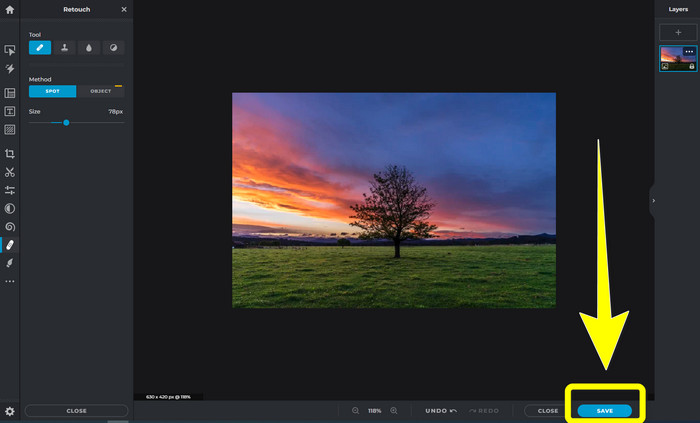
Pas 4: Si la marca d’aigua ja ha desaparegut, fes clic al botó Save.
6. Inpaint
Inpaint és una altra aplicació en línia que pots utilitzar si vols eliminar marques d’aigua de les teves imatges. No només marques d’aigua, sinó també logotips i text. També admet formats d’imatge com JPG, PNG i WEBP. Tot i això, si vols obtenir imatges d’alta qualitat, has de comprar l’aplicació. Si vols eliminar marques d’aigua de les teves fotos, segueix els passos senzills següents.
Pas 1: Ves al lloc web de Inpaint. Fes clic a Upload Image i la teva imatge amb la marca d’aigua.
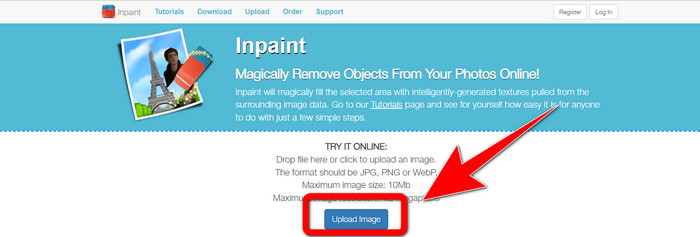
Pas 2: Quan hagis pujat la imatge, selecciona les eines per eliminar marques d’aigua com Marker, Polygonal, Lasso i l’Eraser tool i ressalta les marques d’aigua de la foto.
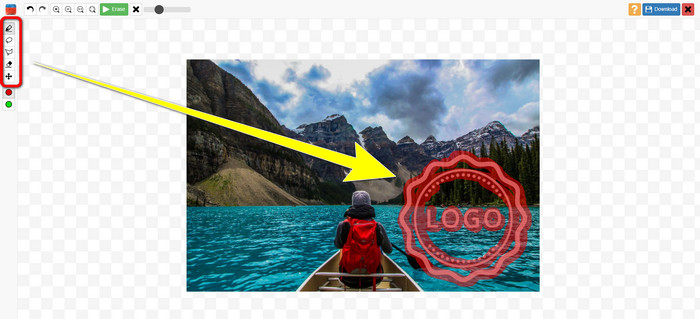
Pas 3: Quan hagis acabat de ressaltar les marques d’aigua, fes clic a Erase.
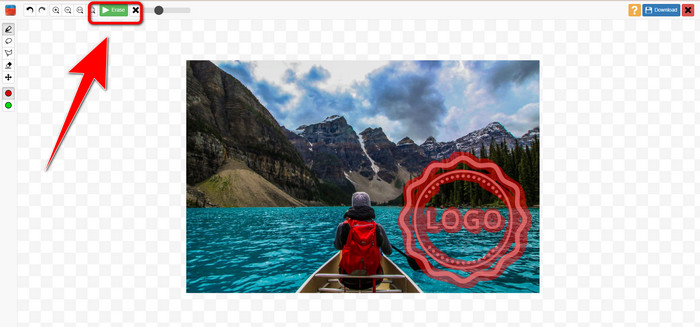
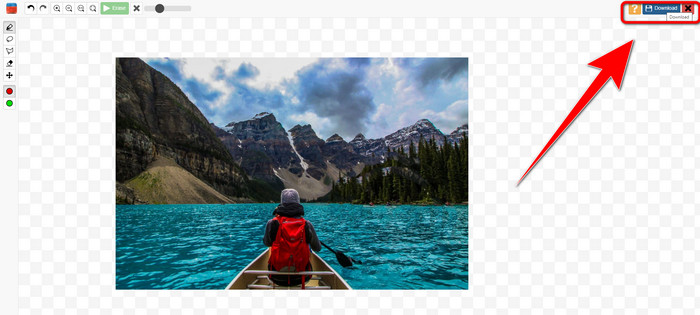
Pas 4: Si la marca d’aigua ha desaparegut, fes clic al botó Download per desar la imatge.
7. Eliminador de segell fotogràfic
Photo Stamp Remover és una aplicació que podeu utilitzar amb el vostre ordinador. Podeu descarregar-lo gratuïtament. Aquesta aplicació pot eliminar ràpidament objectes innecessaris de les vostres imatges, com ara logotips, text, marques d'aigua i dates. Però, no funciona bé en imatges amb fons complicats. A més, aquest programari pot restaurar els colors i la textura de la foto original per cobrir les filigranes de manera que sembli autèntic. Seguiu aquests passos per eliminar les marques d'aigua de les vostres imatges.
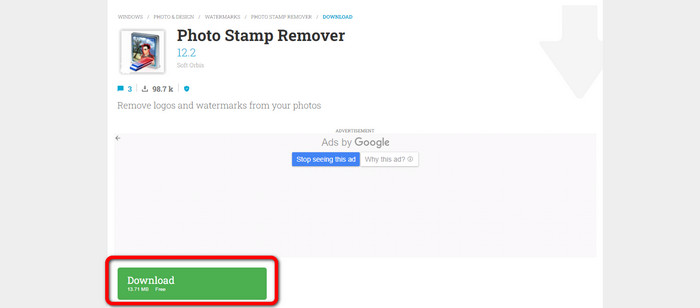
Pas 1: Fes clic al botó Download per descarregar el Photo Stamp Remover al teu Windows i segueix el procés d’instal·lació.
Pas 2: Obre l’aplicació i fes clic a Add File per afegir la foto amb les marques d’aigua.
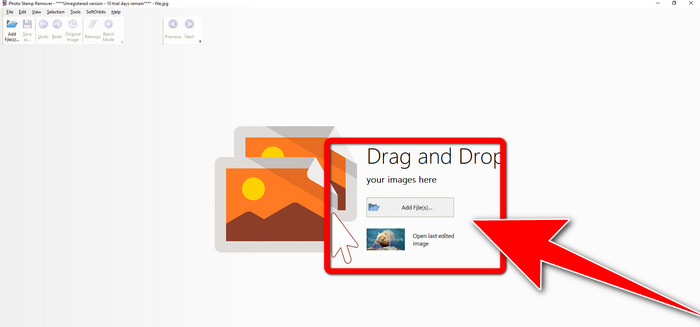
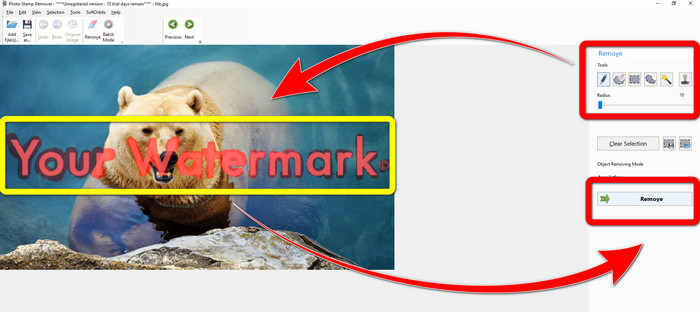
Pas 3: Ves a les Remover tools i fes clic a Selection Marker. Ressalta les marques d’aigua i fes clic a Remove.
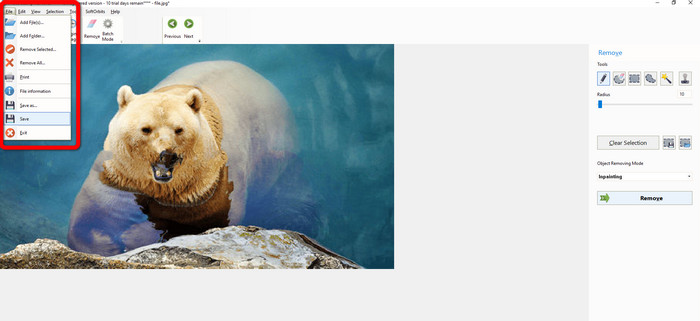
Pas 4: Quan ja hagis eliminat les marques d’aigua de la teva imatge, fes clic a File > Save. A continuació, hauràs acabat d’eliminar les marques d’aigua de la teva imatge.
Part 2. Com eliminar la marca d'aigua de la foto a iPhone i Android
1. Esborrador de vídeo
Si vols saber quina aplicació et pot ajudar a aprendre com eliminar marques d’aigua d’una foto amb Android, Video Eraser és per a tu. Aquesta aplicació pot eliminar objectes innecessaris de les teves fotos, com text, marques d’aigua, etc. A més, amb aquesta aplicació també pots eliminar marques d’aigua dels teus vídeos. Però la imatge esdevindrà tacada a la zona on s’hagi esborrat la marca d’aigua. Si vols aprendre a utilitzar Video Eraser, segueix els passos següents.
Pas 1: Instal·la el Video Eraser al teu Android. Obre l’aplicació quan s’hagi acabat la instal·lació.
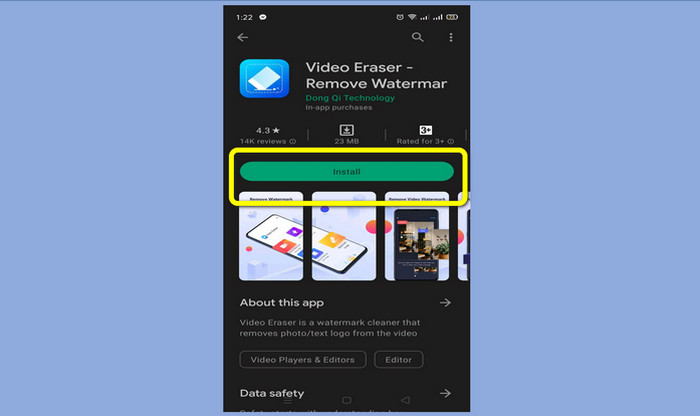
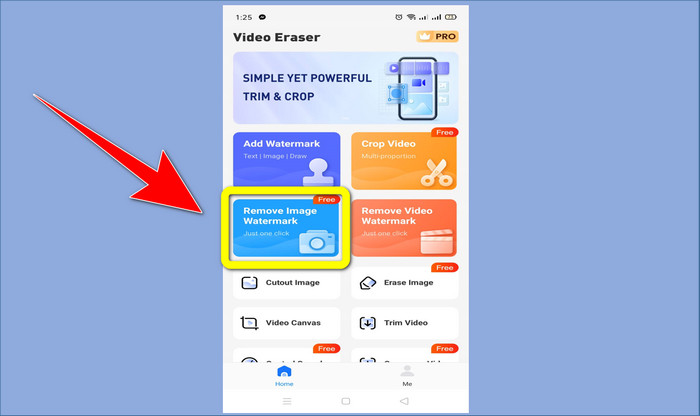
Pas 2: Fes clic a Remove Image Watermark per afegir la foto amb les marques d’aigua.
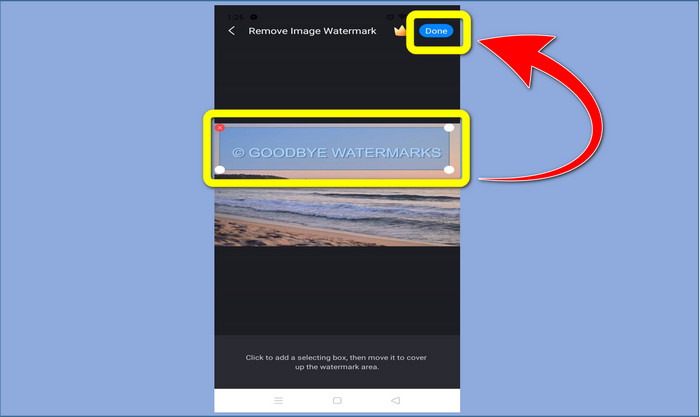
Pas 3: Ressalta la marca d’aigua de la teva foto i fes clic a Done.
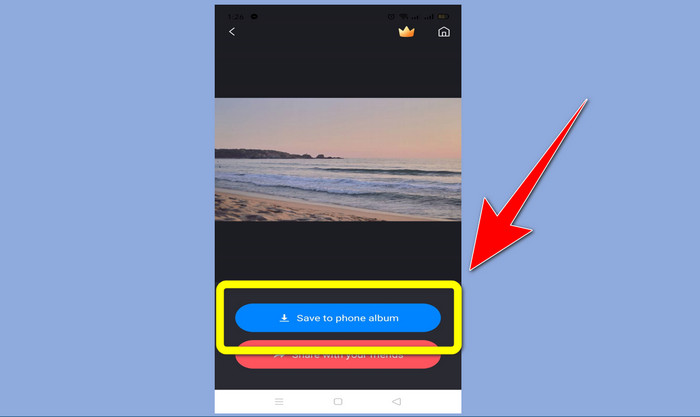
Pas 4: Després de fer clic a Done, la marca d’aigua desapareixerà. Fes clic a Save to Photo Album per desar la foto.
2. Snapseed
Snapseed és un excel·lent editor que pots utilitzar, especialment si vols aprendre com eliminar una marca d’aigua d’una foto en un iPhone. Aquesta aplicació és bona si vols eliminar marques d’aigua de les teves imatges. A més, té diverses eines d’edició que pots utilitzar, com retallar, girar i més. Aquesta aplicació tampoc no és per a principiants, sobretot pel que fa a l’edició avançada, i encara que és fàcil d’utilitzar, té un petit procés d’aprenentatge. Segueix els passos següents per eliminar marques d’aigua de la teva foto amb aquesta aplicació.
Pas 1: Instal·la el Snapseed al teu iPhone. Quan s’acabi la instal·lació, obre el programari.
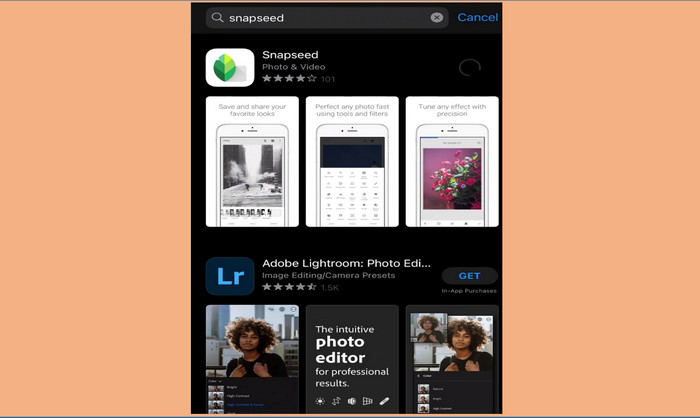
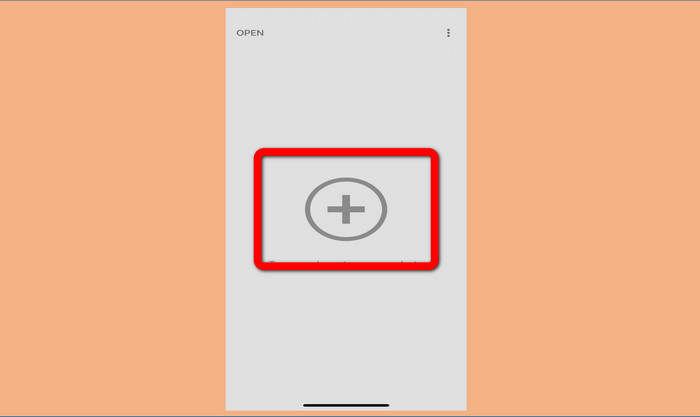
Pas 2: Fes clic al botó del Plus sign per afegir la foto amb les marques d’aigua.
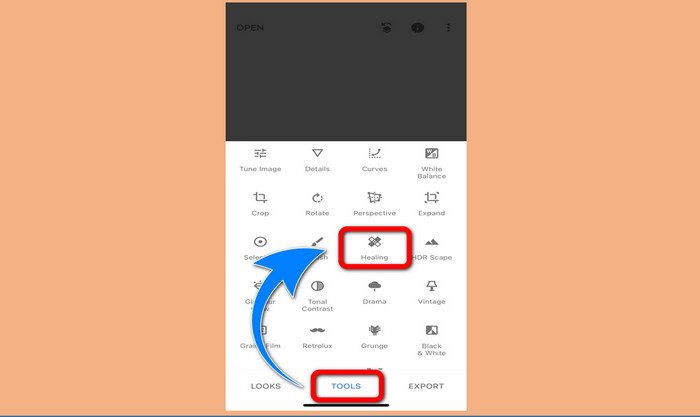
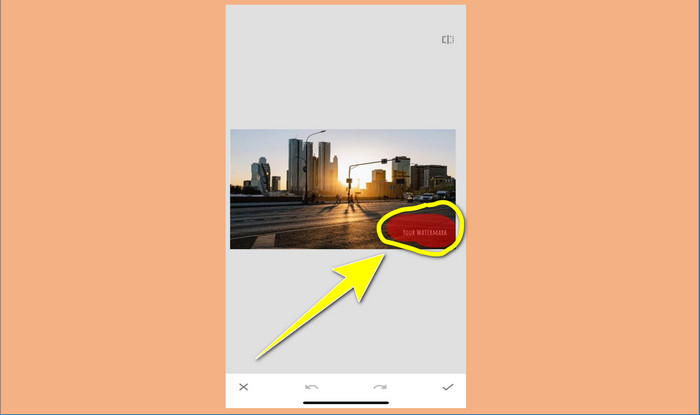
Pas 3: Quan ja hagis afegit la foto, selecciona Tools > Healing i ressalta les marques d’aigua de la imatge. Després de ressaltar les marques d’aigua, desapareixeran automàticament.
Pas 4: Després de ressaltar les marques d’aigua, aquestes desapareixeran automàticament.
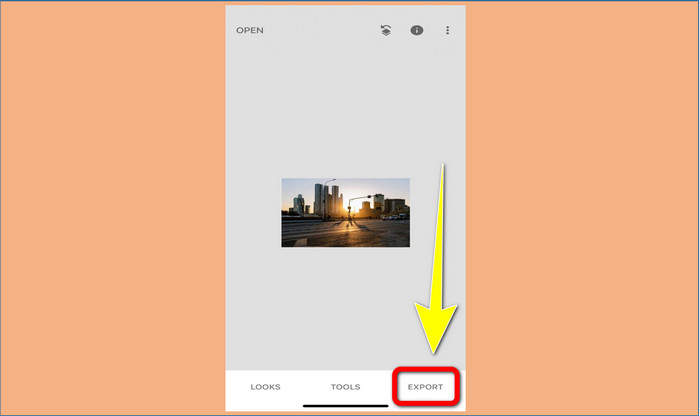
Pas 5: Quan hagis acabat d’eliminar les marques d’aigua de la teva foto, fes clic al signe de Check i a Export per desar la imatge al teu iPhone.
Relacionat amb:
El truc més ràpid per eliminar la marca d’aigua d’Adobe Stock d’un vídeo [ Tutorial ]
5 maneres d’eliminar una marca d’aigua d’un vídeo de manera professional
Part 3. Preguntes freqüents sobre l'eliminació de les marques d'aigua de les fotos
Hi ha algun eliminador de filigrana que puc utilitzar de forma gratuïta, especialment per a Mac?
Sí, n’hi ha! Pots utilitzar molts eliminadors de marques d’aigua al teu Mac, com ara FVC Free Watermark Remover. És una aplicació en línia per eliminar marques d’aigua al teu Mac.
Hi ha alguna manera d'eliminar les marques d'aigua d'un vídeo?
Definitivament! És una cosa fàcil de fer. Algunes de les aplicacions d'eliminació de filigranes que podeu utilitzar ara poden eliminar les filigranes de fotos i vídeos. Tot el que heu de fer és cercar l'eliminador de filigrana al quadre de cerca i veure la pàgina de resultats.
És fàcil eliminar les marques d'aigua?
Sí, per suposat! Si ja teniu l'aplicació que utilitzareu, heu de buscar eines d'eliminació, com ara eines de pinzell, retolador, llaç i poligonal. A continuació, ressalteu les filigranes i fet.
Conclusió
Com s'ha mostrat més amunt, aquest article ofereix maneres extraordinàries de eliminar marques d'aigua de les fotos. Però si voleu una eina excel·lent per eliminar marques d'aigua, FVC Free Watermark Remover és la millor opció per a vosaltres.
-
 Com desfer-se de la marca d'aigua de Power Director de forma gratuïta [Complet]
 Com desfer-se de la marca d'aigua de Power Director de forma gratuïta? Les millors eines per eliminar la marca d'aigua estan aquí, així que apreneu-les llegint això.
-
 Les millors tècniques per eliminar la marca d'aigua de la versió de prova de Canvasjs que heu de conèixer
 La millor manera d'eliminar la marca d'aigua de Canvasjs caldrà utilitzar una eina. Si no heu escollit una eina, podeu triar-la en aquest article.
-
 Com treure la marca d'aigua d'Animaker sense cap cost [maneres provades]
 Com eliminar la marca d'aigua d'Animaker? Amb les millors eines que oferim en aquest bloc, les podeu utilitzar per desfer-vos de la marca d'aigua.
