


 Video Converter Ultimate
 Gravadora de pantalla
 Reparació de vídeo
Revisió imparcial d'Imglarger: tot el que cal saber
Ampliar una imatge s’està convertint en una necessitat per a molta gent, especialment quan es treballa amb fotos que han perdut qualitat per diversos motius. Si aquest és el teu cas i vols millorar la resolució de les teves fotos, avui dia hi ha eines disponibles que pots utilitzar, i una d’elles és Imglarger. Aquesta eina és un editor d’imatges força conegut i inclou una funció específica que permet als usuaris ampliar les seves fotos. Per tant, si t’interessa saber-ne més, continua llegint. A més, no et perdis l’oportunitat de descobrir una eina alternativa d’escalat d’imatges gratuïta.

Part 1. Revisió en profunditat d'Imglarger
Imglarger és una eina en línia versàtil i potent dissenyada per millorar i ampliar imatges sense comprometre la seva qualitat. Aprofitant la intel·ligència artificial, aquesta eina d'edició d'imatges permet als usuaris millorar l'escala de les fotos 200%, 400% i fins i tot 800% amb un sol clic. A més, la tecnologia d'IA no només amplia les imatges, sinó que també elimina el desenfocament i millora la claredat durant el procés de canvi de mida, garantint que les fotos es vegin nítides i clares en mides més grans.
Pros
- Hi ha moltes opcions sobre com els usuaris poden millorar l'escala de les seves imatges.
- La IA nítida i millora automàticament les imatges, estalviant temps.
- Podeu processar diverses imatges alhora, cosa que facilita l'edició en bloc.
- La interfície d'usuari és molt senzilla i fàcil d'utilitzar.
- Les imatges s'eliminen al cap de 24 hores, garantint així la privadesa.
Contres
- Les funcions del conjunt gratuït són limitades.
- Fins i tot a la versió premium, hi ha un límit de fitxers de 10 MB.
Part 2. Pla de preus d'Imglarger
Imglarger no és completament gratuït. Tot i que ofereix una versió gratuïta, les característiques i funcionalitats semblen limitades. Amb això, els usuaris han d'actualitzar les seves versions gratuïtes a la premium per gaudir de totes les funcionalitats de l'eina. A continuació es mostren els plans de preus, inclosos els seus respectius preus i inclusions:
És fantàstic que Imglarger tingui diferents conjunts de plans de preus on els usuaris tenen més opcions per triar el que millor s'adapti a les seves necessitats i al seu pressupost. Tanmateix, el pla gratuït pot semblar força limitat, especialment per als usuaris que necessiten processar imatges d'alta resolució o treballar en diversos fitxers alhora. Per gaudir plenament de totes les funcions sense restriccions, es recomana actualitzar a un pla de pagament.
Part 3. Com utilitzar Imglarger.com per millorar les imatges
Ara que ja saps què és Imglarger, és hora d’aprendre a utilitzar-lo per ampliar imatges. Aquest ampliador de fotos té una interfície molt senzilla i intuïtiva, cosa que el fa fàcil d’utilitzar per a tot tipus d’usuaris, inclosos els principiants. A continuació tens una guia pas a pas sobre com utilitzar Imglarger per augmentar la resolució de les imatges:
Pas 1. Primer, has d’accedir a l’eina al seu lloc web oficial. Per fer-ho, al teu motor de cerca, busca Imglarger.com.
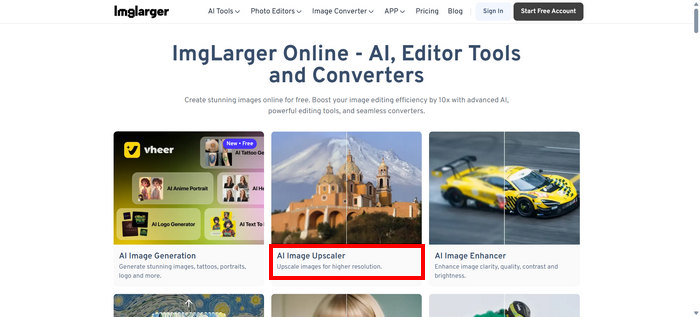
Pas 2. Un cop siguis al seu lloc web, entre les eines disponibles, tria AI Image Upscaler.
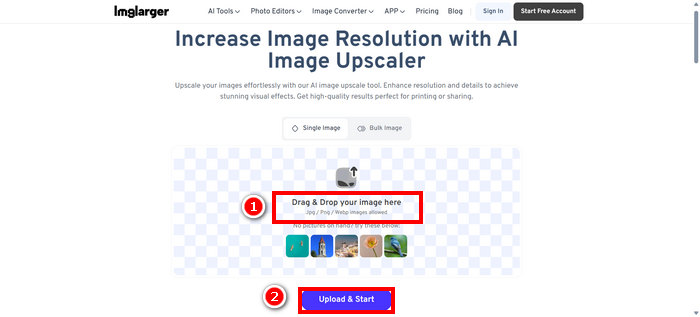
Pas 3. Després, fes clic a Drag & Drop your image here o bé arrossega-hi directament la foto. Quan hagis seleccionat la teva foto, fes clic a Upload & Start.
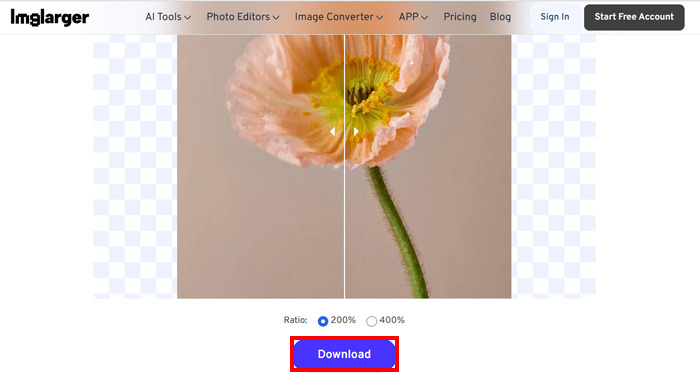
Pas 4. Ara pots previsualitzar la teva foto ampliada comparant-la amb la qualitat original, i quan n’estiguis satisfet, fes clic al botó Download que trobaràs a sota.
Si voleu millorar l'escala d'un grup de fotos, primer heu de triar l'opció Imatge a granel, però tingueu en compte que això només està disponible per a versions premium.
Part 4. Millor alternativa a Imglarger: FVC Free Image Upscaler
Si busques una alternativa gratuïta a Imglarger, la millor eina per a això és el FVC Free Image Upscaler. Aquesta eina permet als usuaris ampliar la seva imatge en pocs passos. Amb la seva interfície senzilla i intuïtiva, els usuaris només han de pujar la foto i s’ampliarà automàticament.
Principals característiques
• L'augment d'escala de la imatge funciona amb intel·ligència artificial per millorar la qualitat de la imatge automàticament.
• Permet als usuaris canviar la mida de les imatges per 2×, 4×, 6× o 8× sense perdre'n la qualitat.
• Corregeix automàticament les parts borroses i restaura els detalls perduts.
• Admet formats populars com JPG, JPEG, PNG i BMP.
• Sense marca d'aigua a les imatges ampliades.
• Processament ràpid i vista prèvia dels resultats en temps real.
Aquí tens la guia pas a pas sobre com canviar la mida d’una imatge amb FVC Free Image Upscaler:
Pas 1. Primer, has d’accedir a l’eina al seu lloc web oficial. Per fer-ho, obre Chrome i, al motor de cerca, busca FVC Free Image Upscaler.
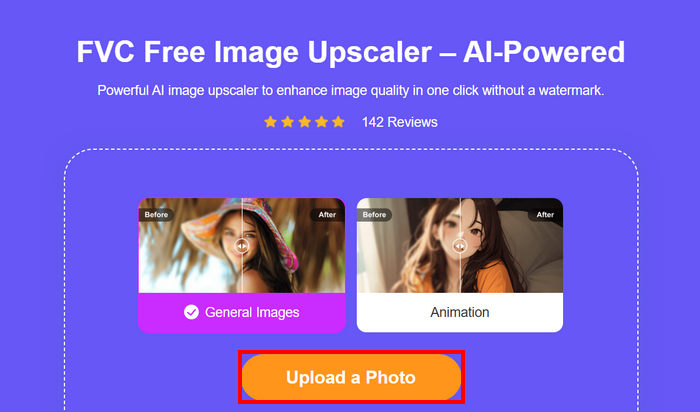
Pas 2. Un cop hagis accedit a l’eina, fes clic a Upload a Photo per importar la imatge que vols ampliar.
Pas 3. Espera que la foto s’ampliï. Després de pocs segons, podràs veure la previsualització de la teva imatge millorada. A més, des d’allà pots canviar el mode de la teva foto i ajustar com vols que s’ampliï. Quan hagis acabat, fes clic al botó Save.
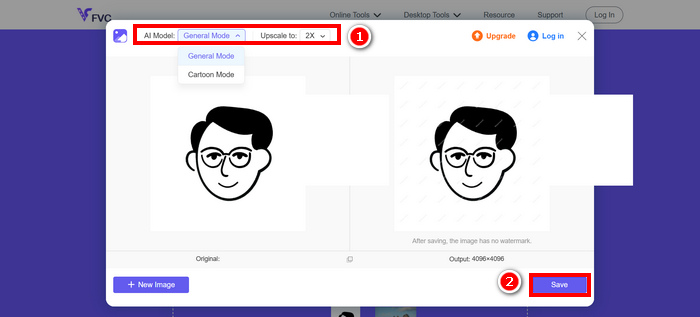
FVC Free Image Upscaler és realment la millor alternativa per a Imglarger. A part d'això, és gratuït i molt fàcil d'utilitzar. Ofereix resultats de qualitat i millorats, i admet una àmplia gamma de formats de sortida.
Part 5. Preguntes freqüents sobre les ressenyes d'Imglarger
Imglarger afegeix una marca d'aigua a la imatge?
No. Imglarger no afegeix cap marca d’aigua a les imatges que amplíes o edites, fins i tot quan utilitzes la versió gratuïta.
Quant pot Imglarger ampliar una imatge?
Imglarger permet ampliar una imatge en 200% fins a 800% de la seva mida original. La tecnologia d'IA que admet aquesta eina millora la qualitat de les fotos durant el procés d'augment d'escala.
Puc processar diverses imatges alhora amb Imglarger?
Sí, pots processar diverses imatges alhora amb aquest ampliador d’imatges, però aquesta funció només està disponible per als usuaris de pagament. Els usuaris gratuïts estan limitats al processament d’una sola imatge. Si passes a un pla premium, s’activarà l’opció de processament per lots, especialment útil per a usuaris que necessiten editar o ampliar diverses fotos de manera ràpida i eficient.
Conclusió
És cert que Imglarger és una gran eina per ampliar imatges. Ofereix molt bones funcions, plans de preus flexibles i més avantatges. Tanmateix, és important reconèixer que la seva versió gratuïta no inclou algunes característiques que sí que ofereixen altres eines gratuïtes d’escalat. Si estàs buscant una alternativa gratuïta, també hauries de provar l’eina FVC Free Image Upscaler. Totes dues eines ofereixen una qualitat excel·lent, així que tria la que millor s’adapti a les teves necessitats.
-
 Com ampliar una imatge per imprimir-la en línia i fora de línia
 Si teniu una imatge de resolució baixa i voleu ampliar-la, tenim una solució per a vosaltres. Llegiu aquest article per saber com ampliar una imatge per imprimir-la.
-
 7 maneres senzilles d'augmentar la resolució de la imatge en alta qualitat
 Com augmentar la resolució de les imatges a Photoshop? Puc fer una imatge JPEG amb una resolució més alta? Aprèn 7 mètodes per augmentar la resolució de les imatges.
-
 Reductors de mida de la imatge superior en dispositius d'escriptori i mòbils
 Mireu les aplicacions més destacades d'aquest article per obtenir el millor reductor de mida de la foto al vostre dispositiu preferit. Apreneu la millor optimització de mida per a imatges ara!
