


 Video Converter Ultimate
 Gravadora de pantalla
 Reparació de vídeo
 Baixada segura
Mètodes en línia i fora de línia més efectius per convertir MTV a MKV
Hi ha alguns casos en què el teu format de fitxer MTV és incompatible amb el teu dispositiu o programa. La millor solució és canviar el format del fitxer de vídeo. Afortunadament, tenim els mètodes més adequats per a tu. Aquesta publicació t’oferirà diverses aplicacions que pots utilitzar per a convertir MTV a MKV a l’instant. No deixis de llegir aquest article per descobrir el millor convertidor de MTV a MKV.

Part 1: Informació detallada sobre MTV i MKV
Què és MTV?
MTV significa Music Television. L’1 d’agost de 1981, MTV es va llançar com un canal de cable nord-americà. Aquest fitxer es va crear per permetre la reproducció de vídeo en reproductors portàtils MP4 de baix cost fabricats a la Xina, sense augmentar-ne el preu amb llicències. El reproductor MTV es fabricava a la Xina i podia mostrar vídeo, fitxers de text i imatges. Finalment, funciona mostrant una sèrie de fotogrames d’imatge en brut sense comprimir rgb565/555 mentre reprodueix àudio MP3.
Què és MKV?
MKV significa Matroska Video. És un contenidor multimèdia, igual que els formats MOV i AVI. Però admet més pistes de subtítols i àudio en un mateix fitxer. Aquest contenidor multimèdia Matroska s’utilitza per a vídeo. També es basa en el llenguatge binari extensible (Extensible Binary Meta Language). La diferència entre el format MKV i altres formats de vídeo és que altres formats són còdecs, mentre que MKV és un contenidor.
Part 2: Com convertir MTV a MKV sense pèrdues
Convertir MTV a MKV sense pèrdua és fàcil amb el Video Converter Ultimate. Aquesta aplicació pot convertir molts fitxers, com ara MOV, MTS, XVID, FLV, AVI, MP4 i més. Pel que fa al procés, té una velocitat de conversió 30 vegades més ràpida, incomparable amb altres convertidors. També pots convertir diversos fitxers simultàniament perquè ofereix conversió per lots. A més, si vols millorar el teu vídeo i fer-lo més atractiu, pots utilitzar aquesta eina. Disposa de moltes funcions per editar i optimitzar el teu vídeo, com ara un potenciador de vídeo, amb el qual pots augmentar la resolució del vídeo, eliminar-ne el soroll, optimitzar la brillantor i el contrast i reduir el tremolor del vídeo. Amb aquestes funcions, pots assegurar que el teu vídeo serà molt més satisfactori. A més, si vols afegir una marca d’aigua al teu vídeo, pots usar aquesta eina, perquè és capaç d’afegir-hi marques d’aigua. Aquestes són algunes de les funcions d’aquesta eina, però si vols descobrir-ne de més avançades, has de provar d’utilitzar el Video Converter Ultimate.
Funcions:
◆ Capaç de crear un collage.
◆ Oferir eines d'edició de vídeo, com ara Enhancer, Watermark Remover, Compressor, etc.
◆ Et permet crear vídeos musicals.
◆ Converteix nombrosos formats de fitxer de vídeo.
Pros
- Té un procés de conversió 30 vegades més ràpid.
- Perfecte per a usuaris no professionals.
- Pot convertir diversos formats de fitxer, com ara MP4, MOV, MTV, MKV, etc.
- No s'ha aplicat cap filigrana.
- Accessible a Windows i Mac.
Contres
- Heu de comprar l'aplicació per experimentar més funcions excel·lents.
Seguiu aquestes guies detallades per convertir MTV a MKV a l'instant.
Pas 1: Descarrega el Video Converter Ultimate al teu ordinador Windows o Mac fent clic al botó de Baixada que tens a continuació. A continuació, instal·la el programari al teu dispositiu i obre l’aplicació.
Descàrrega gratuïtaPer a Windows 7 o posteriorDescàrrega segura
Descàrrega gratuïtaPer a macOS 10.7 o posteriorDescàrrega segura
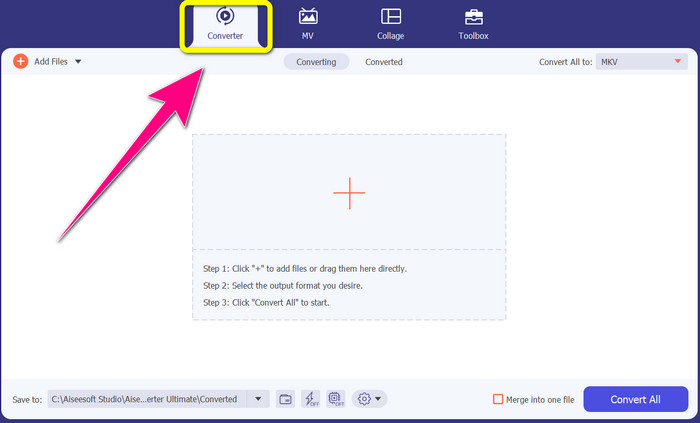
Pas 2: Veureu quatre opcions a la part superior de la interfície: Converter, MV, Collage i Toolbox. Selecciona el panell Converter.
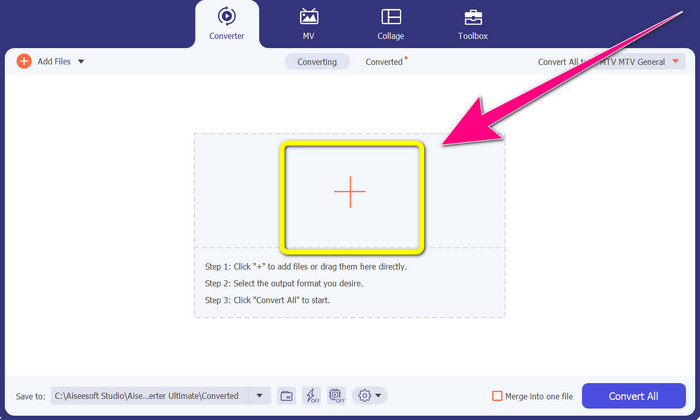
Pas 3: A continuació, fes clic a la icona + per afegir el fitxer de vídeo MTV que vols convertir.
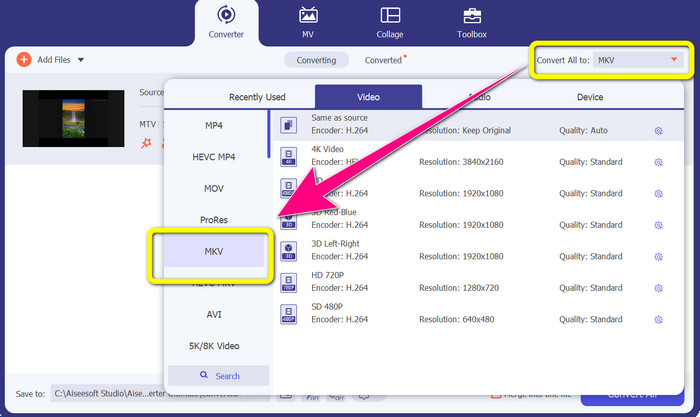
Pas 4: Quan ja hagis afegit el teu vídeo, fes clic a l’opció Convert all to. Després, busca el format de fitxer MKV entre les opcions de format i fes-hi clic.
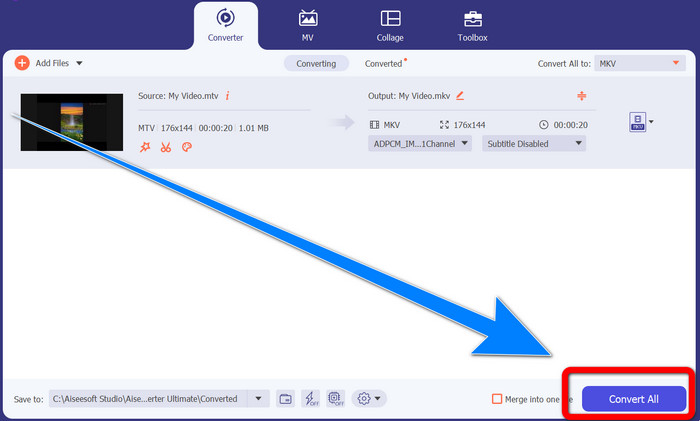
Pas 5: Després de seleccionar el format de fitxer MKV, ja pots fer clic al botó Convert All per convertir i desar el teu vídeo final.
Part 3: Programari en línia per convertir MTV a MKV
Utilitzant Converthelper
Has après com convertir MTV a MKV en Windows i Mac. Ara aprendràs el procediment per convertir fitxers en línia. Un dels convertidors útils que pots utilitzar és Converthelper. Aquesta eina en línia és gratuïta i et permet convertir diferents formats de fitxer, com MTV, MKV, DDAT, AVE, PS GFP, WMF, etc. A més, només calen uns quants passos per convertir, cosa que la fa adequada per a principiants. I pots convertir molts fitxers sense límits amb Converthelper. Tanmateix, aquest convertidor gratuït en línia és lent en el procés de conversió, i triga una estona a completar la conversió dels fitxers. A més, el rendiment d’aquesta eina depèn de la teva connexió a Internet. Per tant, per convertir fitxers amb Converthelper, has de tenir una bona connexió a Internet. Segueix els passos següents per convertir MTV a MKV en línia.
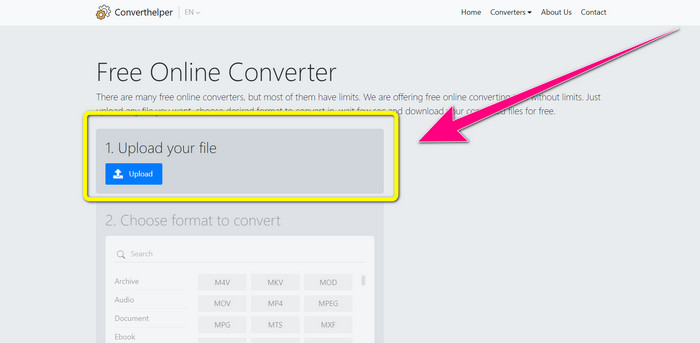
Pas 1: Visita el lloc web de Converthelper al teu navegador. Després, fes clic al botó de pujada i afegeix-hi el vídeo amb el fitxer MTV.
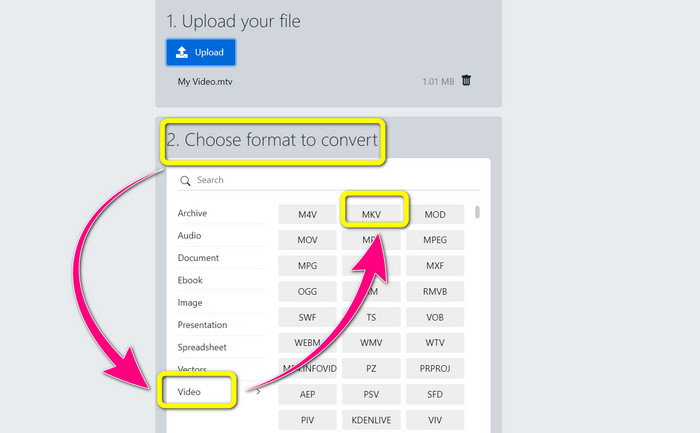
Pas 2: Després de pujar el fitxer, passa al punt 2. Tria les opcions de format. Fes clic al botó Video, busca el fitxer MKV i fes-hi clic.
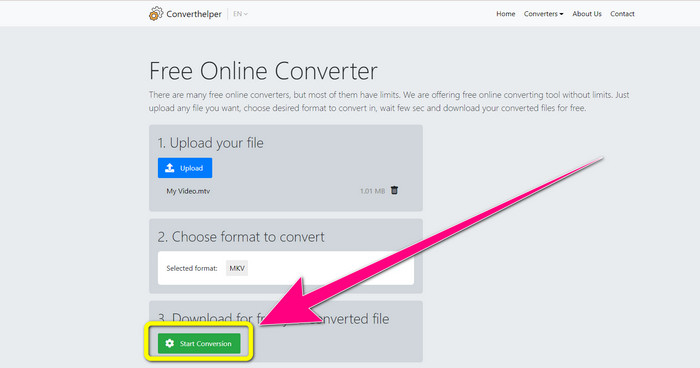
Pas 3: Per a l’últim pas, fes clic al botó Start Conversion per convertir el teu fitxer MTV al format MKV. Espera que acabi el procés de conversió final i després baixa el teu vídeo final en format MKV.
Utilitzant Online Convert
Una altra eina en línia que podeu utilitzar per convertir MTV a MKV és Online Convert. A part dels formats MTV i MKV, admet més formats, com ara MP4, AVI, GIF, FLAC, FLV, VOB, DIVX, MOV, WMV i molt més. No només és fiable a l'hora de convertir arxius de vídeo. També podeu convertir imatges, documents, àudio i altres formats. Aquesta eina en línia també és bona per als usuaris nous perquè és fàcil d'utilitzar i només té uns quants passos per convertir diferents fitxers. Tanmateix, aquesta eina en línia té un límit de mida de fitxer, que és un màxim de 3 Mb. A més, com les altres eines basades en web, no podeu utilitzar-lo si no teniu connexió a Internet. Hi ha vegades que aquest programari no funciona bé. Per convertir el vostre fitxer MTV al format de fitxer MKV, seguiu aquests passos a continuació.
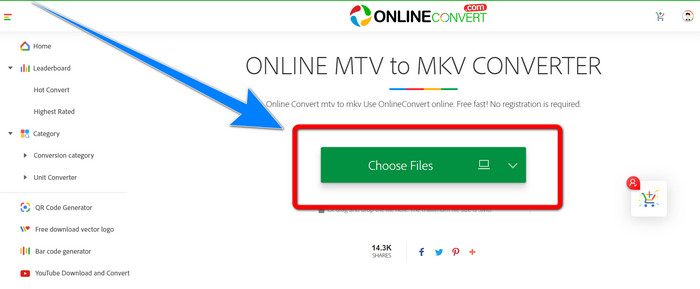
Pas 1: Ves al lloc web Online Convert. Fes clic al botó Choose Files per importar el teu vídeo en format de fitxer MTV.
Pas 2: Quan hagis pujat el vídeo en format MTV, ves a les opcions de format i selecciona el format MKV .
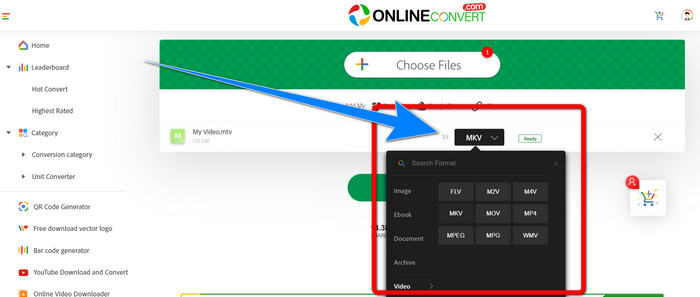
Pas 3: Per a l’últim pas, fes clic al botó Convert per convertir el teu fitxer MTV a format MKV. Després, espera el procés de conversió i desa el teu vídeo convertit.
Lectures relacionades:
Millors procediments sobre com convertir AMV a MKV de franc
[En línia i gratuït] Com puc convertir MKV a MP4 a Windows/Mac
Part 4: Preguntes freqüents sobre la conversió de MTV a MKV
El format MKV és el mateix que l'MP4?
No, no ho fan. MKF té més funcions addicionals, com ara diversos subtítols i pistes d'àudio, de manera que MKV té una mida de fitxer més gran que el format MP4. A més, MKV té una resolució més alta que MP4 perquè té un còdec avançat amb una relació de compressió més alta.
També puc convertir l'MKV a un altre format?
I tant que sí! Pots convertir MKV a altres formats mitjançant programari que admeti fitxers MKV, com ara Video Converter Ultimate. Descarrega l’aplicació al teu Windows o Mac i gaudeix convertint els teus fitxers.
El format MKV és fantàstic?
Sí, ho és. No té requisits de llicència. Admet funcions excel·lents, com ara diverses pistes i subtítols, i molt més.
Conclusió
Aquests són els millors mètodes per convertir MTV a MKV utilitzant excel·lents convertidors. Si vols convertir múltiples fitxers fàcilment i sense pèrdua de qualitat, utilitza el Video Converter Ultimate.
-
 Convertidor gratuït de MP4 a MKV: com convertir MP4 a MKV amb facilitat
 Quan vulgueu convertir MP4 a MKV de forma gratuïta, podeu obtenir més informació sobre els 4 mètodes més eficients per convertir els fitxers MP4 en un vídeo MKV per a diferents escenaris.
-
 Com convertir MKV a DivX en línia i fora de línia de forma gratuïta
 Esteu buscant les millors maneres de convertir MKV a format DivX de forma gratuïta. Segueix llegint per conèixer els millors convertidors de MKV a DivX en línia i fora de línia
-
 4 dels millors convertidors de MKV a 3GP per a Windows i Mac
 Si esteu buscant convertidors MKV a 3GP fàcils d'utilitzar, esteu d'enhorabona! Hem trobat els millors convertidors MKV a 3GP gratuïts que heu de provar
