


 Video Converter Ultimate
 Gravadora de pantalla
 Reparació de vídeo
 Baixada segura
Converteix DIVX a 3GP amb els procediments més efectius
No pots reproduir el teu vídeo DIVX al teu dispositiu perquè no és compatible? Molta gent té el mateix problema. Però tens sort, perquè parlarem del mètode més eficaç i senzill per convertir DIVX a 3GP. No perdis aquesta oportunitat i aprèn més sobre com convertir diferents fitxers utilitzant diverses aplicacions de confiança i provades que t’introduirem.

Part 1: Millor programari per convertir DIVX a 3GP
Vols convertir DIVX a 3GP en els teus dispositius, com ordinadors Windows i Mac? Aleshores, el teu problema ja està resolt. Per convertir el teu fitxer DIVX pots utilitzar el Video Converter Ultimate. Tal com indica el nom de l’eina, és una aplicació definitiva amb la qual pots convertir més de 1000 formats de vídeo, inclosos DIVX, 3GP, MP4, MOV, MTS, WEBM i molts més. També pots convertir dos o més fitxers simultàniament perquè aquesta eina ofereix conversió per lots. A més, el Video Converter Ultimate té un procés de conversió ràpid, cosa ideal si penses convertir nombrosos formats de fitxer.
A més, encara podeu utilitzar aquesta aplicació fora de línia si esteu interessats a editar el vostre fitxer DIVX abans de convertir-lo. Suposant que voleu corregir el color del vostre vídeo, podeu anar al tauler Caixa d'eines i seleccionar l'eina Correcció de color per ajustar la brillantor, el contrast i la saturació del vostre vídeo. A més, suposem que voleu sincronitzar l'àudio al vostre fitxer de vídeo DIVX abans de convertir-lo. En aquest cas, podeu fer-ho perquè ofereix una funció de sincronització d'àudio, de manera que sincronitzar l'àudio amb el vídeo és fàcil per a vosaltres.
Funcions:
◆ Converteix formats de fitxer de vídeo, inclosos MP4, M4V, FLV, AVI, etc.
◆ Pot crear vídeos musicals amb diversos temes.
◆ La Caixa d'eines conté un millorador de vídeo, un eliminador de filigrana, un compressor i molt més.
◆ Capaç de fer un collage.
Pros
- Admet diversos formats de fitxer, com ara MP4, AVI, FLV, MOV, MTS, DIVX, 3GP, etc.
- Té una interfície d'usuari amigable que és adequada per a principiants.
- Té un procés de conversió 30 vegades més ràpid
- Accessible tant a Windows com a Mac.
- Pot convertir diversos vídeos d'una sola vegada.
Contres
- Compra el Video Converter Ultimate per gaudir de funcions més úniques.
Per convertir fàcilment DIVX a 3GP, heu de seguir aquestes senzilles guies a continuació.
Pas 1: Primer, només has de descarregar el Video Converter Ultimate als teus dispositius, com ara ordinadors Windows o Mac. Després, ves al procés d’instal·lació i obre l’aplicació.
Descàrrega gratuïtaPer a Windows 7 o posteriorDescàrrega segura
Descàrrega gratuïtaPer a macOS 10.7 o posteriorDescàrrega segura
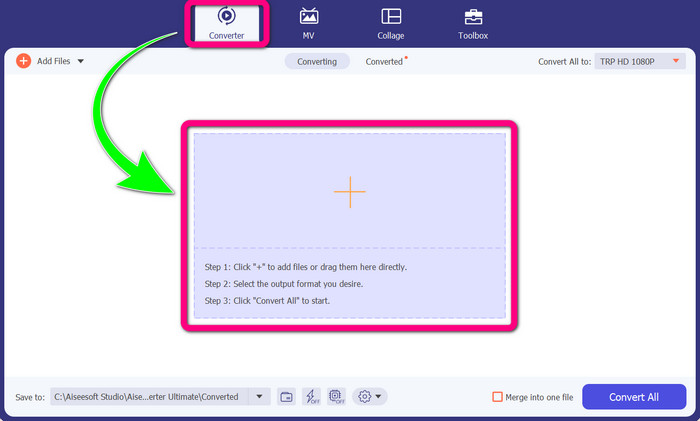
Pas 2: Quan ja hagis obert el Video Converter Ultimate al teu dispositiu, selecciona el panell Converter. Després, fes clic a la icona + per afegir el teu fitxer de vídeo DIVX.
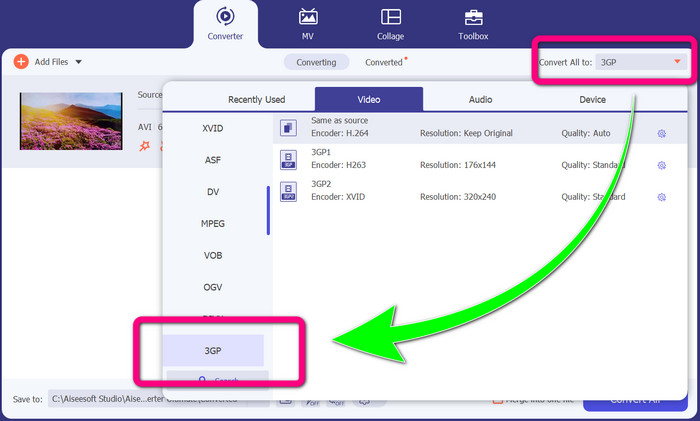
Pas 3: Després d’afegir el teu fitxer de vídeo, fes clic a l’opció Convert all to, busca el format de fitxer 3GP i selecciona’l.
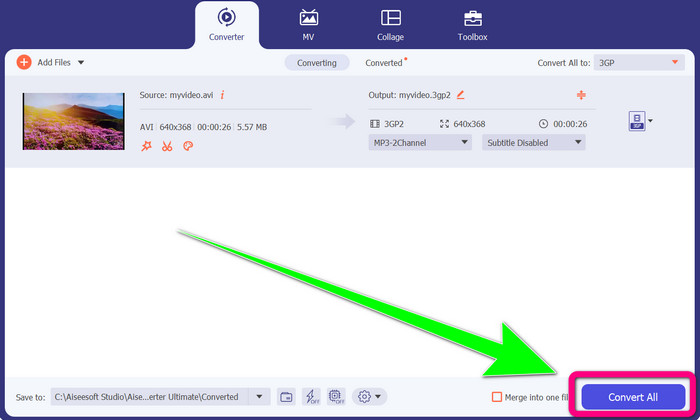
Pas 4: Quan hagis acabat de seleccionar el format de fitxer 3GP, fes clic al botó Convert All. Espera el procés de conversió i desa el vídeo final al teu dispositiu.
Part 2: excel·lents convertidors en línia per convertir DIVX a 3GP
Utilitzant FVC Free Video Converter en línia
Una de les millors eines en línia per convertir DIVX a 3GP és FVC Free Video Converter Online. Aquesta eina pot ajudar-te a convertir diferents formats de fitxer en només uns quants clics. Admet gairebé tots els vídeos i àudios principals a MP4, MOV, MKV, FLV, VOB, MP3, AAC i més. FVC Free Video Converter Online és senzill i fàcil d’utilitzar. Fins i tot els principiants són capaços d’aprofitar aquesta aplicació. A més, tant si ets usuari de Windows com de Mac, pots confiar en aquesta eina perquè està disponible tant per a Windows com per a Mac. Segueix els mètodes senzills següents per convertir DIVX a 3GP.
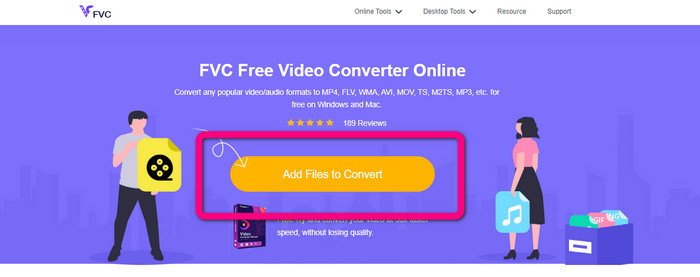
Pas 1: Visita el FVC Free Video Converter Online. Després, selecciona el botó Add Files to Convert per importar el fitxer DIVX que vols convertir.
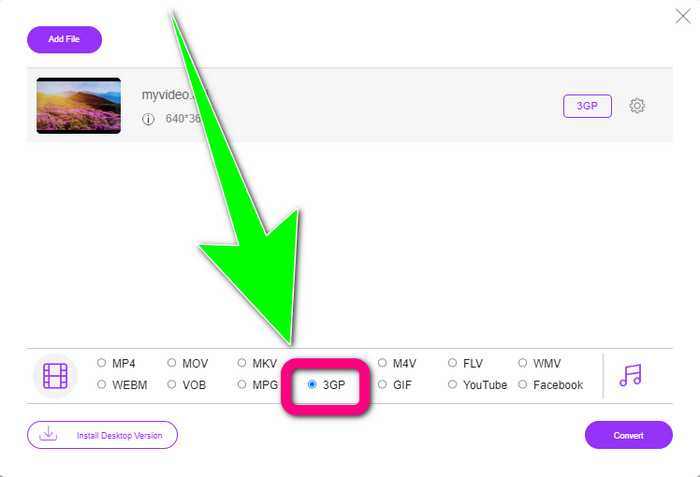
Pas 2: Després d’afegir el teu fitxer DIVX, fes clic al format de fitxer 3GP entre les opcions de format que hi ha a sota.
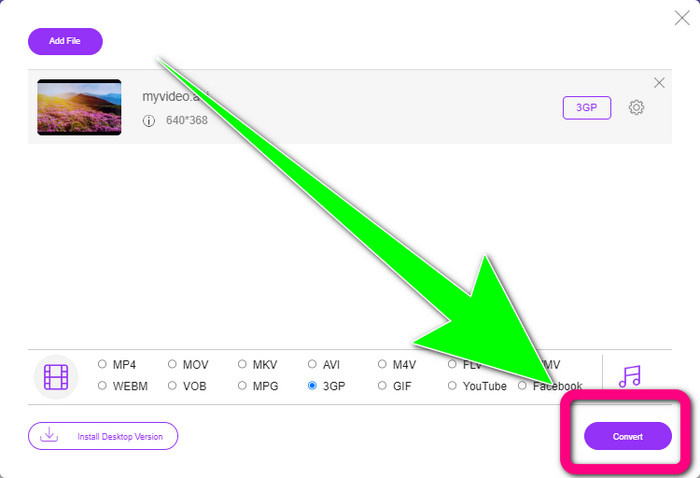
Pas 3: Continua fent clic al botó Convert. Espera el procés de conversió i desa el teu vídeo convertit.
Utilitzant Convertio
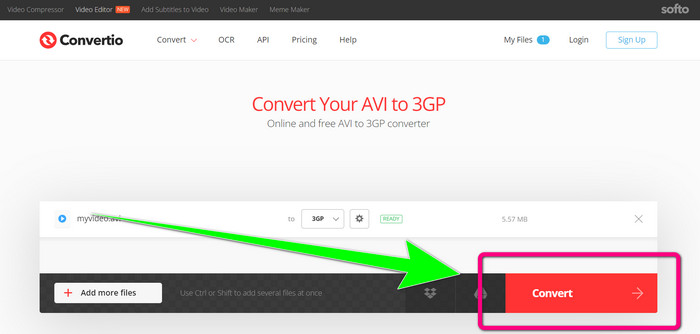
Si vols convertir DIVX a 3GP en línia, Convertio és una de les eines que pots utilitzar. Admet molts formats, com 3GP, DIVX, XVID, AVID, MP4, M4V, ASF, HEVC i més. A més de convertir fitxers de vídeo, pots convertir imatges, àudio, documents, arxius comprimits i altres fitxers. Convertio també és una eina senzilla, perquè pots convertir en pocs passos, de manera que no t’hauràs d’amoïnar gaire per convertir el teu fitxer DIVX a un fitxer 3GP. No obstant això, igual que altres eines en línia, no pots fer servir aquest programari si no tens accés a Internet. A més, hi ha algunes ocasions en què aquesta eina en línia no funciona gaire bé. La versió gratuïta de Convertio té un límit: només pots convertir amb una mida màxima de fitxer de 100 Mb. Has de comprar el programari per augmentar la mida màxima de fitxer i gaudir d’un millor rendiment. Segueix els passos següents per convertir el fitxer DIVX a format de fitxer 3GP.
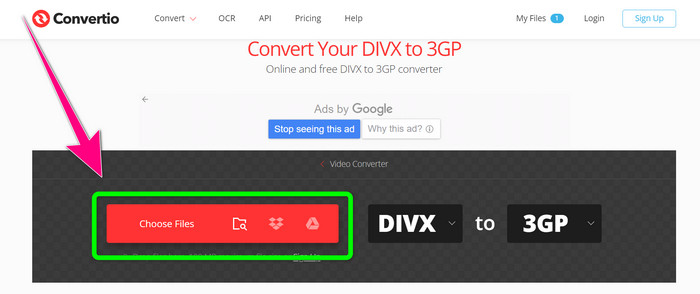
Pas 1: Ves al lloc web de Convertio. Fes clic al botó Choose Files i afegeix el teu vídeo amb format de fitxer DIVX.
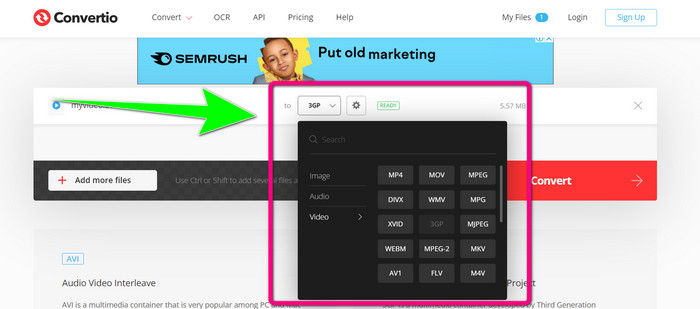
Pas 2: Després d’afegir el teu vídeo, ves a les opcions de format i selecciona el format de fitxer 3GP.
Pas 3: Quan hagis seleccionat el format de fitxer 3GP, fes clic al botó Convert, espera el procés de conversió i desa el teu fitxer de vídeo 3GP.
Part 3: Visió general dels formats de fitxer DIVX i 3GP
DIVX
DIVX és un programari de compressió de vídeo capaç de comprimir fitxers de vídeo fins a una dotzena part del vídeo original amb una pèrdua mínima de qualitat. Aquest format de vídeo és habitual en grans productores cinematogràfiques com Disney, DreamWorks SKG, Universal i Paramount.
3GP
3GP és un contenidor multimèdia. El va desenvolupar el Third Generation Partnership Project l’any 1998 per a telèfons basats en GSM (Global System for Mobile Communications). El contenidor 3GP requereix poc espai d’emmagatzematge, poc consum de dades i poca amplada de banda, cosa que el fa ideal per als telèfons mòbils.
Lectura addicional
Converteix fàcilment MTV a MKV amb aquests convertidors definitius
Com convertir TRP a MKV sense perdre qualitat
Part 4: Preguntes freqüents sobre la conversió de DIVX a 3GP
Què és un convertidor DIVX?
És una eina excel·lent capaç de convertir diferents tipus de fitxers a nombrosos altres formats. Això inclou AVI, MP4, MPEG, MOV, FLV i més. Un cop hagis acabat la conversió, ja podràs reproduir el teu vídeo en qualsevol altre reproductor multimèdia que admeti el format corresponent. FVC Free Video Converter Online és un dels millors convertidors que pots utilitzar.
El format de fitxer DIVX és el mateix que l'AVI?
El format de fitxer DIVX es basa en el contenidor AVI, però pot contenir grans funcions com ara capítols i subtítols. A més, els formats de fitxer AVI i DIVX es poden reproduir en dispositius certificats per DIVX.
Puc convertir el fitxer DIVX a 3GP sense perdre la qualitat?
Sí, és clar que pots. Amb el Video Converter Ultimate pots convertir el fitxer DIVX a 3GP sense preocupar-te que canviï la qualitat. Aquest magnífic convertidor pot convertir diferents fitxers sense perdre la qualitat del teu vídeo.
Conclusió
Com pots veure, hi ha diversos mètodes eficaços per convertir DIVX a 3GP mitjançant eines en línia i fora de línia. Però de vegades algunes eines en línia són poc pràctiques, sobretot si tens una connexió a Internet lenta, així que pots utilitzar una aplicació descarregable. Si busques una eina fora de línia excepcional, pots provar el Video Converter Ultimate.
-
 4 dels millors convertidors de MKV a 3GP per a Windows i Mac
 Si esteu buscant convertidors de MKV a 3GP que siguin fàcils d'utilitzar, esteu d'enhorabona! Hem trobat els millors convertidors MKV a 3GP gratuïts que heu de provar.
-
 Els 5 millors convertidors MOV a 3GP que no us podeu perdre
 Si esteu buscant els millors convertidors de MOV a 3GP en línia i fora de línia, aleshores esteu pel bon camí. Llegiu aquest article per convertir el vostre MOV a un fitxer 3GP.
-
 3 maneres de convertir MPG a 3GP a Windows i Mac [Gratis]
 Si esteu buscant maneres de convertir MPG a 3GP, llegiu aquest article per conèixer les millors maneres de convertir MPG a 3GP a Windows i Mac.
