


 Video Converter Ultimate
 Gravadora de pantalla
 Reparació de vídeo
 Baixada segura
Instrucció senzilla sobre com convertir OGV a MKV
Do you want to know how to convert OGV to MKV and open it on another media player? Then, you are fortunate because this post will introduce you to excellent applications with basic steps in converting different files. Also, you don’t have to worry; these tools are worth utilizing, and you will never be disappointed. So, it would be best to proceed to the main discussion because we don’t want you to wait any longer. Let’s discover these methods and read this article right away.

Part 1: Informació sobre el format OGV i MKV
Abans de convertir el fitxer OGV al format MKV, primer donem la seva valuosa informació.
Què és OGV?
Un format i còdec de contenidor multimèdia gratuït, de codi obert i sense patents és Ogg Vorbis (OGV). Pertany al format Ogg i la família de còdecs, que la Fundació Xiph.Org sense ànim de lucre va crear per assumir còdecs patentats. OGV pot multiplexar el temps (TDM) text (subtítols) i metadades. A més, a la compressió amb pèrdues i sense pèrdues, és compatible amb la transmissió.
Què és MKV?
MKV és un contenidor de codi obert que pot contenir material multimèdia que s'ha comprimit mitjançant diversos còdecs. Té molts avantatges respecte al contenidor AVI tradicional, inclosa la possibilitat d'incloure pistes d'àudio i subtítols en molts idiomes que es poden canviar sense aturar la reproducció i buscar i rebobinar ràpidament els fitxers. A més, el format és fàcil d'alterar, cosa que facilita l'extracció de dades d'àudio i vídeo.
Part 2: Com convertir OGV a MKV sense pèrdues
If you are here to learn how to convert OGV to MKV losslessly, then you are in the right place. The best downloadable converter you can find is Video Converter Ultimate. It is one of the most reliable converters on your Windows and Mac computers. Also, this tool supports 100+ formats, such as FLV, MP4, M4V, MOV, SWF, AVI, MTS, and more. It is not also limited to converting videos. You can convert your image format here because it supports JPG, PNG, GIF, WEBP, etc. The best part is that you are able to convert files up to 30x faster, unlike other tools with a normal conversion speed. In addition, batch conversion is allowed in this tool, which means you can attach multiple video files and convert them with a single process.
A més, hi ha més coses que podeu fer al vostre fitxer OGV. Si voleu canviar la mida del vostre vídeo perquè la mida del fitxer és massa gran, podeu utilitzar aquesta aplicació perquè ofereix una funció de compressor de vídeo on podeu canviar la mida del vostre vídeo. Hi ha més funcions que podeu gaudir per millorar el vostre fitxer OGV abans o després de convertir-lo al format MKV.
Funcions
◆ Converteix formats de vídeo, com ara MP4, M4V, AVI, FLV i més de 1000 més.
◆ Proporcioneu diversos temes per crear un vídeo musical.
◆ La creació d'un collage està disponible.
◆ Capaç de combinar àudio i vídeo.
◆ Ofereix diverses funcions per millorar els vídeos, com ara potenciador de vídeo, eliminador de filigrana, controlador de velocitat de vídeo, etc.
◆ Permet canviar la velocitat d'un vídeo.
Pros
- Té una interfície entenedora, perfecta per a principiants.
- El procés de conversió és 30 vegades més ràpid.
- Ofereix conversió per lots.
- Converteix fitxers sense perdre qualitat.
Contres
- Heu d'aconseguir la versió pro per experimentar funcions extraordinàries.
Per convertir el format de fitxer OGV a MKV amb Video Converter Ultimate, seguiu les guies detallades a continuació.
Step 1: Download the Video Converter Ultimate on your Mac and Windows. Run the application after the installation process.
Descàrrega gratuïtaPer a Windows 7 o posteriorDescàrrega segura
Descàrrega gratuïtaPer a macOS 10.7 o posteriorDescàrrega segura
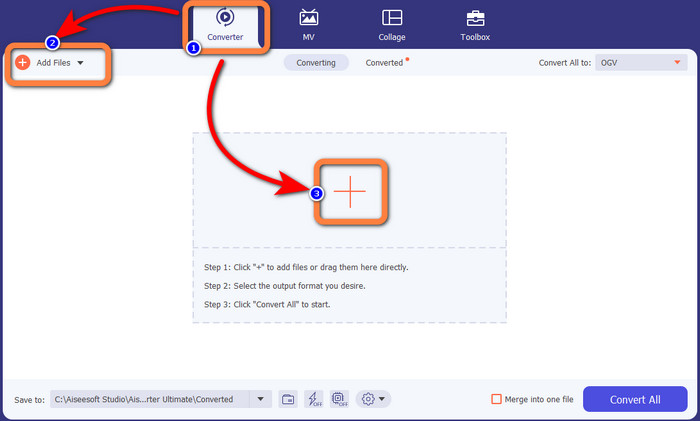
Step 2: After launching the application, select the Converter panel. There are two options to add the OGV file. You can click the Add Files button or click the Plus sign.
Step 3: Go to the format options by clicking the drop-down icon next to Convert All to, and select the MKV file format for the next step.

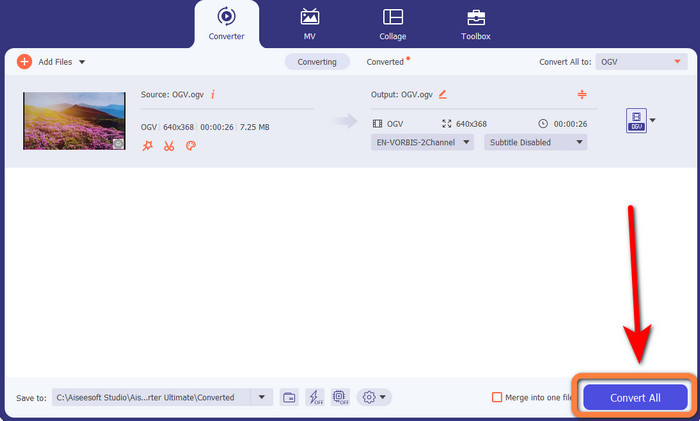
Step 4: The last step is to convert your file by clicking the Convert All button. Next, you can save your video with an MKV file.
Part 3: solucions en línia fàcils per convertir OGV a MKV
Utilitzant Converthelper
If you are amazed by the Video Converter Ultimate, it is reassuring that you will also be satisfied with using Converthelper. This online tool lets you convert OGV to MKV easily and efficiently. Also, it supports various files, like WMA, FLV, AVI, MP4, 3GP, and more. It also has basic methods to convert files, so even a beginner won’t encounter some difficulty in utilizing this online application. In addition, this free video converter can also convert your videos without losing quality. This way, you will make sure that your video looks the same when it comes to quality. However, there are some instances in which Converthelper is not performing well, especially when you have a slow internet connection. Also, it has a slow conversion process, which is time-consuming for users. Try converting your OGV file to MKV using this software.
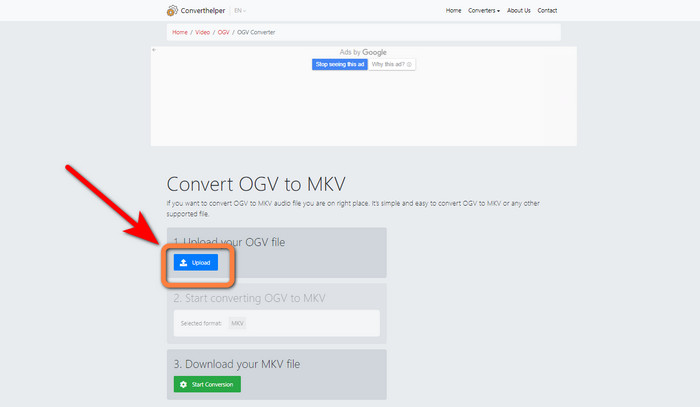
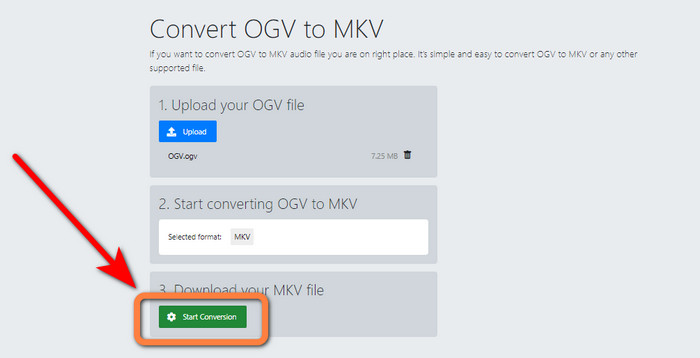
Step 1: You must visit the Converthelper website. Then, click the Upload button and import the OGV file format.
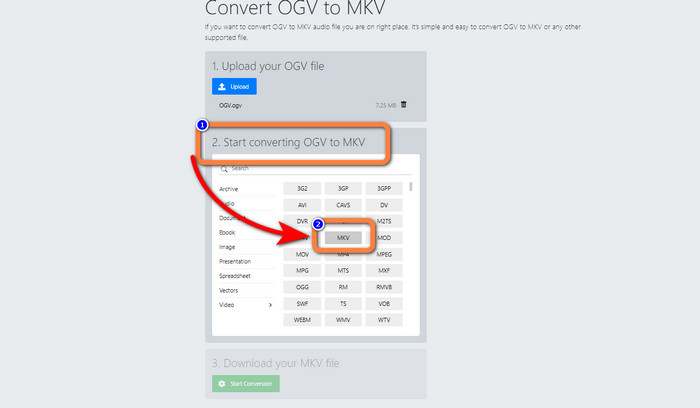
Step 2: Proceed to the number 2. Select the MKV file format from the format options.
Step 3: For your last step, click the Start Conversion button and wait for the conversion process. This tool also enables you to convert OGV to FLV.
Utilitzant FreeConvert
FreeConvert lets you convert OGV to MKV instantly. Also, you can use this tool to convert other file formats, such as MP4, WMV, AVI, WEBM, 3GP, MOV, etc. It also has simple steps to convert files, which is perfect for beginners. Aside from converting, FreeConvert can also compress videos, images, audio, documents, and more. In addition, you can edit your video with its editing tools, like a video cropper and a video trimmer. Unfortunately, when it comes to converting, it can only convert with a maximum size of 1GB. This way, you can only convert limited files. You must buy a subscription if you want to increase the maximum file size. Also, it is a web-based application, so it is essential to have an internet connection. Follow the steps below to convert OGV to MKV.
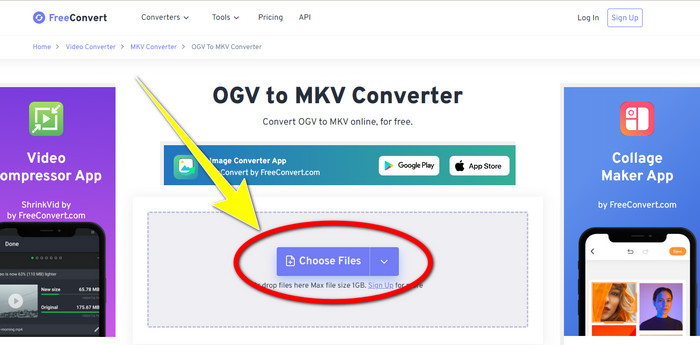
Step 1: Go to the website of FreeConvert. Click the Choose File button to add the OGV file.
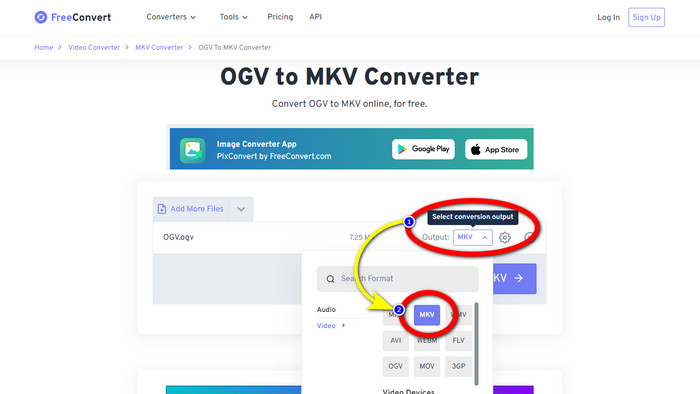
Step 2: The next step is to proceed to the Output button. Click it to see the format options and select the MKV file format.
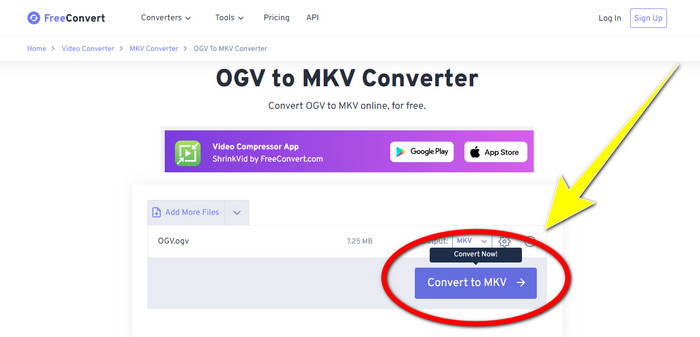
Step 3: After selecting the MKV file format, click the Convert to MKV button. Then the conversion process will begin and save your final video.
Part 4: Preguntes freqüents sobre la conversió d'OGV a MKV
1. Puc utilitzar FFmpeg per convertir OGV a MKV?
Of course, you can. Download the FFmpeg. It is a command-based tool that can convert various video files, including OGV, MKV, MOV, MP4, AVI, and more.
2. MKV és un format comú?
La majoria dels dispositius actuals són compatibles amb el format. Es poden emmagatzemar nombroses pistes d'àudio i subtítols en un fitxer mitjançant el format MKV o Matroska Video. És increïblement popular per guardar pel·lícules. Un fitxer de mida força petita i un vídeo d'alta qualitat.
3. És OGV un OGG?
No. OGG és un format de codi obert que fa servir el contenidor OGV. Un dels objectius principals del desenvolupament d'OGG era estar lliure de restriccions de patents de programari. Un flux de vídeo amb o sense àudio que s'ha comprimit amb el mètode Opus, Vorbis, Theora o Speex s'emmagatzema amb l'extensió de fitxer OGV.
Conclusió
Using online tools to convert OGV to MKV is effective, but you can’t ignore the fact that annoying ads always show up when converting. So, if you want to convert files without being disturbed by the ads, you can use Video Converter Ultimate.
-
 Les 4 millors solucions per convertir MXF a MKV [Resolt]
 Coneix aquests quatre mètodes fantàstics per convertir fàcilment MXF a MKV en línia i fora de línia. Les aplicacions incloses en aquesta publicació us poden ajudar a convertir fitxers sense problemes.
-
 4 maneres de convertir MPG a MKV mitjançant convertidors en línia/fora de línia
 Esteu buscant un convertidor fàcil d'utilitzar que pugui convertir fitxers MPG a MKV? Aquest article enumera les millors i més senzilles maneres de convertir ràpidament fitxers MPG a MKV
-
 Les maneres més fàcils de convertir MOV a MKV de forma gratuïta a Mac
 Vols convertir MOV a MKV de forma gratuïta a Mac? Llegiu aquest article per conèixer les maneres més fàcils i senzilles de convertir el vostre fitxer MOV a MKV.
