


 Video Converter Ultimate
 Gravadora de pantalla
 Reparació de vídeo
 Baixada segura
Maneres senzilles de com eliminar la filigrana a Lightroom Mobile
Posar una marca d’aigua a la teva foto és fantàstic, sobretot si vols protegir-la. Tanmateix, de vegades només vols quedar-te amb la foto i les marques d’aigua es tornen molestes. Aquesta publicació et mostrarà diverses aplicacions amb mètodes senzills que pots utilitzar per eliminar marques d’aigua de les teves imatges. A més, aprendràs com eliminar marques d’aigua a Lightroom per a mòbil. Si t’interessa aquest tipus de contingut, llegeix aquesta guia i descobreix-ne més detalls importants.

Part 1: Com desactivar la funció de marca d'aigua de l'aplicació mòbil Lightroom abans d'exportar-la
Lightroom mòbil és fiable per eliminar objectes molestos de les vostres imatges, com ara marques d'aigua, logotips, signatures i molt més. Podeu eliminar-los en uns quants tocs. Aquest programari fàcil d'utilitzar està dissenyat per a tots els usuaris, especialment els usuaris no professionals. Si voleu descobrir les maneres més fàcils d'eliminar les marques d'aigua a l'aplicació mòbil Lightroom, aquí teniu com fer-ho. Seguiu les guies senzilles a continuació.
Pas 1: Descarrega i instal·la l’aplicació Lightroom al teu telèfon mòbil. Obre-la i obre la línia de temps.

Pas 2: A la cantonada superior esquerra de la pantalla, toca la icona de Lr.
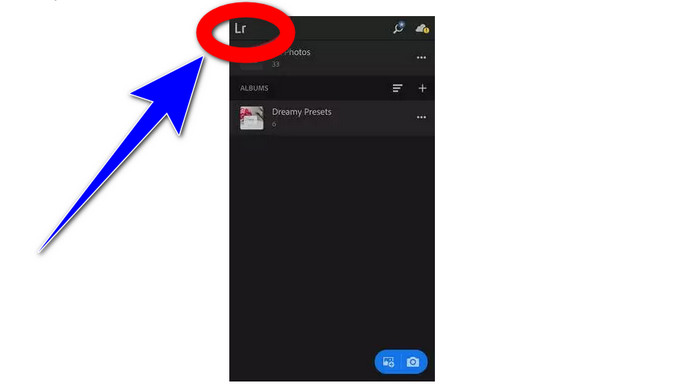
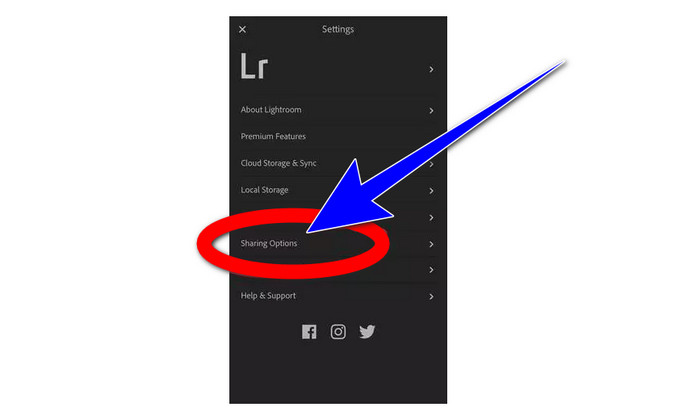
Pas 3: A continuació, ves a les opcions de compartició i fes-hi clic.
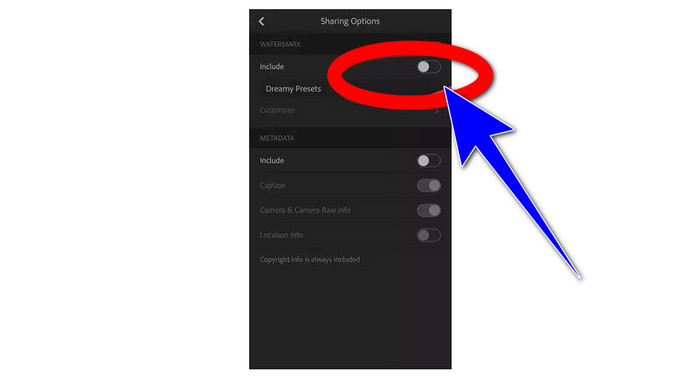
Pas 4: Després de fer clic a les opcions de compartició, desactiva l’opció Dreamy Prest per desactivar la marca d’aigua. Fes clic en aquesta opció i desactiva-la.
Part 2: Com eliminar la filigrana de les fotos sense lightroom
A més de Lightroom per a mòbil, pots eliminar marques d’aigua de les teves imatges amb FVC Free Watermark Remover. És un dels millors eliminadors de marques d’aigua que pots utilitzar a internet. A més de les marques d’aigua, també pot eliminar altres elements molestos de les teves fotos, com ara logotips, textos, adhesius, segells, signatures i més. També pots desar la teva foto amb el mateix format que l’original després d’eliminar la marca d’aigua. Disposa de diverses eines d’eliminació, com ara Llaç (Lasso), Pinzell (Brush) i Poligonal (Polygonal), que faciliten treure les marques d’aigua. A més, aquest eliminador de marques d’aigua ofereix una eina de Retall (Cropping), que pots utilitzar si la zona amb la marca d’aigua es troba a la vora o a la cantonada de la foto. A més a més, aquest eliminador de marques d’aigua és totalment gratuït. No cal que compris cap subscripció, a diferència d’altres eines d’eliminació.
A més, té una interfície senzilla i procediments per eliminar les marques d'aigua, que és adequat per a principiants. Finalment, els vostres fitxers garanteixen privadesa, sou l'únic que pot veure el vostre treball. Seguiu els passos detallats a continuació per eliminar les filigranes de les vostres imatges amb FVC Free Watermark Remover.
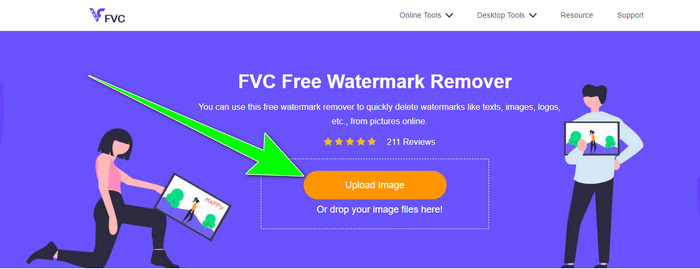
Pas 1: Ves al lloc web de FVC Free Watermark Remover. Puja la teva foto fent clic al botó Upload Image.
Pas 2: Després de pujar la foto, ressalta les marques d’aigua utilitzant les eines d’eliminació de marques d’aigua. Com pots veure, la zona amb la marca d’aigua és al centre de la foto, cosa que significa que no pots utilitzar l’eina de retall. Per tant, farem servir l’eina Poligonal, una de les eines per eliminar marques d’aigua.
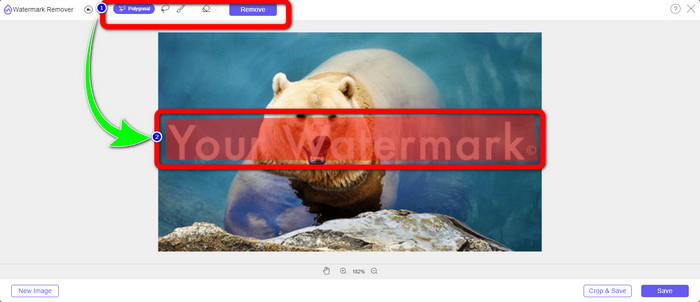
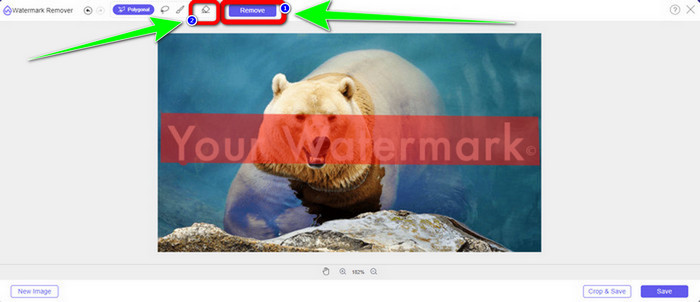
Pas 3: Si vols tornar a seleccionar l’àrea ressaltada, utilitza el botó Erase. Quan hagis acabat de ressaltar les marques d’aigua de la teva foto, fes clic al botó Remove i espera que acabi el procés d’eliminació.
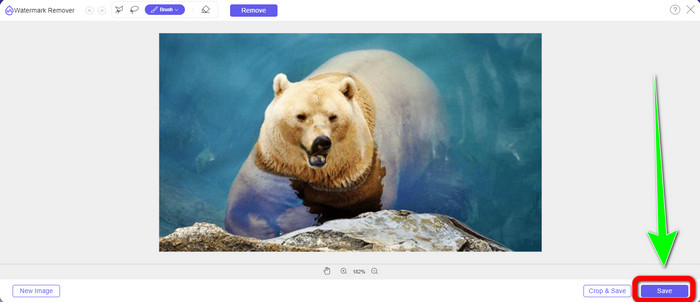
Pas 4: Quan ja hagis eliminat les marques d’aigua, pots fer clic al botó Save i descarregar la foto a l’ordinador.
Utilitzant WatermarkRemover.io
Si vols utilitzar una altra eina en línia per eliminar marques d’aigua de les teves imatges, pots fer servir WatermarkRemover.io. Aquest programa en línia és capaç d’eliminar qualsevol objecte innecessari de les teves fotos, com ara logotips, textos, segells i més. A més, pots eliminar múltiples marques d’aigua de les teves imatges. També té una interfície senzilla i mètodes bàsics adequats per a usuaris principiants. Aquesta eina en línia admet diferents formats d’imatge, com PNG, JPG, WEBP i JPEG. No obstant això, té limitacions en la versió gratuïta. Només pots pujar fins a 50 imatges i només disposes de 25 GB d’emmagatzematge. Has de comprar una subscripció si vols pujar més imatges i obtenir més espai, la qual cosa és una mica cara. Si vols esborrar elements molestos de les teves imatges amb WatermarkRemover.io, segueix els senzills passos que trobaràs a continuació.
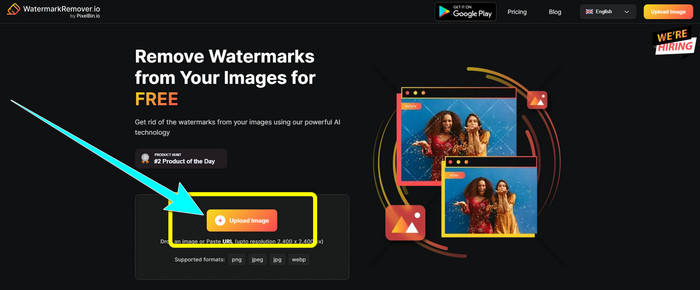
Pas 1: Ves al lloc web de WatermarRemover.io. Fes clic al botó Upload Image per afegir-hi la foto amb la marca d’aigua que vols eliminar.
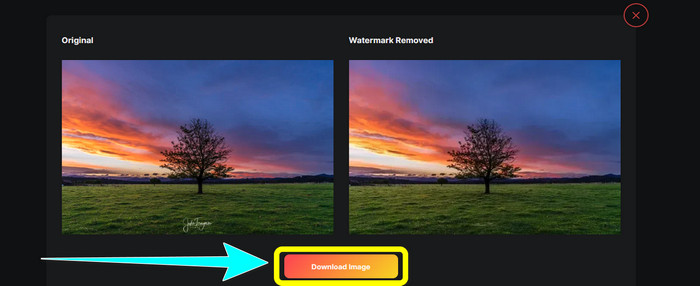
Pas 2: Després d’afegir la teva foto, eliminarà automàticament les marques d’aigua. Fes clic al botó Download Image per desar la foto a l’ordinador.
Utilitzant Apowersoft Watermark Remover Online
Apowersoft Video Watermark Remover Online és una de les eines útils si busques una altra solució en línia per eliminar marques d’aigua de les teves fotos. Amb aquesta eina en línia, pots esborrar fàcilment les marques d’aigua de les teves imatges. A més, és una aplicació senzilla i fàcil d’utilitzar, cosa que la fa adequada per a principiants que vulguin eliminar marques d’aigua. A més, Apowersoft no només destaca en l’eliminació de marques d’aigua de les fotos. També pots eliminar marques d’aigua dels teus vídeos, cosa que és força pràctica per als usuaris. Com que és un programa en línia, no cal instal·lar-lo a l’ordinador. El teu fitxer s’eliminarà automàticament després de treure la marca d’aigua i desar el resultat, de manera que no has de patir per la teva informació. Tanmateix, necessites una connexió a internet ràpida perquè aquesta eina funcioni bé. A més, el procés d’eliminació triga força, cosa que resulta entretinguda i fa perdre temps als usuaris. Segueix els passos següents per eliminar marques d’aigua amb Apowersoft Online Watermark Remover.
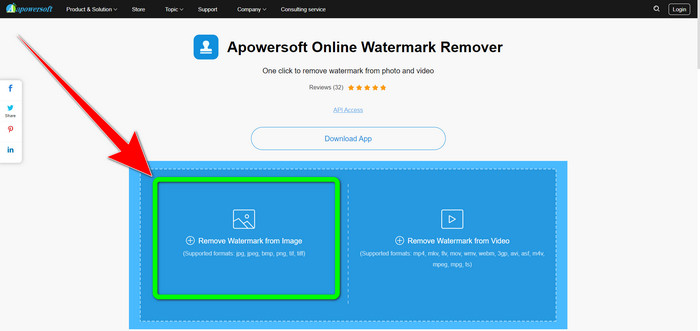
Pas 1: Ves al lloc web de Apowersoft Online Video Watermark Remover. Fes clic al botó Remove Watermark from Image per pujar-hi la foto amb la marca d’aigua.
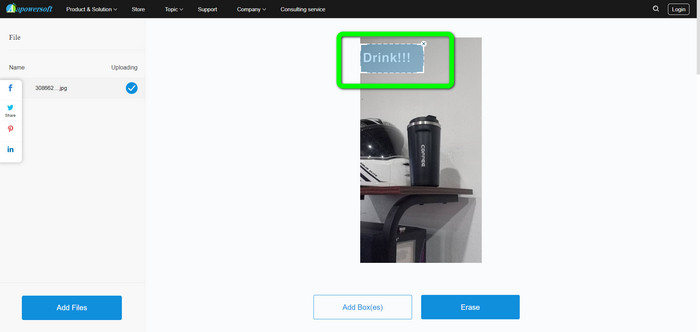
Pas 2: Veureu un element en forma de quadrat després de pujar la foto. Arrossega’l per cobrir les marques d’aigua de la teva imatge.
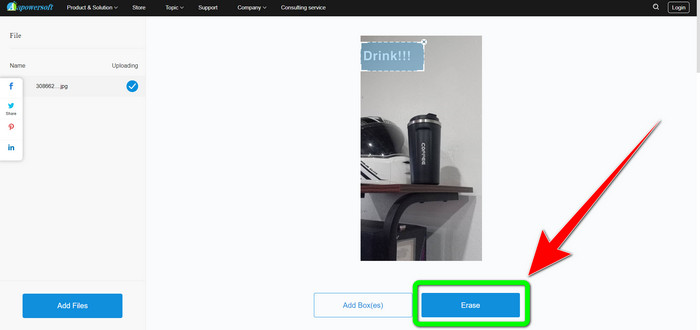
Pas 3: Quan hagis acabat de cobrir la marca d’aigua, fes clic al botó Erase per eliminar-la. Espera que acabi el procés d’eliminació i descarrega la teva foto final sense marca d’aigua.
Part 3: Preguntes freqüents sobre l'eliminació de les marques d'aigua de les fotos a Lightroom
Com eliminar una marca d'aigua de la vora de la imatge?
Si la marca d’aigua és a la vora o a la cantonada de la foto, la pots eliminar fàcilment amb l’eina de retall. Pots trobar aquesta eina de retall a la barra d’eines de la part superior de la foto. Però si no vols tallar cap part de la imatge, pots utilitzar una aplicació per eliminar marques d’aigua com FVC Free Watermark Remover. Aquesta eina pot ajudar a treure elements molestos de les teves fotos, com marques d’aigua, logotips, signatures i més.
Les filigranes tenen drets d'autor?
Per obtenir informació addicional, la marca d'aigua en si no és un copyright. La marca d'aigua pot recordar a la gent que no us roben les fotografies perquè el vostre treball ja està protegit per drets d'autor en el moment en què es fa.
Puc eliminar una filigrana d'una captura de pantalla?
Si, tu pots. Una filigrana d'una captura de pantalla es pot eliminar fàcilment mitjançant eines d'eliminació de marques d'aigua, com ara FVC Free Watermark Remover, WatermarkRemover.io, Apowersoft Online Watermark Remover, Inpaint i molt més.
Quina diferència hi ha entre un logotip i una marca d'aigua?
La marca d'aigua és una versió més simplificada i translúcida del logotip, que és la seva distinció principal. Normalment es col·loca sobre la teva imatge per evitar que altres l'explotin com a pròpia i sol ser d'un sol color, blanc o negre.
Hi ha una goma d'esborrar a Lightroom?
Si aquí està. Aquesta opció ens permet corregir i eliminar les pinzellades que hem pintat sense voler. Només cal que feu clic a "Esborrador" per utilitzar-lo. Tal com ho faríeu si utilitzeu l'eina pinzell, normalment, repasseu les àrees que voleu eliminar.
Conclusió
Aquest article t’ha mostrat la millor manera de eliminar marques d’aigua a Lightroom per a mòbil. A més, hem presentat diversos mètodes que pots provar per eliminar marques d’aigua sense usar només l’aplicació Lightroom. Si prefereixes maneres senzilles d’eliminar al moment marques d’aigua i qualsevol element innecessari de les teves fotos, fes servir FVC Free Watermark Remover.
-
 Guies pas a pas sobre com eliminar els emojis del vídeo
 Et sents molest amb els emojis als teus vídeos? Aquesta publicació us oferirà els millors procediments per eliminar instantàniament els emojis dels vostres vídeos amb eines excel·lents.
-
 Com eliminar les marques d'aigua dels vídeos a After Effects fàcilment
 Aquest article us ajudarà a eliminar les filigranes del vídeo amb After Effects. A més, oferirà les millors alternatives per eliminar objectes molestos.
-
 Maneres de com eliminar fàcilment les marques d'aigua de Reddit de les imatges
 Si esteu aquí, potser esteu buscant un excel·lent eliminador de filigranes de Reddit. En aquest cas, us mostrarem el mètode més fàcil per eliminar les filigranes de Reddit.
