


 Video Converter Ultimate
 Gravadora de pantalla
 Reparació de vídeo
2 maneres fàcils de comprimir fitxers MKV sense perdre la qualitat
Vols reduir la mida d’un fitxer MKV però no vols perdre’n la qualitat de vídeo? Hi ha alguna manera senzilla, sobretot gratuïta, de comprimir fitxers MKV?
Els fitxers MKV ofereixen molt bona qualitat de vídeo i àudio, però normalment tenen una mida gran. Quan vols penjar i compartir un vídeo MKV, és força necessari comprimir-lo. La pregunta és: com comprimir fitxers MKV sense perdre qualitat?

De fet, hi ha una gran quantitat de compressors de vídeo, inclosos serveis en línia gratuïts disponibles al mercat, que poden ajudar-te a reduir la mida dels teus vídeos MKV. En aquesta publicació, volem compartir 2 maneres senzilles de comprimir MKV.
Part 1. Com es pot comprimir gratuïtament fitxers MKV en línia
Com s’ha esmentat més amunt, molts compressors o editors de vídeo en línia gratuïts poden ajudar-te a comprimir MKV i reduir-ne la mida. En primer lloc, volem recomanar-te un popular Compressors de vídeo gratuït en línia perquè puguis fer aquesta tasca.
Aquest compressor de fitxers MKV en línia gratuït està especialment dissenyat per a la compressió de vídeo. És compatible amb gairebé tots els formats de vídeo, inclosos MKV, MP4, MOV, FLV, AVI i molt més. Té la capacitat de reduir la mida del fitxer de vídeo 4K, HD o SD sense perdre qualitat. A més, aquesta eina de compressió MKV té una funció de compressió per lots per garantir que podeu completar la compressió de vídeo amb una velocitat més ràpida.
Pas 1. Obre el navegador i ves al lloc oficial d’aquest compressor de fitxers MKV. És compatible amb qualsevol navegador habitual com Google Chrome, IE, Firefox, Safari i d’altres.

Pas 2. Fes clic al botó Add Files to Compress per descarregar i instal·lar un petit llançador necessari per comprimir el MKV.
Pas 3. Selecciona i afegeix el fitxer MKV que vols comprimir. A continuació podràs veure la mida del fitxer MKV i la durada del vídeo a la cantonada superior dreta.

Pas 4. Pots ajustar la resolució de vídeo MKV, la velocitat de fotogrames i la taxa de bits. A més, pots seleccionar un format de sortida adequat per al vídeo comprimit. Després de totes aquestes operacions, fes clic al botó Compress per començar a comprimir el MKV.

Amb pocs clics, podeu comprimir fàcilment un fitxer MKV per reduir la mida del fitxer. Més important encara, no s'afegirà cap filigrana al vídeo comprimit. Heu de saber que la majoria dels compressors de vídeo en línia inseriran una filigrana al fitxer de sortida.
Part 2. Forma professional de comprimir fitxers MKV
Amb el mètode anterior, pots comprimir gratuïtament un fitxer MKV en línia amb facilitat. Però si comprimeixes massa el teu vídeo MKV, és molt probable que n’obtinguis un fitxer comprimit de mala qualitat. En realitat, pots optar per tallar-ne les parts innecessàries per reduir la mida del fitxer sense cap pèrdua de qualitat. Aquí et presentem una eina potent de conversió i edició de vídeo, Video Converter Ultimate, per ajudar-te a comprimir els fitxers MKV sense perdre qualitat.
Video Converter Ultimate està especialment dissenyat per dur a terme diverses tasques de conversió i edició de vídeo. Pot retallar el vídeo i desar-ne només la part útil. A més, incorpora una funció de Video Compressor per a la compressió de fitxers MKV.
Descàrrega gratuïtaPer a Windows 7 o posteriorDescàrrega segura
Descàrrega gratuïtaPer a macOS 10.7 o posteriorDescàrrega segura
Pas 1. Fes doble clic al botó de descàrrega de més amunt per instal·lar i iniciar gratuïtament aquest programari de compressió de fitxers MKV a l’ordinador. Aquest compressor de vídeo et permet comprimir fitxers MKV tant en PC Windows com en Mac.
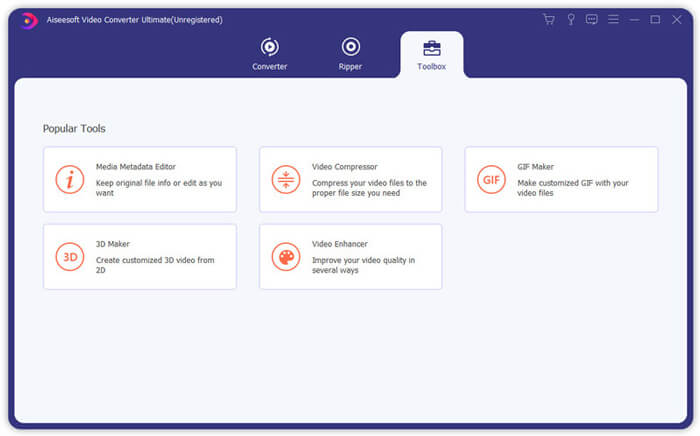
Pas 2. Quan entris a la finestra principal, fes clic a la pestanya Toolbox i després selecciona la funció Video Compressor.
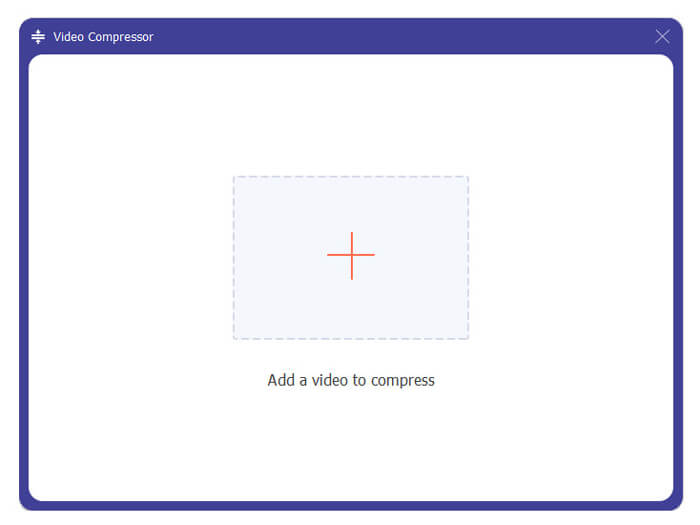
Pas 3. Fes clic a la icona + per importar un fitxer MKV que vulguis comprimir.
Ara podeu reduir fàcilment la mida del fitxer MKV segons les vostres necessitats. Durant aquest pas, també podeu personalitzar la resolució de vídeo, la velocitat de bits, la durada i el nom del fitxer que vulgueu. A més, podeu seleccionar un format de sortida adequat per al vídeo comprimit.
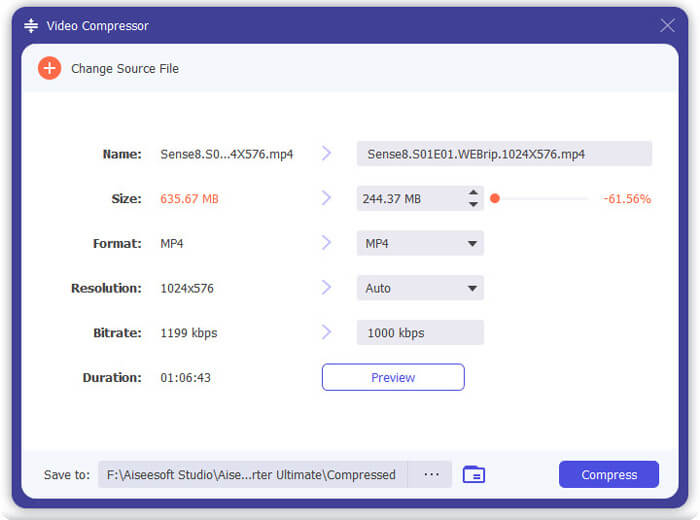
Pas 4. Fes clic al botó Compress per començar a comprimir el teu vídeo MKV fins a obtenir un fitxer de mida reduïda.
Pas 5. Si vols reduir la mida del fitxer MKV mitjançant la funció de retall, pots tornar a la finestra inicial i escollir l’opció Converter. Després d’importar el vídeo MKV, pots fer clic a la icona Cut per eliminar-ne les parts inservibles.
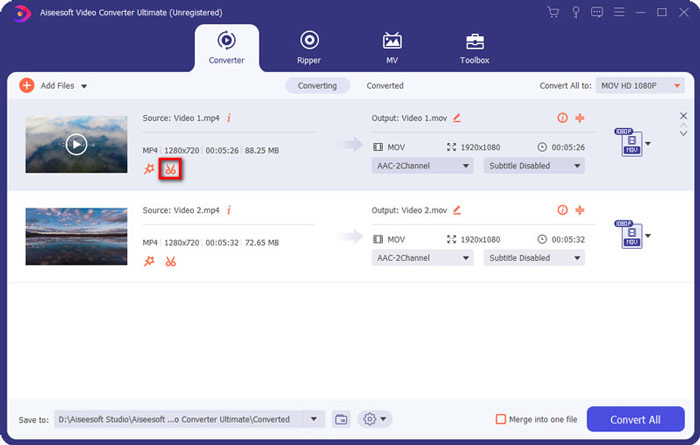
Pas 6. Pots arrossegar el marcador a la barra de progrés o introduir directament l’hora d’inici i de final per retallar el fitxer MKV. A continuació pots fer clic al botó Save per confirmar l’operació.
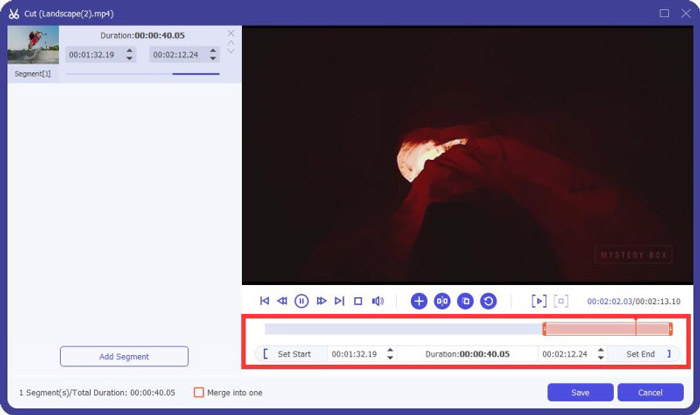
Després d’això, tornaràs a la finestra inicial. Aquí pots fer clic al botó Convert All per exportar el vídeo MKV. Aquest programari de compressió de fitxers MKV incorpora un reproductor multimèdia integrat que et permet veure directament l’efecte de la compressió.
Tant si comprimeixes un vídeo per enviar-lo per correu electrònic com per WhatsApp, ho pots aconseguir fàcilment amb aquest programa.
Part 3. Preguntes més freqüents sobre la compressió del fitxer MKV
Pregunta 1. Com comprimir un vídeo sense perdre qualitat?
Podeu triar retallar el vídeo per reduir la mida del fitxer. En fer-ho, podeu comprimir un vídeo sense cap pèrdua de qualitat. Si trieu un compressor de vídeo gratuït en línia o professional, el vídeo definitivament perdrà certa qualitat d’imatge o de so. Però és possible que no noteu la pèrdua de qualitat dels vostres ulls.
Pregunta 2. Com convertir gratis un fitxer MKV a MP4?
Per convertir gratuïtament un fitxer MKV a vídeo MP4, pots confiar en el Convertidor de vídeo gratuït en línia. És capaç de fer la conversió de MKV a MP4 i altres conversions de vídeo/àudio amb facilitat.
Pregunta 3. Per què són tan grans els fitxers MKV?
MKV és un format de contenidor que utilitzava un còdec millor amb una relació de compressió més alta. Els fitxers MKV solen treure's de Blu-Rays i tenen una resolució més alta.
Conclusió
Després de llegir aquesta publicació, ja coneixes 2 maneres senzilles de comprimir fitxers MKV. Amb els compressors de vídeo recomanats, pots reduir fàcilment la mida dels teus fitxers MKV. Si tens alguna manera millor de comprimir MKV, comparteix-la als comentaris amb la resta de lectors.
-
 Tutorial per comprimir un vídeo per correu electrònic a iPhone / Android / en línia
 No podeu enviar un vídeo massa gran per correu electrònic? Si teniu aquest problema, podeu obtenir formes pràctiques de comprimir un vídeo per correu electrònic aquí. Aquest article us mostrarà com reduir els fitxers de vídeo grans de forma gratuïta en detalls.
-
 Tutorial per comprimir GIF i reduir la mida del fitxer amb alta qualitat
 Aquí teniu dues maneres senzilles de comprimir GIF a l'ordinador o al telèfon mòbil. Podeu utilitzar el compressor de vídeo en línia FVC Free i Photoshop per reduir la mida del fitxer GIF en diferents aspectes.
-
 2 maneres de comprimir vídeos AVCHD en mides de fitxers petits de forma gratuïta
 Obtingueu dues maneres senzilles de comprimir fitxers de vídeo AVCHD. Podeu utilitzar compressors de vídeo en línia i fora de línia per reduir la mida del vídeo AVCHD de forma gratuïta al vostre ordinador.
