


 Video Converter Ultimate
 Gravadora de pantalla
 Reparació de vídeo
 Baixada segura
2 maneres fàcils de comprimir MXF amb fitxers de mida més petita
MXF és un format de fitxer estàndard de la indústria que admet codi de temps complet i metadades. Està dissenyat principalment per a l’ús professional de continguts de vídeo, especialment en l’emissió televisiva. MXF és un format contenidor de vídeo per a continguts de vídeo i àudio professionals d’acord amb l’estàndard SMPTE. Pots obtenir fàcilment un vídeo MXF d’alta qualitat de la teva càmera digital. Mentrestant, el fitxer MXF sol tenir una mida de fitxer gran.
Quan vulguis compartir un vídeo MXF gran, és força necessari comprimir el MXF a una mida de fitxer més petita. La qüestió és: saps com comprimir fitxers MXF?

De fet, hi ha moltes eines de compressió i edició de vídeo al mercat que et poden ajudar a comprimir MXF i reduir-ne la mida. Aquesta publicació et mostrarà com comprimir MXF amb Adobe Premiere Pro i amb un compressor de vídeo en línia gratuït.
Part 1. Com comprimir fitxers MXF gratuïtament en línia
Per comprimir MXF amb una mida de fitxer més petita, pots triar el popular programa de compressió de vídeo MXF, Free Video Compressor. Té la capacitat de reduir la mida del fitxer de vídeo MXF mantenint la qualitat original d’imatge i so. Aquest compressor de vídeo és altament compatible amb qualsevol format de vídeo d’ús freqüent, inclosos MXF, MP4, MOV, AVI, MKV, FLV i més. Et permet comprimir MXF tant en PC amb Windows com en Mac.
Pas 1. Quan vulguis comprimir un fitxer MXF, pots anar al lloc oficial d’aquest compressor de fitxers MXF. Fes clic al botó Add Files to Compress per instal·lar un petit llançador per a la compressió de fitxers MXF.

Pas 2. Selecciona i afegeix el fitxer MXF que vols comprimir a aquest compressor de vídeo en línia gratuït. Aquí pots ajustar lliurement la compressió de vídeo segons les teves necessitats. A més, se’t permet personalitzar la resolució de vídeo, la velocitat de fotogrames, la taxa de bits i el nom del vídeo. També pots seleccionar un altre format de sortida, com ara MP4, per al teu vídeo comprimit.

Pas 3. Després d’això, simplement pots fer clic al botó Compress per començar a comprimir el fitxer MXF gratuïtament en línia.

A diferència de molts altres compressors de vídeo en línia, aquest compressor de vídeo gratuït no afegirà cap filigrana al fitxer MXF comprimit.
Part 2. Com comprimir MXF a Adobe Premiere Pro
Adobe Premiere Pro és una suite professional habitual de producció de vídeo per a usuaris de Mac i Windows. Si tens Premiere Pro instal·lat a l’ordinador, el pots utilitzar per comprimir fitxers MXF.
Pas 1. Inicia Premiere Pro a l’ordinador. Quan entris a la interfície principal, fes clic a New Project per crear un projecte nou. Pots personalitzar diversos paràmetres a la finestra.
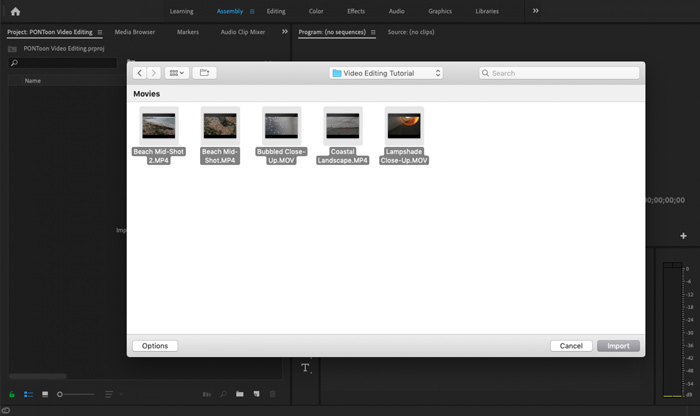
Pas 2. Fes clic a File, Import i després Media per seleccionar i importar-hi el teu fitxer MXF. Si vols comprimir un fitxer MXF que tens a la càmera digital, aquí pots connectar la càmera a l’ordinador. També pots arrossegar i deixar anar directament el vídeo MXF des d’una carpeta.
Pas 3. Canvia a l’espai de treball Editing per comprimir millor el teu fitxer MXF.
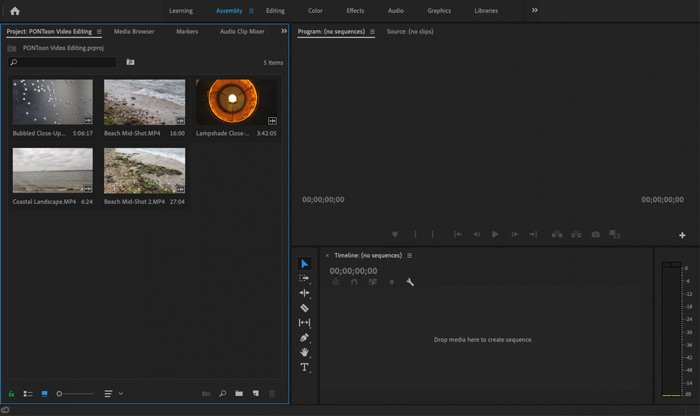
Pas 4. Ara pots editar el teu fitxer MXF a la línia de temps. Només cal que arrosseguis i deixis anar un clip MXF des dels mitjans importats a la línia de temps per crear una seqüència nova. Llavors podràs retallar el fitxer MXF per reduir-ne la mida.

També podeu triar la resolució de vídeo personalitzada i altres per comprimir el fitxer MXF. A més, podeu enviar MXF a un format de vídeo que tingui una mida de fitxer menor.
Part 3. Preguntes més freqüents sobre la compressió de fitxers MXF
Pregunta 1. Què és el format de vídeo MXF?
MXF, que significa Material eXchange Format, és un format de contenidor que emmagatzema vídeo, àudio i metadades. És un format de contenidor de vídeo per a contingut de vídeo i àudio professional estàndard SMPTE. Moltes càmeres de vídeo digitals professionals com Sony, Panasonic, Canon i molt més emmagatzemen vídeos en format MXF.
Pregunta 2. Com convertir gratuïtament MXF a MP4 en línia?
MP4 és sens dubte el format més popular, compatible amb gairebé tots els reproductors, editors i dispositius. Així que, en molts casos, necessites convertir MXF a MP4 per a una millor reproducció o edició. Pots triar el Free Online Video Converter per fer la conversió de MXF a MP4 fàcilment.
Pregunta 3. És MXF un format de vídeo sense pèrdues?
MXF pot emmagatzemar imatges RAW sense pèrdues que ofereixen als estudis professionals de postproducció funcions avançades en els fluxos de treball per a la classificació del color i l’edició de vídeo. El format MXF pot suportar completament el codi de temps SMPTE.
Conclusió
En aquest article hem parlat principalment de com comprimir fitxers MXF. Has d’admetre que comprimir fitxers MXF amb Adobe Premiere Pro és massa complex. Per tant, es recomana utilitzar el Free Video Compressor suggerit per reduir la mida dels teus fitxers MXF.
-
 Com comprimir un vídeo MP4 a mida més petita
 El vídeo MP4 és massa gran per penjar-lo? Voleu reduir la mida del vídeo? Aquí hi ha 3 maneres eficients de comprimir un fitxer MP4 a una mida més petita sense límit.
-
 Tutorial per comprimir GIF i reduir la mida del fitxer amb alta qualitat
 Aquí teniu dues maneres senzilles de comprimir GIF a l'ordinador o al telèfon mòbil. Podeu utilitzar el compressor de vídeo en línia FVC Free i Photoshop per reduir la mida del fitxer GIF en diferents aspectes.
-
 4 maneres de comprimir fitxers MOV QuickTime grans sense perdre qualitat
 En aquest article es mostra com comprimir els vídeos QuickTime MOV al telèfon o a l'ordinador amb detalls. Si el vostre vídeo MOV és massa gran per enviar-lo, compartir-lo o desar-lo, podeu obtenir 4 solucions viables aquí.
