


 Video Converter Ultimate
 Gravadora de pantalla
 Reparació de vídeo
 Baixada segura
Apreneu a convertir SWF a M4V de manera convenient
Per al reproductor Shockwave Flash, Adobe va desenvolupar el format de fitxer SWF heretat. A causa de problemes de velocitat i seguretat, molts navegadors ja no admeten Flash, els dispositius iOS mai no l'han admès i el format de fitxer SWF s'utilitza rarament avui dia. La millor solució que podeu fer és convertir el fitxer SWF a altres formats, com ara M4V. En aquest cas, us mostrarem els millors mètodes per convertir SWF a M4V. A més, us presentarem algunes aplicacions que podeu utilitzar en línia i fora de línia, de manera que tindreu una opció del convertidor que preferiu. Vine a llegir aquesta guia per obtenir més coneixements.

Part 1: Millors maneres de convertir SWF a M4V a Mac i Windows
Si sou un usuari de Windows i Mac, podeu utilitzar FVC Video Converter Ultimate per convertir SWF a M4V. Aquesta eina descarregable pot convertir fàcilment nombrosos formats de fitxer, com ara FLV, MOV, WMV, MP4, AVI, MTS, MPEG, VOB i molt més. A més, aquest convertidor us permet convertir diversos fitxers en un sol procés, la qual cosa és fantàstic, sobretot si voleu convertir molts fitxers. A més, el procés de conversió d'aquesta eina és incomparable amb altres convertidors. Pot convertir fitxers fins a 30 vegades més ràpid que la velocitat mitjana. A més, Video Converter Ultimate ofereix diverses funcions que podeu gaudir. Podeu utilitzar aquesta aplicació si teniu el fitxer de vídeo SWF i voleu posar-hi una marca d'aigua. Aquesta aplicació ofereix una funció de filigranes de vídeo per afegir marques d'aigua al vostre vídeo SWF.
Funcions
◆ Converteix més de 100 formats de fitxer de vídeo, com ara M4V, MP4, SWF, MTS, MOV, VOB, FLV, AVI, WMV i molt més.
◆ Creeu un collage amb plantilles i filtres gratuïts i llestos per utilitzar.
◆ Converteix més de 100 formats de fitxer de vídeo, com ara M4V, MP4, SWF, MTS, MOV, VOB, FLV, AVI, WMV i molt més.
◆ Ofereix un creador de vídeos musicals.
◆ Proporciona eines d'edició, com ara un potenciador de vídeo, correcció de color, retallador i molt més.
◆ Converteix formats de fitxer d'imatge, inclosos JPG, PNG, WEBP, etc.
◆ Ofereix compressor de vídeo i àudio.
Podeu utilitzar els mètodes senzills següents per convertir SWF a M4V mitjançant FVC Video Converter Ultimate amb una versió per a Mac.
Pas 1: Descarrega FVC Video Converter Ultimate al teu Mac fent clic al botó de Baixa. Després, obre l’aplicació.
Descàrrega gratuïtaPer a Windows 7 o posteriorDescàrrega segura
Descàrrega gratuïtaPer a macOS 10.7 o posteriorDescàrrega segura
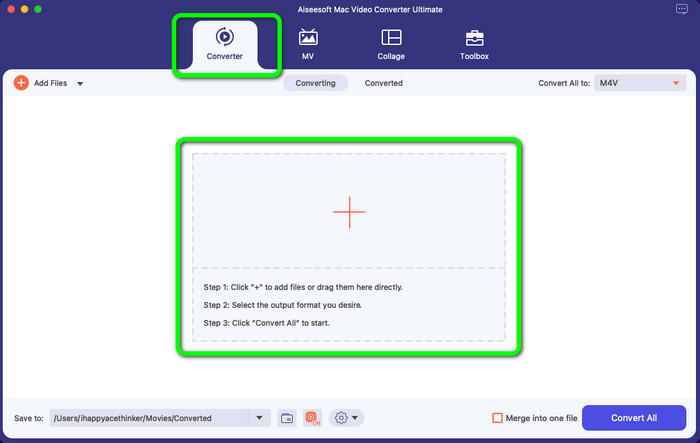
Pas 2: Selecciona l’opció Convertidor a la interfície i fes clic a la icona + per afegir el fitxer de vídeo SWF que vols convertir. També pots arrossegar directament el fitxer de vídeo dins el quadre.
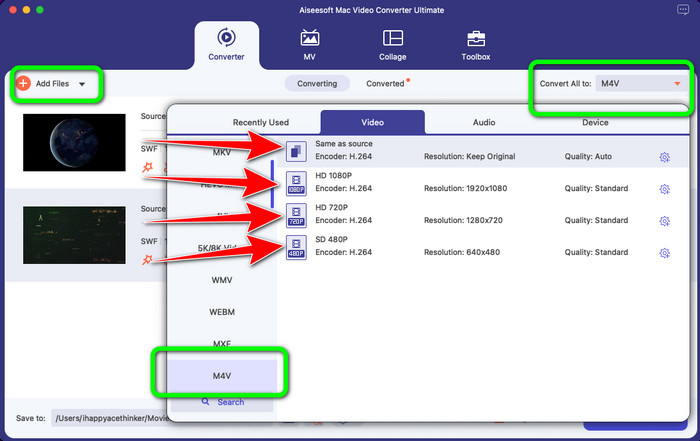
Pas 3: Encara pots afegir més fitxers si en vols convertir més fent clic al botó Afegeix fitxer a la part superior esquerra de la interfície. Després, fes clic al botó Converteix-ho tot a per mostrar les opcions de format i selecciona el format de fitxer M4V. També pots escollir la qualitat que prefereixis.
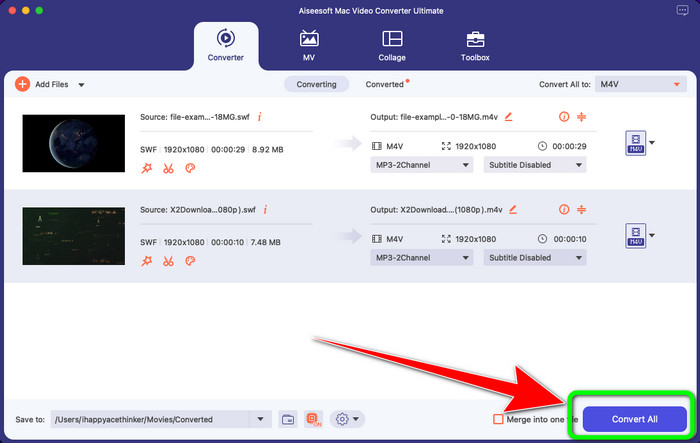
Pas 4: Quan hagis acabat de canviar el format de sortida de tots els fitxers, fes clic al botó Converteix. Espera el ràpid procés de conversió i desa el teu vídeo a la ubicació que vulguis.
Si voleu editar el vostre vídeo, com ara ajustar els colors, us oferim passos senzills.
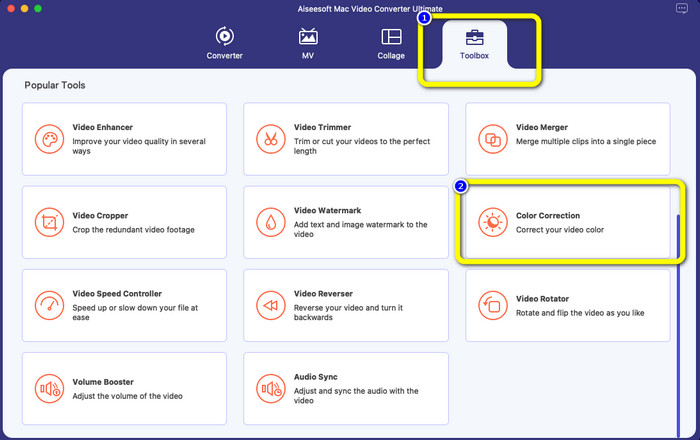
Pas 1: Selecciona l’opció Caixa d’eines i fes clic a l’eina de Correcció de color.
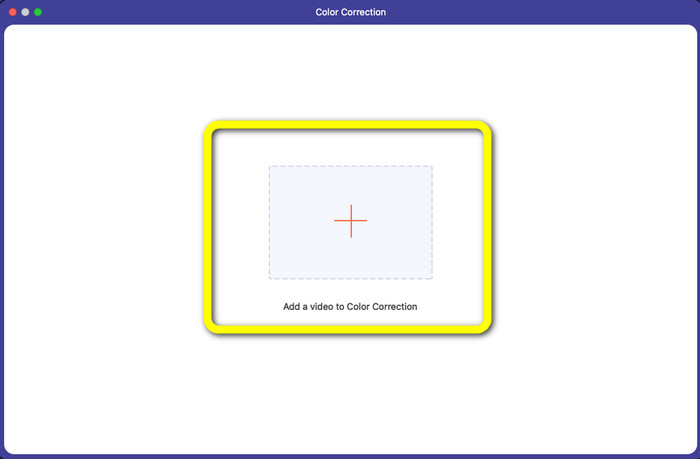
Pas 2: Després de fer clic a l’eina de Correcció de color, fes clic al símbol Més i afegeix el fitxer de vídeo que vols editar.
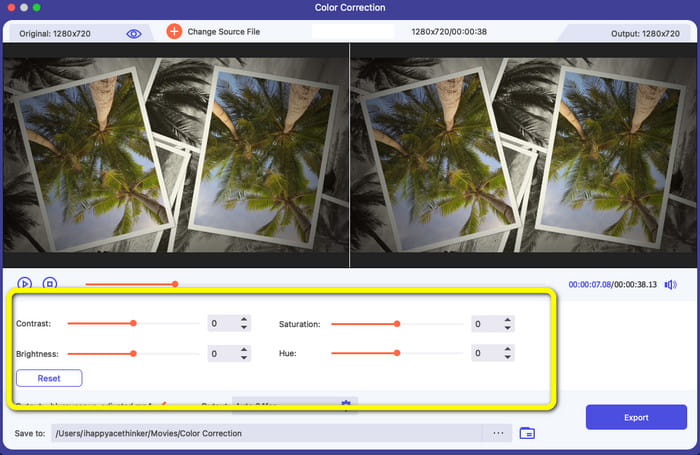
Pas 3: Ja pots ajustar la brillantor, la saturació, el contrast i el to del teu vídeo. Canvia els colors segons les teves preferències.
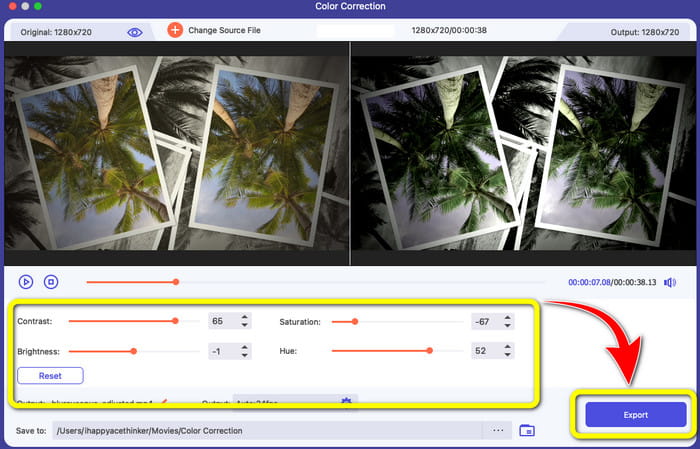
Pas 4: Finalment, quan hagis acabat de canviar els colors del vídeo, fes clic al botó Exporta per desar el vídeo editat.
Part 2: excel·lent procés per convertir SWF a M4V en línia
FVC Free Video Converter Online és l’eina que pots utilitzar per convertir SWF a M4V en línia. Admet la conversió dels formats de fitxer d’àudio i vídeo més populars, com MP4, FLV, MKV, MOV, M4V, MTS, TS, M2TS, WMV, ASF, VOB, MP3, AAC i molts altres. Els teus vídeos en HD es poden convertir en pocs segons a formats molt populars com MP4 i FLV sense perdre qualitat. Amb la seva funció de conversió per lots, pots convertir sense pèrdues molts fitxers de vídeo o àudio. El millor d’aquesta eina és que pots editar el bitrate de vídeo, la velocitat de fotogrames, la freqüència de mostreig i la resolució segons les teves necessitats.
Funcions
◆ Converteix nombrosos formats de fitxer de vídeo, com ara FLV, AVI, MP4, M4V, SWF, TS, etc.
◆ Editeu la velocitat de fotogrames, la velocitat de bits i la resolució del vídeo.
◆ Ofereix procés de conversió per lots.
◆ Converteix formats d'àudio com MP3, M4A, AAC, WMA, WAV, etc.
Aquests són els passos senzills per convertir SWF a M4V mitjançant FVC Free Video Converter Online.
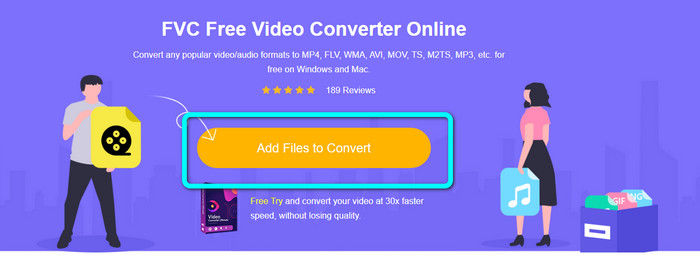
Pas 1: Ves al lloc web de FVC Free Video Converter Online i fes clic al botó Afegeix fitxers per convertir per pujar el teu fitxer de vídeo SWF.
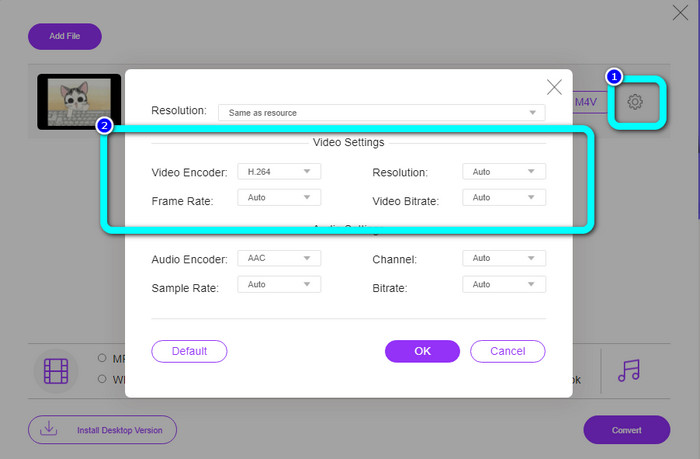
Pas 2: Fes clic a la icona de Configuració a la part dreta de la interfície si vols canviar el bitrate del vídeo, la velocitat de fotogrames i la resolució, i després fes clic a D’acord.
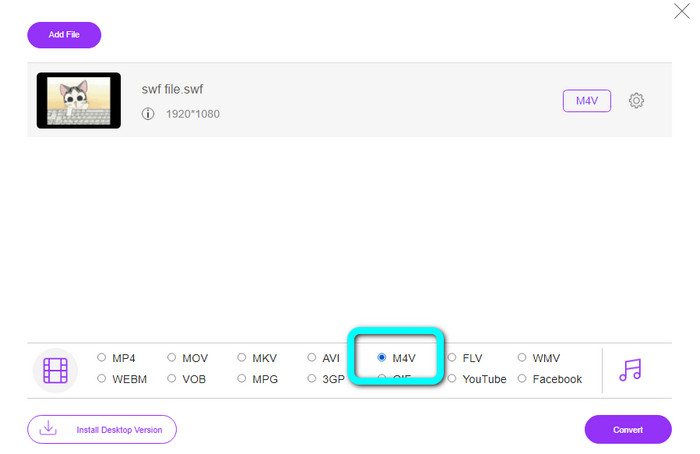
Pas 3: Després d’això, ja pots seleccionar el format de fitxer M4V a les opcions de format a la part inferior de la interfície.
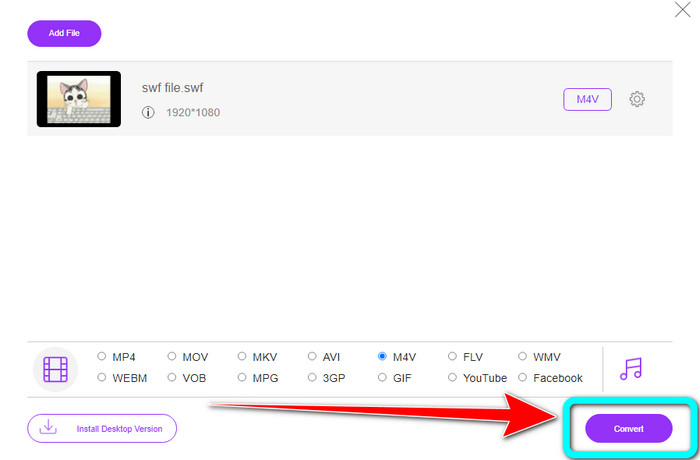
Pas 4: Fes clic al botó Converteix. La carpeta apareixerà a la pantalla i podràs triar la ubicació on vols desar el vídeo. Després fes clic a D’acord.
Lectura addicional
8 millors reproductors de fitxers SWF per reproduir vídeos Flash a Windows i Mac
5 millors convertidors gratuïts de SWF a AVI [basats en web i escriptori]
Part 3: SWF vs. M4V
| SWF | M4V | |
| Extensió de fitxer | SWF | .M4V |
| Descripció | S'utilitza un tipus de fitxer digital Adobe Flash anomenat SWF (Small Web Format/ShockWave Format) per contenir animacions, fitxers d'àudio i vídeos basats en vectors. Normalment s'utilitza per emetre mitjans d'Internet; Els videojocs solen jugar en un navegador. Malauradament, Adobe acaba de declarar que deixaria de donar suport al format Flash a finals de 2020 a causa dels seus defectes, inclòs el seu baix rendiment i la manca de seguretat. | Apple Inc va desenvolupar el format de contenidor de vídeo digital M4V. El seu format és força semblant al del conegut MP4. Tanmateix, els fitxers M4V poden contenir DRM. Actualment, M4V, que permet la multiplexació de nombroses dades d'àudio i vídeo, és el format de vídeo principal per als vídeos disponibles a l'iTunes Store. |
| Desenvolupat per | Adobe Systems Incorporated | Apple Inc. |
| Programes associats | Adobe Flash Professional CC reproductor flash Adobe Adobe Dreamweaver CC Jugador GOM | Zoom Player Media Player Classic KMPlayer Reproductor multimèdia VLC |
| Tipus MIME | application/vnd.adobe.flash-movie | vídeo/x-m4v |
Part 4: Preguntes freqüents sobre la conversió de SWF a M4V
1. Per a què serveix el fitxer SWF?
Els vídeos i les animacions basades en vectors es poden trobar als fitxers SWF, un tipus de fitxer Adobe Flash. Small Web Format és l'acrònim complet de SWF, però també es coneix com a ShockWave Format.
2. Quines diferències hi ha entre FLA i SWF?
La diferència entre aquests dos és per a què serveixen. El fitxer Flash que s'està produint té l'extensió FLA. Inclou les dades (imatges, àudio i altres components) necessaris per al fitxer flash acabat. En canvi, el SWF (Small Web Format) és el fitxer completat preparat per a la seva publicació.
3. Els fitxers SWF tenen àudio?
Sí. Un format SWF està creat per contenir gràfics vectorials i animacions, però també pot contenir altres tipus de dades com text, vídeo i so. Aquest fitxer s'utilitza amb freqüència per produir animacions, jugar a jocs i vídeos i àudio en llocs web.
Conclusió
Aquestes són les aplicacions altament recomanades que pots utilitzar per convertir SWF a M4V. FVC Video Converter Ultimate i FVC Free Video Converter Online són incomparables amb altres convertidors. Ofereixen més funcions que pots gaudir i utilitzar per millorar el teu vídeo.
-
 Com comprimir fitxers M4V a una mida més petita (gratuït i en línia)
 Si esteu buscant una manera senzilla de reduir la mida del vostre fitxer M4V, hauríeu de venir a llegir aquest article. Aquí compartirem la manera més senzilla de comprimir fitxers M4V amb tu
-
 Com convertir fitxers SWF a MKV de forma gratuïta [Resolt]
 Esteu buscant una manera de convertir fitxers SWF a MKV? En aquest article, abordarem els convertidors definitius que poden convertir ràpidament
-
 Procediments útils per convertir instantàniament MPEG a M4V
 Hem enumerat dues grans aplicacions per convertir MPEG a M4V. Veure'ls amb els seus passos bàsics. A continuació, trieu el procediment que preferiu per convertir MPEG a M4V.
