


 Video Converter Ultimate
 Gravadora de pantalla
 Reparació de vídeo
 Baixada segura
Mètodes fàcils per convertir DV a MP4 en línia i fora de línia
El format de fitxer DV va ser el més popular a gairebé totes les videocàmeres abans, perquè emmagatzema vídeos fantàstics per veure i editar. Tanmateix, aquest tipus de fitxer ja no s’utilitza habitualment en aquesta època moderna. Alguns programes no admeten aquest tipus de fitxer, cosa que és inadequada per als usuaris que tenen un fitxer de vídeo DV. Però, si vols reproduir els teus vídeos en tots els programes, has de convertir el teu fitxer DV al format més popular actualment, el format MP4. Tens sort, perquè aquest article et mostrarà els mètodes més efectius per convertir de DV a MP4 utilitzant convertidors excepcionals. Així que, llegeix aquest article mentre aprens tots els detalls necessaris.

Part 1: Diferències entre DV i MP4
Abans de procedir al procés de conversió de fitxers, primer veiem les diferències entre el fitxer DV i el format MP4.
| Dossier | DV | MP4 |
| Extensió de fitxer | .dv | .mp4 |
| Nom complet | Vídeo digital | MPEG-4 |
| Descripció | Els principals productors d'equips de vídeo van crear DV l'any 1995 com a format digital per a l'enregistrament de vídeo magnètic i un mètode de compressió de vídeo. El format DV utilitza un senyal de vídeo de components digitals de 720 × 576 píxels de 8 bits. Per transferir dades s'utilitza una seqüència DIF que conté dades de vídeo, àudio i subcodi. A l'àrea de servei, es registra l'hora i la data. | Els estàndards de vídeo MPEG-4 i d'àudio AAC defineixen conjuntament l'extensió MP4. El contenidor pot contenir qualsevol mitjà, inclosos gràfics en 2D i 3D, àudio, vídeo i subtítols. A Windows, pràcticament qualsevol reproductor pot reproduir fitxers MP4, però a Mac, necessiteu un connector o convertir el fitxer MP4 a un altre format. |
| Desenvolupador | Sony i Panasonic | El grup d'experts en imatges en moviment |
| Tipus MIME | vídeo/x-dv | vídeo/mp4 |
| Programes associats | QuickTime Player Windows Movie Maker Reproductor multimèdia VLC | Reproductor multimèdia VLC MPlayer QuickTime Player Reproductor de Windows Media Pel·lícules i televisió de Microsoft |
Part 2: la millor manera de convertir DV a MP4 en línia
Convertir DV a MP4 en línia és complicat, sobretot quan no saps quina aplicació pots utilitzar i en quina pots confiar. Però gràcies a FVC Free Video Converter Online, pots transformar ràpidament i al moment el teu fitxer DV en format MP4. Aquesta eina en línia admet diversos fitxers de vídeo, com AVI, FLV, M4V, VOB, WMA, MOV, TS i més. També disposa d’un mètode de conversió senzill amb què pots convertir fitxers en només uns quants clics. A més, si tens pensat convertir diversos fitxers DV en un sol fitxer MP4, pots utilitzar aquest convertidor perquè ofereix un procés de conversió per lots. També pots fer servir aquesta eina en tots els navegadors, com Google Chrome, Mozilla Firefox, Safari, Microsoft Edge i més, cosa que la fa més convenient per a tothom. Amb totes aquestes funcions, es pot dir que aquest convertidor en línia és una de les aplicacions més especials que pots utilitzar. Segueix les senzilles instruccions de sota per aprendre com convertir un fitxer DV a format MP4 amb FVC Free Video Converter Online.
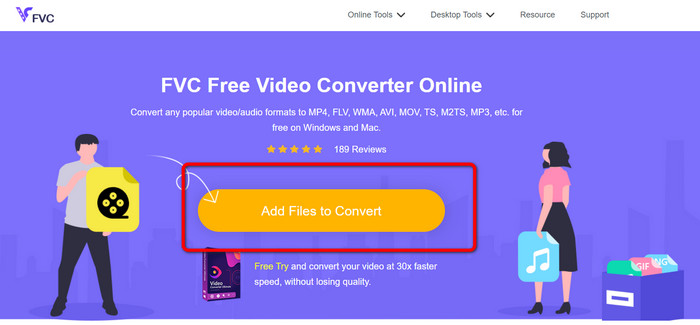
Pas 1: Primer, obre el navegador i visita el lloc web de FVC Free Video Converter Online. Després, a la part central de la pàgina principal, fes clic al botó Add Files to Convert per pujar el teu fitxer de vídeo DV.
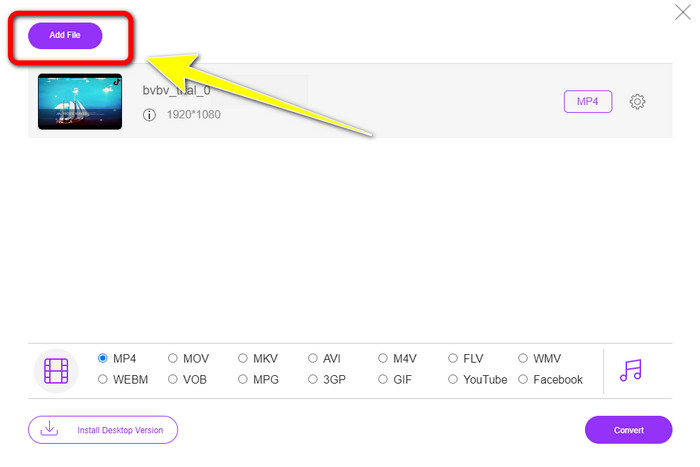
Pas 2: Si vols convertir diversos fitxers DV en un sol MP4, fes clic al botó Add File a la part superior esquerra de la interfície per afegir més fitxers.
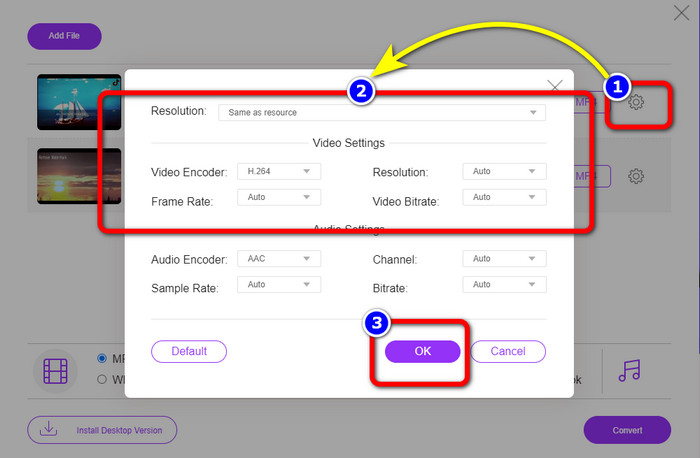
Pas 3: Fes clic a la icona Setting per ajustar la taxa de bits, la velocitat de fotogrames i la resolució del vídeo. Després, quan hagis acabat de fer els canvis segons les teves preferències, fes clic a OK.
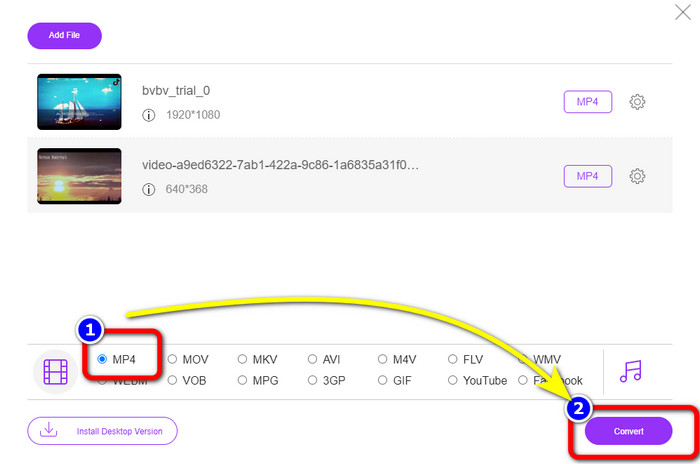
Pas 4: Després de fer tots els canvis, vés a la part inferior de la interfície per veure les opcions de format. Selecciona el format MP4 i prem Convert per començar el procés de conversió.
Part 3: Com convertir DV a MP4 sense pèrdues
Pel que fa a un convertidor fora de línia, pots utilitzar Video Converter Ultimate per convertir DV a MP4 al Mac i al Windows sense pèrdua de qualitat. Pots convertir diversos fitxers de vídeo sense perdre qualitat. A més, amb aquesta aplicació, pots convertir diversos fitxers simultàniament, perquè ofereix un procés de conversió per lots. Aquesta eina fora de línia també pot admetre nombrosos formats de vídeo, com MOV, AVI, FLV, M4V, SWF, MTS, MKV, WMV, VOB i més de 100 formats addicionals. A més, Video Converter Ultimate té una velocitat màxima 30 vegades més ràpida que la velocitat de conversió mitjana, cosa que el fa més convenient per a tots els usuaris. A més a més, tots els usuaris prefereixen un mètode fàcil per convertir fitxers. Aquesta aplicació ofereix una interfície senzilla amb el mètode més simple per convertir els teus vídeos. També pots editar els teus vídeos mentre els converteixes, perquè disposa d’eines d’edició. Si vols convertir mini DV a format de fitxer MP4, utilitza la guia detallada de sota amb Video Converter Ultimate.
Pas 1: Has de descarregar i instal·lar Video Converter Ultimate al teu Mac o Windows fent clic al botó Download. Inicia el programari després d’instal·lar-lo.
Descàrrega gratuïtaPer a Windows 7 o posteriorDescàrrega segura
Descàrrega gratuïtaPer a macOS 10.7 o posteriorDescàrrega segura
Pas 2: Prem el panell Converter i selecciona el signe Plus per adjuntar el fitxer DV. També pots fer clic al botó Add Files o deixar anar el fitxer directament dins del requadre.
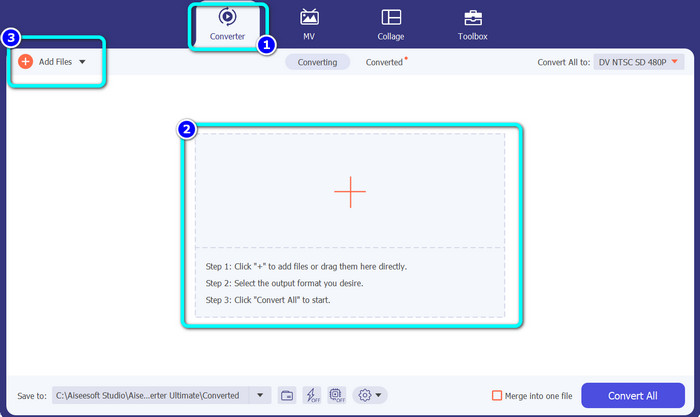
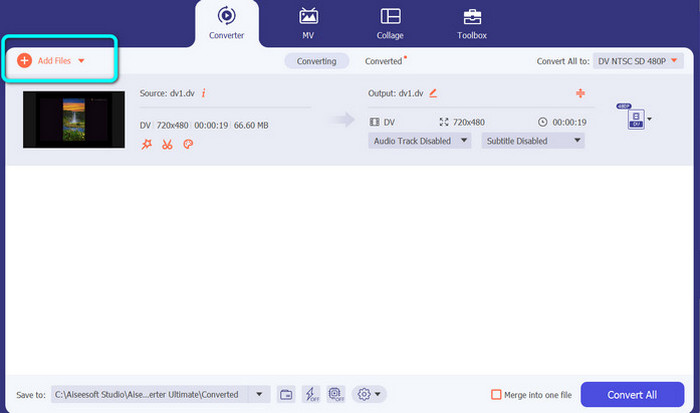
Pas 3: Si vols fer un procés de conversió per lots, fes clic al botó Add Files per afegir més fitxers de vídeo DV.
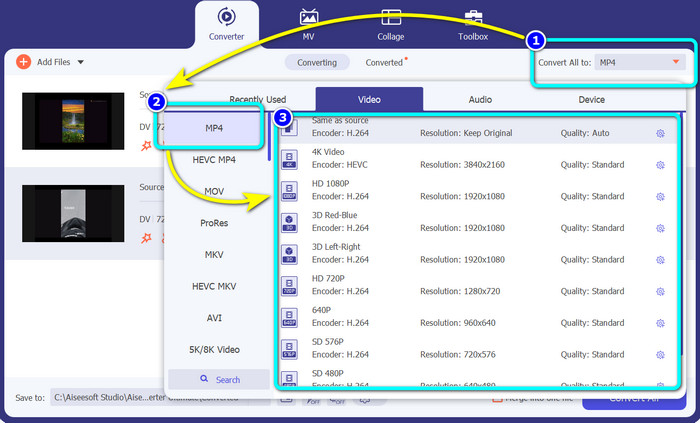
Pas 4: Després d’afegir un altre fitxer DV, canvia el seu format de sortida fent clic al botó Convert All to. Es mostraran les opcions de format i selecciona el format MP4. Després, tria la resolució desitjada.
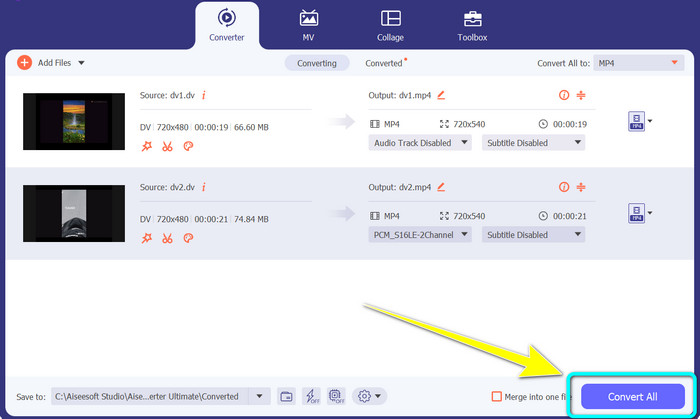
Pas 5: Per a l’últim pas, comença el procés de conversió fent clic al botó Convert All. Després, desa el teu fitxer de vídeo a la ubicació de fitxer que vulguis.
Part 4: Mètode fàcil per convertir DV a MP4 amb programari gratuït
En aquesta part, aprendràs a convertir DV a MP4 amb un fre de mà. Aquesta eina fora de línia també és capaç de convertir fitxers de vídeo com MP4, MKV, WEBM, etc. També ofereix un procés de conversió per lots. Tanmateix, utilitzar aquesta eina no és fàcil. Té moltes opcions a la interfície, cosa que és difícil d'entendre, especialment per als principiants. Seguiu els passos següents per convertir DV a MP4.
Pas 1: Descarrega l’aplicació Handbrake a l’ordinador. Després, inicia-la.
Pas 2: Després d’obrir l’aplicació, selecciona el botó File per afegir el fitxer DV.
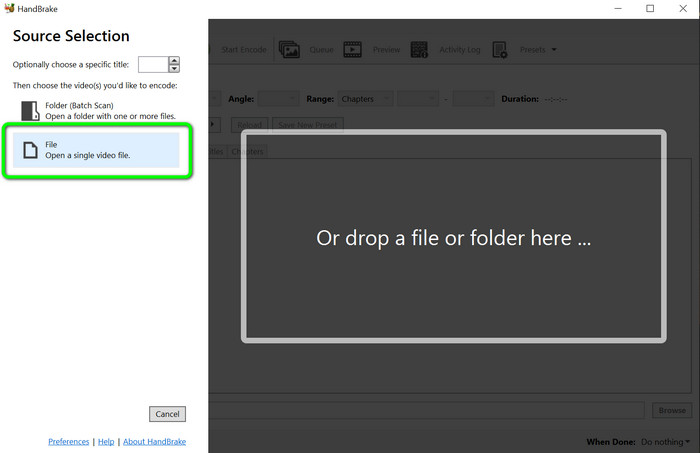
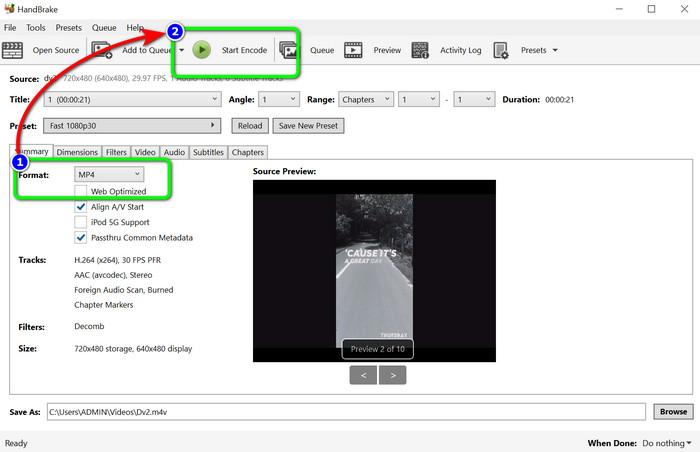
Pas 3: A les opcions de format, selecciona el format de fitxer MP4. Després, fes clic al botó Start Encode per començar el procés de conversió.
Per llegir més:
2 millors maneres de convertir fitxers DV a MOV gratuïtament a l’escriptori i en línia
Convertidors útils de DV a FLV per convertir DV a FLV [2023]
Part 5: Preguntes freqüents sobre la conversió de DV a MP4
1. Pot VLC reproduir fitxers DV?
Sí! VLC Media Player admet el format de fitxer DV, de manera que podeu reproduir els vostres vídeos en aquest programa.
2. Quin programari en línia és millor per a la conversió de vídeo?
Pots utilitzar FVC Free Video Converter Online. Aquesta eina en línia pot convertir els teus vídeos amb facilitat. També pots fer una conversió per lots i editar la taxa de bits, la velocitat de fotogrames i la resolució del teu vídeo.
3. Quina és la resolució estàndard del fitxer DV?
La resolució estàndard del fitxer DV és de 720 píxels horitzontals i 480 línies entrellaçades. L'estàndard d'alta definició de DV és de 720 i 1080 línies.
Conclusió
Com s’ha mostrat anteriorment, aquests són els millors mètodes per convertir de DV a MP4 en línia i fora de línia. Pots utilitzar FVC Free Video Converter Online per convertir fitxers en línia. A més, utilitza Video Converter Ultimate per convertir fitxers més ràpidament fora de línia.
-
 Una manera definitiva i gratuïta de convertir DV a WMV [en línia i fora de línia]
 Descobriu quines són les millors maneres de convertir DV a WMV sense problemes. Vols saber-ne més? Aleshores, llegiu aquest article per saber més sobre DV i WMV.
-
 Com convertir F4V a MP4 amb els mètodes més efectius
 Els vostres vídeos F4V no són de bona qualitat? A continuació, convertiu-lo en un fitxer MP4. Aquesta publicació oferirà la millor manera de convertir F4V a MP4 en línia i fora de línia
-
 Cinc enfocaments populars per convertir Xvid a format MP4
 Doneu una ullada a aquests mètodes sorprenents sobre com convertir Xvid a format de fitxer MP4 en aquest article. A més, aprendràs les millors aplicacions que pots utilitzar per convertir
