


 Video Converter Ultimate
 Gravadora de pantalla
 Reparació de vídeo
 Baixada segura
Maneres inigualables i perfectes de convertir AMV a MP4
Voleu gaudir de veure el vostre vídeo AMV en tots els programes? Aleshores heu de convertir el vostre fitxer AMV al format MP4. Però no patiu! Us oferirem la millor solució per convertir els vostres fitxers de vídeo. En aquest article ja s’han provat els convertidors que descobrireu. D’aquesta manera, no us heu de preocupar de si les aplicacions són segures. A més, us presentarem les funcions de què podeu gaudir mentre useu el programari. Si hem cridat el vostre interès i formeu part dels usuaris que volen convertir AMV a MP4, llegiu aquest article i assimileu els coneixements sobre la conversió de vídeos.

Part 1: Introducció a AMV i MP4
AMV
Extensió de fitxer: .amv
Desenvolupat per: MTV
Categoria de fitxer: Format de fitxer de vídeo
Descripció: Els vídeos desats en el format de fitxer Actions Media Video, que alguns reproductors multimèdia portàtils xinesos admeten, es coneixen com a fitxers AMV. Inclouen una pel·lícula comprimida amb una resolució baixa (de 96x96 a 320x240 píxels). Tant el programari per a ordinador d’escriptori que acompanya els reproductors multimèdia AMV com el reproductor multimèdia VideoLAN VLC poden reproduir fitxers AMV.
Programes associats: K-Lite Codec Pack, Video LAN i VLC Media Player
AMV
Extensió de fitxer: .mp4
Desenvolupat per: Moving Picture Experts Group (MPEG)
Categoria de fitxer: Format de fitxer de vídeo
Descripció: els estàndards de vídeo AAC i MPEG-4 defineixen conjuntament l'extensió MP4. Qualsevol tipus de suport, inclosos àudio, vídeo, subtítols i gràfics en 2D i 3D, es pot incloure dins del contenidor. Gairebé qualsevol reproductor pot reproduir fitxers MP4 a Windows, però a Mac, heu d'instal·lar un connector o convertir el fitxer MP4 a un altre format. Un grup anomenat The Moving Picture Experts.
Programes associats: Apple, QuickTime Player, VLC Media Player, Microsoft, Windows Media Player i Video LAN.
Part 2: excel·lents procediments per convertir AMV a MP4 fora de línia
Tenim la millor solució per a vosaltres si voleu convertir AMV a MP4 mitjançant una eina descarregable. Podeu utilitzar Video Converter Ultimate. Admet més de 100 formats de vídeo, incloent-hi AVI, MKV, WMV, MOV, FLV, M4V, SWF, MTS, M2TS i més. Aquesta eina té una interfície intuïtiva amb mètodes simples, adequada per a tots els usuaris. Amb aquesta eina podeu convertir diversos fitxers alhora, ja que permet fer un procés de conversió per lots. Però espereu, una de les funcions més destacades que ofereix a l’hora de convertir és el seu procés de conversió d’ultra-velocitat, que és 30 vegades més ràpid que altres convertidors. A més, també podeu editar els vostres vídeos AMV amb aquesta eina. Per descobrir més funcions d’aquesta aplicació, llegiu la informació addicional següent.
Característiques
◆ Converteix diversos formats de vídeo, com ara MP4, AMV, WMV, AVI, MKV, FLV, SWF, MOV i més de 100 més.
◆ Ofereix un procés de conversió per lots per convertir diversos fitxers simultàniament.
◆ Proporciona eines d'edició de vídeo, com ara un potenciador de vídeo, retallador, tallador, rotador, correcció de color i molt més.
Seguiu les senzilles instruccions següents per convertir AMV a MP4 amb FVC Video Converter Ultimate.
Pas 1: Primer heu de descarregar el Video Converter Ultimate al vostre Windows o Mac. Feu clic al botó Download de sota. Després, instal·leu i obriu el programari.
Descàrrega gratuïtaPer a Windows 7 o posteriorDescàrrega segura
Descàrrega gratuïtaPer a macOS 10.7 o posteriorDescàrrega segura
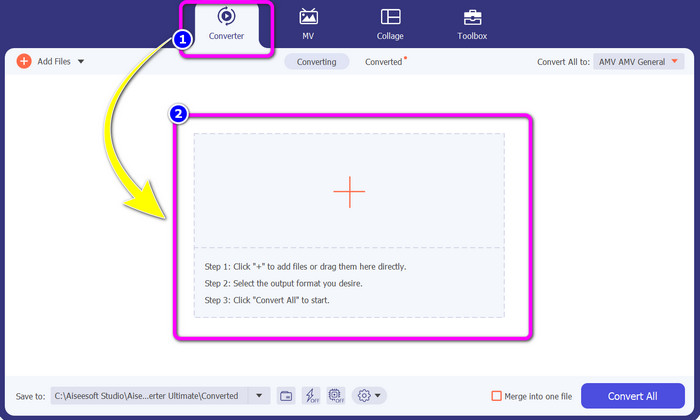
Pas 2: Seleccioneu el panell Converter i feu clic al botó del signe Plus. La carpeta de fitxers apareixerà a la pantalla i trieu el vídeo AMV que voleu convertir.
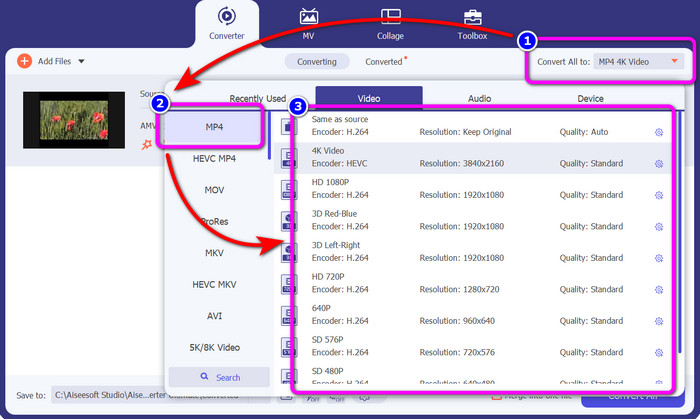
Pas 3: Premeu el botó Convert All. Quan ja apareguin les opcions de format, seleccioneu el format de sortida desitjat, el fitxer MP4. A continuació, podeu triar la resolució del vostre vídeo fins a resolució de vídeo 4K. Trieu la resolució que preferiu o bé podeu escollir la mateixa resolució que el vostre vídeo original.
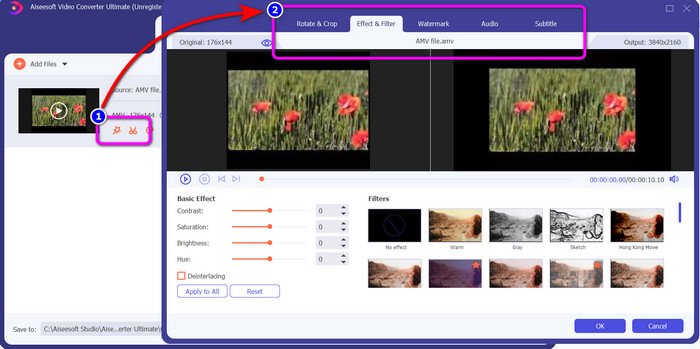
Pas 4: Si voleu editar el vostre vídeo, feu clic a la icona Edit. Llavors ja podeu editar el vídeo canviant, afegint o eliminant marques d’aigua, aplicant efectes o filtres, i girant i retallant els vídeos. Després feu clic a OK. D’aquesta manera podeu millorar el vostre vídeo.
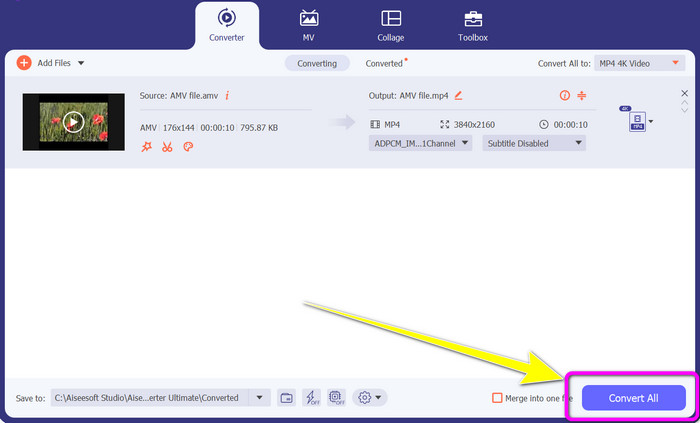
Pas 5: Després d’editar el vostre vídeo, feu clic al botó Convert All per iniciar el procés de conversió. Després, deseu el resultat final a l’ordinador. I obriu el vídeo convertit a l’ordinador per veure el resultat final. Feu clic aquí per saber com convertir DV a MP4.
Part 3: la manera més fàcil de convertir AMV a MP4 en línia de forma gratuïta
Una altra manera de convertir AMV a MP4 en línia és utilitzar el FVC Free Video Converter Online. Aquesta eina té un pas senzill i una interfície simple, cosa que la fa més accessible tant per a usuaris avançats com per a no professionals. Podeu convertir vídeos en només uns quants clics. A més, aquest convertidor admet nombrosos formats de vídeo, com ara AVI, MP4, M4V, FLV, MOV, WMV, MKV i més. També podeu fer un procés de conversió per lots per convertir diversos fitxers simultàniament. A més, també podeu canviar la resolució del vídeo mentre convertiu els fitxers. També és possible si voleu ajustar la taxa de bits i la velocitat de fotogrames del vostre vídeo. Podeu utilitzar aquesta aplicació en línia de manera gratuïta i podeu descarregar els vídeos sense elements no desitjats, com ara marques d’aigua, logotips, adhesius, text i més. També és accessible en tots els navegadors, incloent-hi Google Chrome, Safari, Internet Explorer, Microsoft Edge, etc.
Funcions
◆ Converteix diversos formats de vídeo, com ara MP4, AMV, FLV, AVI, MOV, VOB, MKV i molt més.
◆ Ofereix un procés de conversió per lots per a un procediment més ràpid.
◆ Editeu la velocitat de bits, la velocitat de fotogrames i la resolució del vídeo.
◆ Converteix formats d'àudio com MP3, FLAC, WAV, AAC, AC3, etc.
◆ Ajusteu la taxa de bits i la freqüència de mostreig de l'àudio.
Utilitzeu els procediments senzills següents per convertir AMV a MP4 amb FVC Free Video Converter Ultimate.
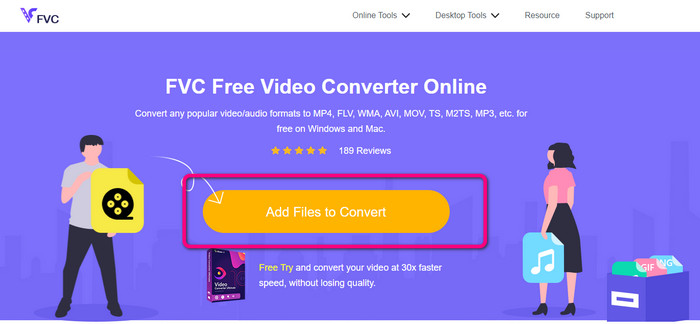
Pas 1: Aneu al vostre navegador i aneu al lloc web de FVC Free Video Converter Online. Premeu el botó Add Files to Convert per pujar el vídeo AMV que voleu convertir.
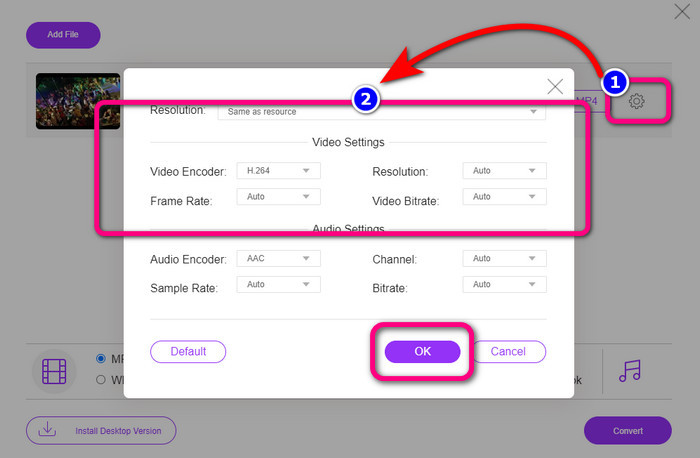
Pas 2: Després d’afegir el vídeo AMV, feu clic a la icona Setting per ajustar la velocitat de fotogrames, la taxa de bits i la resolució del vídeo. Després premeu OK.
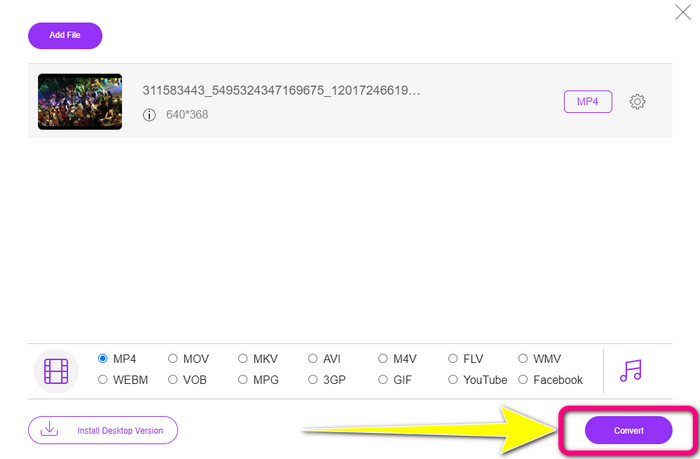
Pas 3: Aneu a la part inferior de la interfície i trieu el format de fitxer MP4. A continuació, premeu el botó Convert. També podeu utilitzar aquesta eina per convertir AMV a MKV.
Part 4: Preguntes freqüents sobre la conversió d'AMV a MP4
1. És el mateix AMV que WMV?
No són els mateixos. AMV és un format de fitxer de vídeo compatible amb reproductors MP3 MP4 i S1. En comparació amb altres formats de vídeo com WMV, té menys mida. No requereix molta potència de processament per jugar.
2. Què és millor, AVI o AMV?
Podeu utilitzar el fitxer AVI si voleu reproduir el vostre vídeo a qualsevol lloc. Tanmateix, el format de fitxer AMV és una bona opció si preferiu una mida de fitxer més petita.
3. Com puc convertir fitxers de vídeo a MP4?
Podeu utilitzar Video Converter Ultimate. Admet gairebé tots els formats de vídeo i podeu convertir fitxers de vídeo més ràpidament.
Conclusió
Convertir AMV a MP4 és fàcil si utilitzeu els dos convertidors esmentats anteriorment. A més, tant els usuaris avançats com els no professionals poden utilitzar les eines perquè totes dues ofereixen una interfície intuïtiva i mètodes simples. Així que utilitzeu ara mateix Video Converter Ultimate i FVC Free Video Converter Online!
-
 Mètodes amb èxit per convertir DIVX a MP4 immediatament
 Com puc convertir DIVX a MP4? Si busqueu la millor solució, esteu a l'article adequat. Us mostrarem com convertir fàcilment DIVX a MP4
-
 Com convertir F4V a MP4 amb els mètodes més efectius
 Els vostres vídeos F4V no són de bona qualitat? A continuació, convertiu-lo en un fitxer MP4. Aquesta publicació oferirà la millor manera de convertir F4V a MP4 en línia i fora de línia
-
 Cinc enfocaments populars per convertir Xvid a format MP4
 Doneu una ullada a aquests mètodes sorprenents sobre com convertir Xvid a format de fitxer MP4 en aquest article. A més, aprendràs les millors aplicacions que pots utilitzar per convertir
