


 Video Converter Ultimate
 Gravadora de pantalla
 Reparació de vídeo
 Baixada segura
Converteix GIF a MKV amb el mètode més senzill
El GIF és un dels formats de fitxer més habituals que pots utilitzar al teu dispositiu, però hi ha casos en què potser el vols convertir a un altre format de vídeo com MKV. Tanmateix, buscar una aplicació pot suposar molta feina. Molts conversors presenten problemes durant el procés de conversió. A més, algunes aplicacions no funcionen correctament. A tot això, s’hi afegeix que és difícil trobar una eina que admeti diversos formats de vídeo. Però en aquest article hi trobaràs la millor solució que busques. Descobriràs un mètode excel·lent per convertir GIF a MKV mitjançant una aplicació fiable que pots utilitzar tant a Windows com a Mac.

Part 1: Introducció de GIF i MKV
Abans de convertir, primer aprendràs la informació sobre aquests dos formats. Consulteu els detalls essencials a la taula següent.
| Format | GIF | MKV |
| Nom | Format d'intercanvi gràfic | Contenidor Multimèdia Matroska |
| Extensió de fitxer | .gif | .mkv |
| Descripció | Un format per intercanviar imatges és GIF. És un format gràfic molt utilitzat que emmagatzema dades comprimides en un format sense qualitat i no utilitza més de 256 colors. CompuServe va crear el format GIF per intercanviar imatges ràster a les xarxes l'any 1987 (GIF87a). El format del fitxer es va modificar el 1989 (GIF89a), afegint la capacitat d'animació i transparència. Es pot carregar GIF a Twitter i Facebook. És impossible penjar GIF a YouTube o Instagram perquè no són vídeos. Els GIF tampoc es poden reproduir en reproductors multimèdia. El format d'intercanvi de gràfics s'anomena GIF. Si GIF s'ha de pronunciar "jiff" o "gif", amb la "g" pronunciada com la "g" a "cabra", ha estat molt discutit. També és possible emmagatzemar diversos fitxers en un sol fitxer GIF. | MKV és un contenidor de codi obert que pot contenir material multimèdia que s'ha comprimit mitjançant diversos còdecs. Té molts avantatges respecte al contenidor AVI tradicional, inclosa la possibilitat d'incloure pistes d'àudio i subtítols en molts idiomes que es poden canviar sense aturar la reproducció i buscar i rebobinar ràpidament els fitxers. A més, el format és fàcil d'alterar, cosa que facilita l'extracció de dades d'àudio i vídeo. |
| Desenvolupat per | CompuServe | Matroska |
| Categoria | Formats de fitxer d'imatge | Formats de fitxer de vídeo |
| Tipus MIME | imatge/gif | vídeo/x-matroska |
Part 2: Passos detallats per convertir GIF a MKV
Video Converter Ultimate és l’aplicació que estàs buscant si vols convertir GIF al format de fitxer MKV de manera ràpida i senzilla. Amb l’ajuda d’aquest programari, pots convertir els teus fitxers GIF sense perdre qualitat. A més, aquest conversor pot oferir un procés de conversió ultraràpid fins a 30 vegades més ràpid que altres conversors. També se’t permet convertir diversos fitxers GIF en un sol format MKV simultàniament, perquè aquesta aplicació permet la conversió per lots. D’aquesta manera, et garanteixes que transformar el teu fitxer a un altre format sigui fàcil i ràpid. A més, Video Converter Ultimate ofereix una interfície intuïtiva, perfecta per a tothom. Pel que fa a l’accessibilitat, els usuaris de Windows i Mac poden utilitzar aquest conversor, cosa que els resulta molt pràctica.
A més, hi ha més funcions que podeu trobar. Suposem que voleu crear un vídeo musical increïble per reproduir-lo en festes d'aniversari, casaments, festes de Nadal i molt més. Encara podeu confiar en aquesta aplicació perquè ofereix un creador de vídeos musicals. Aquest creador té temes gratuïts per fer que el teu vídeo sigui més creatiu i únic. Una altra característica que pot oferir és l'eina de correcció de color. Amb la barra lliscant, aquesta eina us permet ajustar fàcilment la brillantor, el contrast, la saturació i la tonalitat del vostre vídeo. D'aquesta manera, el vostre vídeo serà més agradable de veure. Hi ha més funcions que podeu experimentar en aquesta aplicació que es pot descarregar. Per obtenir més informació sobre aquesta eina, consulteu els detalls addicionals a continuació.
Funcions
◆ Converteix una àmplia gamma de formats de vídeo, com MP4, MKV, M4V, MOV, AVI, FLV, WMV, VOB, SWF i més de 100 més.
◆ Converteix molts fitxers alhora.
◆ Ofereix un procés de conversió ràpid.
◆ Ofereix una funció de millora de vídeo per millorar el vídeo.
Pros
- Té una interfície fàcil d'utilitzar amb guies detallades.
- Apte per a principiants.
- Descàrrega gratuïta.
- Accessible tant a Windows com a Mac.
- Pot convertir fitxers de vídeo/imatge il·limitats.
Contres
- Aconsegueix la versió de pagament per gaudir de funcions més boniques.
Segueix els procediments detallats que tens a continuació per convertir GIF a MKV a l’instant amb Video Converter Ultimate al teu ordinador Windows o Mac.
Pas 1: Si vols descarregar Video Converter Ultimate fàcilment, fes clic al botó Descarrega que tens a sota. Després, executa’l un cop acabada la instal·lació.
Descàrrega gratuïtaPer a Windows 7 o posteriorDescàrrega segura
Descàrrega gratuïtaPer a macOS 10.7 o posteriorDescàrrega segura
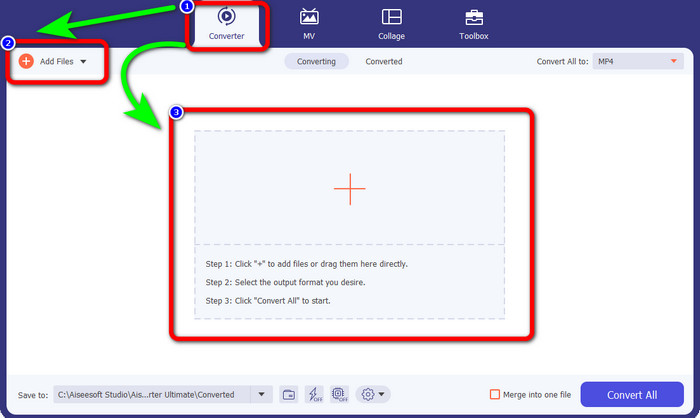
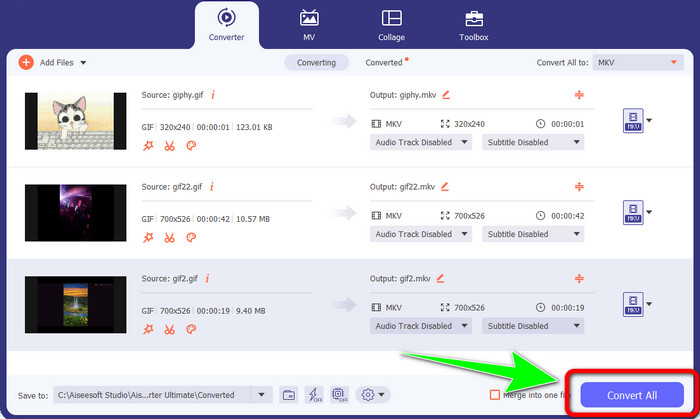
Pas 2: Vés al panell Converter quan la interfície ja aparegui a la pantalla. Llavors, fes clic al botó Add Files per inserir el fitxer GIF. També pots fer clic al signe Plus que hi ha al centre de la interfície per afegir el fitxer.
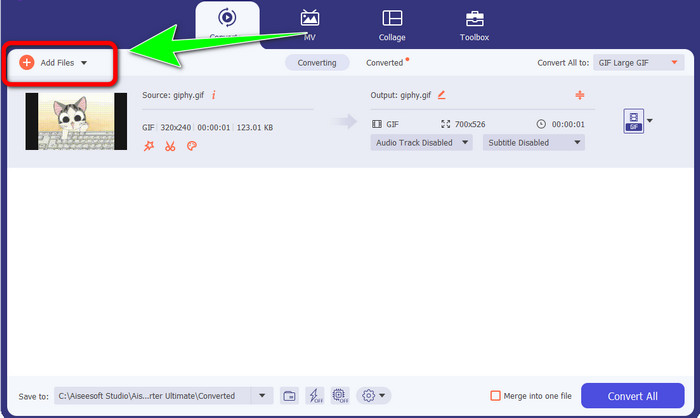
Pas 3: Si vols fer una conversió per lots, fes clic al botó Add Files.
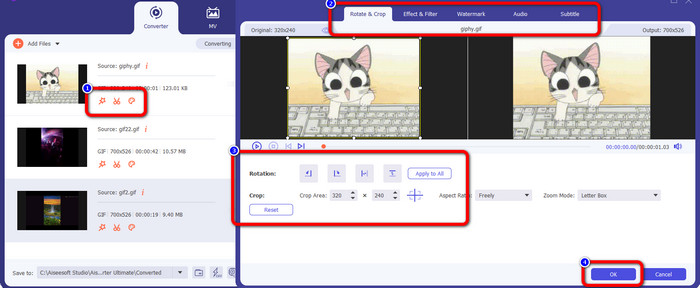
Pas 4: Si vols editar el teu vídeo abans de convertir-lo, fes clic a les icones de les eines d’Editing. Aquesta eina et permet afegir filtres i efectes als teus vídeos. També pots girar i retallar els vídeos. Després, fes clic al botó OK.
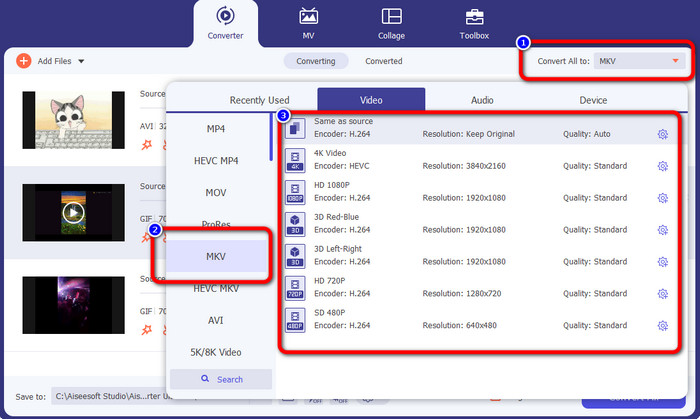
Pas 5: Després, vés al botó Convert All to per convertir tots els fitxers. Selecciona el fitxer MKV entre les opcions de format i tria la qualitat de vídeo que vulguis, des de 480p fins a 4K.
Pas 6: Per acabar, fes clic al botó Convert All a l’angle inferior dret de la interfície. Espera que acabi el procés de conversió i desa el teu vídeo MKV a l’escriptori. Aquest programari també et pot ajudar a convertir GIF a M4V.
Part 3: Preguntes freqüents sobre la conversió de GIF a MKV
1. Quin és el millor format de fitxer per convertir MKV?
El millor format al qual pots convertir MKV és el format MP4. El format de fitxer MP4 és el més utilitzat en aquesta època moderna. Pel que fa a la compatibilitat, és excel·lent perquè pots reproduir un fitxer MP4 a tots els programes i dispositius. Fes clic aquí per aprendre com convertir MKV a MP4.
2. Té millor qualitat MKV que MP4?
Sí. Tot i que el fitxer MP4 és compatible amb tots els dispositius, el fitxer MKV té una millor qualitat que el fitxer MP4. És perquè a causa de la compatibilitat amb funcions addicionals, diverses pistes d'àudio i pistes de subtítols, els fitxers MKV solen ser més grans que els vídeos MP4. El fitxer MKV també admet diversos fitxers de subtítols que podeu utilitzar en diferents idiomes.
3. Quins són els avantatges i els desavantatges dels fitxers GIF?
L'avantatge dels fitxers GIF és que la seva mida del fitxer és petita, el temps de càrrega és curt, l'animació és possible i la compressió sense pèrdues. Llavors, el desavantatge d'aquest fitxer és que té una selecció limitada de colors, la imatge només és plana i no és perfecte per a la fotografia amb una àmplia gamma de colors.
4. Per què hi ha vegades que el fitxer MKV és retardat?
Un dels motius és que és possible que l'ordinador no tingui prou memòria i potència de CPU per gestionar vídeos MKV d'alta qualitat o UHD. Després de tot, aquest format de fitxer té una mida gran.
5. Quins reproductors de vídeo poden suportar fitxers MKV?
Podeu reproduir el vostre fitxer MKV a VLC Media Player, Media Player Classic, 5KPlayer, Real Player, KMPlayer, Pot Player, etc. Amb aquests programes, definitivament podeu reproduir el vostre fitxer de vídeo MKV.
Conclusió
Amb aquest mètode, pots convertir GIF a MKV fàcilment i ràpidament. I Video Converter Ultimate és l’elecció adequada com a conversor fora de línia excepcional. Doncs, què estàs esperant? Prova aquesta aplicació i gaudeix de les nombroses funcions que t’ofereix!
-
 Com convertir TRP a MKV sense perdre la qualitat
 Teniu problemes per esbrinar com convertir TRP a MKV? Aleshores ets a la publicació correcta. Us oferirem les millors maneres de convertir fàcilment TRP a MKV.
-
 Les 4 millors solucions per convertir MXF a MKV [Resolt]
 Coneix aquests quatre mètodes fantàstics per convertir fàcilment MXF a MKV en línia i fora de línia. Les aplicacions incloses en aquesta publicació us poden ajudar a convertir fitxers sense problemes.
-
 Maneres sorprenents de convertir OGV a MKV de manera eficient i senzilla
 Aquesta guia us oferirà un procediment sense problemes per convertir OGV a MKV sense pèrdues. Proveu aquests convertidors més fiables i experimenteu la seva gran funció
