


 Video Converter Ultimate
 Gravadora de pantalla
 Reparació de vídeo
 Baixada segura
Reducció d'àudio: com convertir WAV en format OGG per a mides de fitxers més petites
Els fitxers d’àudio grans poden ocupar molta memòria al teu ordinador o dispositiu mòbil quan hi treballes. Convertir aquests fitxers del format WAV a OGG redueix molt la seva mida, cosa que els fa més fàcils de gestionar i transmetre. En aquesta publicació, veurem els avantatges de convertir fitxers WAV a format OGG i t’ensenyarem com fer-ho pas a pas. També repassarem alguns dels millors programes per a aquesta tasca per assegurar que obtinguis la millor qualitat d’àudio possible. Així doncs, tant si ets músic, podcaster o simplement algú que vol organitzar les seves gravacions d’àudio, aquest article és per a tu.

Part 1. Comparació d'OGG i WAV
Aquí hi ha un gràfic de comparació que descriu les diferències entre convertir WAV a OGG. Podeu consultar-los per a la vostra referència.
| WAV | OGG | |
| Mida de l'arxiu | Gran | Petit |
| Compressió | Sense comprimir | Comprimit |
| Qualitat d'àudio | Alta qualitat | Alta qualitat |
| Compatibilitat | Àmpliament compatible | Menys compatible |
| Suport a la plataforma | Compatible amb totes les plataformes | Suport limitat en algunes plataformes |
| Edició | Fàcil d'editar | Una mica més difícil d'editar |
Part 2. La millor manera de convertir WAV a OGG o OGG a WAV
1. FVC Video Converter Ultimate
FVC Video Converter Ultimate és un potent programari de conversió de vídeo que et pot ajudar a convertir ràpidament i fàcilment els teus fitxers d’àudio WAV al format comprimit OGG. Amb la seva interfície intuïtiva i fàcil d’utilitzar, pots seleccionar fàcilment els teus fitxers WAV, triar el format OGG i iniciar el procés de conversió amb només uns quants clics.
A més, FVC Video Converter Ultimate inclou funcions avançades d'edició de vídeo, que us permeten retallar, retallar, afegir filigranes i aplicar diversos filtres als vostres fitxers d'àudio abans de la conversió. Aquesta funció pot ser útil si necessiteu fer petits ajustaments o millorar la qualitat dels vostres fitxers d'àudio abans de convertir-los al format OGG. Per tant, si voleu convertir per lots OGG a WAV o viceversa, seguiu els passos següents:
Pas 1. Instal·la el programa i importa fitxers OGG o WAV
Pots descarregar i instal·lar FVC Video Converter des del lloc web oficial. Obre l’aplicació i selecciona el botó amb el signe Plus per importar el fitxer d’àudio que vols convertir.
Baixada gratuïtaPer a Windows 7 o posteriorBaixada segura
Descarrega gratisPer a MacOS 10.7 o posteriorBaixada segura
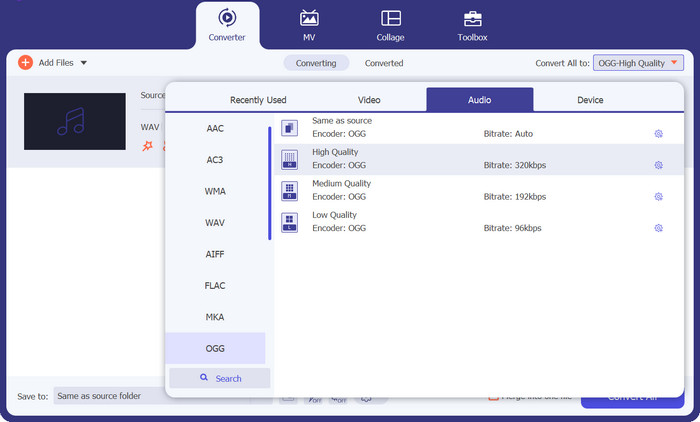
Pas 2. Selecciona OGG com a format de sortida
Fent clic al menú desplegable Profile i seleccionant OGG de la llista de formats disponibles, pots triar OGG com a format de sortida. També pots canviar els paràmetres de sortida seleccionant el botó Settings si cal. Això et permet modificar paràmetres com el bitrate, la freqüència de mostreig i els canals.
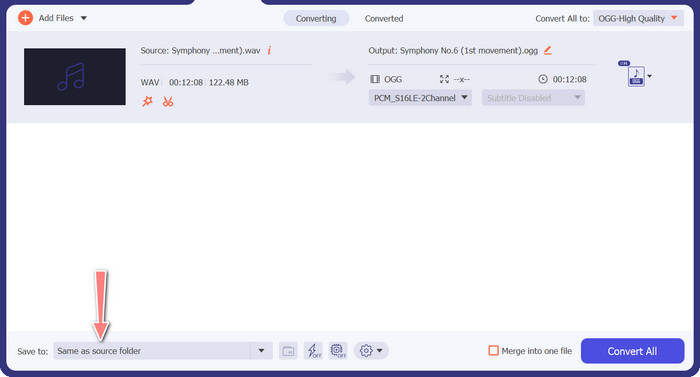
Pas 3. Introdueix la ubicació de sortida
Fent clic al botó Browse al costat del camp Output Folder, pots escollir la carpeta de sortida on vols desar el fitxer convertit.
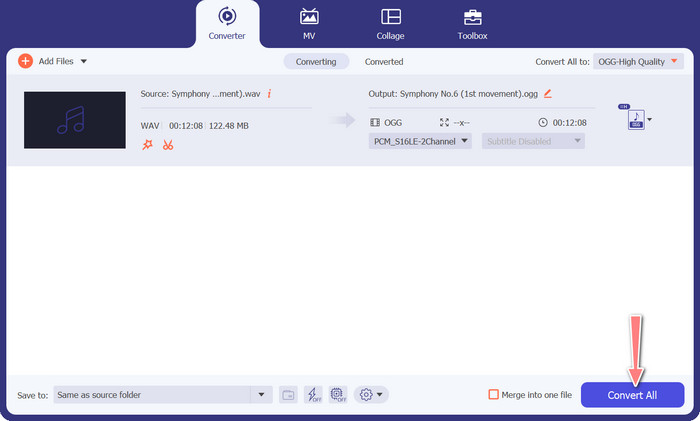
Pas 4. Conversió de fitxer de WAV a OGG
Quan estiguis satisfet amb les opcions, fes clic al botó Convert All per iniciar la conversió. FVC Free Video Converter començarà a convertir el teu fitxer WAV al format OGG. La barra de progrés indica en quin punt es troba el procés de conversió i el temps estimat restant.
2. Convertidor d'àudio gratuït en línia
El Free Audio Converter Online és una eina potent per convertir WAV a OGG en línia. Els usuaris poden afegir ràpidament fitxers WAV o OGG i convertir-los a format OGG mitjançant la seva interfície senzilla. El convertidor també permet modificar els paràmetres de sortida, com ara el bitrate i la freqüència de mostreig, per obtenir la qualitat desitjada dels fitxers OGG. El procés de conversió és ràpid i senzill, i els usuaris poden descarregar els fitxers modificats directament des del lloc web.
Pas 1. Accedeix al lloc web de Free Video Converter Online amb el teu navegador preferit.
Pas 2. Puja el fitxer OGG que vols convertir a WAV fent clic al botó Add Files to Convert.
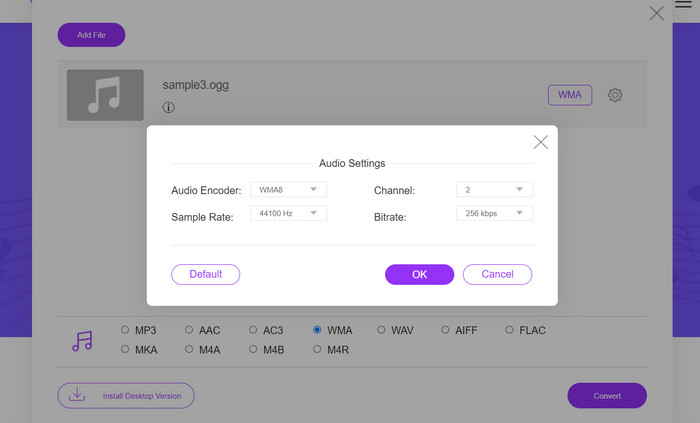
Pas 3. Selecciona OGG com a format de sortida des del menú de formats Audio en la llista de formats compatibles. També pots especificar el bitrate i la qualitat de sortida per al fitxer OGG.
Pas 4. Per començar el procés de conversió, fes clic al botó Convert. Així és com es converteix OGG a WAV en línia.
Part 2. Converteix OGG a WAV o WAV a OGG amb Audacity
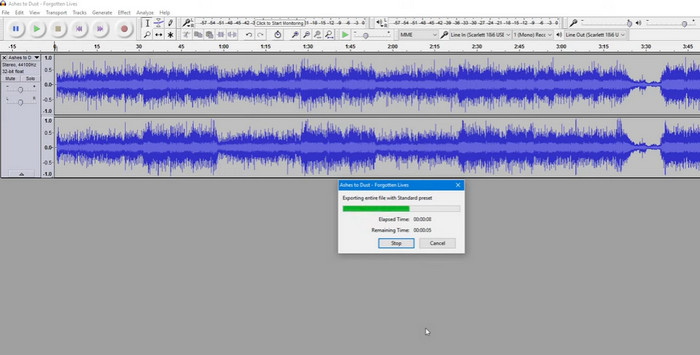
Aquesta eina és un programari d'edició d'àudio de codi obert que pot convertir fitxers MP3 a fitxers OGG. Audacity ofereix una varietat d'eines i efectes d'edició a més de la conversió, que permet als usuaris ajustar i millorar els seus fitxers d'àudio, convertint-lo en una eina versàtil per a operacions d'edició i conversió d'àudio.
A més, Audacity està disponible per a Windows, macOS i Linux, cosa que el fa àmpliament disponible. Audacity és una bona alternativa per a qualsevol persona que vulgui convertir fitxers WAV a format OGG a causa de les seves capacitats sofisticades i la seva facilitat d'ús. Examineu la guia següent per saber com funciona aquest programa.
Pas 1. Descarrega i instal·la Audacity al teu ordinador. Obre Audacity i després el fitxer OGG o WAV que vols editar. Pots fer-ho seleccionant File > Open, després cercant i seleccionant el fitxer WAV al teu equip.
Pas 2. Un cop el fitxer WAV estigui obert a Audacity, fes clic a File i després a Export. Al quadre de diàleg Export Audio, selecciona OGG Vorbis Files com a tipus de fitxer.
Pas 3. Pots ajustar la qualitat del teu fitxer OGG arrossegant el control lliscant de Quality. Uns paràmetres de qualitat més alts incrementaran la mida del fitxer, mentre que uns paràmetres més baixos en reduiran la mida però poden disminuir la qualitat de la cançó.
Pros
- Té la capacitat de convertir per lots WAV a OGG.
- Converteix OGG a WAV a Windows, macOS i Linux.
Contres
- El programa no té una comunitat de suport dedicada.
Part 3. Converteix OGG a WAV o WAV a OGG amb VLC
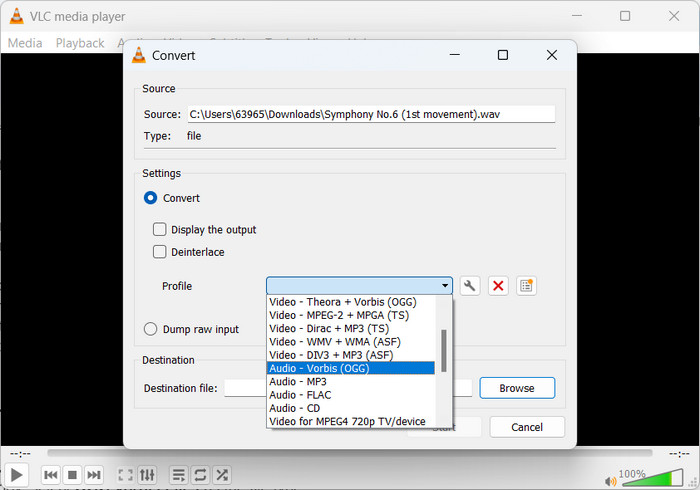
El reproductor multimèdia VLC és una potent eina multimèdia que s'utilitza àmpliament per reproduir diversos tipus de fitxers multimèdia. És possible que molts usuaris no sàpiguen que aquest programa també funciona bé per convertir l'eina OGG a WAV per a Mac. Amb la seva eina de conversió integrada, el reproductor multimèdia VLC pot convertir ràpidament i fàcilment fitxers WAV a format OGG, permetent als usuaris gaudir de la seva música preferida en diversos formats. Per a totes les vostres necessitats de conversió d'àudio, el reproductor multimèdia VLC ofereix una solució senzilla i fàcil d'utilitzar tant si voleu convertir un únic fitxer com un lot d'arxius. Seguiu aquests passos per aprendre a convertir un fitxer MP3 en un fitxer OGG:
Pas 1. Per reproduir un vídeo, executa VLC i tria des de la barra de menús del reproductor. L’opció Convert / Save apareixerà en un menú desplegable; selecciona-la.
Pas 2. Fent clic al botó Add, tria el fitxer WAV que vols convertir des de l’àrea File Selection. Quan estiguis llest per convertir o desar el fitxer, és el moment de clicar el botó Convert / Save.
Pas 3. Fes clic al menú desplegable Profile i tria Audio - Vorbis (OGG) com a perfil preferit.
Pas 4. Fes clic al botó Browse a la dreta de la secció del fitxer Destination per especificar una nova ubicació i nom de fitxer per al fitxer convertit. Pots iniciar la conversió fent clic al botó Start a la part inferior de la finestra.
Pros
- Interfície fàcil d'utilitzar.
- Admet molts formats de vídeo i àudio.
Contres
- Possible pèrdua de qualitat d'àudio.
Lectures relacionades:
Converteix MP3 a OGG i gaudeix d’una qualitat de so superior
Com convertir MP4 a WAV gratuïtament a l’escriptori o en línia [2023]
Part 4. Preguntes freqüents sobre la conversió d'OGG a WAV
Puc convertir diversos fitxers WAV al format OGG alhora?
Sí, molts programes de conversió d'àudio, inclòs FVC Video Converter Ultimate, admeten la conversió per lots que us permet convertir simultàniament en format WAV a OGG.
És possible tornar a convertir els fitxers OGG al format WAV?
Sí, és possible tornar a convertir els fitxers OGG al format WAV mitjançant un programari de conversió d'àudio. Tanmateix, tingueu en compte que la qualitat de l'àudio es pot veure afectada si el fitxer WAV original es comprimia al format OGG.
Puc convertir els meus fitxers WAV a altres formats d'àudio a més d'OGG?
Sí, la majoria del programari de conversió d'àudio admet una àmplia gamma de formats d'àudio, inclosos MP3, AAC, FLAC i més.
Conclusió
Convertir el teu format WAV a OGG pot oferir diversos avantatges, com ara reduir la mida del fitxer i mantenir una alta qualitat d’àudio. Mentrestant, amb les eines de conversió d’àudio adequades i una mica de coneixements, pots convertir fàcilment els teus fitxers d’àudio al format que millor s’adapti a les teves necessitats.
-
 Excel·lents reproductors OGG per a Windows i Mac que no us heu de perdre
 Quan vulgueu reproduir el vostre àudio preferit en format OGG, especialment quan hi ha menys emmagatzematge. Podeu obtenir més informació sobre els 5 millors jugadors OGG d’aquest article.
-
 Obteniu informació sobre com convertir MP3 a un format WAV
 Vols saber com convertir MP3 a WAV? Determineu quina de les eines produeix la conversió de millor qualitat que podeu obtenir.
-
 2 millors maneres d'editar les metadades OGG que hauríeu de provar gratuïtament
 Necessites editar les metadades OGG? Bé, podeu gestionar fàcilment l'edició de les etiquetes utilitzant el programari correcte. Si no en teniu cap, és imprescindible llegir aquest article.
