


 Video Converter Ultimate
 Gravadora de pantalla
 Reparació de vídeo
 Baixada segura
Les maneres més ràpides de convertir FLAC i WAV (fora de línia / en línia)
El Free Lossless Audio Codec, conegut habitualment com a FLAC, és un format de fitxer d’àudio amb una semblança notable amb l’MP3. Ofereix una qualitat d’àudio excel·lent ocupant alhora una mida relativament petita a l’espai del disc. A més, aquest tipus de format és sense pèrdua, és a dir, que es conserva una gran part de les dades d’àudio malgrat el procés de compressió. D’altra banda, hi ha casos en què cal convertir fitxers FLAC a un altre format com WAV si vols portar la teva experiència d’escolta al màxim nivell i a una qualitat superior. Has de triar entre tots dos? Descobreix a continuació com pots gaudir dels dos formats utilitzant les millors eines de conversió de FLAC a WAV disponibles.

Part 1. Converteix FLAC i WAV fora de línia
Video Converter Ultimate és una eina de primer nivell per convertir fitxers a qualsevol format d’àudio, inclosos WAV i FLAC. Aquest programa ofereix una funció de conversió per lots que et permet convertir una col·lecció de fitxers d’àudio en una sola sessió. A més, pots maximitzar la qualitat de cada cançó en què vulguis treballar, ja que el programa permet als usuaris ajustar aspectes tècnics de la sortida com la freqüència de mostreig i la taxa de bits. Si vols convertir per lots de WAV a FLAC o a l’inrevés, llegeix la guia ràpida que hem preparat a continuació.
Pas 1. Inicia el programa al teu dispositiu seleccionant el botó de Baixada gratuïta corresponent que trobaràs més avall. Tot seguit, segueix les instruccions que apareixen a la pantalla per posar en marxa el programa. Un cop instal·lat, podràs familiaritzar-te amb la seva interfície.
Descàrrega gratuïtaPer a Windows 7 o posteriorDescàrrega segura
Descàrrega gratuïtaPer a macOS 10.7 o posteriorDescàrrega segura
Pas 2. Prem la icona Afegeix a la pantalla principal i importa el fitxer d’àudio amb què vols treballar. Tot seguit, se t’obrirà una vista prèvia del fitxer importat. Pots pujar una carpeta si vols convertir fitxers en bloc. Tria al teu directori la carpeta que contingui tots els fitxers d’àudio que necessites.
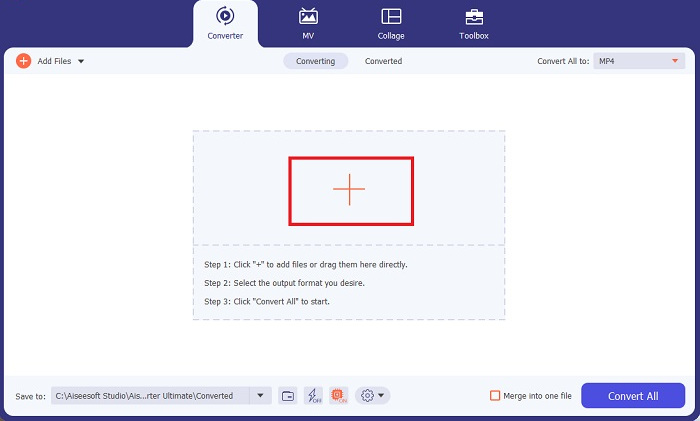
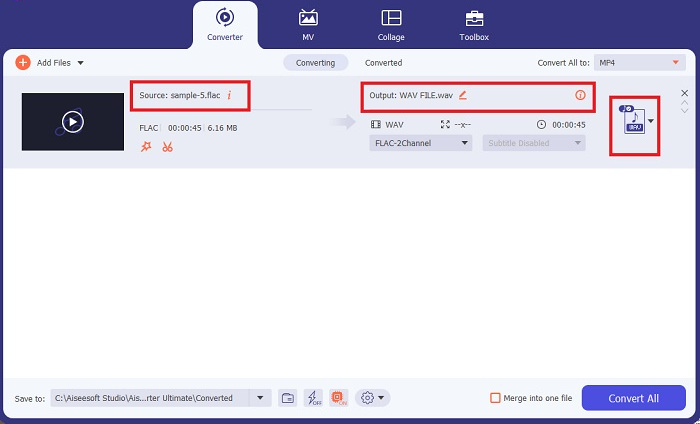
Pas 3. Ara pots canviar el format de sortida fent clic al botó Convertidor a la part superior de la pantalla del programa. Des d’allà, tria WAV a la pestanya de selecció Sortida d’àudio. Paral·lelament, pots ajustar la freqüència de mostreig i la taxa de bits del fitxer de sortida perquè s’adaptin a la qualitat que prefereixes.
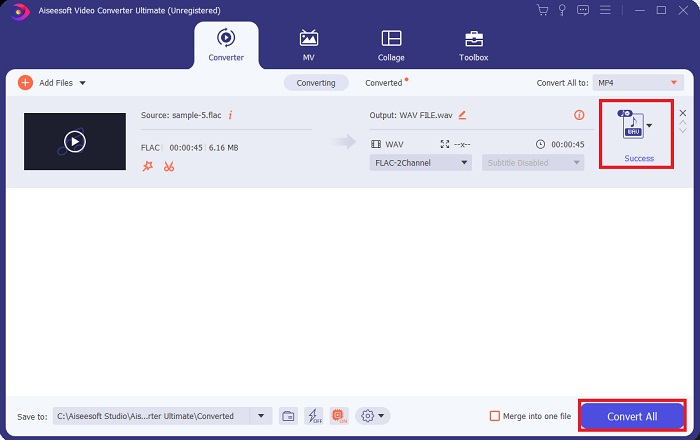
Pas 4. Per acabar, inicia el procés de conversió fent clic al botó Converteix-ho tot de la part inferior. A continuació, el programa obrirà automàticament la carpeta de sortida perquè puguis comprovar el nou format del fitxer.
Pros
- Pot convertir per lots el format de fitxer d'àudio FLAC a WAV.
- El programa funciona bé amb Windows i Mac OS.
- Té una velocitat de conversió ràpida.
Contres
- Requereix una quota de subscripció pagada després de la prova gratuïta.
- El programa no funciona en dispositius amb sistema operatiu Linux.
Part 2. Converteix FLAC a WAV o WAV a FLAC en línia
Tot i que el teu cercador et pot mostrar una gran quantitat de convertidors en línia de FLAC a WAV o de WAV a FLAC, aquí tens què podem fer per facilitar-te la tasca. El Free Audio Converter Online és una opció excel·lent si vols evitar instal·lar un programa d’escriptori. Aquest convertidor en línia funciona de manera fluida, garantint la seguretat i la protecció de les teves dades personals mentre realitza la conversió. A més, pots aprofitar la funció de conversió per lots del programari com si estiguessis utilitzant un programa d’escriptori.
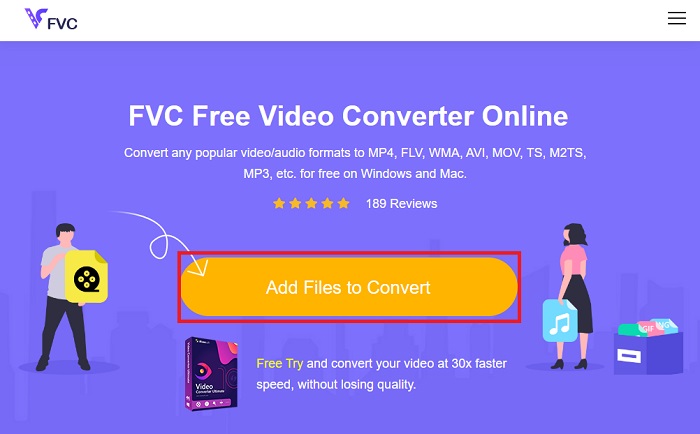
Pas 1. Fes clic a l’enllaç anterior per accedir a la pàgina principal de Free Online Video Converter. Selecciona Afegeix fitxers per convertir a la pantalla principal i puja el teu fitxer d’àudio.
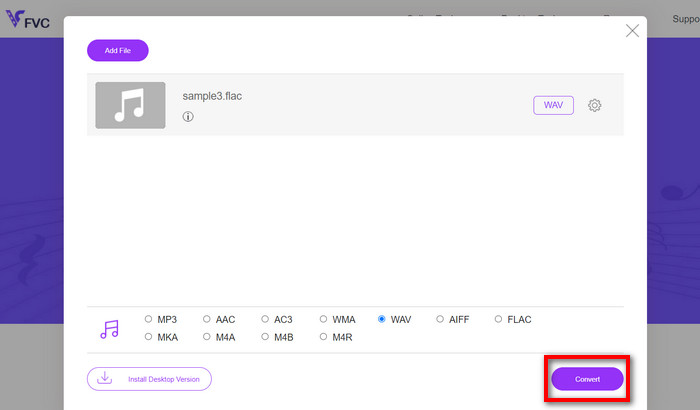
Pas 2. La vista prèvia del fitxer original es mostrarà a la pantalla. Des del mateix panell, desplaça’t cap avall i tria el format de sortida desitjat.
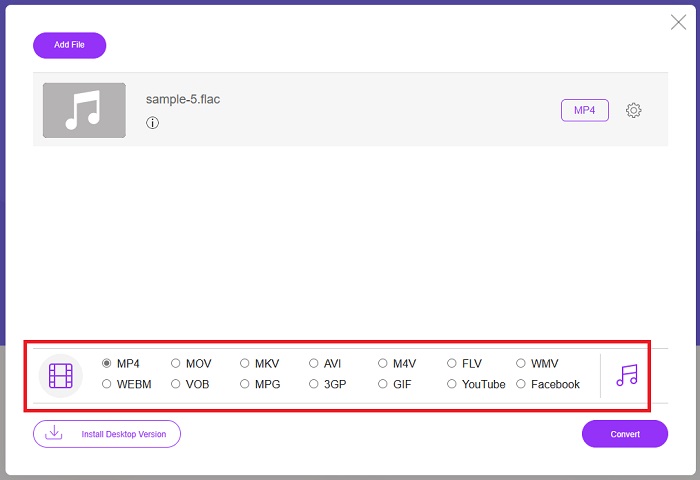
Pas 3. Prem el botó Converteix per canviar el format de FLAC a WAV. Si vols convertir un altre fitxer, torna a seguir aquesta guia des del principi.
Pros
- Funciona en qualsevol motor de cerca com Google Chrome, Safari, Firefox i molt més.
- Ofereix diversos formats de fitxers d'àudio populars com MP3, AAC i WMA.
- Els usuaris poden gaudir de conversions il·limitades per dia.
Contres
- La velocitat de conversió depèn de la força de la connexió a Internet.
Lectures relacionades:
Convertir FLAC a MP3 per preservar la qualitat d’àudio
Passos senzills per convertir WAV a OGG per obtenir una mida d’àudio òptima
Part 3. Preguntes freqüents sobre la conversió FLAC i WAV
La conversió d'un fitxer de FLAC a WAV disminuirà la qualitat?
Convertir els vostres fitxers d'àudio de FLAC a WAV no degradarà la qualitat ja que la seva resolució no està comprimida. Tanmateix, suposem que convertiu un fitxer de WAV a FLAC. En aquest cas, és possible que noteu lleugers canvis, especialment per a aquells que tenen les orelles molt detallades. Si necessiteu ajuda per decidir quin conservar, aquí teniu una perspectiva que podeu veure; Els formats d'àudio FLAC són una bona opció per emmagatzemar un munt de cançons, mentre que la mida dels fitxers WAV és més gran, però és adequat per a l'edició d'àudio.
WAV és el format d'àudio de més alta resolució?
WAV és l'abreviatura Waveform Audio File Format desenvolupada per IBM i Microsoft. Aquest format es considera el format de més alta resolució de la indústria de la música digital perquè conté freqüències d'àudio en brut i sense compromisos.
Quin és el millor convertidor en línia de FLAC a WAV?
Sens dubte, FVC Free Online Video Converter és el millor convertidor gratuït de FLAC a WAV en línia. No cal adquirir habilitat tècnica per transformar cap fitxer de vídeo i àudio amb el programari. Pot fer la vostra feina de manera eficient perquè és fàcil d'utilitzar i té una velocitat de conversió inigualable. A més, aquest programa en línia ofereix, si no tots, però la majoria dels formats d'àudio populars que coneixem.
Conclusió
La conversió pot produir-se en ambdós sentits, de FLAC a WAV i de WAV a FLAC. Com que tots dos formats de fitxer són molt habituals en la música digital actual, triar-ne un o un altre pot dependre de la tasca per a la qual els vulguis utilitzar. Amb les eines esmentades anteriorment, pots canviar de format en qualsevol moment. Segueix els passos esmentats més amunt per passar de FLAC a WAV o de WAV a FLAC, i no hauries de tenir cap dificultat.
-
 Obteniu informació sobre com convertir MP3 a un format WAV
 Vols saber com convertir MP3 a WAV? Determineu quina de les eines produeix la conversió de millor qualitat que podeu obtenir.
-
 WAV Player: les 5 millors aplicacions de WAV Player per a Android, iPhone, PC i Mac
 Com es reprodueixen fitxers WAV al telèfon Android? Quin jugador pot jugar a WAV? Aquesta publicació comparteix els cinc millors reproductors WAV gratuïts per a Android, iPhone, Mac i PC.
-
 Els 3 principals editors de metadades FLAC a Mac i Windows [Actualitzat el 2023]
 Voleu canviar les metadades de FLAC? En aquest cas, heu de llegir aquest article, ja que proporcionem coneixements suficients sobre l'últim editor de metadades FLAC que podeu utilitzar.
