


 Video Converter Ultimate
 Gravadora de pantalla
 Reparació de vídeo
 Baixada segura
Converteix 3GP a MP4 amb convertidors eficients i fàcils d'utilitzar
La necessitat de convertir formats de fitxer ha crescut significativament. Una conversió particular que té una importància immensa és convertir fitxers 3GP a format MP4. Tot i que els fitxers 3GP eren populars en el passat, sovint plantegen problemes de compatibilitat en dispositius i plataformes moderns. En canvi, el format MP4 ofereix compatibilitat universal, reproducció d'alta qualitat i un suport més ampli en diversos dispositius i plataformes.
Per satisfer la necessitat de convertir 3GP a MP4 sense entrebancs, hem revisat i seleccionat amb cura una llista d’eines de conversió potents. Aquestes eines ofereixen solucions eficients i fiables per transformar sense esforç els teus vídeos 3GP al format MP4, àmpliament compatible. Acompanya’ns mentre explorem aquestes eines de conversió més ben valorades i descobrim com poden millorar la teva experiència de vídeo garantint una qualitat de reproducció òptima i compatibilitat en múltiples plataformes i dispositius.

Part 1. Millors convertidors de 3GP a MP4
1. Video Converter Ultimate
Video Converter Ultimate és un programa excel·lent per convertir vídeos a 3GP i MP4, i a altres formats d’àudio. Aquest programari té una funció de conversió per lots que et permet convertir diversos fitxers d’àudio alhora. A més, l’aplicació permet als usuaris optimitzar la qualitat del resultat modificant paràmetres com la velocitat de fotogrames, la taxa de bits i la resolució. Llegeix el petit tutorial que hem preparat a continuació si vols aprendre a convertir 3GP a MP4.
Funcions clau
◆ El programari FVC Video Converter Ultimate està dissenyat per generar vídeos de sortida superiors i fitxers d'àudio, centrant-se a preservar la qualitat original dels fitxers convertits en la major mesura possible.
◆ La interfície de l'aplicació està dissenyada per ser fàcil d'utilitzar i intuïtiva, facilitant la navegació tant per a usuaris novells com avançats.
◆ El FVC Video Converter Ultimate és una eina de programari que presenta una alta velocitat i eficàcia, facilitant la conversió ràpida de diversos formats de fitxer.
Pas 1. Aconsegueix l’aplicació convertidora de 3GP a MP4
Primer, fes clic a l’opció de Descàrrega gratuïta corresponent que trobaràs a continuació per començar a descarregar el programa al teu dispositiu. El següent que has de fer és seguir les indicacions que apareixen a la pantalla per activar el programari. Un cop instal·lat, pots demanar ajuda sobre la interfície d’usuari.
Baixada gratuïtaPer a Windows 7 o posteriorBaixada segura
Descarrega gratisPer a MacOS 10.7 o posteriorBaixada segura
Pas 2. Puja els fitxers de pel·lícula 3GP
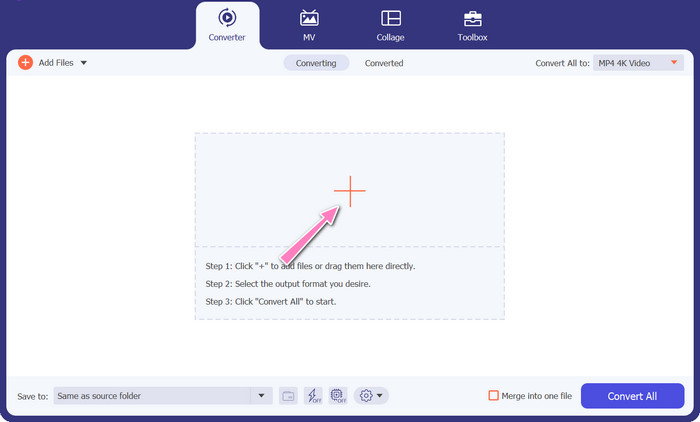
El segon pas és importar el fitxer de pel·lícula que vols editar prement la icona Afegeix a la pantalla principal. Després es carregarà una previsualització del fitxer importat. Si vols convertir molts fitxers alhora, només cal que pugis la carpeta. Tria el directori que conté tots els teus fitxers d’àudio.
Pas 3. Selecciona el format de sortida
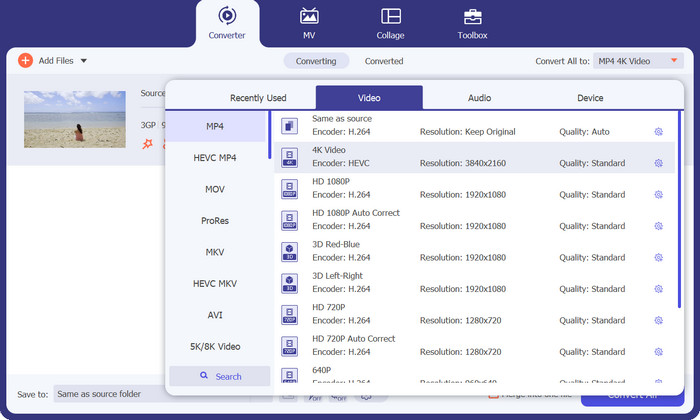
En tercer lloc, prem el botó Convertir-ho tot a a la part superior de la interfície del programa per seleccionar un nou format per al producte final. Selecciona MP4 al menú desplegable Sortida de vídeo. Pots controlar la qualitat del fitxer de sortida modificant la seva freqüència de mostreig i la taxa de bits.
Pas 4. Inicia el procés de conversió
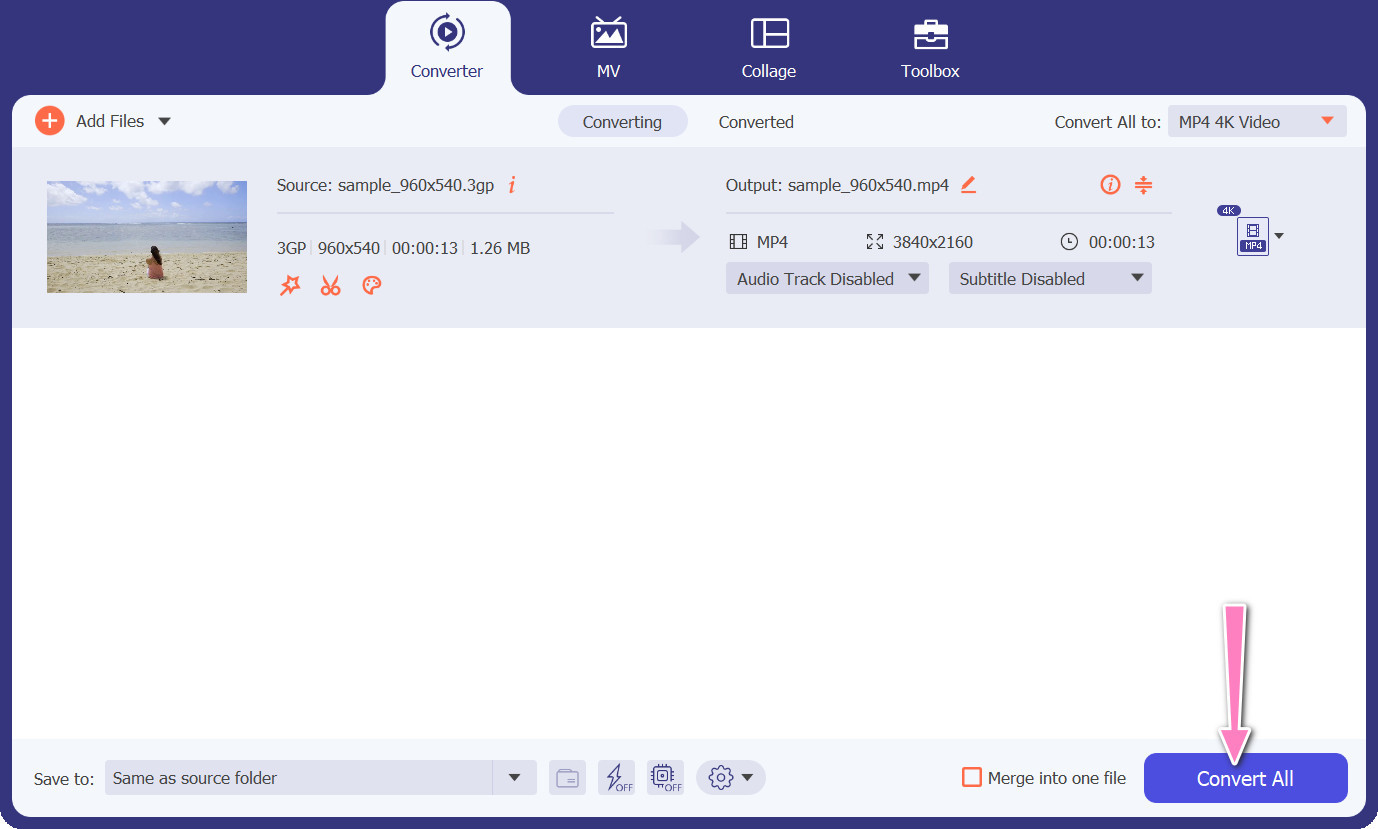
En quart lloc, inicia la transformació prement el botó Converteix-ho tot situat a la part inferior. A continuació, s’obrirà la carpeta de sortida perquè puguis comprovar el fitxer convertit.
2. Convertidor MP4 gratuït en línia
L’ús de Free MP4 Converter Online suposa una alternativa viable a la instal·lació d’un programa d’escriptori i, per tant, ofereix una solució pràctica. Aquest convertidor en línia de 3GP a MP4 funciona amb una eficiència totalment fluida i garanteix la protecció i la confidencialitat de les dades personals durant el procés de conversió. A més, la funcionalitat de conversió per lots del programari es pot utilitzar de manera similar a la d’un programa d’escriptori.
Funcions clau
◆ Free MP4 Converter Online us permet personalitzar la configuració de sortida segons les vostres preferències. Podeu ajustar paràmetres com ara el còdec de vídeo, la resolució, la velocitat de bits i la velocitat de fotogrames per aconseguir la qualitat i la mida del fitxer desitjades.
◆ Free MP4 Converter Online admet la conversió per lots, la qual cosa us permet carregar i convertir diversos fitxers 3GP a MP4 simultàniament. Això estalvia temps i esforç quan es tracta de diversos fitxers.
◆ Free MP4 Converter Online valora la privadesa de l'usuari i utilitza mesures per protegir els fitxers penjats. Sovint ofereixen opcions per eliminar fitxers després de la conversió o emmagatzemar-los de manera segura durant un període limitat.
Pas 1. El primer pas és anar al lloc web principal de Free MP4 Converter Online fent clic a l’enllaç proporcionat. Ves a l’opció Afegeix fitxers per convertir ubicada a la interfície principal i puja-hi el teu fitxer d’àudio.

Pas 2. Un cop fet això, el document inicial es mostrarà a la interfície. Selecciona el format de sortida preferit desplegant les opcions des del mateix panell.
Pas 3. Tot seguit, selecciona el botó Converteix per canviar de 3GP a MP4. Per convertir fitxers addicionals, cal repetir les instruccions esmentades anteriorment des del principi.

3. Qualsevol convertidor de vídeo
El programa d'escriptori molt utilitzat Any Video Converter té un homòleg gratuït basat en web. És possible convertir 3GP a MP4 i té un munt de configuracions sofisticades i processament per lots. L'edició de vídeo i la gravació de DVD són només dos dels extres disponibles a l'edició de programari.
Funcions clau
◆ Any Video Converter us permet personalitzar la resolució de vídeo, la taxa de bits, la velocitat de fotogrames i la qualitat d'àudio. Optimitza la sortida de vídeo segons les vostres especificacions.
◆ Any Video Converter us permet tallar, retallar, combinar i afegir efectes als vídeos. Els subtítols i les marques d'aigua personalitzen els vídeos.
◆ Any Video Converter admet la importació i la inserció de subtítols als vostres vídeos. Podeu afegir fitxers de subtítols externs o introduir subtítols manualment per fer que els vostres vídeos siguin més accessibles o multilingües.
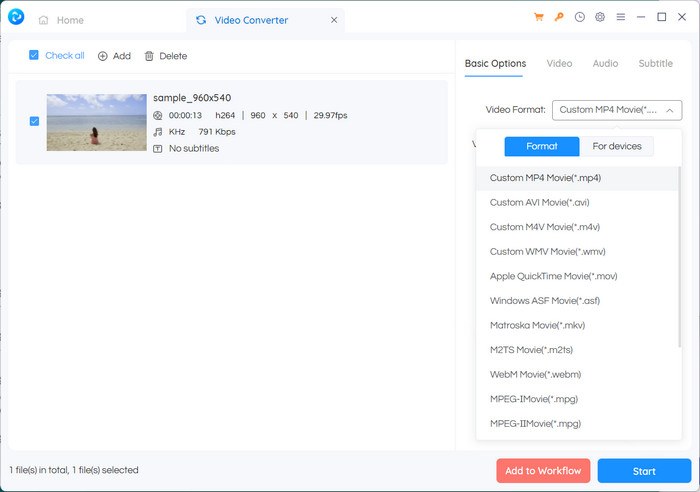
Pas 1. Primer, instal·la Any Video Converter. Descarrega Any Video Converter des del seu lloc web i instal·la’l a l’ordinador seguint les instruccions en pantalla. Inicia Any Video Converter.
Pas 2. Fes clic al botó Add Video(s) dins del programari. Navega i selecciona els fitxers 3GP que vols convertir a MP4. A continuació, fes clic a Open per afegir els fitxers seleccionats a la cua de conversió.
Pas 3. A la secció Profile, selecciona MP4 com a format de sortida desitjat. Pots tenir diferents opcions de MP4 per triar segons les teves preferències i necessitats. Selecciona la que s’adapti millor al que busques.
Pas 4. Marca el botó Start per començar el procés de conversió.
Lectures relacionades:
Unir 3GP – Com combinar diferents clips de vídeo del teu telèfon intel·ligent
Com convertir 3GP a MOV amb diferents mètodes [2023]
Part 2. Preguntes freqüents sobre els convertidors de 3GP a MP4
Quines diferències hi ha entre 3GP i MP4?
MP4 és compatible amb més dispositius i plataformes que 3GP. Còdecs: MP4 admet més còdecs d'àudio i vídeo per a una major flexibilitat i qualitat de codificació. Característiques: 3GP no admet subtítols, capítols o diverses pistes d'àudio, mentre que MP4 sí. A causa dels algorismes de compressió més eficients, els fitxers MP4 són més petits que els fitxers 3GP, però tenen una qualitat equivalent o superior.
Hi ha algun avantatge específic d'utilitzar MP4 sobre 3GP per a la transmissió en línia?
La millor qualitat de vídeo d'MP4, les tècniques de compressió avançades i la compatibilitat més àmplia el converteixen en l'opció preferida per a les plataformes de transmissió en línia, proporcionant una millor experiència de visualització per als usuaris.
Puc convertir vídeos MP4 a format 3GP si cal?
Sí, hi ha convertidors de vídeo disponibles que us permeten convertir vídeos MP4 a format 3GP si cal, tot i que pot provocar una baixada de qualitat i capacitats multimèdia limitades.
Conclusió
Tot i que 3GP va ser popular en el passat, especialment en dispositius mòbils, té un suport més limitat per a funcions avançades i pot ser menys compatible amb les plataformes modernes. MP4, en canvi, admet una gamma més àmplia de còdecs de vídeo, còdecs d’àudio, subtítols i funcions avançades com capítols, menús i diverses pistes d’àudio. Per sort, tens moltes opcions per triar el millor convertidor de 3GP a MP4 segons les teves necessitats. En general, si pots triar entre 3GP i MP4 per als fitxers de vídeo, es recomana optar per MP4 a causa de la seva qualitat superior, la compatibilitat i una gamma més àmplia de funcions i funcionalitats.
-
 Com comprimir vídeos 3GP a una mida més petita amb un procés per lots
 Per fer una còpia de seguretat dels vídeos 3GP al telèfon intel·ligent, aquí teniu les dues maneres més freqüents de comprimir fitxers 3GP a una mida molt petita amb un procés per lots de l'article.
-
 Solucions destacades per convertir 3GP a MKV sense pèrdues
 Consulteu els tutorials pas a pas sobre com convertir 3GP a MKV sense perdre qualitat. Si voleu convertir fitxers, prepareu-vos per complir amb aquests mètodes estupefaents.
-
 3 millors reproductors 3GP gratuïts per a ordinadors i mòbils que hauríeu de conèixer
 Quan vulgueu reproduir fàcilment la vostra pel·lícula 3GP sense instal·lar o convertir cap còdec de vídeo, podeu obtenir més informació sobre els 3 millors reproductors 3GP de Windows, Mac, Android i iPhone en aquest article.
