


 Video Converter Ultimate
 Gravadora de pantalla
 Reparació de vídeo
 Baixada segura
7 eina gratuïta de reparació de vídeo: millors opcions per a la recuperació de fitxers de vídeo
Els teus apreciats fitxers de vídeo pateixen errors, problemes de reproducció o s’han corromput? No et preocupis; hi ha una solució que no et costarà ni un cèntim. T’ensenyem el món de les eines gratuïtes de reparació de vídeo; la teva clau per recuperar i restaurar els teus fitxers de vídeo malmesos. Explorarem les meravelles d’aquestes joies de programari i t’ensenyarem com salvar els teus records més preuats sense esforç. Aconsegueix accés exclusiu al millor programari gratuït de reparació de vídeo (7 opcions) disponible avui a la xarxa. No et limitis a fullejar; llegeix-ho de dalt a baix.

Part 1. Els 3 millors programes de reparació de vídeo gratuïts (Windows/Mac)
1. Reparació de vídeo MiniTool
No diguis mai menys, com el seu nom indica. MiniTool Video Repair pot solucionar un dels vostres problemes de vídeo més grans. Mai no heu desat el vostre vídeo alhora que estalvieu espai. Dissenyat per reparar i recuperar fitxers de vídeo danyats o danyats.
◆ Dissenyat per a persones lliures i creatives. Aquesta solució fàcil d’utilitzar et permet crear, editar i millorar els teus vídeos sense cap cost. Allibera la teva creativitat i dona vida a les teves idees de vídeo amb aquest recurs de gran valor.
◆ Repara vídeos des de qualsevol dispositiu. Des de l’ordinador fins a la targeta SD, amb funcions avançades com afegir un vídeo de mostra perquè el programari l’analitzi i utilitzi les dades per reparar el vídeo malmès.
◆ Repara diversos vídeos d’una sola vegada. Estalviant-te temps valuós i optimitzant el procés de reparació.
Pas 1. Instal·la el programari des del lloc web de Minitool.
Pas 2. Inicia el programari a l’ordinador i fes clic a Add Video(s).
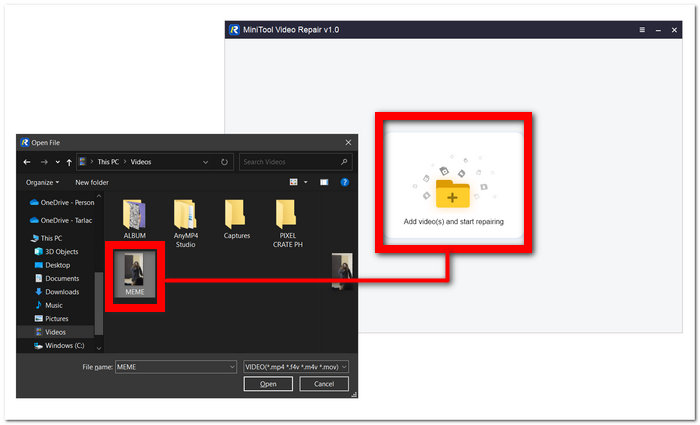
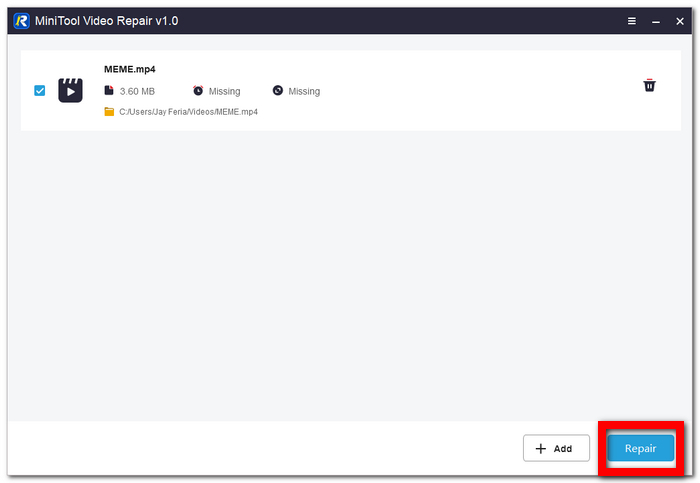
Pas 3. Carrega el teu vídeo al programari i fes clic a Repair.
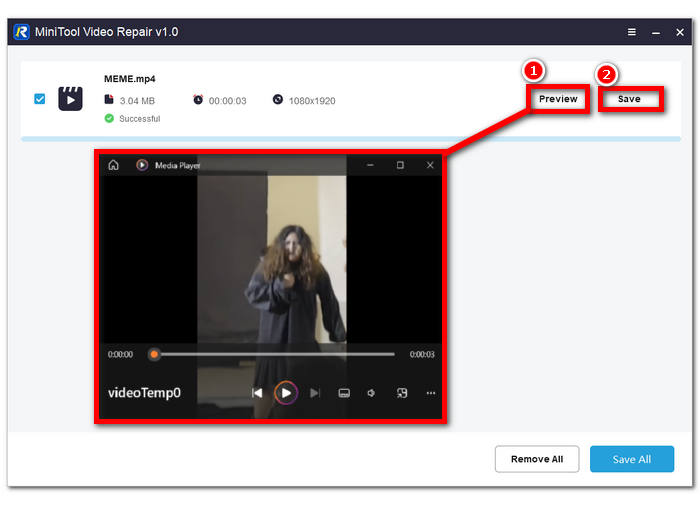
Pas 4. Un cop reparat, pots fer clic a Preview per comprovar si la qualitat és correcta i continuar amb Save per desar el fitxer de vídeo reparat a l’ordinador.
2. Reparació de vídeo Aiseesoft
Reparar allò que està trencat és la especialitat de Aiseesoft Video Repair. No tornis a patir una crisi emocional en descobrir que els teus vídeos estan danyats i no es poden reproduir. Fa servir i adopta un alt nivell de restauració, cosa que el converteix en un dels programes de la xarxa a tenir en compte, i amb molt bons motius.
◆ Adéu a hores de frustració. Experimenta la màgia d’una restauració de vídeo fluida avui mateix. Recupera el teu temps i els teus records restaurant sense esforç els teus vídeos corromputs amb el nostre programari intuïtiu.
◆ Màgia de la restauració mitjançant vídeo de mostra. Una tecnologia d’última generació garanteix que els teus records més preuats o projectes professionals es vegin tan espectaculars com el vídeo de referència, preservant tots els detalls i la nitidesa per al teu gaudi o per a la teva presentació.
◆ Fortes mesures de seguretat. Apliquem xifratge avançat, controls d’accés i protocols d’autenticació robustos per protegir la teva informació. Pots confiar que les teves dades estaran protegides durant el procés de restauració, oferint-te tranquil·litat i confiança en els nostres serveis.
Pas 1. Descarrega i instal·la el programari a l’ordinador. Després del procés d’instal·lació, obre el programa.
Descàrrega gratuïtaPer a Windows 7 o posteriorDescàrrega segura
Descàrrega gratuïtaPer a MacOS 10.7 o posteriorDescàrrega segura
Pas 2. A la interfície principal, fes clic al botó + de la part esquerra de la pantalla per afegir el teu fitxer de vídeo corromput. A continuació, afegeix un vídeo de mostra fent clic al botó + de la part dreta de la interfície.
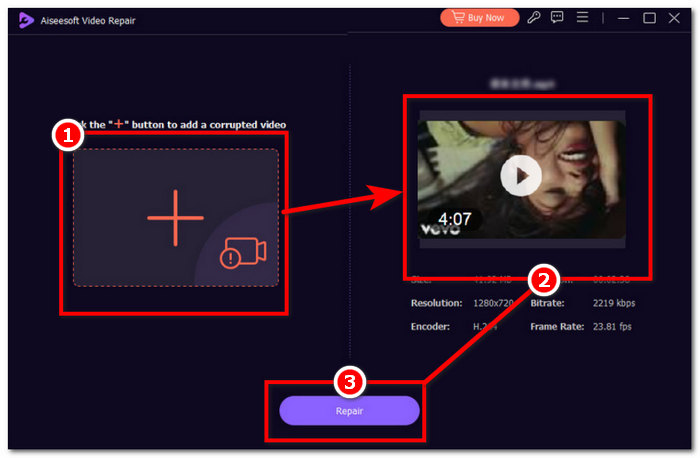
Pas 3. Fes clic a Repair per iniciar el procés de reparació i, quan el programari hagi acabat de reparar el fitxer de vídeo corromput, podràs fer clic a Preview per comprovar-ne tu mateix la qualitat.
Pas 4. Quan estiguis satisfet amb el resultat, fes clic a Save per desar el vídeo a l’ordinador.
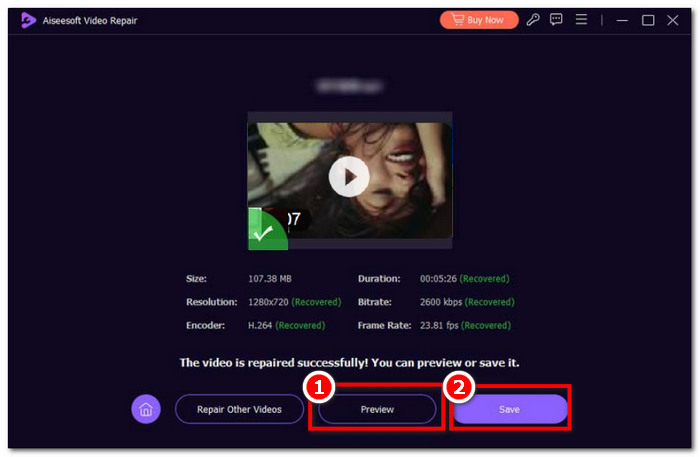
La velocitat ràpida, les tecles de drecera, la seguretat forta i la vista prèvia són algunes de les funcions clau d'Aiseesoft Video Repair. Programari intuïtiu per a una càrrega de treball ràpida, que us ofereix un avantatge sobre la qualitat.
3. Eina de reparació de vídeo Stellar Phoenix
Creieu millor que l'eina de reparació de vídeo Stellar Phoenix, quan s'utilitza, podria simplificar tota la vostra feina. Un programari gratuït de reparació de fitxers de vídeo amb eines integrades amb IA, el disseny senzill i de màxima qualitat.
◆ Eina integrada amb IA. La restauració professional de dades perdudes o corrompudes requereix un programari de nivell professional que incorpori algoritmes d’IA en constant evolució per aconseguir una reparació completament polida i amb píxels perfectes.
◆ Qualitat màxima en el seu millor moment. Pots esperar una alta taxa d’èxit en la reparació, amb una funció de previsualització per comprovar una restauració impecable amb la màxima qualitat, taxa de fotogrames i bitrate compatibles amb el format de vídeo que utilitzes.
◆ Més àgil i senzill. No tornis a esforçar-te amb programes improvisats que no arriben a les expectatives; en lloc d’això, repara avui mateix vídeos de diferents dispositius gràcies a la seva interfície clara i directa.
Pas 1. Ves al lloc web de Stellar Phoenix Video Repair Tool i descarrega i instal·la el programa.
Pas 2. Després d’instal·lar el programari, obre’l i fes clic a la secció Add Videos.
Pas 3. Selecciona els vídeos corromputs que vols restaurar.
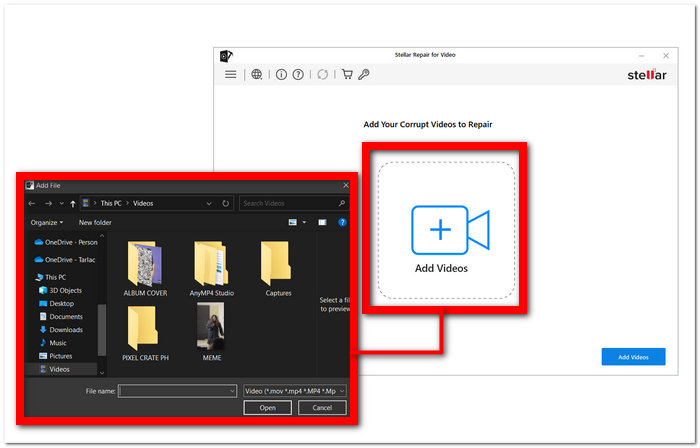
Pas 4. Fes clic a Repair per començar finalment a reparar els teus vídeos.
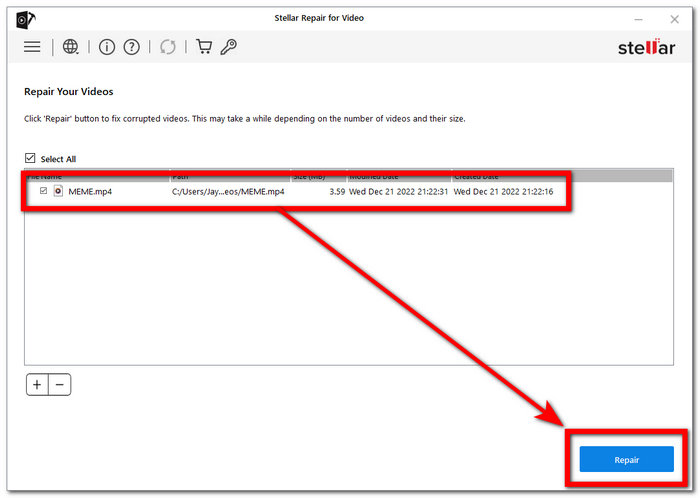
Tot està pensat professionalment per maximitzar i treure el professional que hi ha en un requisit de sistema tan baix cost. Especialitzat en la reparació de vídeo, en el seu nucli, amb FVC Video Repair, ja no hi ha problemes de corrupció.
Part 2. Les 2 millors eines gratuïtes de reparació de vídeo en línia
1. Vídeo de reparació d'EaseUS
Reparar vídeos danyats és molt fàcil amb el nostre programari, tant si els problemes s'han produït durant la gravació, l'edició, la transferència o qualsevol altre procés. RepairVideo pot gestionar diversos formats de vídeo, com ara MP4, MOV, M2TS, MKV, MTS, 3GP, AVI, FLV, M4V i molt més.
◆ 19 anys d’experiència. Hem reparat amb èxit incomptables vídeos, des de pel·lícules casolanes fins a material professional, garantint que els nostres clients puguin reviure els seus moments més preuats sense haver de patir errors o corrupcions. Confia en el nostre ampli coneixement i dedicació per tornar la vida als teus vídeos, per molts reptes que presentin.
◆ Reparació des de diversos dispositius. Principals marques de càmeres com Canon, Nikon, Sony, GoPro, DJI, etc. Tant si és material gravat amb el mòbil com amb altres dispositius de vídeo, la nostra eina està dissenyada per restaurar sense esforç el teu valuós contingut, assegurant que no perdis mai aquests records tan importants.
◆ Ràpid i fàcil. Amb més de 120 milions de vídeos reparats, et garantim un servei ràpid.
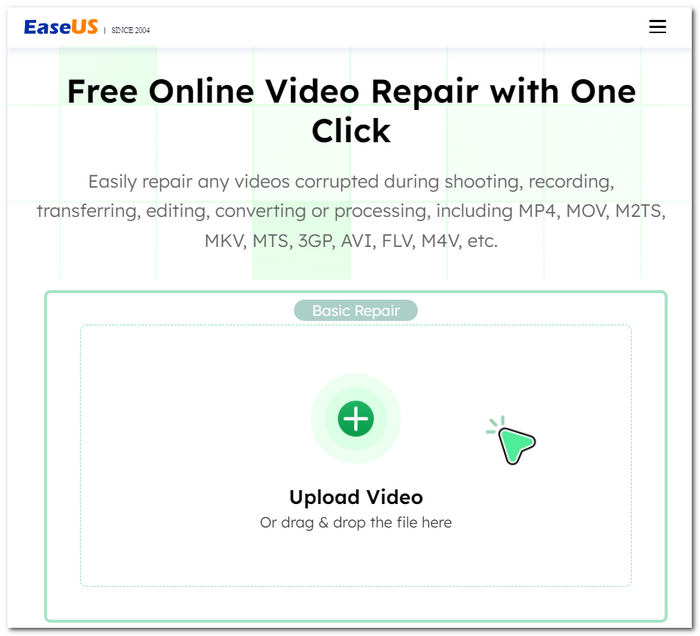
Digues adéu als errors frustrants del vídeo i als problemes de reproducció; la nostra solució està aquí per restaurar els teus vídeos a la seva qualitat original. No importa com es danyin els teus vídeos, proporciona una manera eficaç de recuperar-los i reparar-los. Gaudeix dels teus records preciosos sense interrupcions: confia en la nostra eina perquè els teus vídeos siguin com a nous.
2. iSkysoft Repairit Online
Admet diversos formats de fitxer de vídeo danyats o danyats, com ara MP4, MOV, 3GP i molt més. Tant si els vostres vídeos es troben en telèfons mòbils, càmeres, targetes de memòria o ordinadors, la nostra eina pot reparar-los de manera eficaç amb facilitat.
◆ Eina de restauració professional. Ens esforcem per preservar cada detall i nitidesa. Amb el nostre programari, podràs reviure els teus moments més preuats sense renunciar a l’experiència visual i auditiva, per molt danyats que estiguin els fitxers. Els teus vídeos, els teus records, perfectament recuperats.
◆ Sense comprometre les dades de vídeo. Els teus records i continguts més valuosos es mantenen intactes i amb qualitat durant tot el procés de reparació. Confia en nosaltres per restaurar els teus vídeos sense malmetre’n l’encant ni la claredat inherents.
◆ Reparació des d’una gran varietat de dispositius. Des de telèfons mòbils i càmeres fins a targetes de memòria i ordinadors. Amb el nostre programari intuïtiu, podràs recuperar i gaudir dels teus vídeos sense complicacions, independentment del dispositiu amb què s’hagin gravat.
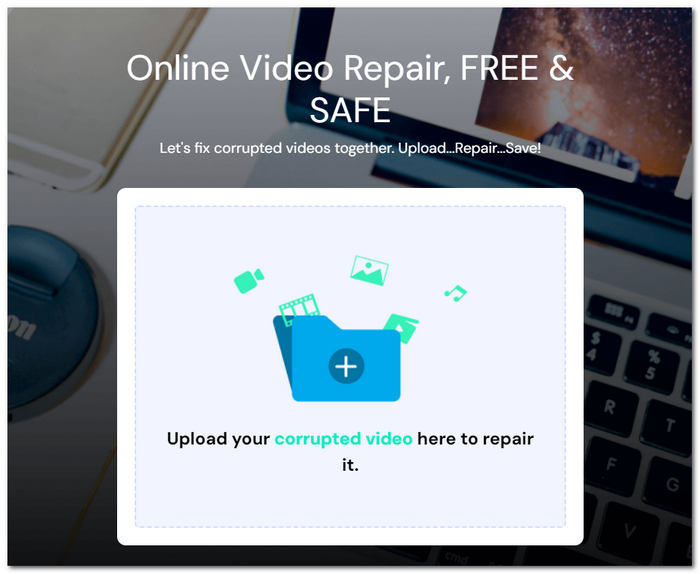
El procés de reparació és sense problemes; només cal que carregueu els vostres fitxers de vídeo danyats i, en qüestió de minuts, podreu descarregar les versions totalment restaurades. Podeu confiar en la seguretat de les vostres dades, ja que la vostra transferència de fitxers està protegida per una connexió xifrada de 2048 bits, que garanteix la vostra privadesa i protecció.
Part 3. Les millors aplicacions de reparació de vídeos per arreglar vídeos a iOS Android
1. Empalme
Presentem una aplicació d'edició i millora de vídeo potent i fàcil d'utilitzar compatible amb dispositius Android i iOS.
◆ Interfície senzilla. La qual cosa fa que sigui increïblement fàcil per als usuaris portar els seus vídeos a un nivell professional.
◆ Eines intuïtives. Podràs retallar, tallar, ajustar la velocitat de reproducció, millorar la qualitat del vídeo i molt més, garantint que els teus vídeos tinguin el millor aspecte i so possibles.
◆ Una gran biblioteca de música lliure de drets. Et permet afegir la banda sonora perfecta, no només reparant la qualitat dels teus vídeos, sinó fent-los encara més captivadors i atractius.
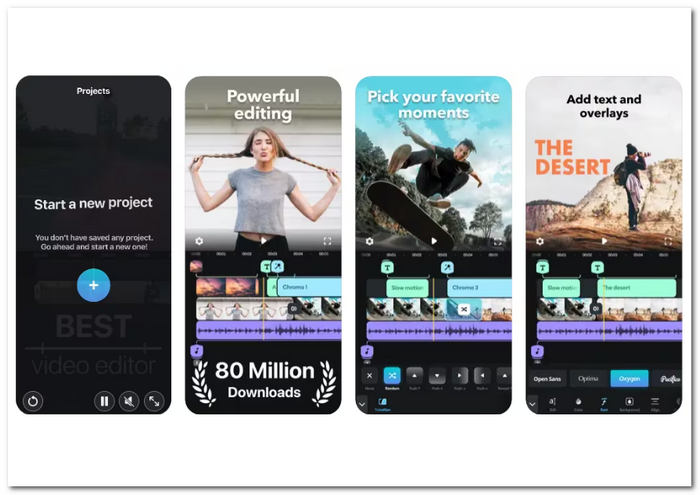
Tant si sou un creador de contingut, un vlogger o algú que vol millorar els seus records estimats, Splice ofereix una solució versàtil per a totes les vostres necessitats d'edició de vídeo. Descarrega'l ara a la teva botiga d'aplicacions i desbloqueja tot el potencial de les teves creacions de vídeo.
2. KinemasterBackup
Una aplicació d'eines de millora de vídeo molt aclamada per a dispositius Android i iOS. Aquesta aplicació fàcil d'utilitzar ofereix una gran varietat d'eines d'edició que us permeten transformar els vostres vídeos.
◆ Un conjunt complet de funcions. Dissenyat per millorar la qualitat dels teus vídeos. Pots ajustar la brillantor, el contrast, la saturació, la il·luminació i més aspectes per produir contingut de vídeo amb un aspecte professional.
◆ Processament de vídeos en 4K. Assegurant que el teu contingut mantingui una resolució de primer nivell.
◆ Fàcil integració amb diverses plataformes. Permetent als usuaris pujar vídeos des de YouTube, Instagram i altres xarxes socials populars.
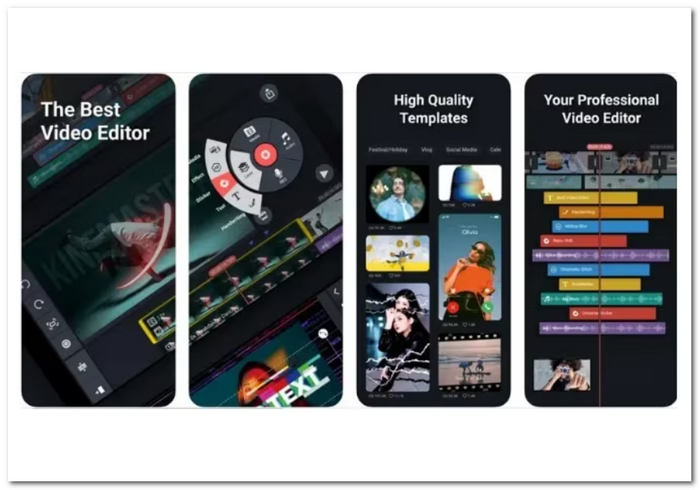
Des de retallar fins a afegir efectes, filtres, superposicions i fins i tot retalls fotograma a fotograma, KineMaster us equipa per elevar el vostre contingut de vídeo. L'aplicació permet la superposició de vídeos, donant-vos la llibertat creativa per combinar diversos elements a la perfecció.
Part 4. Preguntes freqüents sobre la reparació de vídeo gratuïta
Wondershare Video Repair és gratuït?
El programa Wondershare Video Repair no és gratuït. Normalment podeu provar les seves capacitats amb una versió de prova gratuïta, però és possible que necessiteu una llicència o una subscripció per obtenir accés i capacitat totals.
Hi ha alguna aplicació gratuïta de reparació de vídeo?
Sí, hi ha aplicacions i eines de reparació de vídeo gratuïtes disponibles. Algunes opcions gratuïtes de programari de reparació de vídeo inclouen Splice i KinemasterBackup, com s'ha esmentat anteriorment. Es poden descarregar gratuïtament en dispositius Android i iOS, amb una subscripció per a funcions premium addicionals.
Les eines gratuïtes de reparació de vídeos realment funcionen?
Per a alguns problemes de vídeo, els programes gratuïts de reparació de vídeo poden ser molt útils. Són molt útils per a problemes habituals, com ara errors menors de reproducció, problemes de sincronització i fitxers danyats. No obstant això, el grau de destrucció del fitxer de vídeo pot determinar la seva eficàcia. És possible que es requereixin serveis professionals de reparació de vídeo o programari comprat amb funcionalitats sofisticades per a problemes més complicats i greus. Abans de mirar les opcions premium, sempre és una bona idea provar una eina gratuïta per veure si pot solucionar els vostres problemes de vídeo.
Conclusió
Les eines gratuïtes de reparació de vídeo són una autèntica salvació per a qualsevol persona amb fitxers de vídeo malmesos o corromputs. Proporcionen una manera econòmica de recuperar els teus records més preuats sense necessitat d’assistència professional. Amb la varietat d’aplicacions i eines disponibles, pots triar la que millor s’adapti a les teves necessitats i preferències.
No deixis que els problemes de reproducció espatllin la teva experiència de visualització. Prova avui mateix una d’aquestes eines gratuïtes de reparació de vídeo i gaudeix dels teus vídeos tal com van ser concebuts: impecables i inoblidables.
-
 Com solucionar fàcilment l'error 5 de No es pot reproduir el vídeo
 Has experimentat la reproducció d'un dels teus vídeos baixats però t'ha interromput un missatge d'error 5 de vídeo que no es pot reproduir? Aquí teniu tot el que necessiteu saber.
-
 Els meus vídeos no es reprodueixen, què he de fer per solucionar-los
 Tens vídeos que no es reprodueixen i no saps com solucionar-los? Esteu en el bon camí per solucionar el vostre problema. Aquí teniu tot el que necessiteu saber.
-
 5 100% Solucions de treball per solucionar vídeos que no es reprodueixen a l'iPad
 Els vostres vídeos no es reprodueixen a l'iPad? Aquí teniu cinc solucions per ajudar-vos a desfer-vos d’aquest problema i, a continuació, podreu gaudir fàcilment dels vostres vídeos preferits al telèfon.
