


 Video Converter Ultimate
 Gravadora de pantalla
 Reparació de vídeo
Com reparar fàcilment el vídeo amb VLC Media Player
Tot i que molts coneixen el paper de VLC a l’hora de reproduir vídeos, pocs n’adonen del seu potencial per arreglar fitxers de vídeo trencats o malmesos. Sí, VLC pot reparar vídeos! Així que, si et trobes lluitant amb vídeos danyats, és el moment de descobrir aquesta funció menys coneguda i restaurar els teus fitxers amb facilitat. En aquesta guia completa, t’acompanyarem pas a pas perquè puguis reparar vídeos fàcilment amb VLC Media Player, garantint una reproducció fluida del teu contingut multimèdia.

Part 1. Què és VLC Media Player
VLC Media Player és un reproductor multimèdia i marc de treball versàtil i de codi obert, conegut per les seves àmplies capacitats i funcions fàcils d’utilitzar. Admet una gran varietat de formats de vídeo, com ara MPEG, AVI, MP4, MKV i molts més. A més d’això, pot solucionar problemes de vídeo com errors de reproducció o problemes de sincronització com a eina gratuïta de reparació de vídeo.
Pros
- Gratuït i de codi obert.
- Funciona en totes les plataformes, com Windows, Mac o Linux.
- Té opcions de baixada d'àudio i vídeo
- Permet als usuaris crear i personalitzar conversions.
- Permet previsualitzar la sortida.
- Admet una varietat de còdecs populars.
Contres
- No es poden solucionar de manera exhaustiva els problemes de vídeo.
Guia ràpida: com utilitzar VLC per reparar vídeos danyats
Pas 1. Primer, al seu lloc web oficial, descarrega VLC al teu dispositiu i instal·la’l.
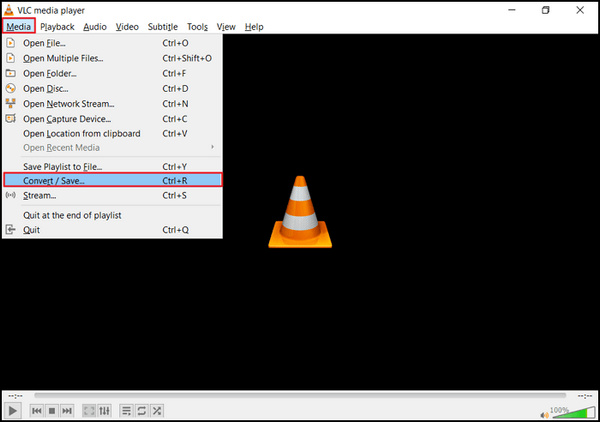
Pas 2. Obre el programa i ves a la pestaña Media, després selecciona Convert/Save.
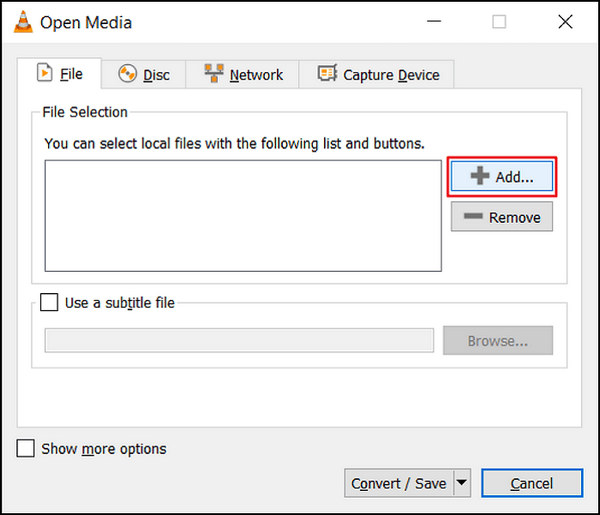
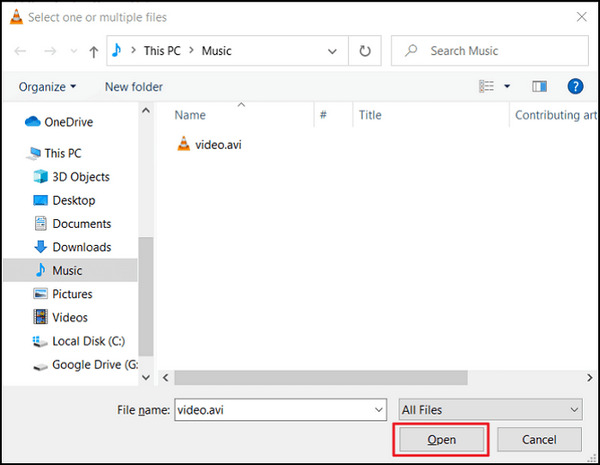
Pas 3. Crea la teva llista de transcodificació triant l’opció Add per incloure vídeos.
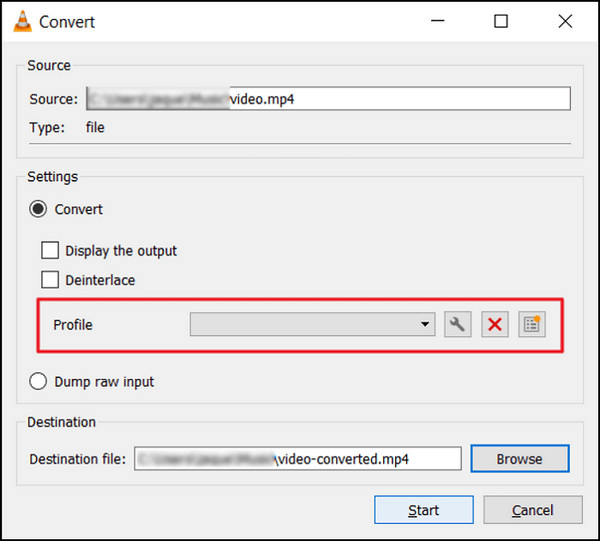
Pas 4. Indica el nom del fitxer i la destinació al quadre Convert.
Pas 5. Tria Convert/Save. A la finestra següent, explora la pestanya Profiles per escollir un còdec d’entrada.
Pas 6. Finalment, fes clic a Start per iniciar el procés de conversió. VLC Media Player s’encarregarà de la resta.
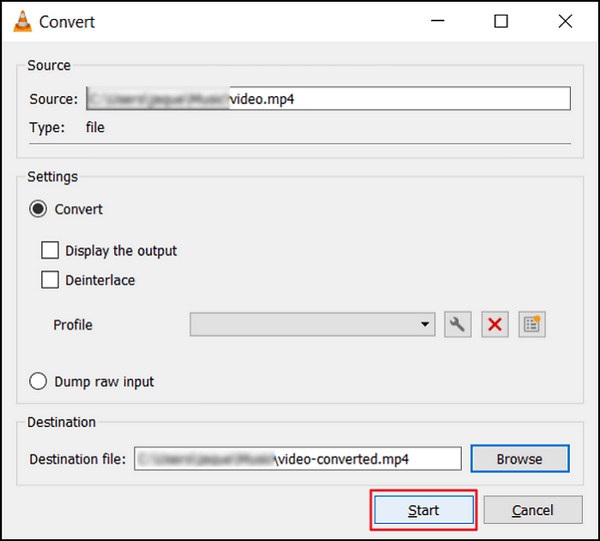
VLC Media Player sorgeix no només com un reproductor multimèdia versàtil, sinó també com una eina de reparació de vídeo fiable. Les seves funcions intuïtives i els seus mètodes senzills el converteixen en una opció accessible per als usuaris que busquen solucionar problemes habituals de vídeo, garantint una experiència de visualització millorada i sense problemes.
Part 2. Millor alternativa per a VLC Media Player
Si la funció de reparació de vídeo de VLC no pot arreglar del tot els teus vídeos danyats o trencats, hi ha una eina alternativa excel·lent que pots fer servir: és FVC Video Repair. Aquesta eina destaca com una de les millors eines de reparació de vídeo en línia. Pot reparar qualsevol dels problemes de vídeo més habituals, a diferència de VLC, que només utilitza la funció de conversió per arreglar vídeos. A més, aquesta eina admet diversos formats populars i està disponible per als sistemes operatius Windows i Mac.
VLC Media Player vs. FVC Video Repair
| Reproductor multimèdia VLC | Reparació de vídeo FVC | |
| En general | ⭐⭐⭐⭐⭐ | ⭐⭐⭐⭐ |
| Facilitat d'ús | ⭐⭐⭐ | ⭐⭐⭐⭐⭐ |
| Suport | ⭐⭐⭐⭐ | ⭐⭐⭐⭐⭐ |
| Disseny | ⭐⭐⭐⭐ | ⭐⭐⭐⭐⭐ |
| Preus | Gratuït | Mensual: $19,96 Vida útil: $ 39,96 Llicència comercial: $ 69.96 |
| Plataforma | Windows, Mac i Linux | Windows i Mac |
| Formats de suport | H.264/MPEG-4 AVC, MPEG-1/2, Theora, On2 VP3/VP5/VP6, Sorenson 1/3, WMV 3/WMV-9/VC-1, DivX® (1/2/3/4 /5/6), H.263 / H.263i, 3ivX D4, Cinepak, MJPEG (A/B), WMV 1/2, Vídeo real (1/2/3/4), Vídeo Indeo v3 (IV32), XviD, Dirac / VC-2, DV. | MP4, MOV i 3GP |
| Velocitat de conversió | Mitjana | Ràpid |
| Prova gratuïta | Gratuït | 30 dies |
L'única preocupació de VLC Video Repair és que no pot arreglar completament els vídeos trencats. Aquesta eina es va crear com a reproductor multimèdia. No obstant això, té funcions complexes que podeu utilitzar de manera eficaç.
Per utilitzar FVC Video Repair, seguiu els passos que s'indiquen a continuació:
Pas 1. Primer, ves al seu lloc web oficial. Descarrega i instal·la el programa al teu dispositiu.
Descàrrega gratuïtaPer a Windows 7 o posteriorDescàrrega segura
Descàrrega gratuïtaPer a MacOS 10.7 o posteriorDescàrrega segura
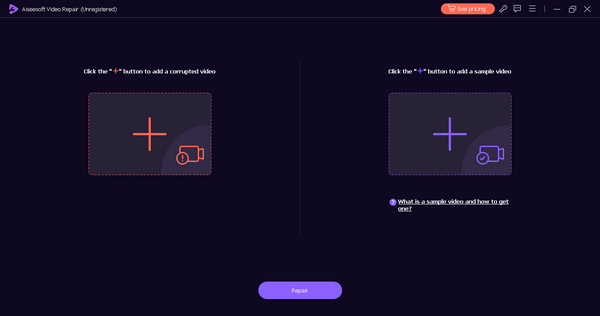
Pas 2. A continuació, afegeix el vídeo malmès o trencat fent clic al botó Plus vermell. I fes clic al botó Plus blau per afegir el vídeo de mostra.
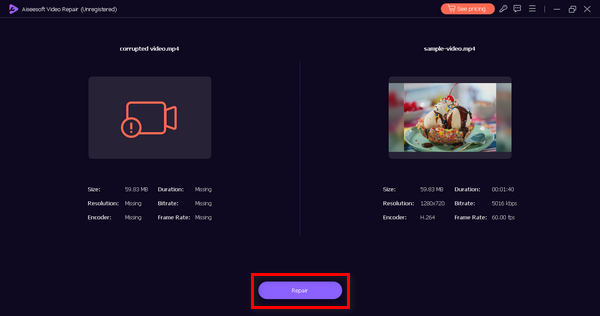
Pas 3. Després d’això, fes clic al botó Repair per començar a reparar el teu vídeo trencat.
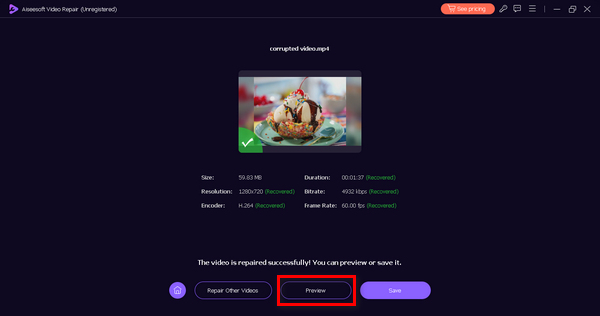
Pas 4. Finalment, pots comprovar si el vídeo encara està trencat o malmès previsualitzant-lo amb el botó Preview. Quan la reparació hagi tingut èxit, el pots desar fent clic al botó Save.
FVC Video Repair està dissenyat específicament per abordar un ampli ventall de problemes de vídeo, des de la restauració de fitxers de vídeo malmesos fins a vídeos que no es reprodueixen. Aquesta eina versàtil està concebuda per oferir solucions integrals a una gran varietat de reptes relacionats amb el vídeo, garantint una resolució fluida i efectiva per millorar la teva experiència audiovisual global.
Part 3. Preguntes freqüents sobre VLC Media Player
Per què VLC no obre vídeos i mostra un error MRL?
VLC pot mostrar un MRL o l'error del Localitzador de recursos multimèdia quan es troben problemes relacionats amb la ruta del fitxer, protocols no compatibles o connectivitat de xarxa. Per solucionar problemes, assegureu-vos que la ruta del fitxer sigui correcta, confirmeu l'accessibilitat del fitxer i comproveu les connexions de xarxa. A més, prova d'obrir el vídeo utilitzant protocols o camins alternatius.
Pot VLC arreglar la capçalera del vídeo que falta?
VLC Media Player no té la capacitat de reparar les capçaleres de vídeo que falten, ja que són components essencials de l'estructura d'un fitxer de vídeo. L'absència d'una capçalera de vídeo pot suposar un repte per a VLC per reproduir o reparar fitxers. En aquests casos, considereu l'ús d'eines de reparació de vídeo especialitzades dissenyades per resoldre problemes relacionats amb la capçalera per a una recuperació més completa.
VLC repara els vídeos AVI?
Tot i que VLC pot reproduir determinats fitxers AVI danyats, el seu èmfasi principal es posa en la reproducció en lloc de la reparació de vídeo extensa. Per a la reparació d'AVI dedicada, és recomanable utilitzar programari especialitzat dissenyat explícitament per a la recuperació de vídeo. Aquestes eines estan més ben equipades per gestionar les complexitats associades a la reparació i restauració dels fitxers de vídeo AVI.
Com puc personalitzar els subtítols a VLC?
VLC ofereix un ampli suport per a la personalització de subtítols. Durant la reproducció, aneu al menú Subtítols, seleccioneu Pista de subtítols i seleccioneu Sincronització de pistes per ajustar la configuració de sincronització amb precisió. Els usuaris poden millorar encara més la seva experiència modificant l'aparença, el tipus de lletra i la mida dels subtítols mitjançant el menú de preferències de VLC, proporcionant una experiència de visualització personalitzada i optimitzada visualment.
Es pot utilitzar VLC per convertir formats de vídeo?
Sí. VLC ofereix funcions integrades per a una conversió perfecta de formats de vídeo. Els usuaris poden accedir a aquesta funcionalitat mitjançant el menú Multimèdia seleccionant Convertir/Desar. A la finestra de conversió següent, configureu el format i la configuració de sortida desitjats per iniciar el procés de conversió. Les versàtils capacitats de conversió de formats de VLC contribueixen al seu estat com a reproductor i convertidor multimèdia global.
Conclusió
Tot i que VLC Media Player destaca com a reproductor multimèdia versàtil, és important reconèixer les seves limitacions a l’hora de solucionar de manera integral tots els problemes de vídeo. Excel·leix en la reproducció de diversos formats i en la correcció d’errors de reproducció habituals. Tanmateix, la reparació de vídeo amb VLC pot no ser la solució definitiva per a problemes de vídeo complexos. Si la reparació de vídeo no té èxit, pots utilitzar l’eina FVC Video Repair, dissenyada per reparar la majoria de problemes de vídeo habituals, independentment de la gravetat del dany.
-
 Com arreglar el vídeo borrós: esperen vídeos clars
 Com fer que un vídeo borrós sigui clar? No deixis que els vídeos borrosos enfonsin el teu contingut; Trobeu solucions per a una visualització nítida per aconseguir imatges d'aspecte professional.
-
 Què causa la congelació del vídeo i com descongelar-lo?
 Heu experimentat l'actualització i el reinici de vídeos que es mantenen congelats mentre els mireu? Aquí teniu tot el que necessiteu saber per ajudar-vos a descongelar-los.
-
 Excel·lents maneres possibles | Com solucionar el retard d'àudio de VLC [2024]
 Et costa veure la teva pel·lícula preferida al teu reproductor multimèdia VLC a causa de la incertesa d'àudio? Continueu llegint aquest article per conèixer totes les maneres possibles d'arreglar el retard d'àudio VLC.
