


 Video Converter Ultimate
 Gravadora de pantalla
 Reparació de vídeo
 Baixada segura
3 maneres de reproduir fitxers MKV al Windows Media Player
No pots obrir fitxers MKV al Windows Media Player?
MKV és un tipus de format de vídeo molt popular. Pots tenir moltes pel·lícules d’alta qualitat, sèries de TV o altres vídeos desats en MKV. No obstant això, com a usuari de Windows, el reproductor de vídeo per defecte, Windows Media Player, no admet de manera nativa la separació (obertura) de contenidors MKV. Així doncs, tornant a la pregunta, com reproduir fitxers MKV al Windows Media Center?

Fins i tot després d’actualitzar el Windows Media Player a la versió més recent, no es garanteix que no trobi problemes de reproducció MKV. Tenint en compte això, a aquesta publicació li agradaria compartir 3 maneres efectives d’ajudar-vos a reproduir fitxers MKV al vostre PC amb Windows.
Part 1. Com obrir un fitxer MKV al Windows Media Player
Windows Media Player no pot reproduir fitxers MKV principalment per una manca de coincidència del còdec. Has de saber que MKV és en realitat un contenidor multimèdia per a fluxos de vídeo, fluxos d’àudio, subtítols i més. Cal proporcionar al WMP el splitter correcte per a MKV, i els còdecs i filtres per al vídeo i l’àudio. Aquesta part t’orientarà perquè puguis reproduir fitxers MKV al Windows Media Player.
Pas 1. Obre el Windows Media Player i obre-hi el fitxer MKV. També pots fer clic amb el botó dret sobre el fitxer MKV i seleccionar obre amb WMP.
Pas 2. Ara veuràs un missatge d’error que diu que Windows Media Player no pot reproduir el fitxer. Fes clic a l’opció Ajuda en el web al quadre de diàleg.
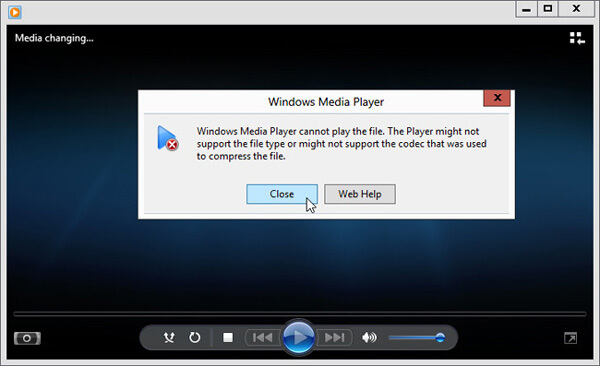
Pas 3. Fes clic a l'enllaç del còdec sota Falta el còdec. Copia i enganxa l’enllaç al navegador. Això et guiarà per obtenir el còdec MKV adequat per a Windows Media Player. Després de descarregar-lo, has de seguir les instruccions per completar el procés de configuració de MKV al Windows Media Player.
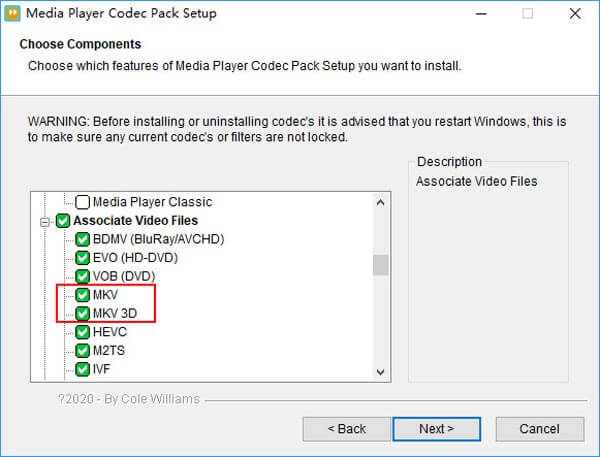
Pas 4. Reinicia el Windows Media Player i torna a intentar reproduir el fitxer MKV.

Part 2. Millor manera de reproduir fitxers MKV a Windows Media Player Alternative
Amb el còdec MKV adequat, podeu obrir fàcilment el fitxer MKV al Windows Media Player. No obstant això, molts usuaris van informar que encara hi ha altres problemes de reproducció mentre es reprodueixen MKV amb WMP. En aquest cas, podeu triar una alternativa del Windows Media Player per ajudar-vos a reproduir fitxers MKV.
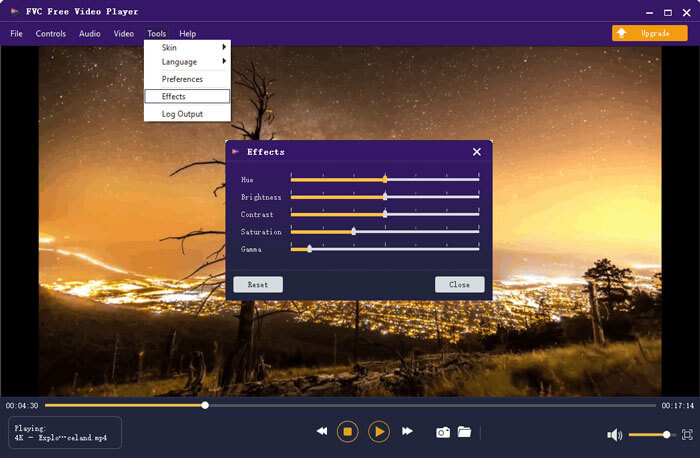
FVC Free MKV Player és una gran eina alternativa al Windows Media Player. Admet de manera nativa qualsevol format de vídeo i àudio d’ús habitual, com ara MKV, MOV, MP4, FLV, AVI, RMVB, MPEG, AAC, MP3, M4A, WMA i molts més. Pots fer-hi confiança per veure pel·lícules MKV amb alta qualitat.

Pas 1. Obre el navegador i ves a aquest lloc del reproductor MKV gratuït. Fes clic al botó Play Now per instal·lar un petit fitxer de llançament per reproduir MKV. Després, la finestra principal de reproducció MKV apareixerà a la pantalla.
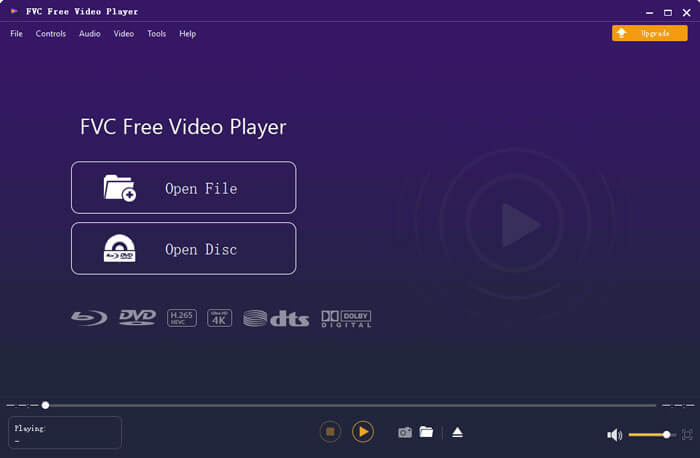
Pas 2. Fes clic al botó Open File per cercar i importar-hi el teu fitxer MKV. A continuació, el vídeo es reproduirà automàticament. Amb l’adopció de la tecnologia avançada de codificació de vídeo, pot reproduir fitxers MKV de manera fluida i amb alta qualitat. A més, és compatible amb DTS-HD i Dolby TrueHD.
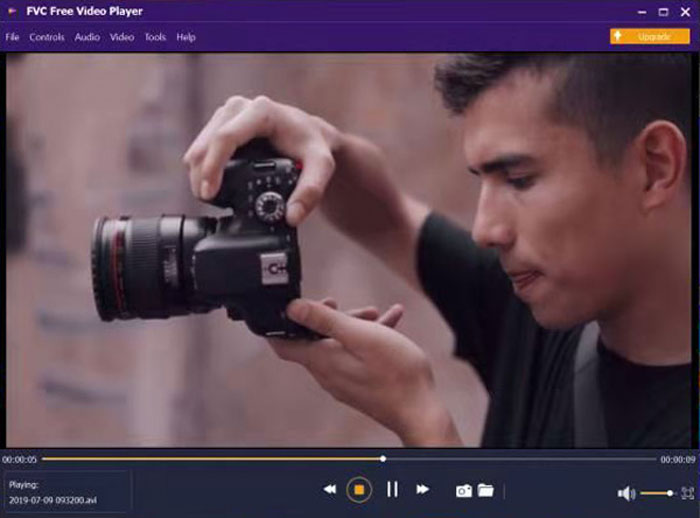
Se us proporcionen tots els controls de la reproducció MKV. A més de les operacions bàsiques com reproduir, pausar, retrocedir, avançar, ajustar el volum i molt més, també us permet ajustar efectes, canviar la pista d'àudio i els subtítols i altres paràmetres personalitzats.
Part 3. Converteix MKV per a la reproducció al Windows Media Player
Per reproduir fitxers MKV al Windows Media Player, també pots optar per convertir MKV a un format de vídeo compatible com MP4. Aquí et presentem el Convertidor de Vídeo en Línia Gratuït per ajudar-te a convertir MKV a MP4 sense pèrdua de qualitat.
Pas 1. Ves a aquesta pàgina del convertidor en línia gratuït de MKV a MP4 al navegador. És compatible amb qualsevol navegador web popular, inclosos Chrome, IE, Safari i Firefox.
Pas 2. Quan hi arribis, fes clic al botó Add File to Convert. En aquest pas, has d’instal·lar un petit llançador per a la conversió de MKV. Tot seguit, apareixerà una finestra emergent a la pantalla perquè puguis seleccionar el teu fitxer MKV.
Pas 3. Veureu que s’hi llisten molts formats de vídeo populars, com MP4, MOV, AVI, MKV, FLV, etc. Assegura’t que el format de sortida sigui MP4 i després fes clic al botó Convert.
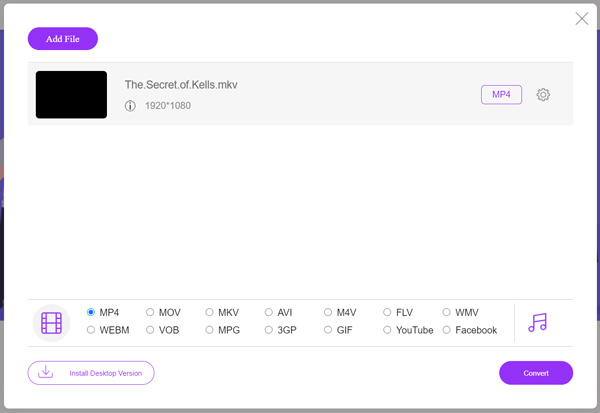
Després de la conversió de MKV a MP4, el podràs reproduir amb el Windows Media Player. No hi haurà cap pèrdua de qualitat d’imatge ni de so durant la conversió.
Part 4. Preguntes més freqüents sobre la reproducció de MKV al Windows Media Player
Pregunta 1. Com puc canviar el format d'un vídeo al Windows Media Player?
Obriu el Windows Media Player i carregueu el fitxer de vídeo que voleu convertir. Feu clic a la fletxa petita de la pestanya Rip al menú superior. Seleccioneu Més opcions i feu clic al menú desplegable anomenat Format. Aquí podeu triar un format de sortida adequat i iniciar la conversió.
Pregunta 2. Quin format de vídeo és el Windows Media Player?
El format de fitxer per defecte del Windows Media Player és WMV, Windows Media Video i WMA, Windows Media Audio. A més, és compatible amb Advanced Systems Format i el seu propi format de llista de reproducció basat en XML, Windows Playlist.
Pregunta 3. El Windows 10 pot reproduir fitxers MKV?
No. El Windows Media Player 12 integrat al Windows 10 no pot reproduir fitxers MKV. Cal instal·lar el còdec MKV per obtenir la reproducció.
Conclusió
Quan el Windows Media Player no pot interpretar el còdec MKV, simplement mostra un error. Per reproduir fitxers MKV al Windows Media Player, cal instal·lar el còdec adequat. També pots utilitzar un reproductor de tercers o convertir el format MKV per poder-lo reproduir. Si encara tens cap dubte sobre com obrir fitxers MKV al Windows Media Player, no dubtis a deixar-nos un missatge.
-
 Els 8 millors reproductors MKV per reproduir fitxers MKV amb el subtítol desitjat
 Quan vulgueu reproduir el vídeo MKV amb el subtítol desitjat, podeu obtenir més informació sobre els 8 millors reproductors de fitxers MKV per a PC / Mac i triar el que vulgueu segons el vostre requisit.
-
 MKV a MOV - Com convertir MKV a MOV
 Com puc convertir MKV a MOV a Mac? Pot iMovie llegir MKV? Què significa el format MOV? Aquesta publicació explica dues maneres senzilles d'ajudar-vos a convertir MKV a MOV amb convertidors de vídeo gratuïts en línia i professionals.
-
 AC3 Player: revisió dels 10 millors jugadors AC3 gratuïts del 2021
 Quin és el millor reproductor AC3? Pot MX Player obrir AC3? Aquesta publicació inclou una llista de 10 reproductors AC3 gratuïts per a dispositius Mac, Windows PC, iOS i Android.
